
Deployment vs. Publishing Dashboard: What’s the Difference?

TL;DR: A deployment dashboard automatically provisions dashboards for new sites, making it ideal for onboarding and standardization. A publishing dashboard enables secure dashboard sharing across existing sites with governance controls. Most organizations benefit from using both together.
Introduction
Understanding the difference between deployment dashboards and publishing dashboards is critical for organizations that need to deliver analytics consistently across departments, business units, customers, and regions.
Building dashboards is only one part of a successful analytics strategy. As environments grow, administrators face a different challenge, getting the right dashboards to the right users while maintaining governance, consistency, and security. Common questions include:
- How can dashboards be automatically provisioned for new customers?
- How can analytics standards be maintained across hundreds of sites?
- How can dashboards be securely distributed to existing teams and external stakeholders?
- How can administrators balance accessibility and governance without increasing operational overhead?
These challenges are especially common in organizations practicing multitenant dashboard management, where hundreds of sites may require consistent analytics experiences while still supporting tenant-specific needs. Bold BI® addresses these requirements through two complementary capabilities: a deployment dashboard and a publishing dashboard.
If you’re evaluating dashboard migration scenarios, see our guide on when to publish or migrate a dashboard, which explains how dashboard movement differs from deployment and ongoing distribution.
Although both features support dashboard distribution, they solve different operational challenges. A deployment dashboard helps organizations establish a consistent analytics foundation when new sites are created, while a publishing dashboard provides administrators with flexible options for distributing, updating, and governing analytics assets across existing environments.
Understanding how these capabilities complement each other can help organizations create a scalable analytics strategy that balances efficiency, flexibility, and governance. Let’s examine how each feature works and when to use them.
Understanding Deployment Dashboard in Bold BI
A deployment dashboard is a template dashboard that is automatically deployed whenever a new Bold BI site is created. Instead of manually recreating dashboards for every tenant, department, or customer environment, administrators configure them once and allow the platform to distribute them automatically.
For organizations onboarding new sites regularly, this can significantly reduce administrative effort while ensuring consistency.
Why Deployment Dashboard Matter
As organizations scale, manually configuring dashboards for every new site becomes time-consuming and difficult to maintain. Deployment dashboards help standardize the delivery of every business intelligence dashboard, ensuring that new sites begin with approved metrics, layouts, and reporting structures.
Organizations that manage large multitenant analytics environments often use deployment dashboards to standardize onboarding processes across customer sites. Instead of manually recreating dashboards and data source configurations for every new site, administrators can deploy approved analytics assets automatically, reducing setup effort and helping maintain consistency across environments.
Benefits of deployment dashboards
- Faster site onboarding: Automatically provision dashboards for new sites, reducing setup time and accelerating onboarding.
- Consistent analytics standards: Ensure every site starts with the same KPIs, metrics, and dashboards for a unified reporting experience.
- Reduced administrative effort: Minimize repetitive dashboard configuration tasks by deploying dashboards automatically.
- Improved scalability: Easily support a growing number of sites without increasing manual administration work.
By automating dashboard provisioning, teams spend less time on repetitive setup activities and more time driving analytics adoption.
When to Use Deployment Dashboard
Use the deployment option when:
- Creating new sites or tenants regularly.
- Automating dashboard setup during onboarding.
- Maintaining a standardized analytics framework.
- Reducing repetitive administrative tasks.
- Ensuring consistent KPIs and reporting across sites.
Key Features of Deployment Dashboard
Deployment dashboards provide built-in capabilities that help automate and control dashboard distribution across newly created sites.
- Automatic dashboard deployment: Automatically deploy selected dashboards to new sites during site creation.
- Custom category and dashboard naming: Configure how deployed dashboards and categories appear on destination sites.
- Dashboard and data source locking: Lock deployed dashboards and data sources to prevent editing.
- Public dashboard support: Make deployed dashboards publicly accessible when required.
- Centralized deployment management: Add, view, and manage deployment dashboards from a single location.
- Deployment to new sites: Automatically include deployment dashboards whenever a new site is created.
These features help administrators streamline site provisioning while maintaining consistency across deployments.
How to Use Deployment Dashboard in Bold BI
Deployment dashboards enable administrators to automatically distribute predefined dashboards to newly created sites, ensuring a consistent analytics setup with minimal effort. Let’s look at the steps to configure and deploy dashboards across sites using the deployment dashboard feature.
Step 1: Open Dashboard Settings
Log in to the Bold BI dashboard designer home page.
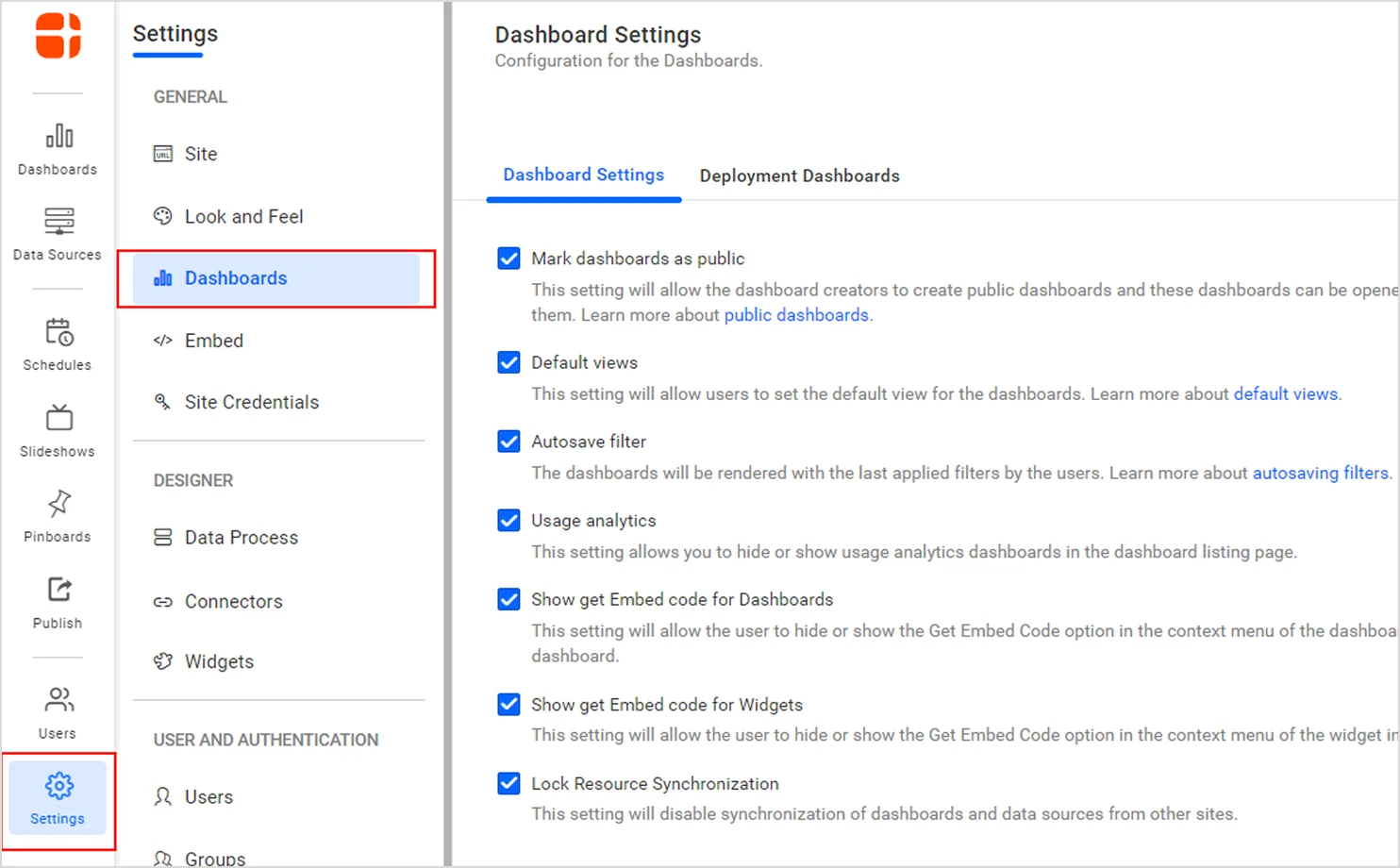
Click the settings and navigate to the Dashboard Settings page.
This page contains the configuration options used to manage deployment dashboard.
Step 2: Open the Deployment Dashboards Tab
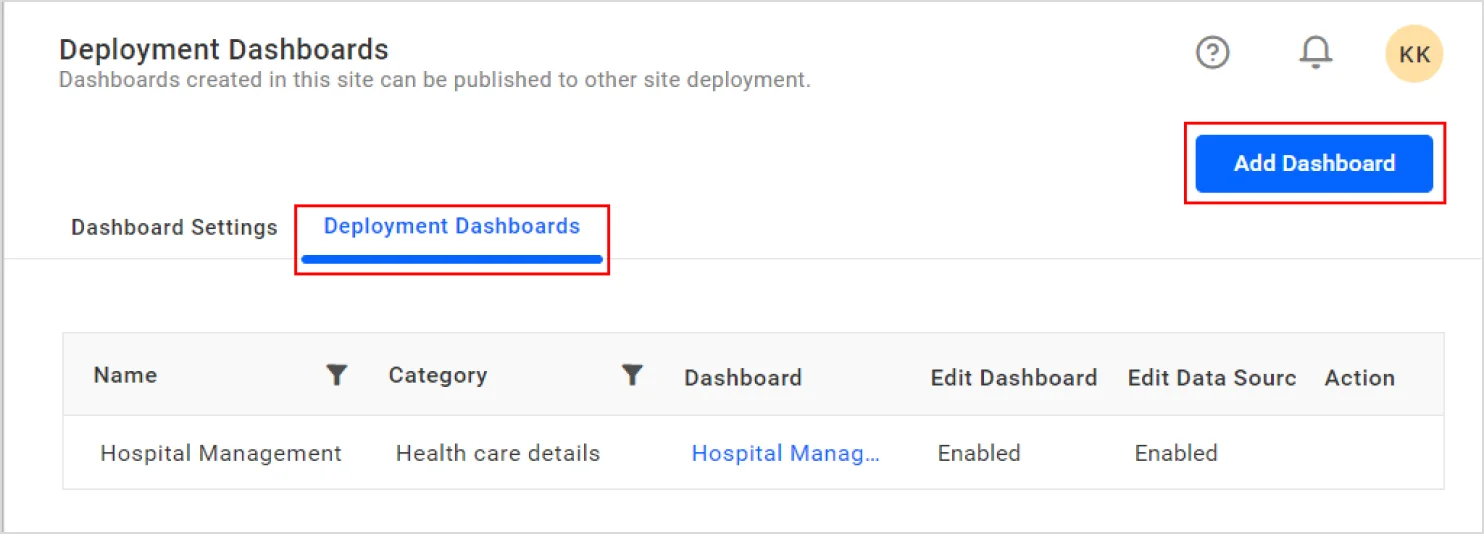
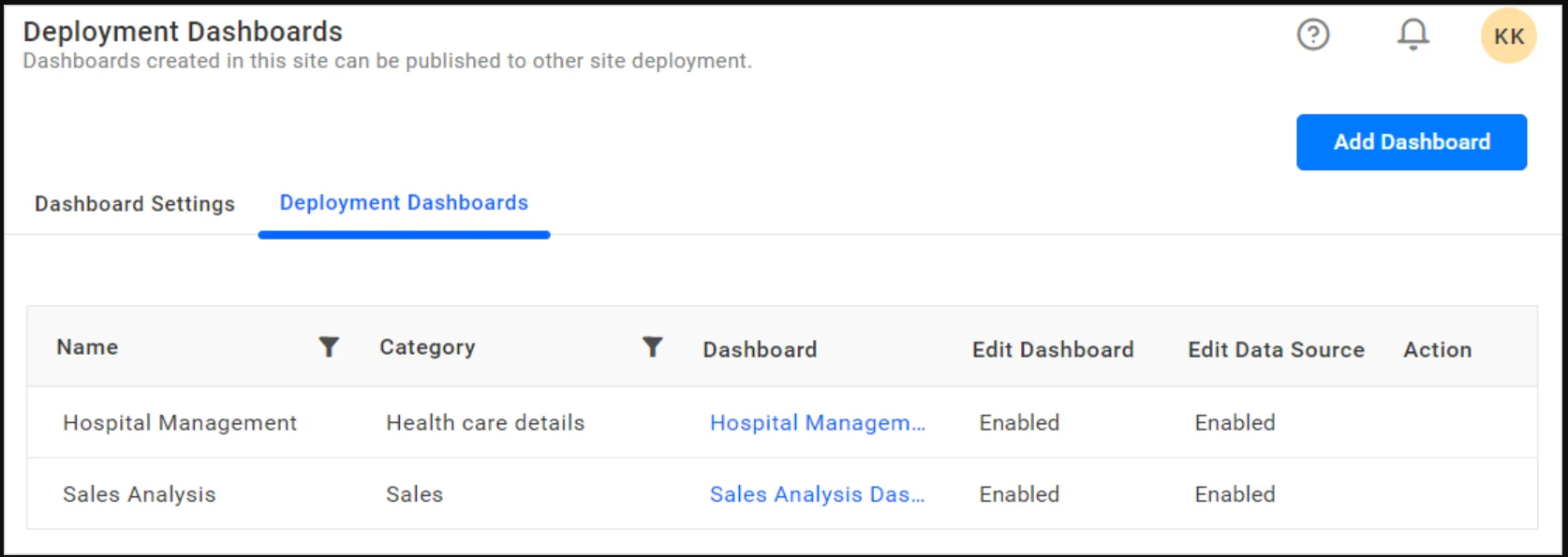
Select the Deployment Dashboards tab. Here you can view existing deployment dashboards and access the Add Dashboard button in the upper-right corner.
Step 3: Select the Dashboard and Category
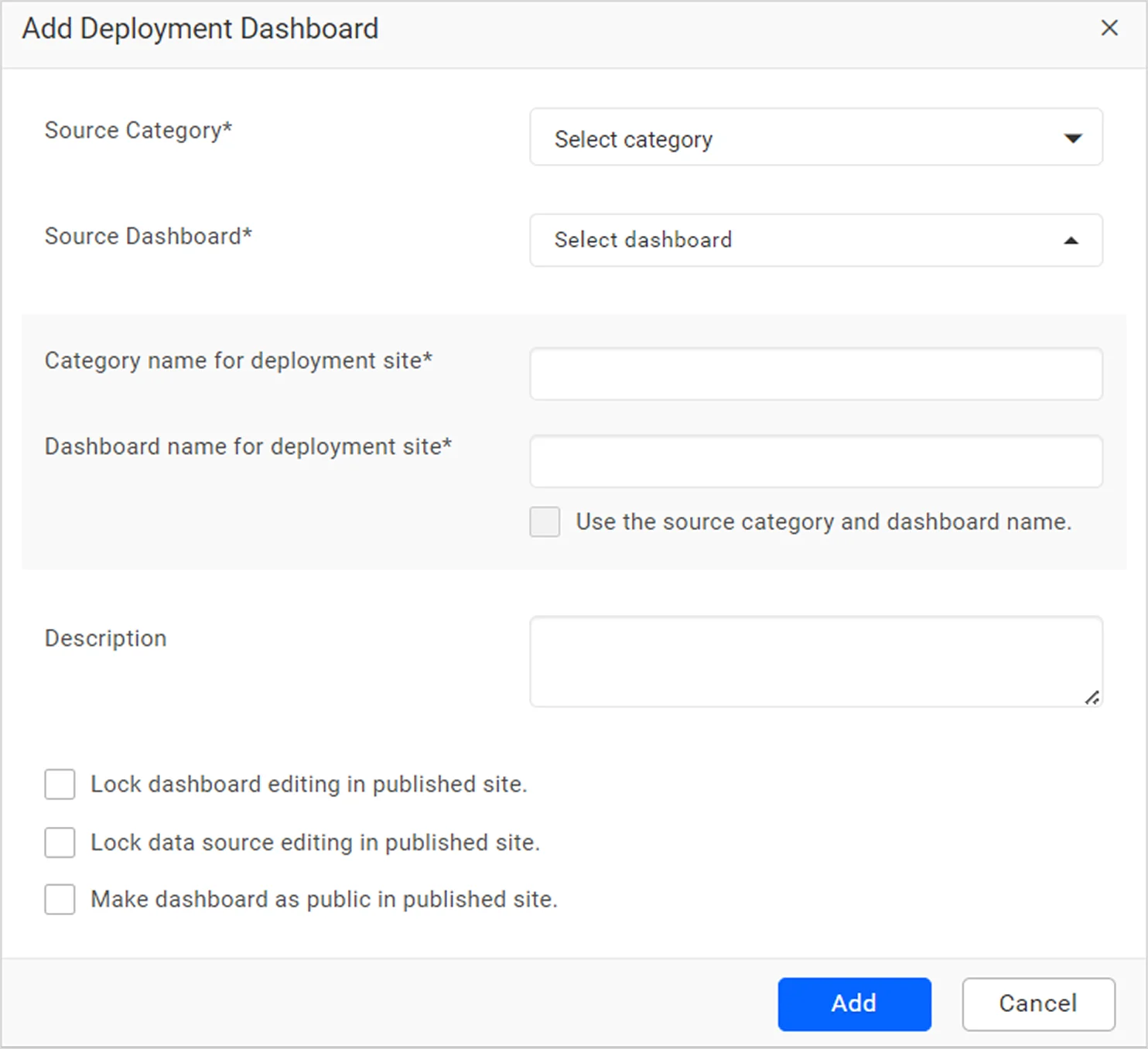
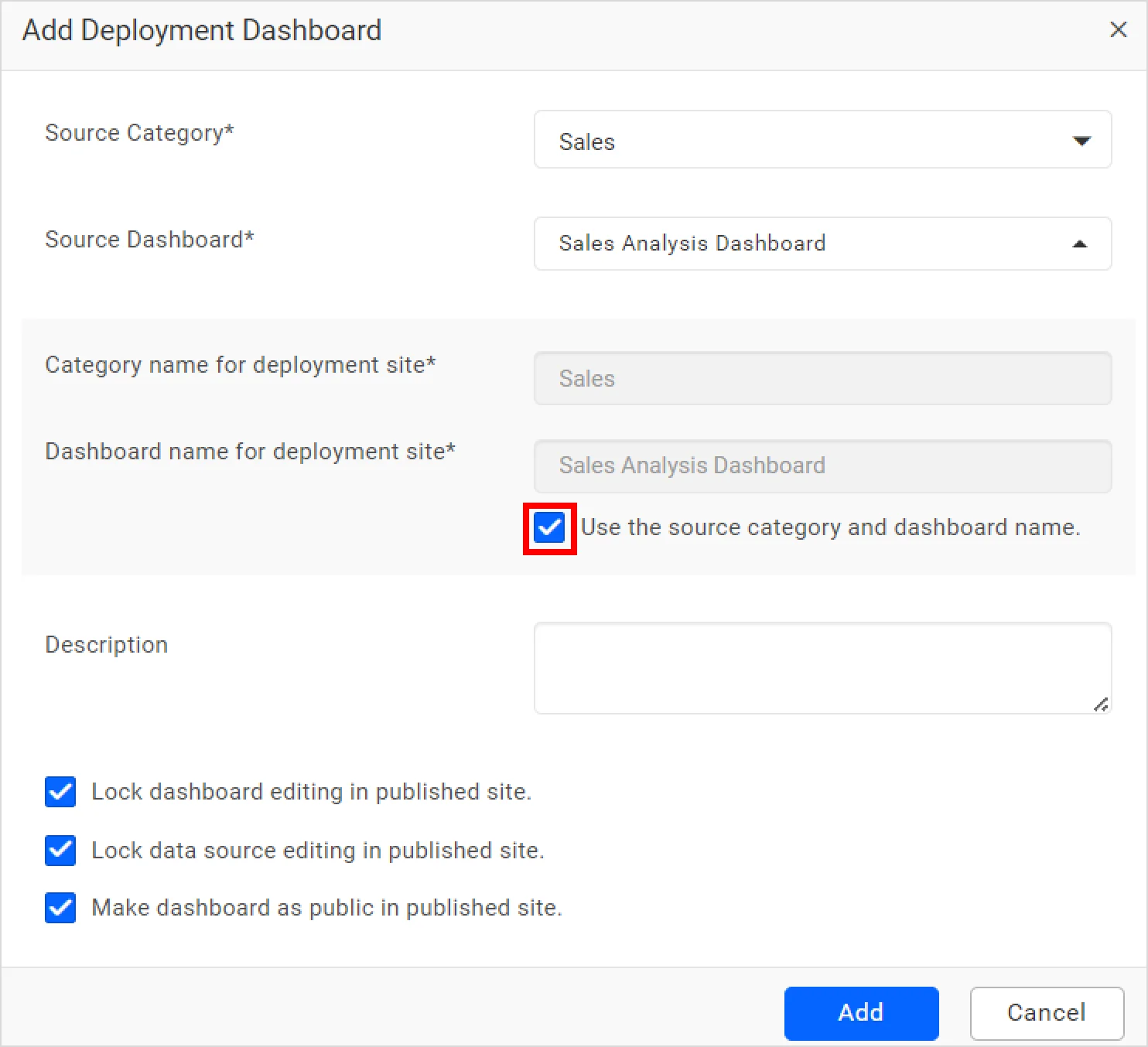
In the Add Deployment Dashboard dialog box, select the Source Category and Source Dashboard you want to deploy. Enter the necessary text in the Category name for deployment site, Dashboard name for deployment site, and Description fields that will be used on the destination sites.
Step 4: Configure Deployment Options (Optional)
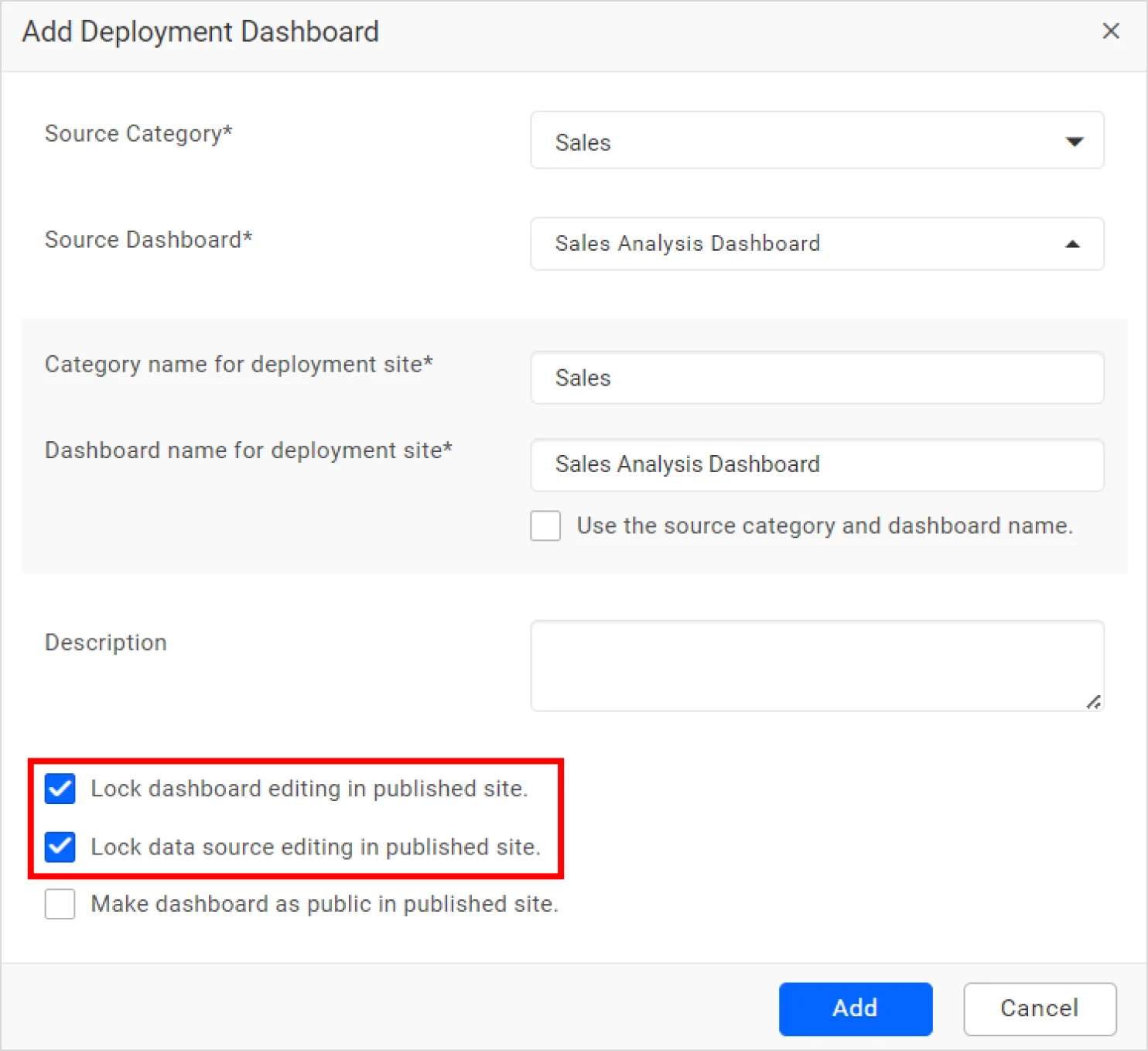
Select Use the category and dashboard name to keep the original source names. Enable Make dashboard as public in published site if anonymous users should be able to access the dashboard and select the lock options to prevent modifications to the deployed dashboard and data source.
Step 5: Add the Deployment Dashboard
Select Add to complete the configuration. The dashboard will be added to the deployment dashboard list, and a success message should be displayed.
Step 6: Verify automatic dashboard deployment.
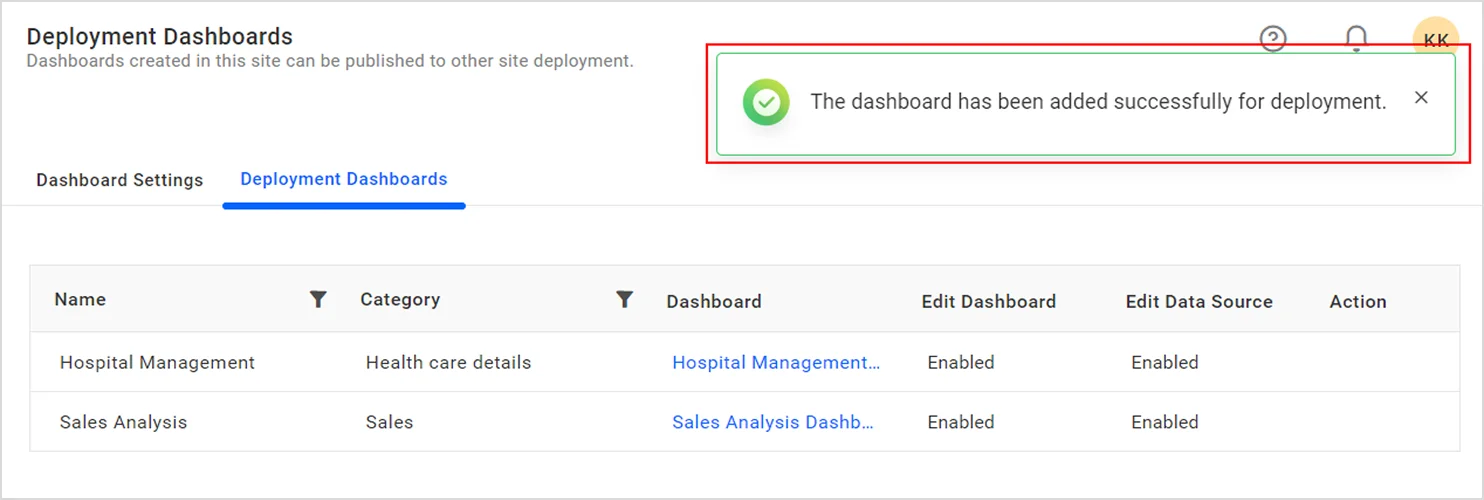
After selecting Add, a success message is displayed confirming that the deployment dashboard was added successfully, and the dashboard appears in the deployment dashboard grid.
In practice, teams managing dozens or hundreds of tenant sites often discover that manual dashboard setup creates version inconsistencies over time. Deployment dashboards helps eliminate these issues by ensuring every new site starts with the same approved KPIs, layouts, and data source configurations.
For a detailed walkthrough, refer to our documentation on deployment dashboards.
Understanding Publishing Dashboard in Bold BI
While deployment dashboards focus on automatically provisioning dashboards for newly created sites, publishing dashboards help dashboard designers and administrators save, organize, and manage dashboards within existing environments.
Publishing dashboards enable users to publish completed dashboards to designated categories, manage dashboard visibility, and control access settings. This makes it easier to maintain organized analytics content and share approved dashboards with the appropriate audience. Rather than rebuilding dashboards from scratch, teams can publish completed dashboards into production-ready locations where users can access and consume them.
Why Publishing Dashboards Matter
Analytics requirements continue to evolve after onboarding. Strong dashboard governance becomes increasingly important as organizations distribute reports across departments, regions, and customer-facing environments.
A publishing dashboard simplifies this process by allowing teams to publish dashboards to approved categories, apply visibility settings, and maintain reporting standards across the organization.
In organizations with multiple departments, regions, or customer-facing sites, a publishing dashboard provides a controlled way to distribute updated dashboards while maintaining visibility settings, ownership assignments, and governance policies. This helps ensure users access the latest approved reports without requiring manual recreation of analytics content.
Benefits of publishing dashboards
- Simplified dashboard publishing: Move dashboards from development to production-ready locations.
- Improved organization: Publish dashboards into designated categories for easier management.
- Access management: Configure visibility and public access settings when required.
- Consistent reporting experience: Ensure users access approved dashboards rather than draft versions.
- Reduced duplication: Reuse existing dashboards instead of recreating content across categories.
A well-defined publishing workflow helps teams keep dashboards organized, deliver approved content to users faster, and maintain governance standards across the organization.
When to Use Publishing Dashboard
Use a publishing dashboard when you need to:
- Publish a completed dashboard to a category.
- Save a dashboard under a new name using Publish As.
- Move dashboards from development to production-ready locations.
- Configure dashboard visibility settings.
- Organize dashboards for business users and stakeholders.
Key Features of Publishing Dashboard
A publishing dashboard offers several capabilities designed to simplify dashboard management, including:
- Publishing dashboards directly from the designer.
- Publish As functionality for creating new dashboard versions.
- Category selection during publication.
- Dashboard naming and description management.
- Public dashboard support where appropriate.
- Streamlined dashboard distribution within the environment.
These capabilities help teams maintain organized and accessible analytics assets.
How Publishing Dashboard Works in Bold BI
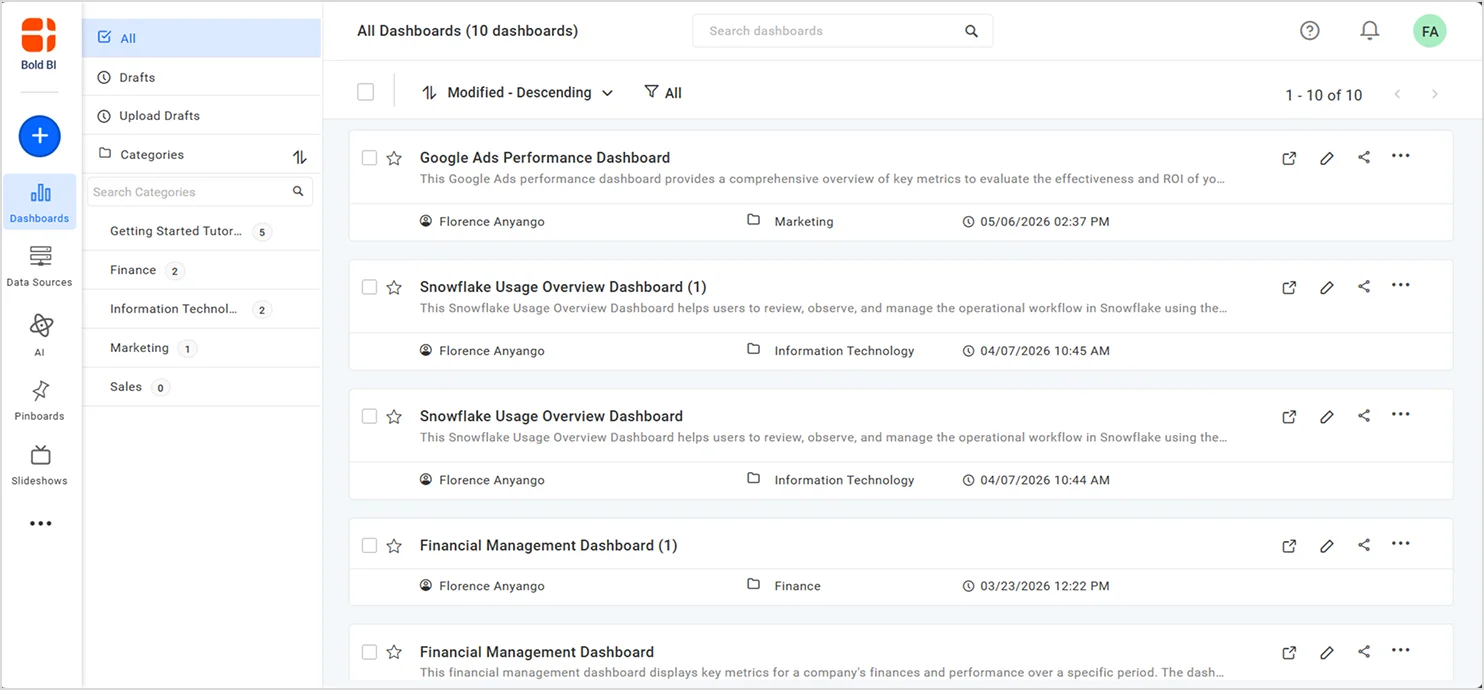
Step 1: Open the Dashboard
From the dashboard listing page, locate the dashboard you want to publish to another site.
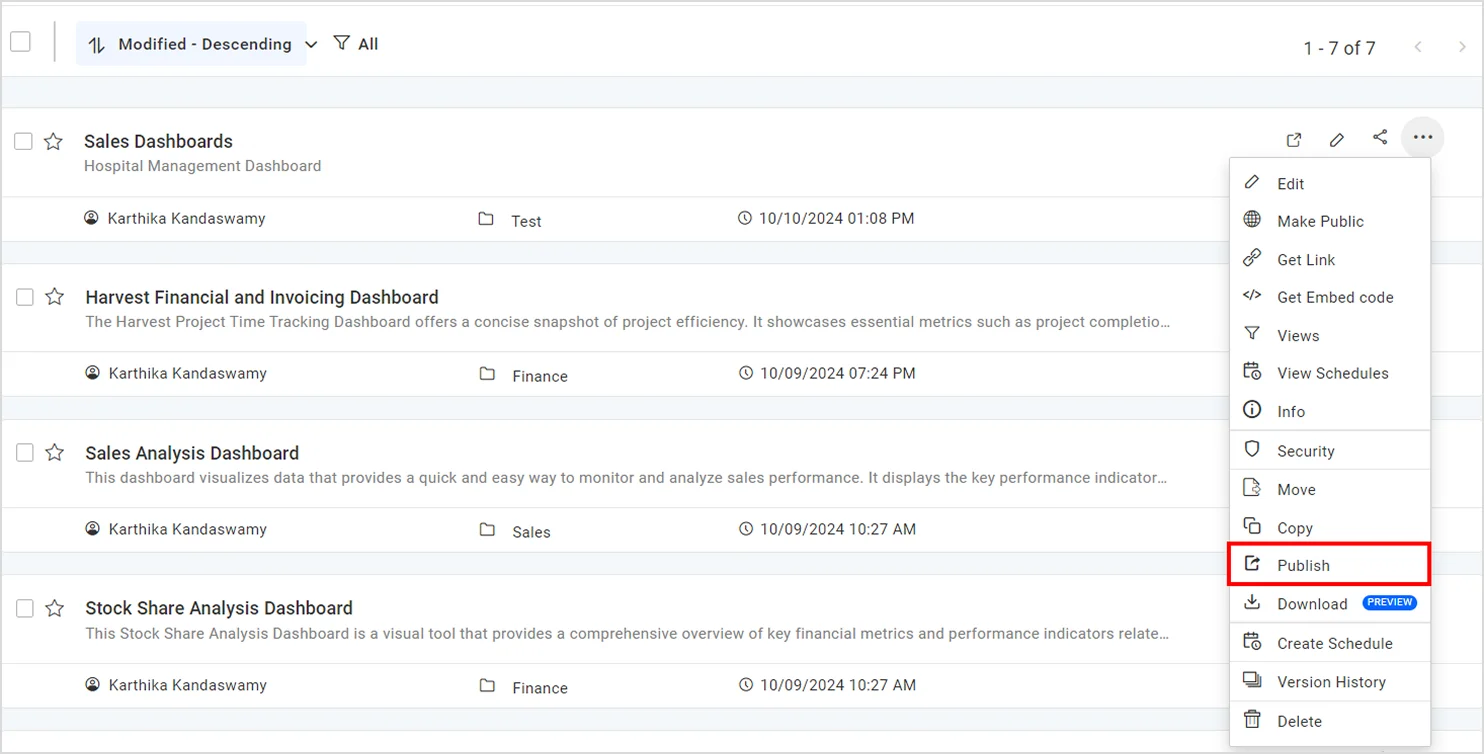
Step 2: Select Publish
In the dashboard context menu, select Publish.
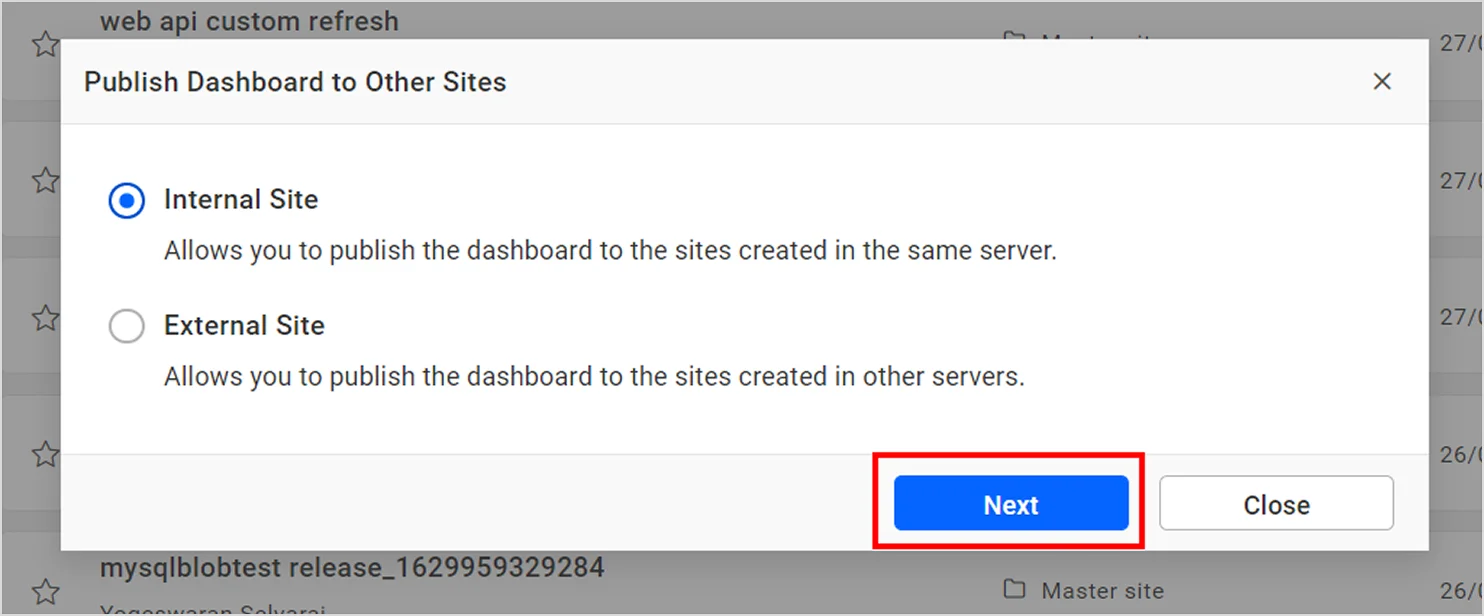
Step 3: Choose Internal Site or External Site
If you’re publishing from the master site, select either:
- Internal Site to publish to another site on the same Bold BI server.
- External Site to publish to a site hosted on a different Bold BI server.
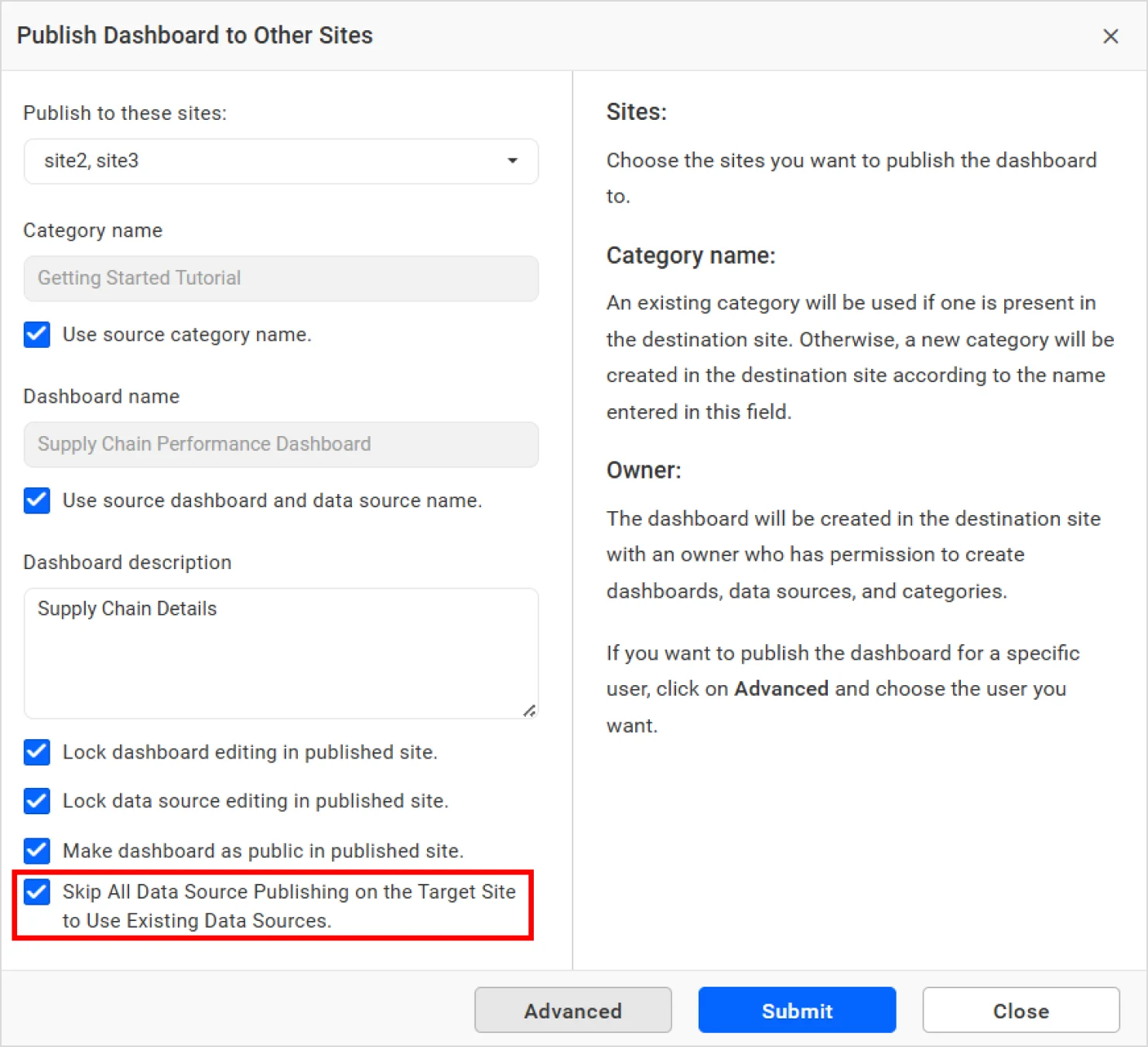
Step 4: Configure Publishing Settings
Configure publishing options such as:
- Category name.
- Use source category name.
- Use source dashboard and data source name.
- Dashboard description.
- Public dashboard access.
- Skip data source publishing when existing data sources are available on the target site.
Step 5: Publish and Monitor Status
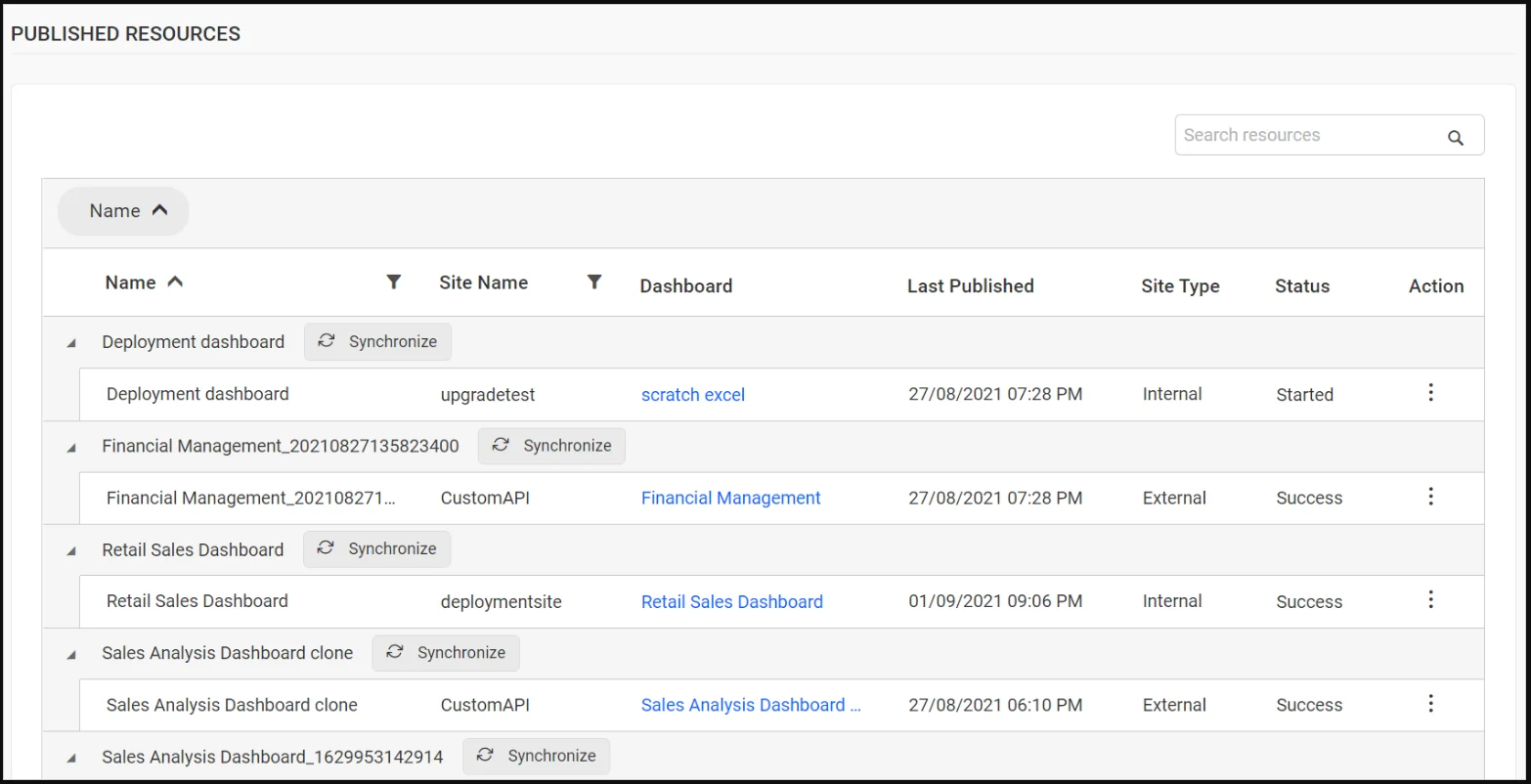
Submit the publishing request and monitor progress from the Published Resources page. The published dashboard becomes available in the selected destination site once the process completes.
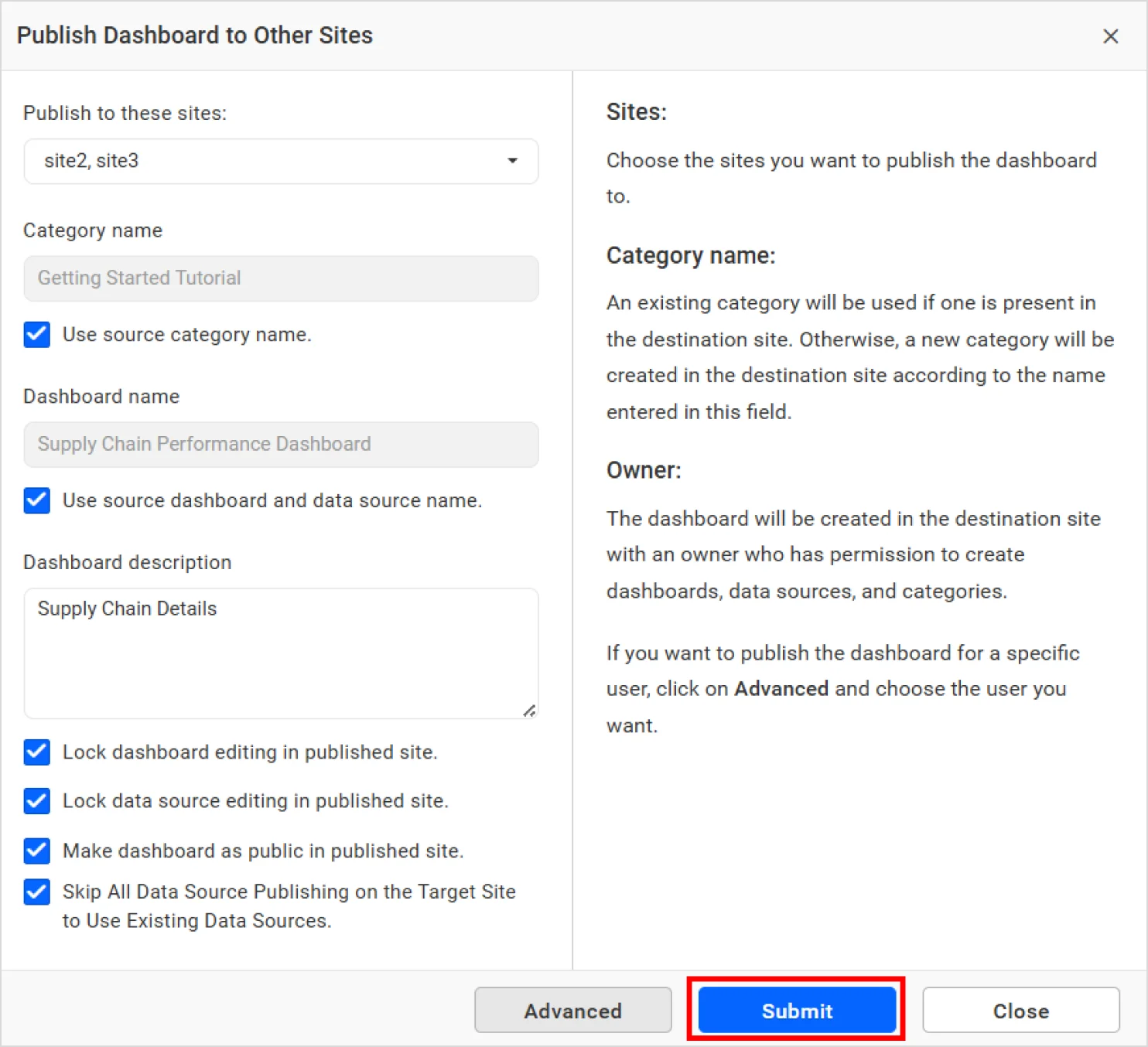
After submitting the form, the publishing process will be started, and you can check the status of the publishing on the Published Resources page.
In practice, centralized analytics teams frequently need to distribute updated executive scorecards, compliance dashboards, or operational reports across existing regions and departments. A publishing dashboard reduces the risk of teams working from outdated versions while preserving governance controls.
For step-by-step instructions and publishing options, refer to our documentation on publishing dashboards.
Deployment Dashboard vs. Publishing Dashboard: Key Differences
Although both capabilities support dashboard distribution, they are designed for different operational workflows. Deployment dashboards serve as an onboarding mechanism that automatically provisions analytics assets in newly created sites, whereas publishing dashboards are designed for ongoing distribution, version control, and governance across sites that are already operational.
| Feature | Deployment dashboard | Publishing dashboard |
| Primary purpose | Automated provisioning | Controlled distribution |
| Lifecycle stage | Site creation | Existing sites |
| Target audience | New tenants and sites | Existing tenants and sites |
| Distribution method | Automatic | Administrator controlled |
| Standardization | High | Selective |
| Governance controls | Basic | Advanced |
| Dashboard access control | Limited | Extensive |
| Multitenant dashboard management | Site onboarding | Cross-site distribution |
| Administrative effort | Minimal after setup | Ongoing management |
| Most common use case | Standardized onboarding | Analytics governance and sharing |
The choice is not typically one or the other. Organizations that scale successfully often use a deployment dashboard to establish analytics foundations and a publishing dashboard to manage ongoing distribution and governance.
Best Practices for Effective Dashboard Management
A successful dashboard management strategy extends beyond deployment and publishing features alone. The following practices help maintain consistency and long-term scalability:
- Standardize core dashboard templates: Create approved dashboard templates and KPI frameworks that can be reused across environments.
- Automate onboarding: Use a deployment dashboard to eliminate repetitive setup activities for newly created sites.
- Implement role-based access control: Grant access according to business responsibilities and data sensitivity.
- Protect critical data sources: Lock key dashboards and data sources when modification could affect reporting accuracy.
- Establish ownership: Define ownership and approval processes to maintain accountability and content quality.
- Enforce analytics governance: Develop organization-wide standards covering creation, publishing, maintenance, and retirement of dashboards.
- Track dashboard adoption: Monitor usage metrics to identify valuable reports and underutilized assets.
- Design for growth: Build distribution strategies that support future expansion without increasing administrative complexity.
Organizations that follow these practices typically achieve higher dashboard adoption, stronger governance, and a more consistent analytics experience.
Final Thoughts
When comparing deployment dashboards to publishing dashboards, the most important consideration is where you are in the dashboard lifecycle. If you’re onboarding new customers, departments, or business units, a deployment dashboard provides the automation needed to deliver standardized analytics experiences quickly. If you’re distributing dashboards across existing sites, managing permissions, and maintaining compliance requirements, a publishing dashboard offers the governance and control necessary for secure sharing.
Together, these features provide a scalable framework for dashboard distribution, multitenant dashboard management, and enterprise-wide analytics governance.
For existing Bold BI users
Explore the deployment dashboard documentation, review publishing dashboard administration guides, and contact your customer success manager for implementation recommendations.
New to Bold BI?
See how Bold BI helps organizations automate onboarding, simplify dashboard distribution, and manage analytics at scale.
Start a free trial or schedule a personalized demo to experience these capabilities firsthand.
Frequently asked questions
-
- 1.
Can a publishing dashboard distribute dashboards to external customer sites?
Yes. Administrators can publish dashboards to approved external sites and apply ownership, visibility, and locking settings before distribution.
- 2.
What happens when a dashboard already exists in a destination site?
Administrators can choose whether to replace the existing dashboard or maintain separate versions depending on publishing settings and governance requirements.
- 3.
Can a deployment dashboard and a publishing dashboard be used together?
Yes. Many organizations use deployment dashboards to provision dashboards during onboarding and publishing dashboards to distribute updates and new content afterward.
- 4.
Are data sources transferred during publishing?
Publishing options allow administrators to control how data sources are handled, including locking configurations and reusing approved destination-site data sources where applicable.
- 5.
Which feature is better for multitenant deployments?
A deployment dashboard is typically better for onboarding new tenants, while a publishing dashboard is better for distributing content across existing tenant environments.
- 6.
How can administrators prevent unauthorized modifications?
Both features support locking options that help protect dashboards and associated data sources from unintended changes.
- 1.