

AI Analytics Built for the Way Your Team Works
Bold BI AI analytics lets your team work with data in plain English through 3 AI surfaces: AI Copilot in the Dashboard Designer, AI Agent in the Dashboard Viewer, and AI Assistant, a standalone conversational hub. All 3 share one AI engine and security model; AI Assistant runs on Cloud and on-premises, including Docker and Kubernetes, and every license gets 500 free AI credits a month.
30-day trial, no credit card required
Customers featured by Bold BI
- Syscon
- Networcx
- A4B
- DigiQuip
- CarNow
- Revver
- Smartway2
- GeniusVets
- Talentegy
Bold BI has three AI surfaces on one platform
Bold BI has 3 AI surfaces, AI Copilot, AI Agent and AI Assistant, and each one lives where you already work. All 3 share the same AI engine and security model, and AI Assistant runs on Cloud, Docker and Kubernetes.
Create visuals by describing what you need
AI Copilot lives in the Dashboard Designer. Users type a request in plain English and it builds the chart, adjusts colors and labels, and handles layout.
- Create visuals from a prompt and edit them by description.
- Customize a selected widget, or one named by its title.
- Takes the previous 4 conversations into account.
- Every AI visual stays fully editable.
Analyze dashboards by asking questions
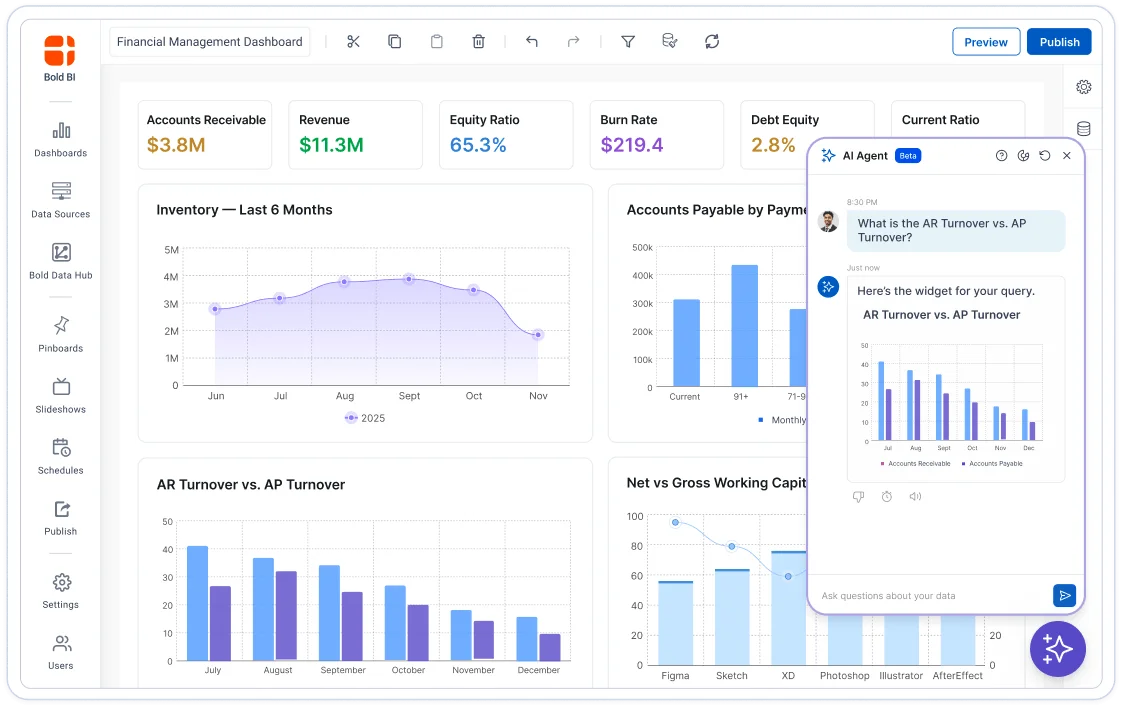
AI Agent lives in the Dashboard Viewer. It answers questions about the dashboard being viewed, as text or as a visual inside the chat window, and does not edit dashboards.
- It reads your question and decides how to answer: a visual or a written explanation.
- Works on existing dashboards with no changes.
- Read-only: it never edits widgets or the layout.
One conversational space for all your data
AI Assistant is a standalone hub that combines AI Copilot and AI Agent in one conversational interface. Conversations are saved, so users can resume, rename and delete them.
- Type @ to select a datasource and # to select a dashboard, and from v17 / to list skills; there are no separate Data and Dashboard modes.
- View any answer as a visual or a grid and toggle between them.
- Like and dislike feedback on each answer.
How Bold BI AI analytics turns a plain question into an answer
Bold BI AI analytics works in three steps: you ask, Bold BI resolves the question against your datasource, and you get an answer you can keep.

You ask in plain English
Type the question in the Dashboard Designer, inside a dashboard, or in the AI Assistant hub. Synonym support lets the AI Assistant map business terms to field names, for example 'revenue' instead of 'TotalSales'.

Bold BI resolves it against your model
The Bold AI Service classifies the intent, applies AI guardrails and sends the language model a structured prompt with your datasource schema. SQL runs only inside the secure Bold BI environment, and role-based access and row-level security are applied on every request.

You get an answer you can keep
The language model returns JSON for visuals, valid SQL queries and business summaries. Bold BI renders them as a chart or grid, and every AI visual stays editable.
Bold BI AI analytics at a glance
Bold BI AI analytics is one set of AI features across the Dashboard Designer, the Dashboard Viewer and a standalone hub. This table answers the questions buyers ask most. Bold BI is developed and owned by Syncfusion, Inc.
| The question | With Bold BI |
|---|---|
| Where does the AI live? | Three surfaces: AI Copilot in the Dashboard Designer, AI Agent in the Dashboard Viewer, and AI Assistant as a standalone hub. |
| What reaches the language model? | It depends on the operation: the prompt and schema for visuals, the schema plus processed or aggregated results for text answers, and widget metadata plus displayed data points for summaries. |
| Who provides the AI model? | Bold AI Service is included by default. On-premises users can bring their own OpenAI, Azure OpenAI or Anthropic key. |
| How is usage tracked? | Each license gets 500 free AI credits every month, and administrators watch credit use across teams and the organization. |
| Where can it run? | AI Assistant runs on Cloud and on-premises, including Docker and Kubernetes. Choosing your own AI provider is available only for on-premises users. |
| Is customer data used for training? | No. Customer data is not used to train or fine-tune Bold BI's AI models. |
More ways Bold BI AI analytics works for you
Beyond the 3 AI surfaces, Bold BI AI analytics includes 6 supporting capabilities that extend AI across dashboards, applications and administration.

Prompt to Dashboard
Bold BI Prompt to Dashboard turns one text prompt into a complete interactive dashboard of exactly 6 widgets, built from 9 widget types (Bar, Column, Pie, Doughnut, Line, Spline, Spline Area, Grid and Map), with value labels on by default.

Smart Narrations
Bold BI Smart Narrations create plain-language summaries of dashboard metrics and trends. They can be switched on or off per dashboard and per widget.

Embed AI into your app
Bold BI AI features can be embedded in your own application with the JavaScript SDKs or APIs, with white-label branding, row-level security and audit logs kept in place. SSO is available in self-hosted deployments; Cloud Edition does not support SSO.

Bring your own key (BYOK)
Bold BI supports 3 BYOK providers: OpenAI, Azure OpenAI and Anthropic (Claude). Anthropic BYOK needs v16.1.90 or later. The default Bold BI AI Service needs no credentials, and choosing your own provider is available only for on-premises users.

AI Credits Management
Bold BI AI Credits Management lets administrators watch AI credit use across teams and the organization. Each license receives 500 free AI credits every month, and credits cannot be shared with another license.

Synonym support for AI queries
Bold BI synonym support lets the AI Assistant map business terms to field names. Synonyms are added from the datasource editor, as column synonyms (alternate names for a column) or value synonyms (alternate names for a value).
How Bold BI AI analytics handles data, cost and access
Bold BI AI analytics answers questions about data security, cost and governance with specific mechanisms, covered below.

Data control
Customer data is not used to train or fine-tune Bold BI's AI models. For visual generation only the prompt and schema metadata (table names, column names and data types) go to the language model; text answers and summaries also send processed results or displayed data points.

Cost control
Every AI action uses credits from the license wallet, and each license gets 500 free credits a month. Paid credit plans cost $20, $50 and $100 a month, and a paid plan replaces the free credits for that billing period. Only the license owner or an authorized admin can see the balance and buy credits. Users on their own provider key are billed directly by that provider.

Access and audit
AI features use role-based access, audit logging and data encryption, and in self-hosted deployments they also use SSO. Cloud Edition does not support SSO. Data is encrypted in transit with 256-bit SSL / TLS 1.2. Audit logs are stored immutably and can be exported.
Bold BI AI analytics limitations
Bold BI AI analytics has limitations worth checking before you plan a rollout, especially around the AI Assistant, Prompt to Dashboard and choosing your own AI provider.
AI Assistant scope
The AI Assistant does not support querying more than one datasource in a single conversation, and it cannot edit dashboards.
Prompt to Dashboard
It works only on empty dashboards, only in Design Mode, and always generates exactly 6 widgets per prompt, regardless of the data.
Visuals and aggregations
The AI Assistant does not support Pivot Grid, Radar Polar or KPI Card. It supports 6 aggregation functions: COUNT, COUNTD, SUM, MIN, MAX and AVG.
Your own AI provider
Choosing your own AI provider is available only for on-premises users. Cloud Edition uses the Bold BI AI Service.
Rate limit
A single tenant can send up to 100 messages per minute to the AI Assistant.
Language
The AI Assistant is mainly trained and tested in English and can respond in other languages, but accuracy varies by language.
Bold BI AI analytics for the person asking and the person who supports them

Dashboard creator / analyst
Types "show me Q2 sales by region as a bar chart" in the Dashboard Designer, then refines colors and labels with follow-up prompts.

Business user / operations lead
Asks "what were return rates by category last quarter?" inside an existing dashboard and gets a written answer or a visual in the chat window.

Executive / LOB leader
Types # to pick a performance dashboard in the AI Assistant and asks for a plain-language summary of its trends and key metrics.

Developer / ISV embedding Bold BI
Embeds the AI Assistant by creating the embed with BoldBI.Mode.AIAssistant and calling loadAIAssistant() (v14.1 or later), with the embed token generated on the server.
Bold BI ratings and recognition
Bold BI holds 4.4 out of 5 on G2 and 4.9 out of 5 on Capterra, GetApp and Software Advice.
RATINGS
RECOGNITION
- G2 Leader, Fall 2025
- G2 High Performer - EMEA, Fall 2025
- G2 Regional Leader - Americas, Fall 2025
- Visual Studio Magazine Reader's Choice, 2025
Bold BI AI analytics: frequently asked questions
What is AI analytics in Bold BI?
AI analytics in Bold BI means asking questions of your data in plain English and getting charts, written answers, summaries and dashboards back. Bold BI has 3 AI surfaces, AI Copilot, AI Agent and AI Assistant, and they share the same AI engine and security model.
What is the difference between AI Copilot, AI Agent and AI Assistant?
AI Copilot lives in the Dashboard Designer and builds visuals from plain-English requests. AI Agent lives in the Dashboard Viewer and answers questions about the dashboard being viewed, without editing it. AI Assistant is a standalone hub that combines AI Copilot and AI Agent in one conversational interface.
What is the Unified AI Agent?
The Unified AI Agent is the conversational engine that powers the AI Assistant hub. It has no separate Data and Dashboard modes: users type @ to select a datasource and # to select a dashboard. From v17 the chat box has 3 shortcuts: @ lists datasources, # lists dashboards and / lists skills.
What is Prompt to Dashboard?
Prompt to Dashboard turns one text prompt into a complete interactive dashboard of exactly 6 widgets, built from 9 widget types (Bar, Column, Pie, Doughnut, Line, Spline, Spline Area, Grid and Map), with value labels on by default. It works only on empty dashboards and only in Design Mode.
What data does Bold BI send to the language model?
It depends on the AI operation. For visual or dashboard generation, the user prompt and the datasource schema (table names, column names and data types) are sent. For a textual data answer, the schema plus processed or aggregated query results are sent. For a widget or dashboard summary, widget metadata and the displayed data points are sent.
Is my data used to train Bold BI's AI models?
No. Customer data is not used to train or fine-tune Bold BI's AI models.
Which AI providers does Bold BI support?
Bold AI Service is included by default and needs no credentials. On-premises users can instead bring their own key for OpenAI, Azure OpenAI or Anthropic (Claude); Anthropic needs v16.1.90 or later. Cloud Edition uses the Bold AI Service. The AI configuration screen offers 4 choices: Bold AI Service (the default), OpenAI, Anthropic and Azure AI (models deployed in Azure AI Foundry).
How do AI credits work?
Every AI action uses credits from the license wallet. Each license receives 500 free AI credits every month, and credits cannot be moved to another license. Paid credit plans cost $20, $50 and $100 a month, and a paid plan replaces the free credits for that billing period. With your own AI provider key, the provider bills you directly. Only the license owner or an authorized admin can see the balance and buy credits.
Can I embed Bold BI AI features in my own application?
Yes. AI features can be embedded with the JavaScript SDKs or APIs, with white-label branding, row-level security and audit logs kept in place, and SSO in self-hosted deployments. To embed the standalone AI Assistant, create the embed with mode BoldBI.Mode.AIAssistant and call loadAIAssistant(), which needs v14.1 or later. Cloud Edition does not support SSO.
Related articles
Bold BI guides on AI analytics, AI-powered BI tools and how AI differs from traditional BI.

What is AI Analytics? Why It Matters & 4 Industry Use Cases
Understand what AI analytics is, why it matters, and four industry use cases showing how Bold BI simplifies AI insights.

Top 5 AI-Powered BI Tools Every Enterprise Should Explore
Compare the top AI-powered BI tools by features, benefits, and pricing to find the right solution for smarter, faster decision-making.

AI-Native vs. AI-Augmented Analytics: What's the Difference
Understand AI-native vs. AI-augmented analytics, with features, benefits, and use cases to help you pick the right BI approach.
AI for Data Analytics: Benefits, Best Practices & Use Cases
Explore the benefits, best practices, and real use cases of AI for data analytics across industries.
Traditional BI vs. AI-Powered Analytics: Key Differences
Compare traditional BI and AI-powered analytics across automation, predictive insights & conversational capabilities to understand their differences.
Try Bold BI AI analytics free for 30 days
Bold BI's 30-day free trial needs no credit card and includes full feature access from day one, so you can ask questions of your own data in plain language.