
Top 5 AI-Powered BI Tools Every Enterprise Should Explore
TL;DR: AI-powered BI tools combine conversational analytics, automated insights, AI-generated summaries, and natural-language data exploration to help teams uncover insights faster and make informed decisions. Key features include AI-driven analysis, dashboard creation, embedded analytics, and governance. Leading tools include Bold BI®, Power BI, Zoho Analytics, Domo, and Looker. The right platform improves visibility, reduces analytics delays, and scales analytics across users and customers.
Introduction
Having data isn’t the same as having answers. Many teams still depend on analysts to build dashboards or respond to ad hoc questions, which slows decisions and limits visibility across the business. AI-powered BI tools eliminate that bottleneck by helping users explore data using natural language, automatically surfacing insights, and creating dashboards more efficiently. Instead of spending hours preparing dashboards, teams can focus on understanding what the data means and acting on it.
This article explains what AI-powered BI software is, why it matters, which features to evaluate, and how the leading platforms compare.
What is an AI-powered BI tool?
An AI-powered BI tool is a business intelligence platform that uses AI to help users analyze data, uncover patterns, and generate insights. It simplifies analytics by reducing the need for manual queries or advanced technical skills. Modern AI-powered BI platforms can:
- Process natural-language questions.
- Automatically generate dashboards and summaries.
- Detect unusual trends and anomalies.
- Provide predictions based on historical data.
This makes analytics more accessible to business users across departments while still supporting enterprise governance and scalability.
Why AI-powered business intelligence tools matter
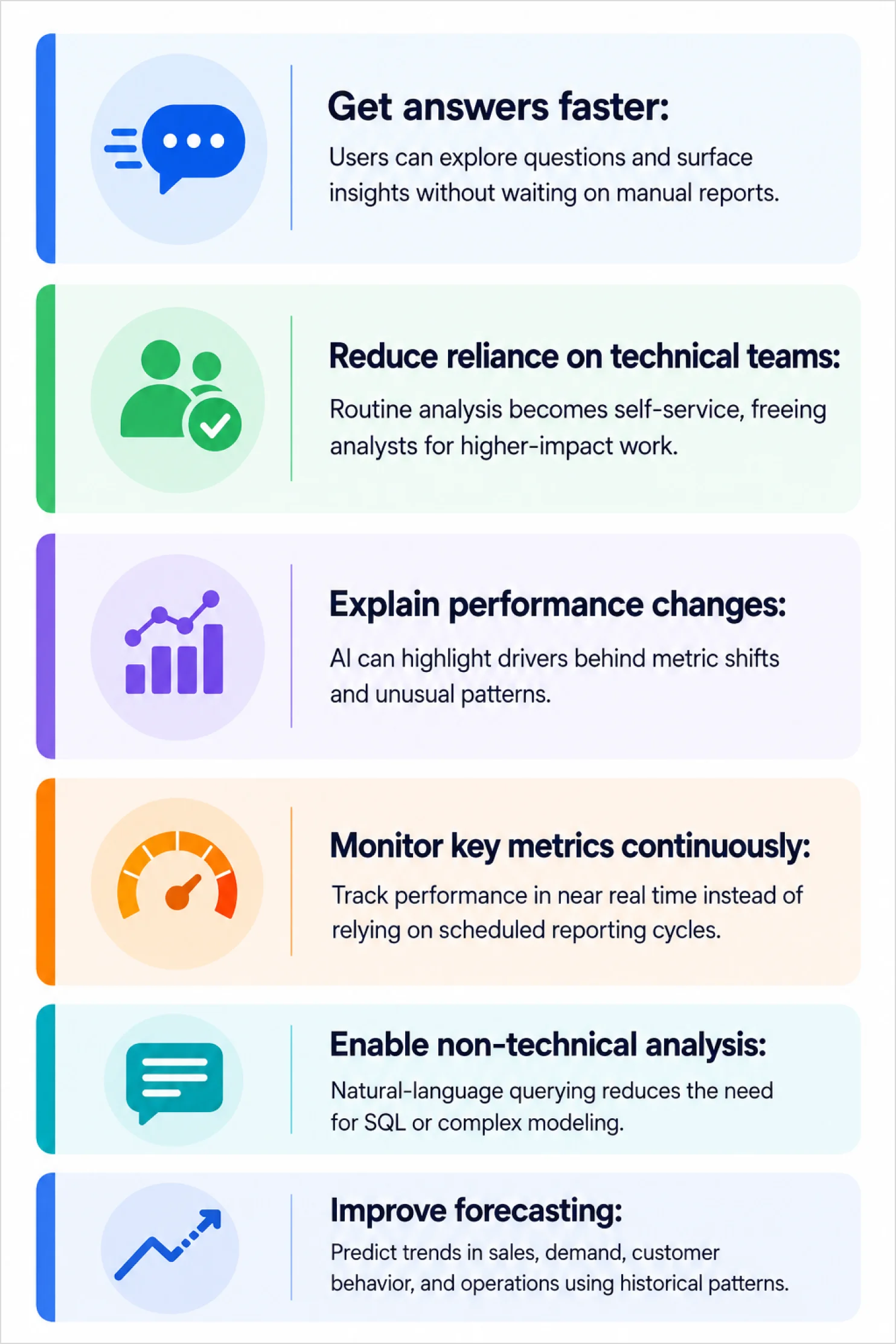
AI-powered business intelligence tools help organizations move from analytics to decision-making faster. Key benefits include:
Key features to look for in modern BI tools
Choose a modern BI tool that balances self-service usability with governance and control.
Data management
- Connected data across systems: The platform should bring together information from different tools so users can analyze business performance without switching between tools.
- Structured data preparation: It should help organize raw data into reliable datasets, ensuring consistency in analytics.
AI features
- No-code dashboard creation: Users should be able to design dashboards through simple interactions, reducing the need for technical support.
- AI-assisted querying and insights: The system should allow users to ask questions in natural language and receive meaningful answers, visualizations, or summaries.
- Automated insight discovery: It should automatically surface key patterns, unusual activity in data, and trends, helping users focus on what matters most.
- Plain-language explanations: The platform should provide context behind metrics, helping users understand not just what happened, but also why it happened.
- Interactive exploration capabilities: Users should be able to drill into data and explore follow-up questions without building new dashboards.
Enterprise requirements
- Embedding dashboards into apps: Dashboards should be easily integrated into applications, delivering insights directly within user workflows.
- Access control and governance: The system should ensure secure and consistent access to data across users.
- Collaboration and shared visibility: Teams should be able to share dashboards and align around a single source of truth.
- Scalability and performance: The platform should handle increasing data volumes and users without performance issues.
- Customization and branding support: Organizations should be able to tailor analytics experiences for internal teams or external customers.
AI-powered BI trends shaping enterprise analytics
AI-powered business intelligence continues to evolve rapidly. The most important trends shaping analytics platforms include:
- Conversational analytics through AI assistants and copilots.
- Automated dashboard creation from datasets.
- AI-generated summaries and automatic written explanations of data.
- Predictive forecasting and business planning.
- Real-time anomaly detection that identifies unusual activity and triggers smart alerts.
- Embedded AI-powered analytics within applications.
- Explainable AI and strong governance controls.
- Self-service analytics for non-technical users.
- Generative AI experiences that allow users to build dashboards, generate summaries, and explore data through simple conversations.
Modern AI-powered BI tools are increasingly centered around AI assistants that help users interact with dashboards and analytics using natural language instead of traditional manual analysis workflows. These innovations are helping organizations move beyond traditional analytics and toward faster, more proactive decision-making.
How to choose the right AI-powered BI platform
Many AI-powered BI platforms offer similar capabilities, but the best choice depends on your goals, users, and data environment. When evaluating a platform, consider the following:
- Business size and requirements: Small businesses often prioritize ease of use and affordability, while larger organizations may require advanced governance, scalability, and security controls.
- AI capabilities: Look for capabilities like natural language querying, automated insights, predictive analytics, AI-generated dashboards, and conversational analytics.
- Data connectivity: The platform should connect easily with your existing databases, cloud applications, spreadsheets, and business systems.
- Embedded analytics support: Organizations that deliver analytics to customers should evaluate whether dashboards and AI-powered insights can be embedded directly into applications and portals.
- Security and governance: Ensure the platform provides role-based access controls, data governance features, and compliance support to protect sensitive information.
- Scalability: The solution should continue to perform effectively as data volumes, dashboards, and user counts increase.
5 AI-powered business intelligence tools for enterprises
1. Bold BI
Bold BI is an AI-powered analytics platform designed for organizations that need both self-service dashboards and embedded analytics. It helps teams create dashboards, explore data, and deliver insights inside applications with governed access. Bold BI also helps organizations control AI usage through BYOK and AI credits management while improving query accuracy with synonym-aware AI queries.
AI-powered features
- AI Copilot for dashboard creation: Create charts and visualizations using natural-language prompts. AI Copilot helps users build and refine dashboard elements faster, reducing the effort required to create data-driven dashboards.
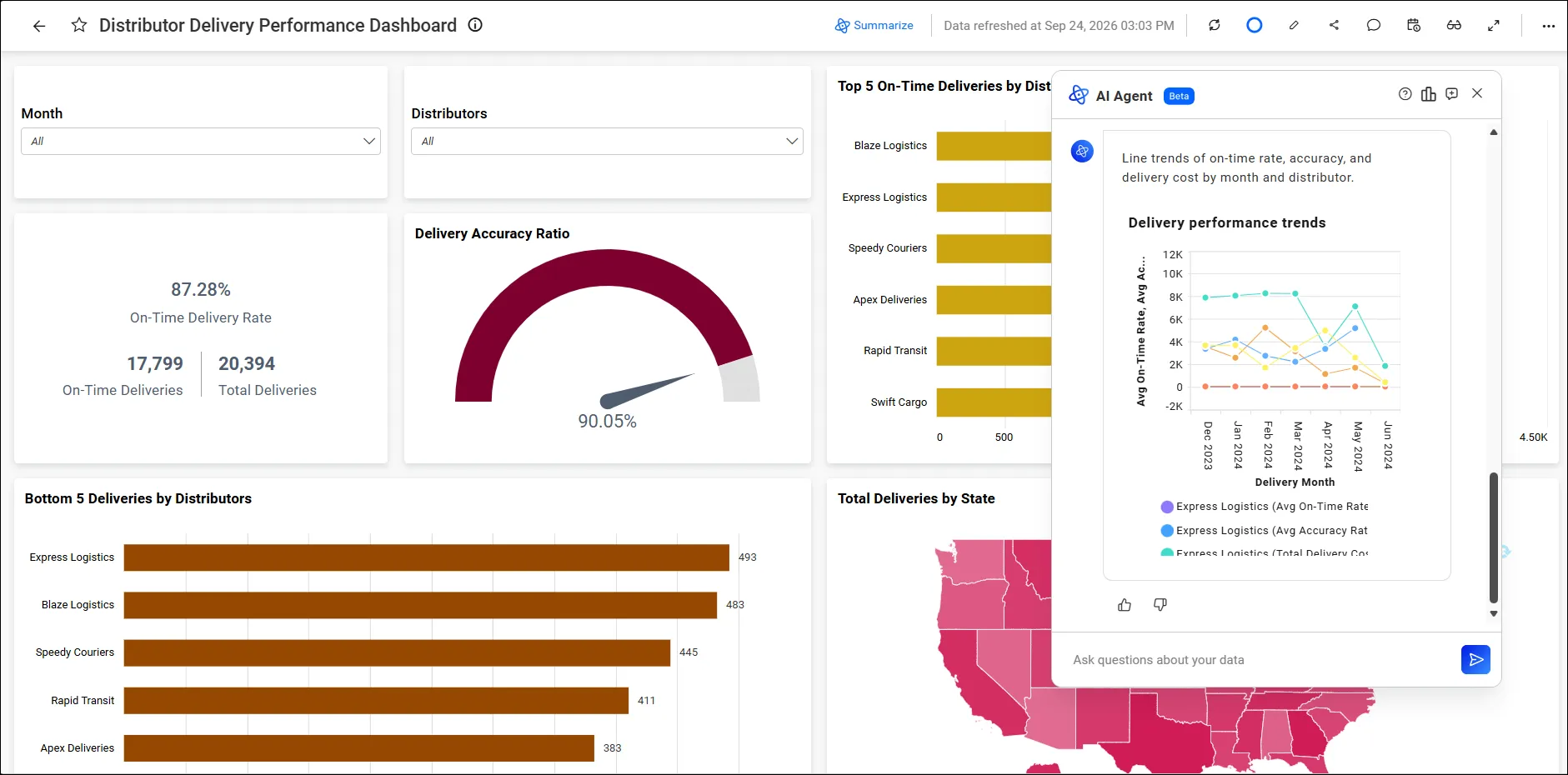
- AI Agent for dashboard analysis: Analyse existing dashboards through natural-language conversations. AI Agent helps users understand performance trends, uncover insights, generate dashboard summaries, and answer business questions based on dashboard data.
- AI Assistant for conversational analytics: Explore business data through an AI-powered conversational experience. Users can ask questions, receive contextual answers, generate visualizations, and interact with analytics without relying on manual queries.
- Prompt-to-Dashboard generation: Convert a plain-language prompt into a fully functional dashboard with relevant visualizations. This capability accelerates dashboard creation and helps users move from raw data to actionable insights faster.
- AI Smart Actions: Turn insights into action by automating responses based on dashboard data and business conditions. AI Smart Actions help teams streamline decision-making and respond more efficiently to important business events.
Best for: SaaS companies, ISVs, and enterprises that need AI-powered analytics, conversational data exploration, embedded analytics, and governed access to business insights.
2. Power BI
Power BI integrates AI capabilities into its analytics environment, enabling users to explore data, identify influences, and generate insights through both visual and automated methods.
AI features
- Natural language Q&A: Visual answers for plain-language questions.
- Automated insights: Pattern, trend, and change detection across datasets.
- Copilot assistance: AI-generated dashboard drafts and summaries.
- Azure AI integration: Machine learning models and AI services that extend analysis.
Best for: Organizations already standardized on Microsoft tools and Azure.
3. Zoho Analytics
Zoho Analytics provides AI-assisted analytics focused on ease of use, helping teams generate insights and dashboards without deep technical expertise.
AI features
- Zia conversational assistant: Chat-style data interaction with natural-language responses.
- Automatically generated narratives: Automatically generated explanations that help users understand dashboards faster.
- Predictive forecasting: Built-in models that estimate future trends from historical data.
- Anomaly detection: Irregular pattern identification with alerts to unusual behavior.
Best for: Small and midsize businesses that want approachable AI analytics.
4. Domo
Domo combines real-time data processing with AI capabilities to support operational monitoring and faster decision-making.
AI features
- AI-driven alerts and anomaly detection: Notifications when metrics deviate from expected patterns.
- Conversational exploration: Natural-language querying for non-technical users.
- Predictive analytics: Forecasted outcomes like sales performance or operational trends.
- Real-time insight automation: Continuous analysis of incoming data that surfaces relevant insights.
Best for: Teams that need real-time operational analytics and rapid alerting.
5. Looker
Looker is Google Cloud’s business intelligence platform that combines governed analytics with AI-assisted data exploration. Built on a governed semantic model, Looker helps teams standardize metric definitions while enabling natural-language experiences.
AI features
- Visualization assistant: Charts created and customized using natural-language prompts.
- Formula assistant: Calculated fields generated faster with AI-assisted formula creation.
- Advanced analytics via conversational workflows: Support for forecasting and anomaly detection through guided AI experiences.
- Conversational analytics API: Embedded natural-language analytics in applications using a trusted semantic model.
Best for: Organizations operating in Google Cloud environments that prioritize governed metrics.
AI-powered BI tool comparison
| Platform | AI assistant | Automated insights | Embedded analytics | Natural language queries | Best for |
| Bold BI | ✓ | ✓ | ✓ | ✓ | Embedded analytics and enterprise BI |
| Power BI | ✓ | ✓ | Limited | ✓ | Microsoft-centric organizations |
| Zoho Analytics | ✓ | ✓ | Limited | ✓ | Small and mid-sized businesses |
| Domo | ✓ | ✓ | ✓ | ✓ | Real-time operational analytics |
| Looker | ✓ | ✓ | ✓ | ✓ | Governed analytics and Google Cloud environments |
Use cases for AI-powered BI solutions in various industries
Modern organizations use AI-powered BI platforms not only to visualize data but also to generate insights, summarize findings, and enable natural-language exploration of business data. The following examples demonstrate how AI-powered capabilities help teams uncover insights faster and make more informed decisions across different industries.
Sales: Tracking quarterly revenue performance
- Scenario: A sales manager is preparing for a quarterly business review and needs a quick understanding of overall sales performance.
- Challenge: Sales data is distributed across multiple widgets, visualizations, and dashboards, making manual analysis time-consuming.
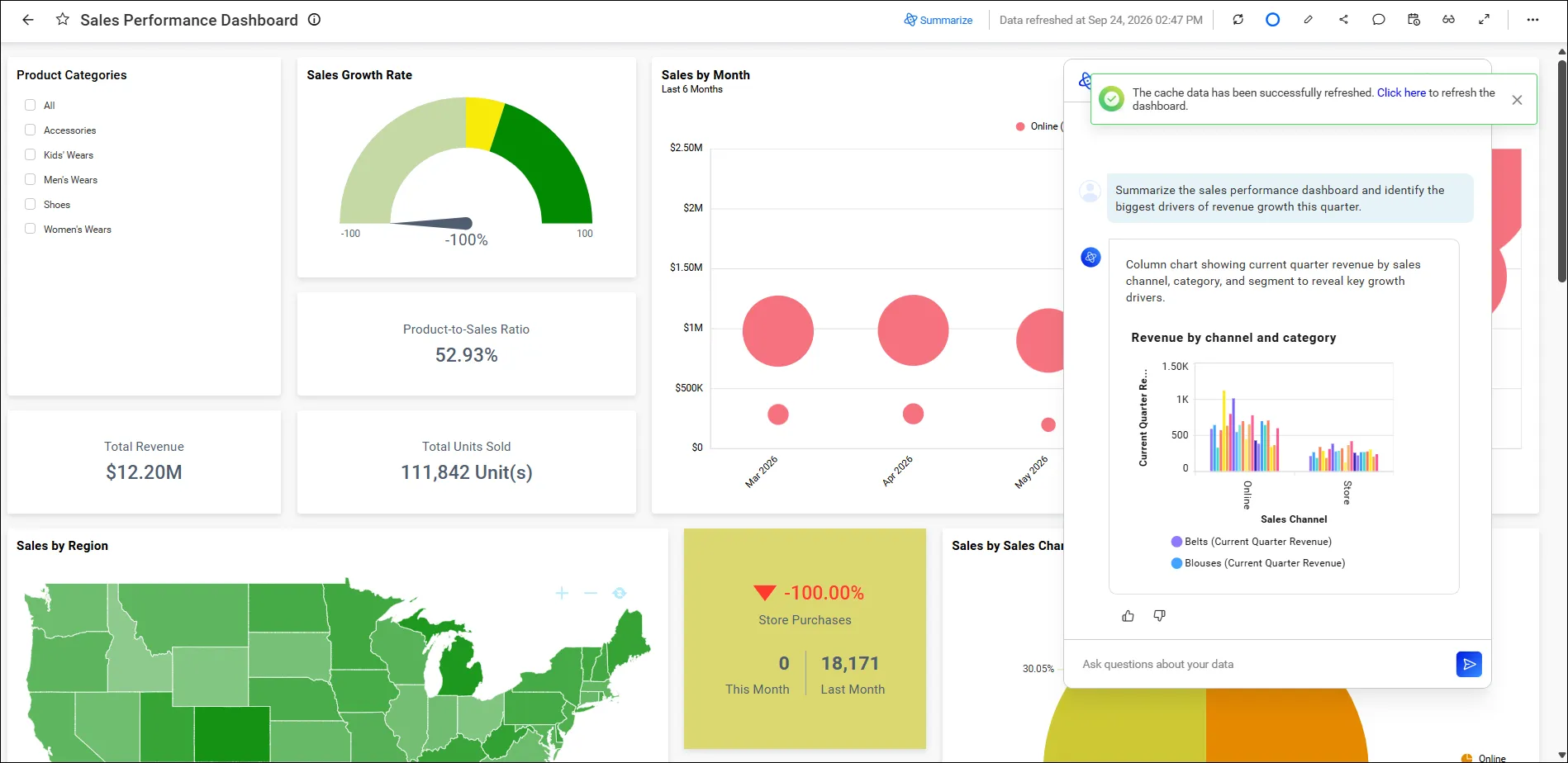
- How the AI assistant helps: Instead of reviewing each visualization individually, the sales manager asks, “Summarize the sales performance dashboard”. The AI assistant analyses the dashboard, highlights the metrics driving overall performance, identifies important trends, and generates a plain-language summary. For example, it can surface which region contributed most to revenue growth or highlight specific metrics driving changes in performance.
- Business outcome: The sales manager receives actionable insights within seconds, enabling faster decision-making, more productive business reviews, and improved sales planning.
Marketing: Evaluating campaign performance
- Scenario: A marketing manager wants a quick overview of campaign performance across channels without manually analysing multiple dashboards.
- Challenge: Reviewing marketing data across various metrics, channels, and campaigns can require significant time and effort.
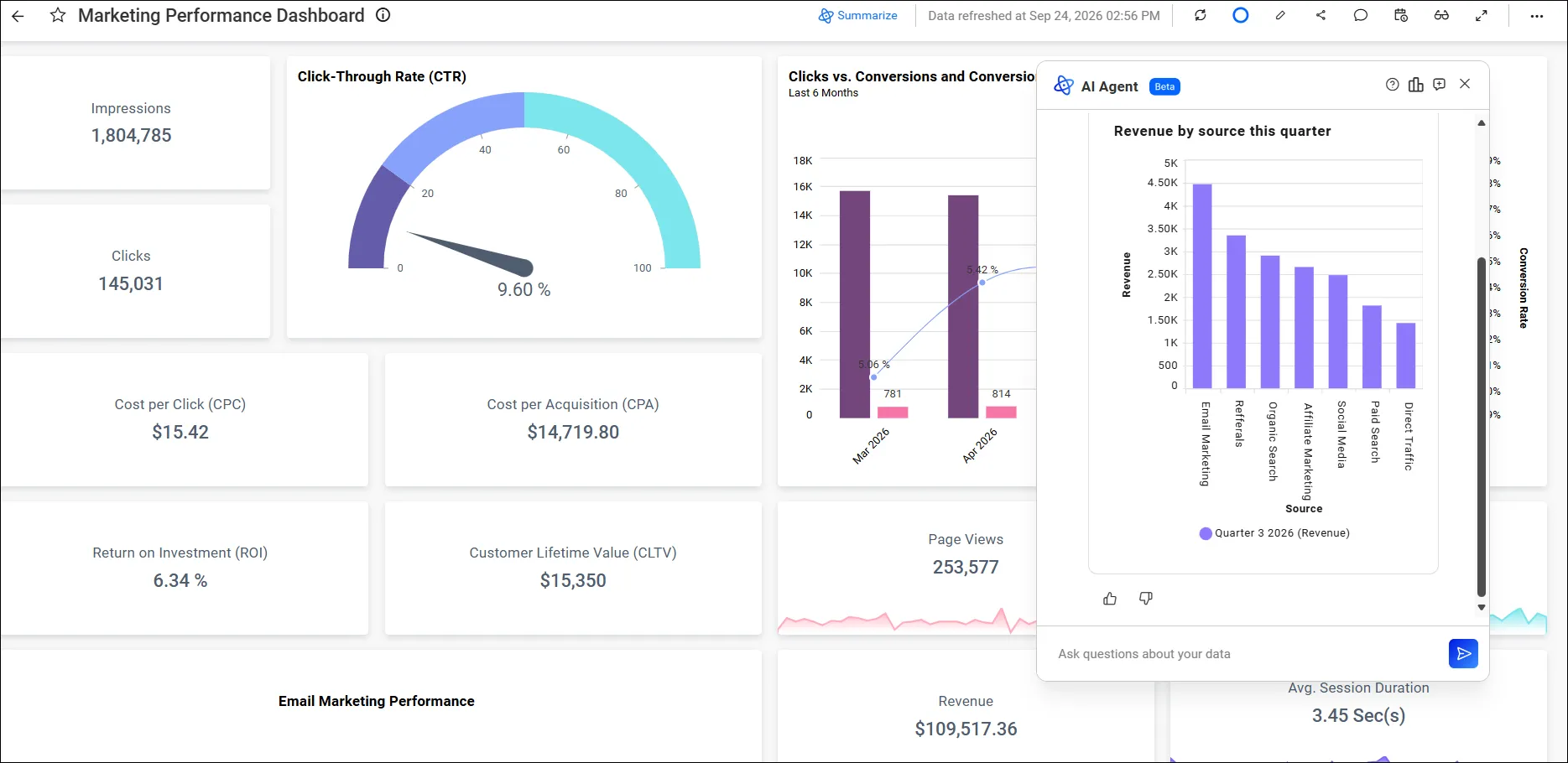
- How the AI assistant helps: The marketing manager asks, “Summarize our campaign performance this quarter”. The AI assistant analyses the dashboard, highlights top-performing channels, identifies significant engagement and conversion trends, and generates a concise summary of the most important findings.
- Business outcome: Marketing teams can quickly identify successful strategies, optimize campaign investments, and respond faster to changing market conditions.
Supply chain: Identifying operational bottlenecks
- Scenario: An operations leader wants to understand the factors contributing to shipment delays.
- Challenge: Supply chain data often spans multiple dashboards, making it difficult to quickly identify patterns and root causes.
- How the AI assistant helps: The operations leader asks, “What is causing shipment delays this month?” The AI assistant analyses the available dashboard data, highlights suppliers, locations, or processes associated with delays, and provides a natural-language explanation of the trends observed.
- Business outcome: Teams can investigate issues more efficiently, reduce operational disruptions, and make faster data-driven decisions.
Why choose Bold BI for AI-powered analytics
AI-powered BI makes it easier to explore data, generate insights, and interact with analytics using natural language. Organizations need a platform that combines conversational analytics, AI-assisted dashboard creation, embedded analytics, and enterprise governance while remaining flexible enough to support both internal and customer-facing analytics use cases.
Bold BI addresses these requirements by combining:
- AI-powered analytics
- AI-assisted dashboard creation
- Conversational analytics experiences
- Embedded analytics capabilities
- Flexible deployment options
- Enterprise-grade security and governance
- White-label customization for customer-facing analytics
With capabilities such as AI Copilot, AI Agent, AI Assistant, Prompt-to-Dashboard generation, and AI-powered Smart Narrations, Bold BI helps organizations accelerate data exploration, reduce manual analysis, and transform business data into actionable insights.
Whether you’re creating dashboards for internal teams or delivering analytics experiences within customer applications, Bold BI provides the scalability, flexibility, and governance needed to support modern AI-powered business intelligence initiatives.
Ready to deliver AI-powered analytics to your teams or customers? Start your free trial or book a demo to see how Bold BI® supports embedded BI, governed AI insights, and flexible deployment.
Frequently asked questions
- 1.
How do AI-powered business intelligence tools reduce reliance on IT teams?
They enable users to ask questions, generate dashboard insights, and analyze data independently using AI, reducing the need for manual dashboard creation and repeated requests to technical teams.
- 2.
What should businesses consider when choosing an AI-powered BI platform?
Evaluate AI capabilities, ease of use, data connectivity, security, embedded analytics support, governance, and scalability.
- 3.
What role does AI play in business intelligence?
AI automates data analysis, identifies trends, provides predictions, detects anomalies, and delivers insights in plain language, making analytics faster and more accessible.
- 4.
Are AI-powered BI tools suitable for non-technical users?
Yes. Natural-language queries, automated insights, and AI copilots help non-technical users explore data without writing SQL or building complex models.
- 5.
Can AI-powered BI tools handle multiple data sources?
Most platforms connect to databases, cloud applications, and business systems to create a unified analytics environment.
- 6.
How do AI-powered BI tools improve decision-making?
They provide faster access to insights, real-time monitoring, predictive analytics, and anomaly alerts, helping teams respond quickly and plan more effectively.
- 7.
How can you get started with Bold BI?
You can start a free trial on the Bold BI website and begin creating AI-powered dashboards.
- 8.
What is the difference between traditional BI and AI-powered BI?
Traditional BI focuses on dashboards and historical analysis. AI-powered BI adds natural-language querying, automated insight generation, anomaly detection, forecasting, and conversational exploration, making analytics more proactive and accessible.