



Employee Training Dashboard for HR & L&D Teams
See real-time training progress, workforce readiness, and learning ROI—all in one place.
The Employee Training Dashboard of Bold BI allows the HR and L&D departments to track training status, budget utilization, course success, and completion percentages—without spreadsheets and manual reports. Simply connect your LMS, HRIS, survey tools, or Excel/SQL data and get a unified view of the entire workforce's growth.
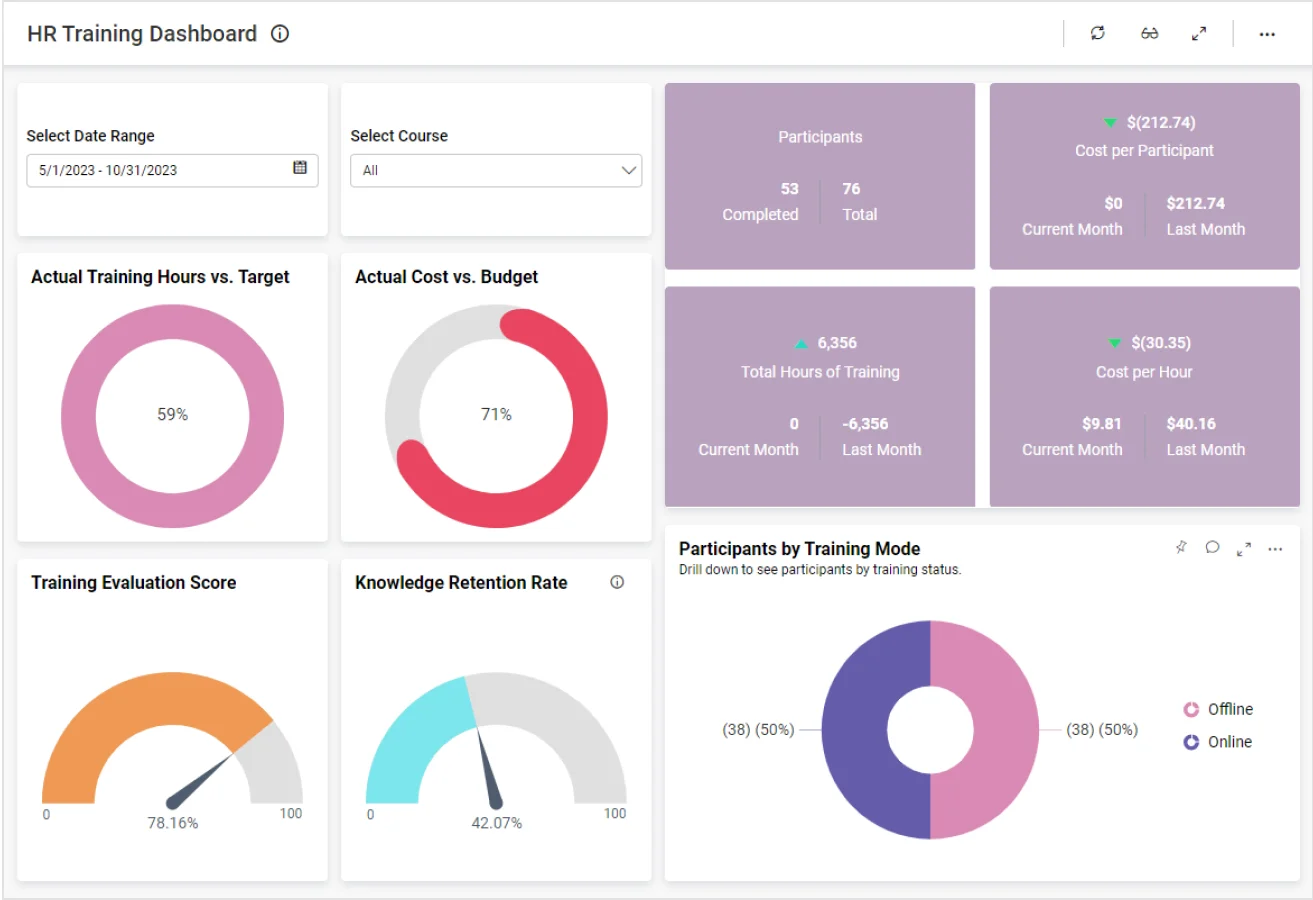
TL;DR: What you’ll see in your first week
-
Complete training visibility: Overall status, active vs. overdue courses.
-
Budget vs. actual cost: Track spend, spot overruns, and calculate cost-per-employee.
-
Course performance insights: See which courses are most completed, highest-rated, and driving success.
-
Completion analytics: Employee-level and course-level completion rates.
-
Executive view: Workforce readiness, skill gaps, and training ROI.
What is an Employee Training Dashboard? (Quick answer)
An Employee Training Dashboard shows real-time insights into training progress, course effectiveness, compliance status, and L&D budget usage.
In Bold BI, this means interactive visuals that blend LMS, HRIS, and survey data automatically—no manual Excel reporting.
Example: Instantly compare completion rates across departments to identify skill gaps.
Why this matters for HR leaders
Stop guessing training impact—gain a complete, real-time view of workforce readiness.
When training data is scattered across LMS exports, HRIS reports, and spreadsheets, L&D programs end up reactive instead of strategic.
Bold BI gives you one source of truth for learning performance—so you can answer questions like:
-
Are employees completing the required courses on time?
-
Are we spending within the training budget?
-
Which courses deliver the most value?
-
How ready is the workforce for upcoming initiatives or compliance needs?
Why Bold BI Is the Right Fit for L&D Analytics
Bold BI brings all your learning, HR, and budget data into one secure dashboard—so HR and L&D teams can view the training performance and program impact in a single place.
-
Combine LMS + HRIS + survey data into one dashboard.
-
Self-service analytics for HR teams, with granular controls for leadership.
-
Set it up in the cloud or on your own servers.
-
Add dashboards directly to your HR portals, intranet, SharePoint, or LMS.
All dashboards are easily customizable—add your own KPIs, adjust thresholds, and blend in HR or performance data.
What You’ll Track
-
Overall training status: A real-time view of active, completed, and overdue courses, plus how ready your workforce is.
-
Training cost vs. budget: How your L&D spend compares to budget, including cost per course and cost per employee.
-
Course success analysis: Which courses perform best, how learners rate them, and where drop-offs happen.
-
Completion rates: Course-level and company-wide completion trends, showing how engaged different teams and regions are.
How Employee Training Analytics Dashboard Works (Simple Setup)
-
Connect: LMS, HRIS, Excel, SQL, and SharePoint.
-
Choose the Employee Training sample dashboard and plug in your data.
-
Blend: Training and HR metrics to measure training ROI and workforce readiness.
-
Share: Role-based views for HR, managers, and executives.
-
Set alerts: For overdue training, budget overspend, or low completion rates.
Why HR and L&D Teams Choose Bold BI for Training Analytics
-
Combined view of performance + training + cost metrics.
-
Drill down from org-wide trends to individual insights.
-
Embed dashboards in your employee portal, LMS, or HR app.
More Articles About Employee Training
-
Employee Satisfaction Analysis with BI
 Explains how BI tools help improve employee satisfaction and engagement through data-driven insights.
-
Mastering Employee Turnover Analysis
Discusses how visualization helps HR teams reduce turnover and improve retention strategies.


