
The Bold BI designer allows you to connect with several SQL data sources to visualize and analyze the data using interactive dashboards.
Build dashboards using Microsoft SQL Server data to get a more informed view of your metrics. 
Bring your Microsoft SQL Server data to Bold BI® and create beautiful dashboards with useful widgets. By embedding dashboards inside your application, you can visualize the story behind your data and make effective business decisions.
Create a connection with a SQL data source using live or extract modes.
Enter your own SQL query to create a connection with manually written queries instead of manually dragged tables.
Bold BI can connect stored procedures for Microsoft SQL Server only.
Configure data refreshes in the SQL data source only in extract mode.
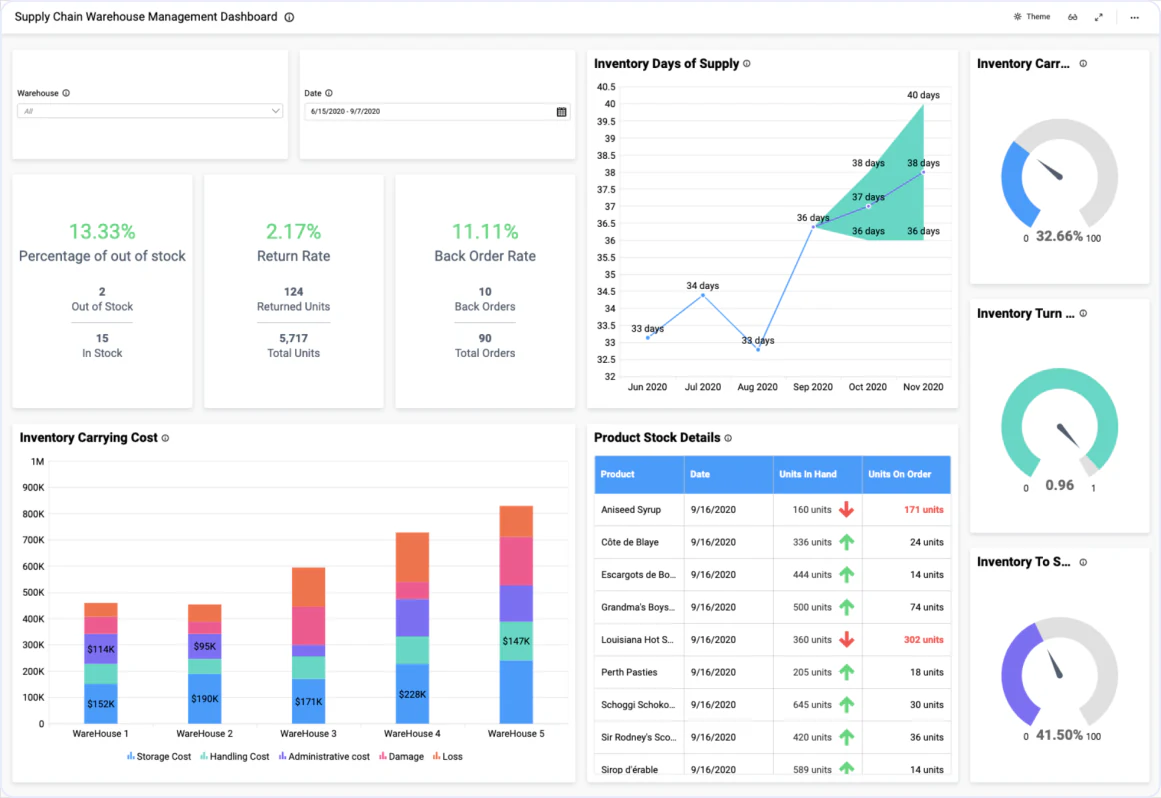
The Supply Chain Inventory Management Dashboard helps you track and monitor the flow and movement of your inventory and products. You can effectively analyze inventory process transactions, from shipping to receiving. With this dashboard, you can track inventory costs and receive real-time inventory levels.
Combine Microsoft SQL data with other integrations, like SQL or web data sources, and create dashboards with multiple data sources. Embed these dashboards into your application for powerful data visualization.
Integrations
Your data, wherever it lives. SQL databases, REST APIs, cloud warehouses, flat files, and SaaS tools connect without a custom pipeline.





Explore Bold BI with a 30-day free trial. Embed dashboards, connect data sources, and empower your team with actionable insights.
No credit card required.