webinar announcement icon

announcement icon Webinar - 9th Apr 2026, 10:00 AM ET

Webinar: Personalizing Dashboards with Role-Based Access and Row-Level Security

webinar banner line

10:00 AM ET

9th Apr, 2026

banner line />
         </div>
         
          <div class= Register Now

Release Announcement:

Bold BI v16.2.5 has arrived! Explore the latest features here.

Overview

Bring your SurveyMonkey data to Bold BI® and create beautiful dashboards with useful widgets. By embedding dashboards inside your application, you can visualize the story behind your data and make effective business decisions.

API Endpoints

API Endpoints

You can choose the relevant API endpoints provided to fetch data from the SurveyMonkey account.

Custom URL

Custom URL

Create your own query URL that retrieves data from the SurveyMonkey account.

Pagination

Pagination

Set the maximum number of rows to be fetched from SurveyMonkey connector.

Refresh Data

Refresh Data

Configure data refreshes to keep your dashboard up to date.

SurveyMonkey Dashboard Examples

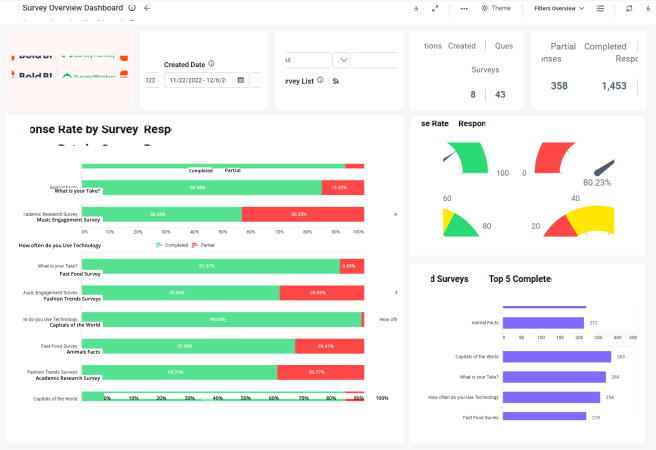
SurveyMonkey Survey Overview Dashboard

SurveyMonkey Survey Overview Dashboard

Bold BI SurveyMonkey Overview Dashboard helps the stakeholders to monitor the performance of every survey conducted by giving insights into the number of respondents each survey attracts, the responses from the respondent and the number of surveys sent.

SurveyMonkey Overview Dashboard allow the user to have a broader insight into the number of respondents who participates in a survey and their responses. The time frame in which a survey is completed is captured to get a glimpse of the surveys level of engagement.

  • Total Surveys and Total Pages
  • Total Respondents, Total Questions and Total Collectors.
  • Surveys by Category.
  • Respondents Over Date, Respondent and Status Over Month and Respondents by Survey.
  • Completed Survey Response Over Time and Average Time Taken.
  • Top 5 Completed Surveys by Responses and Survey Summary Details.

Integration Mashups with SurveyMonkey Data

Combine SurveyMonkey data with other integrations, like SQL or web data sources, and create dashboards with multiple data sources. Embed these dashboards into your applications for powerful data visualization.

Data Source List

Check Out Our 150+ Supported Integrations

Smarter Dashboards, Faster Decisions

Explore Bold BI with a 30-day free trial. Embed dashboards, connect data sources, and empower your team with actionable insights.

No credit card required.