
Bold BI dashboard designer supports connecting Twilio web services through REST API.
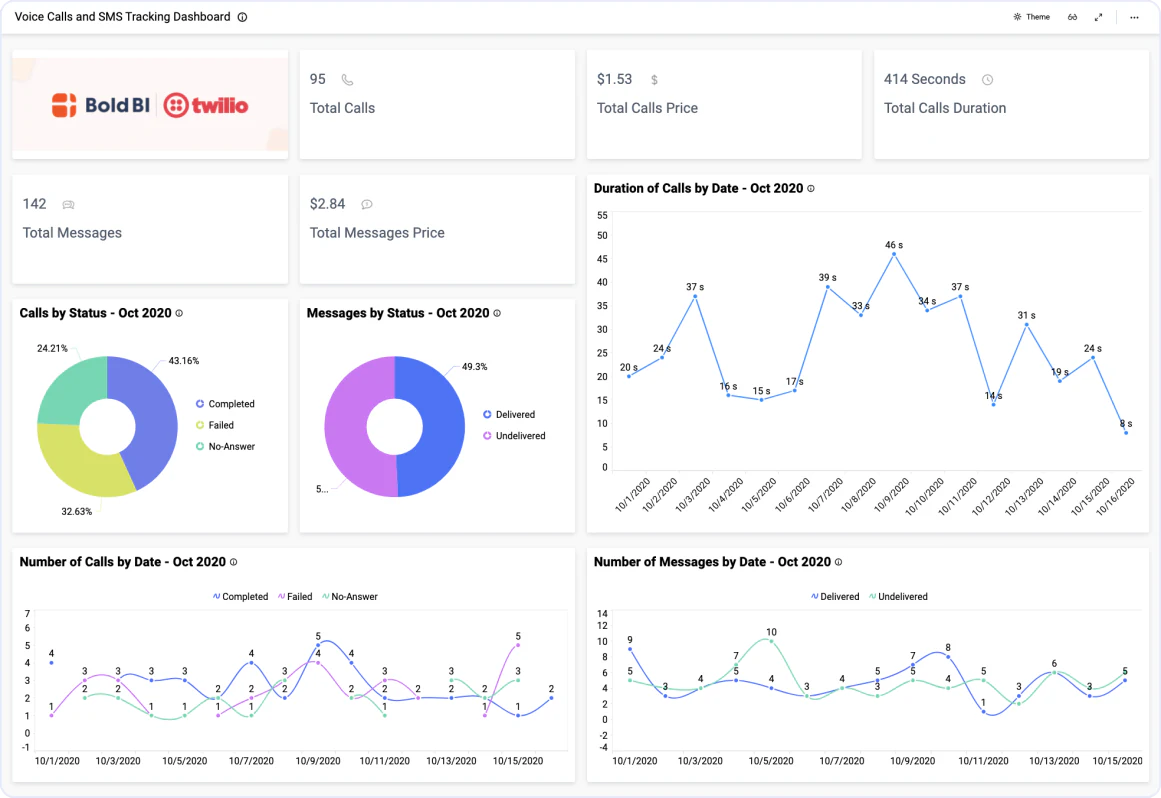
Bring your Twilio data to Bold BI® and create beautiful dashboards with useful widgets. By embedding dashboards inside your application, you can visualize the story behind your data and make effective business decisions.
Set the maximum number of rows to be fetched from the Twilio connector.
Configure data refreshes to keep your dashboard up to date.
Join Twilio data with data from different data sources using shared tables.
The Voice Calls and SMS Tracking Dashboard offers a wide range of contact data points, from the number of contacts engaged to the duration of calls. With this dashboard, you can track and improve call traffic trends and identify agent needs.
Combine Twilio data with other integrations, like SQL or web data sources, and create dashboards with multiple data sources. Embed these dashboards into your application for powerful data visualization.
Integrations
Your data, wherever it lives. SQL databases, REST APIs, cloud warehouses, flat files, and SaaS tools connect without a custom pipeline.





Explore Bold BI with a 30-day free trial. Embed dashboards, connect data sources, and empower your team with actionable insights.
No credit card required.