How to Securely Embed Bold BI Dashboards in JavaScript

 10 min read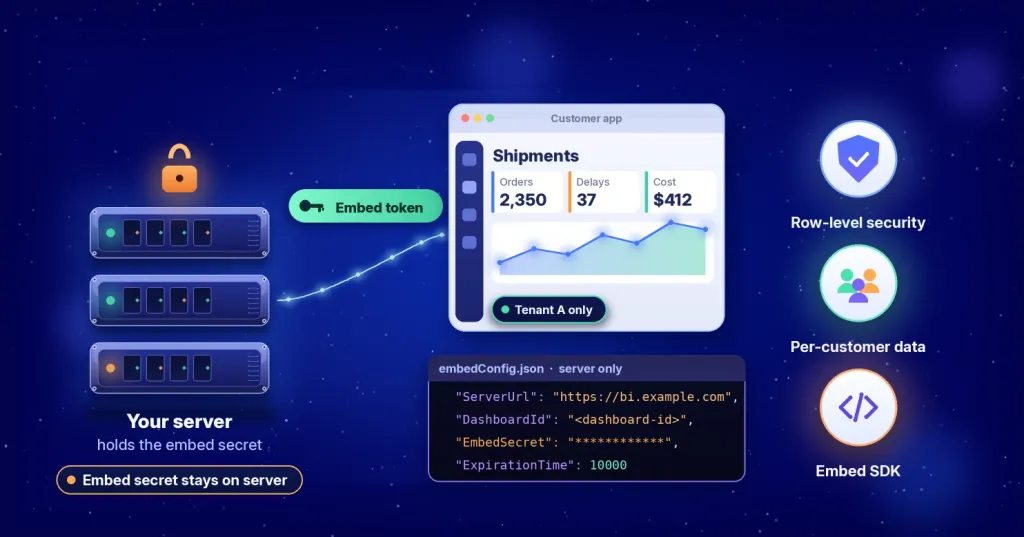
TL;DR: One of the most common dashboard embedding security mistakes happens before the dashboard even loads: exposing the embed secret in browser code. A more secure approach is to keep the embed secret on your server, generate an embed token through your back end, and pass only that token to the JavaScript application.
Bold BI® is a dashboard, AI, self-service, and embedded analytics platform from Syncfusion® that helps you turn your data into clear answers. It allows you to embed interactive dashboards directly in your product, so your customers see their numbers without leaving your application.
This guide explains secure dashboard embedding in a JavaScript application, keeping the embed secret on your server, sending only a token to the browser, and applying row-level security (RLS) so each customer sees only its own data.
Why secure dashboard embedding matters to your business
Your customers expect to see their numbers inside your product, not in a separate tool. Embedded dashboards can shorten the time it takes to find an answer, reduce the number of tools people switch between, and give your product team a clear way to show value. Every one of those benefits depends on a single rule. Each customer must see only their own data.
If you are comparing analytics platforms, the questions are practical. Can each customer see only its own data? Can the platform run in our environment? Can our team launch without a long build? Secure embedding answers each of those questions, and this guide shows you where to check.
Every Bold BI edition includes a 30-day free trial with no credit card required, allowing teams to evaluate embedding, security, multitenancy, and deployment capabilities before making a decision. You can also explore available editions, deployment options, and licensing details on the Bold BI pricing page to determine which plan best fits your organization’s requirements.
How secure dashboard embedding works in Bold BI
In Bold BI, your server stores the embed secret securely, while the browser receives only a temporary embed token. This token determines which dashboard a user can access and what data they are authorized to view. Because the embed secret never reaches the browser, it cannot be exposed through client-side code. In the official JavaScript sample, the default token lifetime is 10,000 seconds.
A typical embedding flow works as follows:
- User authentication: A user signs in to your application.
- Token generation: Your server requests an embed token from Bold BI using the embed secret stored securely on the back end.
- Token delivery: The server sends the generated embed token to the browser.
- Dashboard loading: Your JavaScript application uses the token to load and display the dashboard.
- Controlled data access: The user sees only the dashboards and data permitted by the token and any applied security rules.
- Credential protection: The embed secret remains on the server and is never exposed to the browser, reducing the risk of unauthorized access.
With the flow understood, the next step is to confirm you have the required components in place before embedding a dashboard.
What you need before embedding a Bold BI dashboard
Before you write any code, make sure you have:
- A Bold BI environment, either Bold BI Cloud or your own server (Enterprise).
- A published dashboard and its dashboard ID.
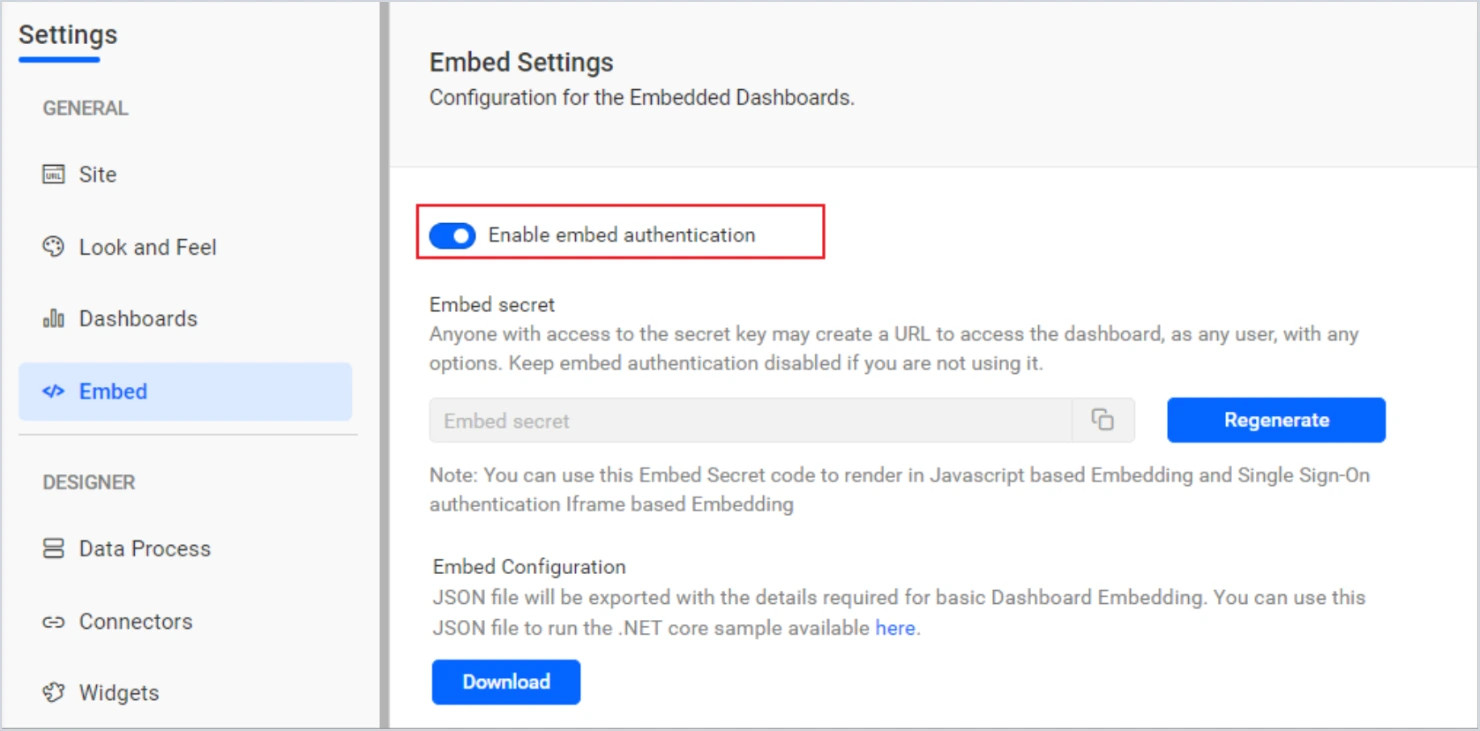
- Embed authentication turned on in the Embed settings page of Bold BI.
- A back-end service that can request tokens and store your secret safely.
- A web page or JavaScript application to host the dashboard.
- A Bold BI user account with permission to view the dashboard.
The embed settings page provides the values your server needs, including the server URL, the embed secret, and the environment setting. Keep those values out of front-end code and out of your source repository.
Now that the setup is ready, you can decide how to test it.
Step-by-step guide on embedding dashboards in JavaScript using Bold BI
Before you start, make sure you have the Bold BI environment, embed settings, and back-end service described above. You also need Node.js and Visual Studio Code. Download the JavaScript sample from the official Bold BI GitHub repository. The steps below run that sample on your computer so you can confirm that your dashboard loads with your own data before you build your own integration.
Step 1: Turn on embed authentication and download your settings
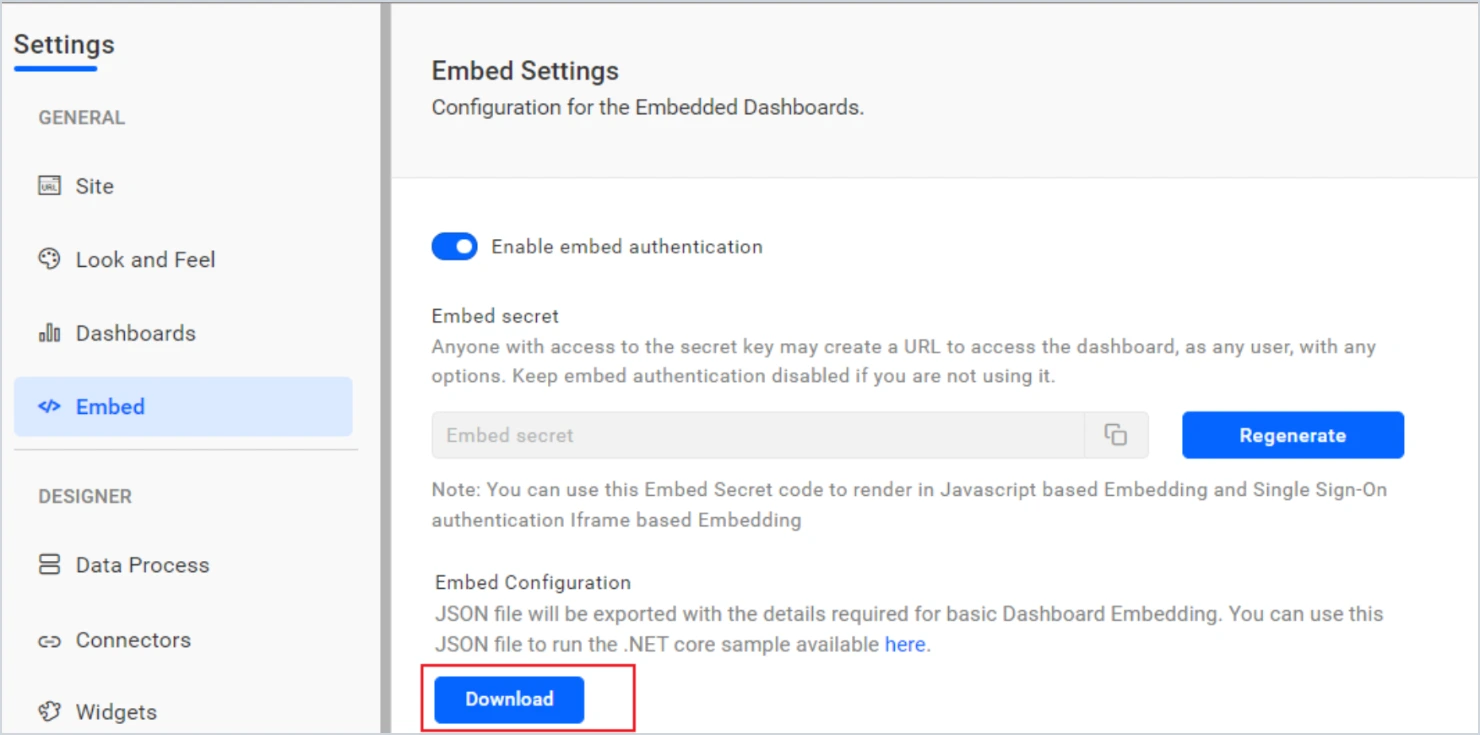
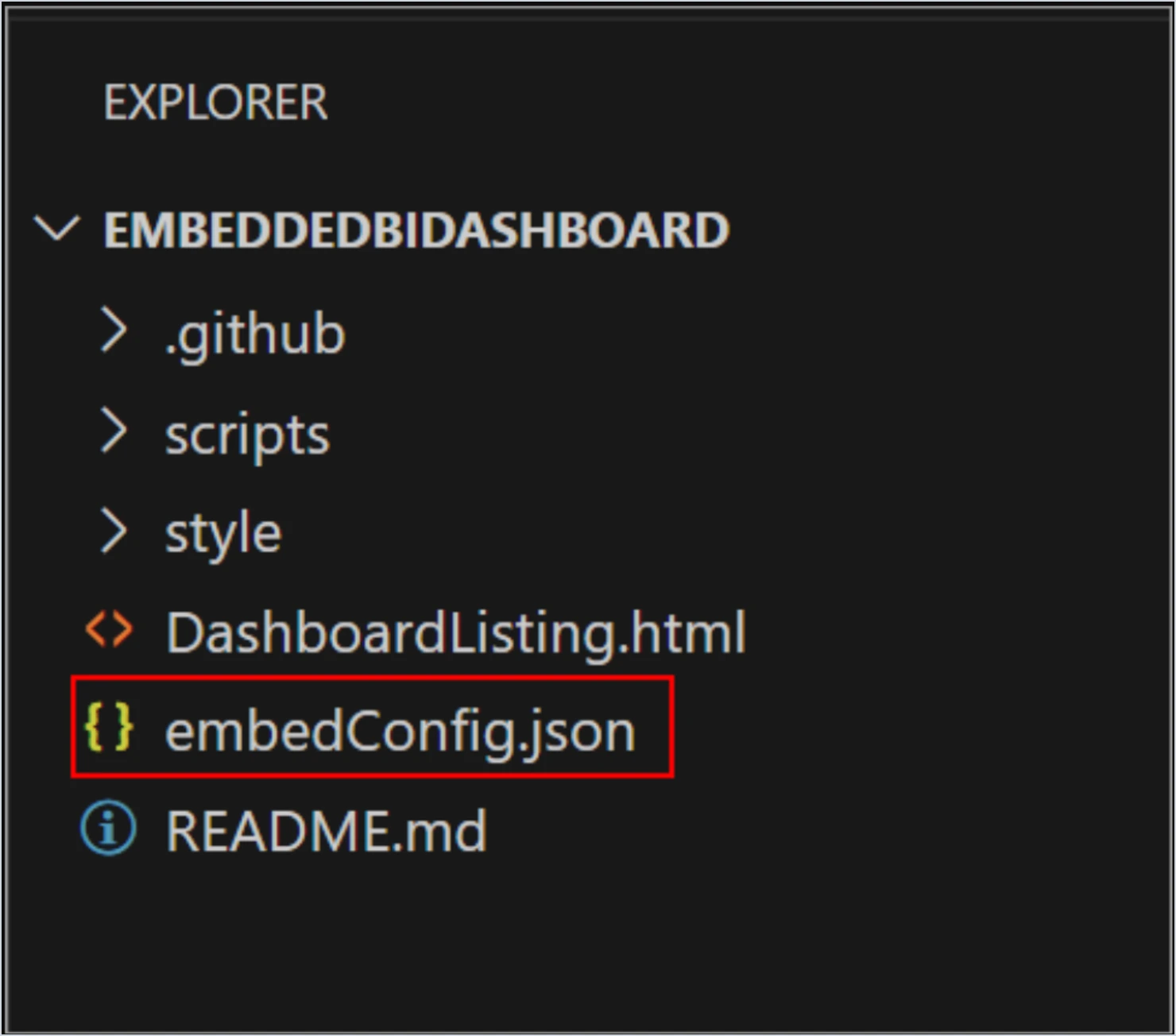
In Bold BI, go to Settings > Embed and enable embed authentication. Select Download to download the embedConfig.json file from the same page and place it in the root folder of the sample project.
Step 2: Set the configuration values
Open the embedConfig.json file and enter the following values.
| Key | What to enter |
|---|---|
| ServerUrl | Your Bold BI server URL, for example http://localhost:5000/bi. |
| SiteIdentifier | For Enterprise, for example, use site/site1. For Cloud, leave it empty. |
| Environment | BoldBI.Environment.Cloud or BoldBI.Environment.Enterprise. |
| DashboardId | The item ID of the dashboard you want to embed. |
| EmbedSecret | Copied from the Embed tab on the Settings page. |
| UserEmail | The Bold BI admin email used to load the dashboard list. |
| ExpirationTime | Token lifetime in seconds. The sample default is 10,000. |
Step 3: Install and start the local server
Open a command prompt in the project folder and run the following commands. The sample supports Node.js versions 14.16 to 18.18.
npm install -g http-server
http-server -p 5555
Replace 5555 with any port you prefer.
Step 4: Open the Bold BI dashboard listing
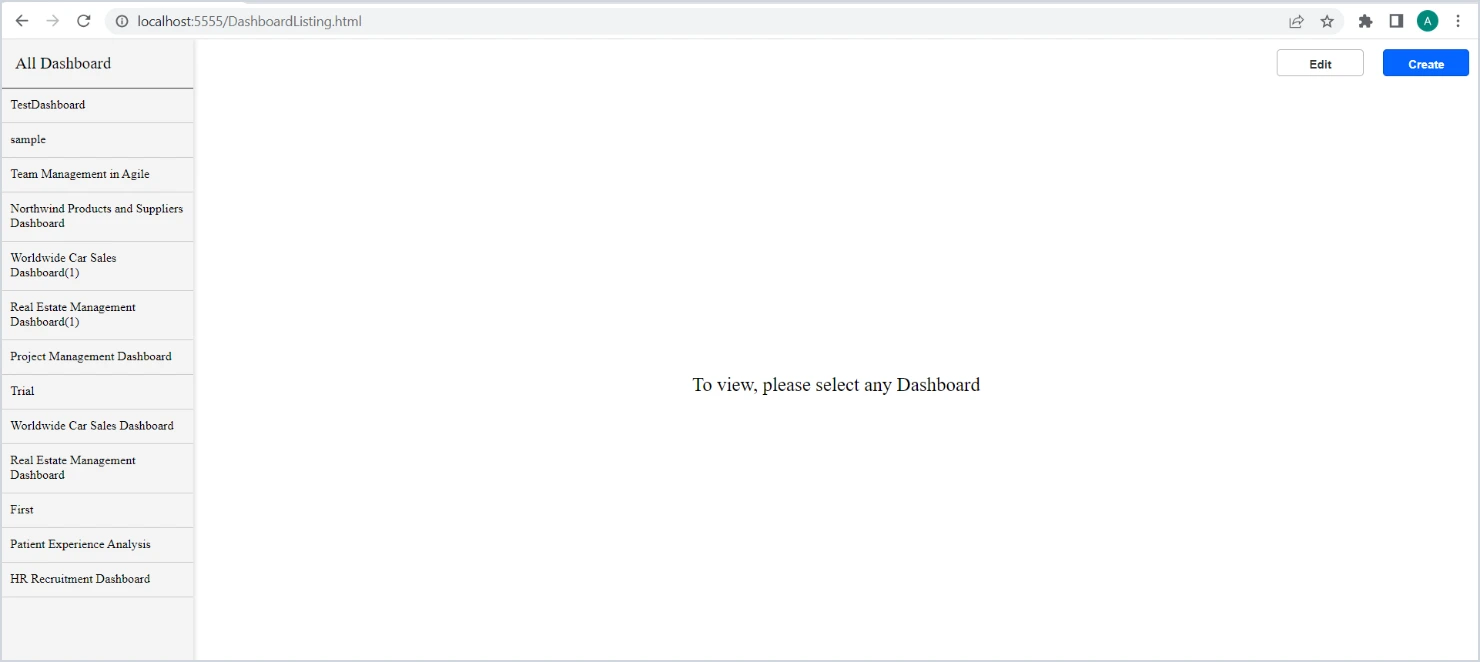
In a browser, open the dashboard listing page. The page fetches your dashboards and lists them. Select Create to open the dashboard designer or select a dashboard and choose Edit to open it in the designer.
Step 5: Open a Bold BI dashboard and check the result
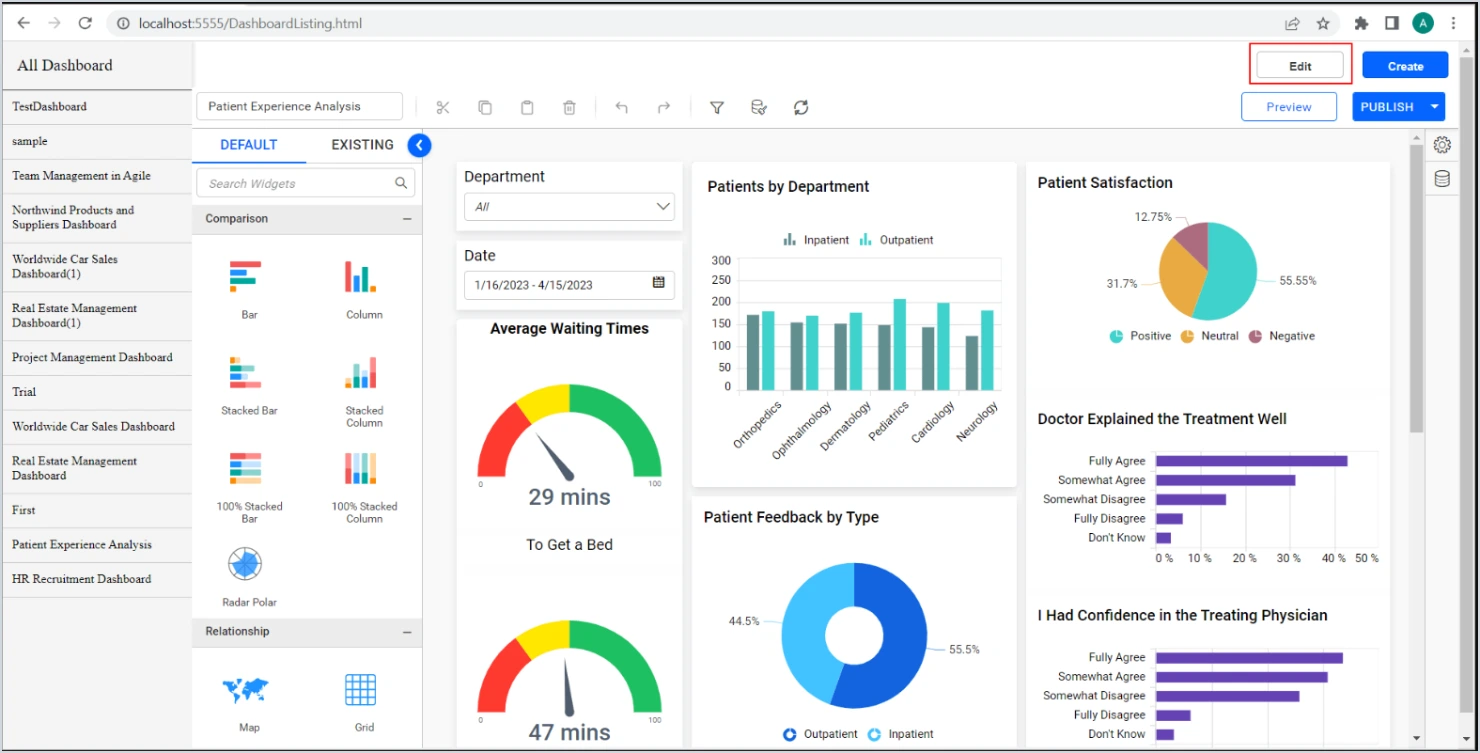
Select a dashboard from the list. The sample builds an embed URL from its ID, name, and category, then displays it inside the page. The finished dashboard should load with its data, as shown.
The sample keeps the embed secret in a local configuration file and creates the token in browser code, so it is for local testing only. For a live application, move the token request to your server as described earlier. Store the secret in a secrets manager such as Bold BI’s README recommends.
Choose between the iframe sample and the SDK
Bold BI supports both iframe-based embedding and the JavaScript Embed SDK. The right choice depends on how much control your product needs.
The iframe sample shows how to list dashboards, view them, and open the designer from your application. It is a practical starting point for a proof of concept, and it runs on Node.js versions 14.16 to 18.18.
The Embed SDK suits production applications that need token-based access, event handling, and deeper control over how the dashboard looks and behaves inside your product.
With the Embed SDK, Bold BI renders the dashboard in an isolated container that it controls. Direct DOM access and changes to internal Bold BI widgets are not supported. To control the dashboard, use the SDK’s official APIs and events, such as loading dashboards or widgets, applying filters, and listening for render and export events. For deeper customization, build custom widgets within Bold BI’s supported framework.
Many teams start with the sample to test their data, then move to the SDK when the product is ready for customers.
When secure dashboard embedding is not the right fit
Secure embedding may not be the right choice in the following situations:
- No back-end service available: Secure embedding requires a back-end service to store the embed secret and generate embed tokens. Without a server-side component, you cannot implement the recommended security model.
- Planning to use the sample in production: The JavaScript sample stores the embed secret in a local configuration file and generates tokens in browser code. It is intended for testing and validation, not production deployments.
- Required RLS capabilities are not supported in your version: If your application depends on row-level security rules that are unavailable in your current Bold BI version, you may need to upgrade or use a different implementation approach.
If any of these scenarios apply, review the row-level security documentation and evaluate the available options before proceeding with your implementation.
Control what each customer sees with row-level security
Row-level security limits which rows of data a user can see inside a shared dashboard. With RLS, you publish one dashboard to every customer instead of building a separate copy for each one. Version 13 is the dividing line for Bold BI RLS methods, so confirm your version before you choose one. Bold BI supports two token-based approaches:
- Data filters: Your server adds a filter to the token, such as a region or country. This works well for straightforward rules.
- Custom attributes: Your server passes attributes that identify a tenant, team, or group. Attributes can be set at the user, group, or site level, which suits products that serve many customers.
Consider a software company that sells project management tools to hundreds of client companies. Each client wants a dashboard of its own project activity. With secure embedding, the company builds one dashboard, and its server passes each client’s tenant attribute in the token. Each client sees only its own projects, and the company avoids having to maintain hundreds of copies.
Filters must be enclosed in square brackets and curly braces, as shown in the embed documentation. The query-string method described there applies to Bold BI versions below version 13. Newer versions also offer an object-model approach to RLS, so check the RLS documentation for your version before you choose a method.
Common mistakes to avoid when embedding dashboards securely
Before you launch, watch for these Bold BI embedding issues:
- Leaving token lifetimes at a default value: Set token expiration to match your security policy. The sample default is 10,000 seconds.
- Giving users more dashboard permissions than they need: Grant access by role and review it regularly.
- Testing with only one account: Test with at least two customer accounts to confirm each one sees only its own data.
- Assuming the layout works on every screen: Check the container on desktop, tablet, and phone sizes.
- Customizing the dashboard through the page instead of the SDK: Use the SDK’s APIs, events, and custom widgets, since direct DOM changes are not supported.
Start your evaluation with Bold BI
Secure dashboard embedding allows organizations to deliver analytics directly inside their applications while maintaining strong access controls. By keeping embed secrets on the server, using token-based authentication, and applying row-level security, teams can provide customer-specific analytics experiences at scale with Bold BI.
Secure embedding is easiest to judge with your own customer model. Start a free 30-day trial, or request a demo to walk through your RLS requirements with our team. To go deeper, read the JavaScript embedding sample and the embed viewer documentation. To see the rest of the platform, explore Bold BI embedded analytics, dashboard examples, and the security overview.
Frequently asked questions
- 1.
Do I need a back end to embed a Bold BI dashboard securely?
Yes. Your server stores the embed secret and requests the tokens that the browser uses.
- 2.
Can each customer see different data in the same dashboard?
Yes. RLS applied through token filters or custom attributes limits each user to their own rows.
- 3.
Which deployment types are supported?
Bold BI supports cloud and on-premises deployments, where you run Bold BI on your own server. Set the environment value to match your deployment.
- 4.
Is the iframe sample enough for production?
It is a practical starting point. For production features such as event handling and deeper control, plan to use the Embed SDK.
- 5.
How do I start evaluating?
Start with the free 30-day trial, which requires no credit card, or request a demo.
- 6.
Can I implement row-level security for embedded users?
Yes. Row-level security can be applied during token generation using datasource filters or custom attributes, enabling user-specific access within a shared dashboard.