
Boost Embedded Dashboard Performance Using Hybrid Data Cache


 12 min read
TL;DR: Hybrid Data Cache stores an encrypted copy of your dataset inside Bold BI so dashboards load from cache instead of repeatedly querying the live source. This improves performance, reduces database load, and ensures consistent dashboard responsiveness at scale.
Introduction
As embedded analytics adoption grows, organizations increasingly rely on dashboards to deliver customer-facing insights inside SaaS applications and business platforms. However, as dashboard usage scales across users, tenants, and concurrent sessions, repeated live database queries can create major performance bottlenecks.
At scale, repeated live queries can create performance bottlenecks that lead to:
- Slow dashboard load times.
- Excessive database pressure.
- Inconsistent dashboard responsiveness.
- Scalability limitations during peak usage.
While live queries provide real-time data access, they can become difficult to sustain efficiently in high-concurrency embedded analytics environments.
This is where Hybrid Data Cache helps. Instead of sending every dashboard request back to the production database, Bold BI can serve commonly accessed datasets directly from cache.
In this blog, you will learn:
- What Hybrid Data Cache in Bold BI is.
- Why Hybrid Data Cache matters.
- How it differs from other data retrieval strategies such as live queries and extract mode.
- How to configure Hybrid Data Cache in Bold BI.
What Is Hybrid Data Cache in Bold BI?
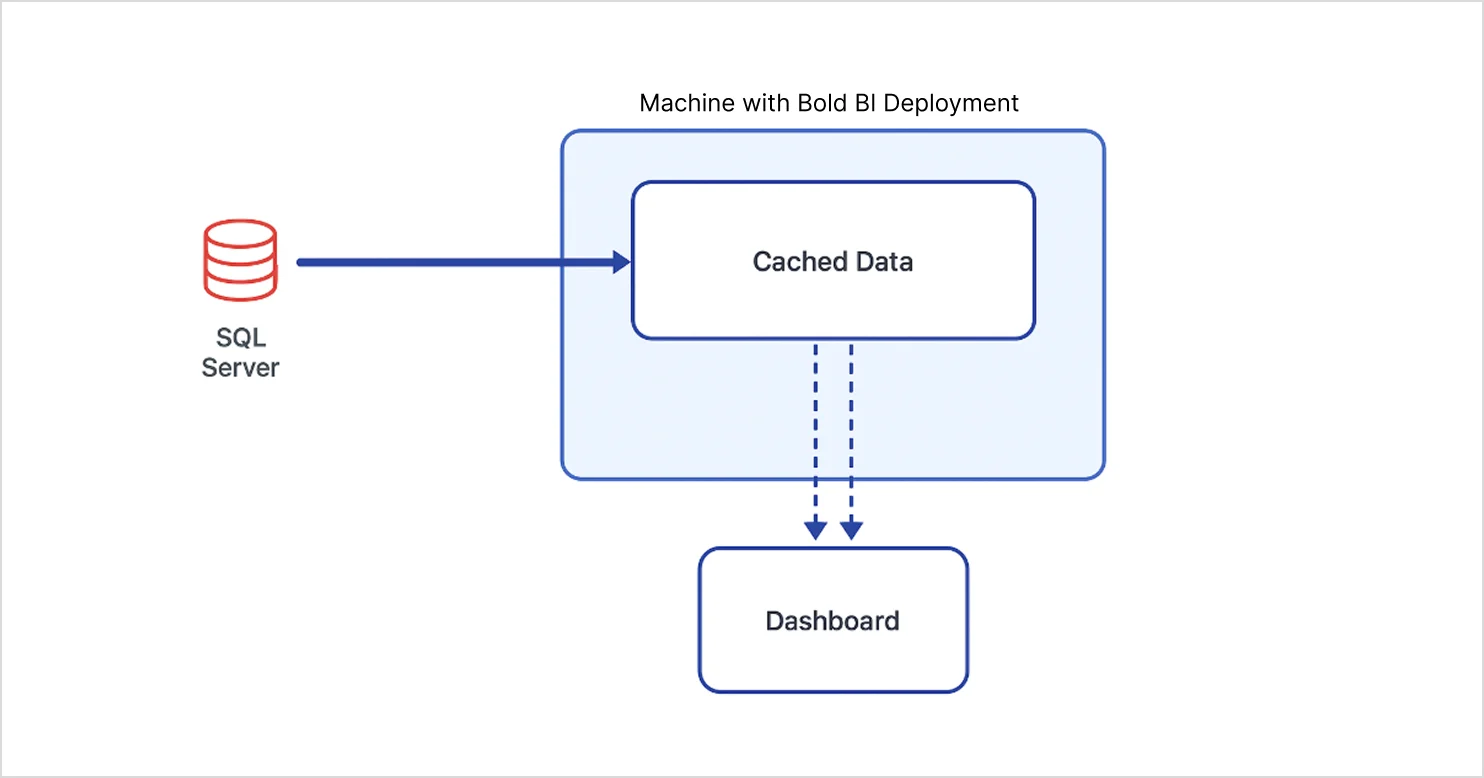
Hybrid Data Cache is a performance optimization feature in Bold BI that stores dashboard data locally and refreshes it on a schedule from the original data source.
Instead of querying the live database for every dashboard request, dashboards can load data directly from the cache.
The key question is when Hybrid Data Cache is worth using at scale. The bigger question for embedded analytics teams is why this matters once dashboard usage starts scaling across users and tenants.
Why Hybrid Data Cache matters
Embedded dashboards need Hybrid Data Cache for the following reasons:
- Faster dashboard loading: Cached data allows dashboards to load significantly faster without repeatedly querying live databases.
- Reduced database and server load: By minimizing frequent data requests, a Hybrid Data Cache prevents excessive strain on back-end systems.
- Consistent performance for high user traffic: Hybrid Data Cache ensures stable performance even when many users access dashboards simultaneously.
- Efficient and controlled data refresh: Scheduled refreshes keep cached data up to date without impacting production databases.
- Better user experience: Faster rendering and smoother interactions improve usability across embedded applications.
These benefits become even more important in embedded analytics environments, where dashboards are exposed to large numbers of concurrent users instead of just internal teams.
Why embedded analytics platforms need Hybrid Data Cache
Unlike internal BI dashboards, embedded analytics platforms must support repeated dashboard access across customers, tenants, and concurrent sessions.
Without caching, every dashboard interaction can generate repeated live database queries that increase:
- Infrastructure costs.
- Transactional database pressure.
- Dashboard latency.
- Concurrency bottlenecks.
- Customer-facing performance issues.
Hybrid Data Cache helps embedded analytics teams scale dashboard delivery more efficiently by serving repeated requests from cached datasets instead of continuously querying production systems.
This becomes especially valuable for:
- SaaS analytics portals.
- Multi-tenant reporting platforms.
- Customer-facing dashboards.
- Usage analytics applications.
- High-concurrency embedded BI environments.
In these scenarios, caching becomes more than a performance feature; it becomes a way to keep embedded dashboards scalable and responsive.
At this stage, many teams confuse Hybrid Data Cache with Bold BI’s standard Data Cache feature. Although both improve dashboard performance, they solve very different problems. Understanding this distinction helps teams choose the right caching approach based on their scalability and performance needs.
What is Data Cache in Bold BI?
Data Cache in Bold BI temporarily stores widget-level query results to improve rendering speed and reduce repeated data requests. Unlike Hybrid Data Cache, it does not cache the full dataset locally. It stores reusable query results for dashboard widgets, helping you reduce duplicate queries and improve dashboard loading speed during repeated access.
Next, let’s compare Hybrid Data Cache with Bold BI’s Data Cache so you can choose the right approach. While both improve performance, they solve very different scalability problems.
Data Cache vs Hybrid Data Cache: What’s the difference
This distinction matters because the two caching methods solve different performance challenges.
| Aspect | Data Cache | Hybrid Data Cache |
| Cache Scope | Widget-level result cache | Entire dataset |
| Works With | Dashboard widgets (query results) | Datasets from supported sources (SQL, PostgreSQL, MySQL, extracts) |
| Purpose | Faster widget rendering | Reduce live DB querying |
| Refresh Behavior | Per widget | Scheduled dataset refresh |
| Query Execution | Still tied to live DB | Runs on cached dataset |
| Best For | Frequently accessed visuals | Embedded dashboards at scale |
| Performance | Improves UI rendering speed | Improves overall dashboard performance |
| Data Freshness | Near real-time (depends on usage) | Slight delay (based on schedule) |
| Scalability | Moderate improvement | High scalability for concurrent users |
| Tradeoff | Limited to widget optimization | Not fully real-time |
Choosing the right dashboard strategy isn’t only about caching. Teams also need to balance real-time access, infrastructure cost, and concurrency requirements.
Live queries, extract mode, and Hybrid Data Cache: What’s the difference
The following comparison helps explain when to use live queries, extract mode, or Hybrid Data Cache depending on workload requirements.
| Features | Live Queries | Extract Mode | Hybrid Data Cache |
| Data source access | Queries live DB every request | Uses extracted snapshot | Uses locally cached dataset |
| Performance | Slower under concurrency | Fast | Fastest for repeated access |
| Database load | High | Low | Very low |
| Data freshness | Real-time | Depends on extract refresh | Depends on cache refresh |
| Scalability | Limited under heavy traffic | Moderate | High |
| Best use case | Real-time operational monitoring | Scheduled analytics | Embedded analytics at scale |
| Infrastructure impact | High DB pressure | Moderate | Optimized for concurrency |
| Tradeoff | Performance bottlenecks | Data latency | Slight refresh delay |
For most SaaS teams, the decision usually comes down to one tradeoff: real-time accuracy versus scalable dashboard performance.
Once Hybrid Data Cache is enabled, dashboard requests follow a very different execution flow compared to traditional live-query dashboards.
How Hybrid Data Cache works
Hybrid Data Cache works by storing dashboard datasets locally inside the Bold BI environment and serving dashboard requests directly from cached data instead of repeatedly querying the live database. Let’s look at how dashboard requests are processed after caching is enabled. The workflow typically follows these steps:
- Bold BI retrieves data from the connected data source.
- The retrieved dataset is securely stored in the Hybrid Data Cache.
- Dashboard requests are served directly from the cached dataset for faster access.
- Scheduled refresh jobs synchronize the cache with the source database.
- Users continue viewing updated dashboards without placing repeated load on the live database.
In practice, Hybrid Data Cache becomes most valuable when dashboards are accessed repeatedly by large numbers of users.
When to use Hybrid Data Cache
Use Hybrid Data Cache when:
- Dashboards are accessed frequently.
- You expect high concurrency.
- A slight delay in data refresh is acceptable.
- Reducing backend database load is important.
- You need consistent and predictable performance at scale.
When not to use Hybrid Data Cache
Hybrid Data Cache is not the right fit for every analytics workload. Avoid it when:
- Real-time data updates are critical.
- Every interaction must reflect the latest database changes instantly.
- Dashboards are used for monitoring rapidly changing operational systems.
To get the best results from Hybrid Data Cache, teams should carefully plan refresh schedules, dataset design, and workload separation.
Best practices for embedded dashboard scalability using Hybrid Data Cache
To maximize embedded dashboard scalability and maintain consistent performance, follow these recommended practices when choosing the right refresh frequency:
- Use hourly refreshes for operational dashboards.
- Use daily refreshes for historical analytics workloads.
- Avoid unnecessarily aggressive refresh intervals.
- Monitor cache refresh success regularly.
- Separate real-time and historical dashboard workloads.
- Optimize datasets before caching very large dashboards.
- Validate row-level security after enabling cache.
- Monitor database load before and after enabling cache.
These practices help improve dashboard optimization while ensuring reliable cache synchronization and scalable embedded analytics performance.
Now, let’s look at how to configure Hybrid Data Cache in Bold BI’s embedded dashboards.
How to configure Hybrid Data Cache in Bold BI
You can configure the Hybrid Data Cache for both live-mode and extract-mode data sources to improve dashboard performance and reduce database load.
Prerequisites and supported environment
Before enabling Hybrid Data Cache:
Supported data sources
- SQL databases.
- PostgreSQL.
- MySQL.
- Extract-based datasets.
Environment support
- Works with cloud and on-prem deployments.
- Supports embedded analytics implementations.
Required permissions
- Dataset configuration access.
- Ability to define refresh schedules.
Security and enterprise considerations
Hybrid Data Cache is designed for enterprise-grade deployments:
- Encrypted dataset storage ensures data protection.
- Row-level security (RLS) is preserved.
- User permissions are inherited from source configuration.
- Tenant isolation is maintained for multi-tenant systems.
- Secure refresh processes synchronize with source systems.
This ensures performance improvements do not compromise governance or compliance.
Steps to configure Hybrid Data Cache in Bold BI
Follow these steps to enable Hybrid Data Cache for dashboards:
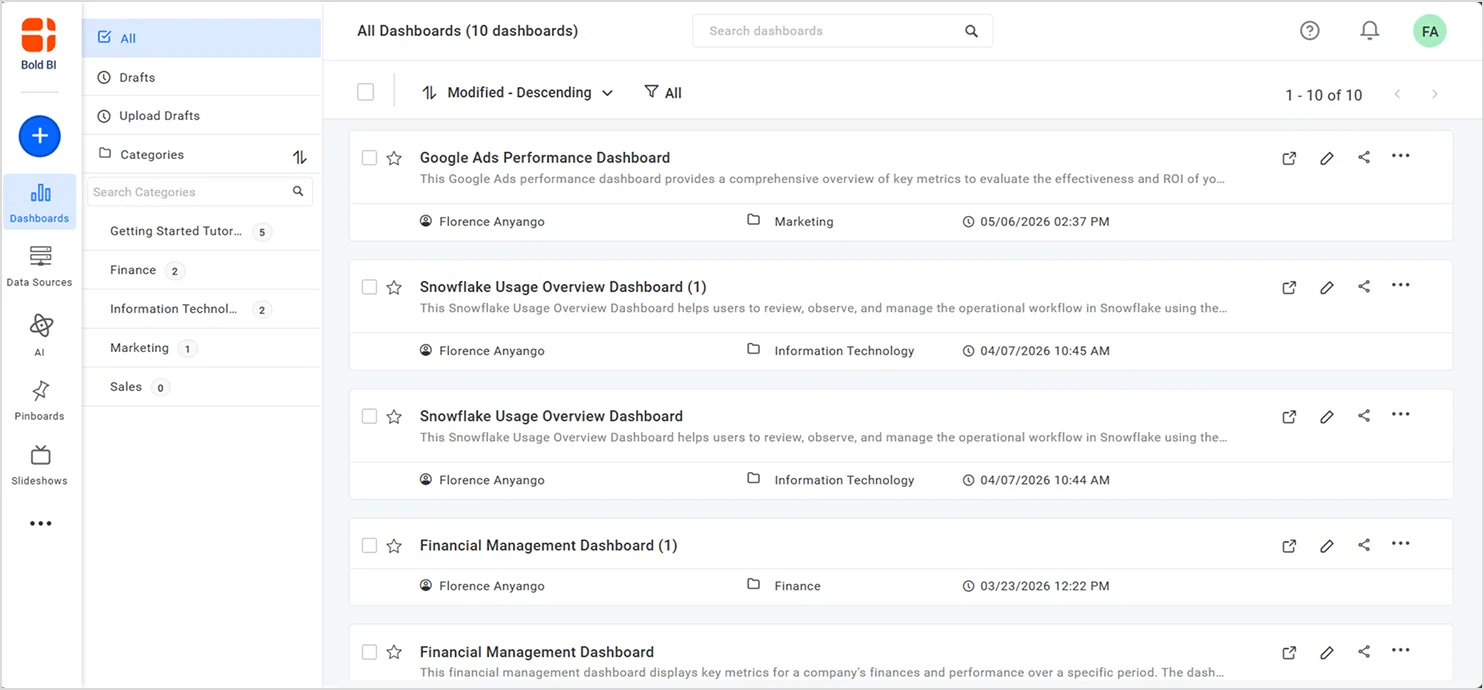
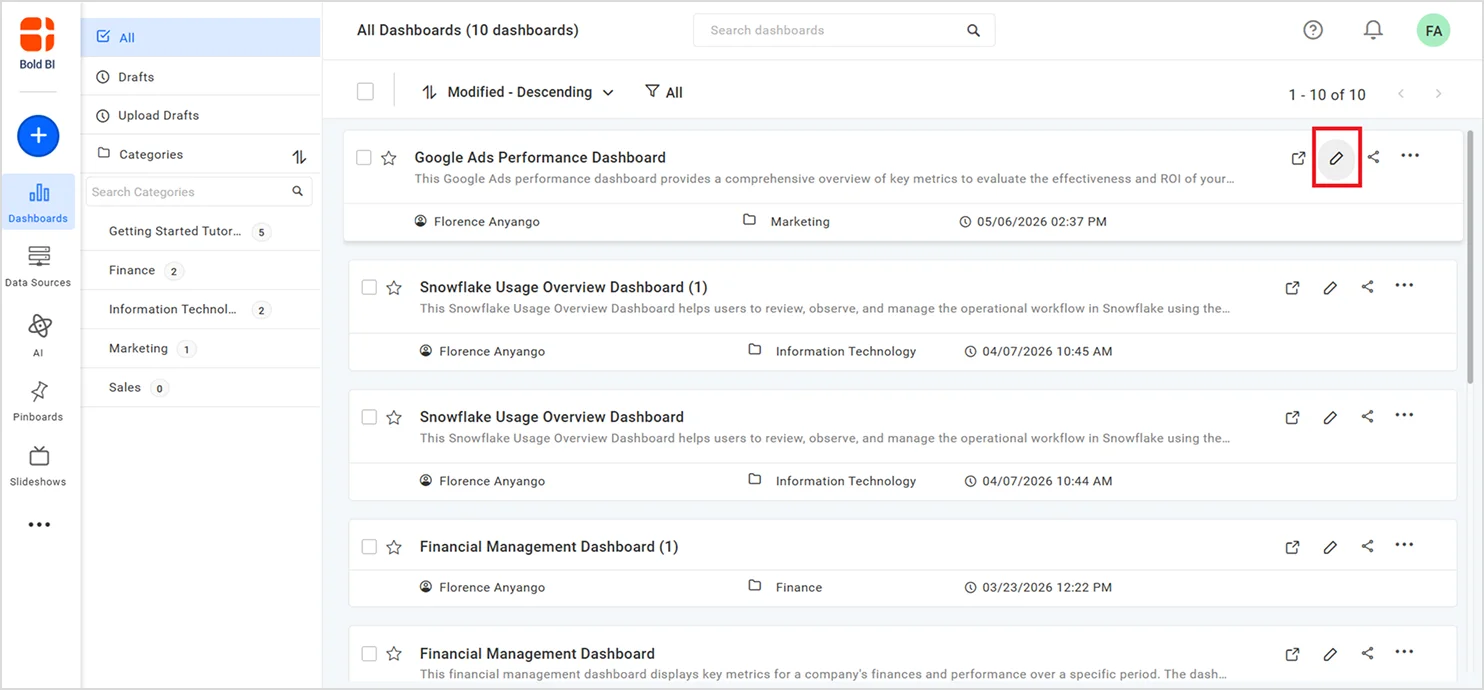
1. On the Bold BI dashboard designer home page, open the dashboard in Edit mode.
2. Go to Data Sources then select the Edit option.
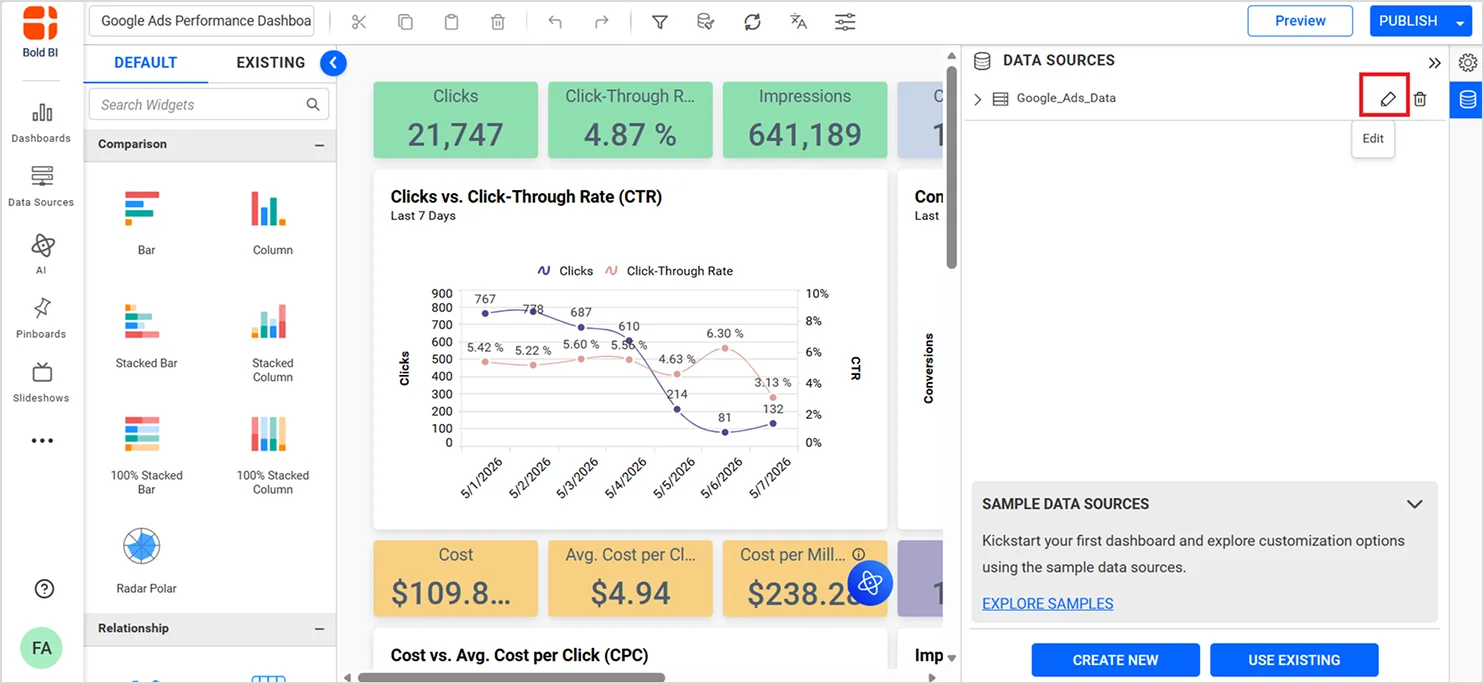
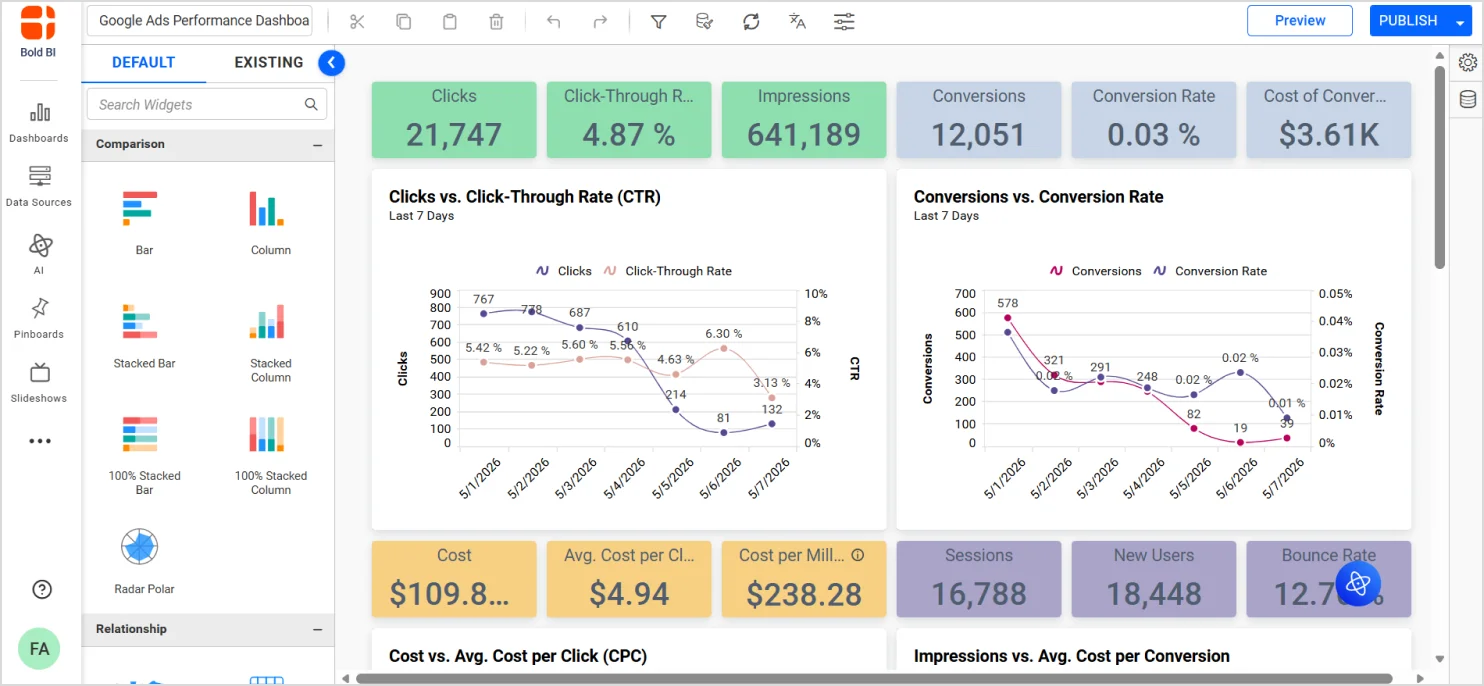
3. Select Hybrid Data Cache from the available options.
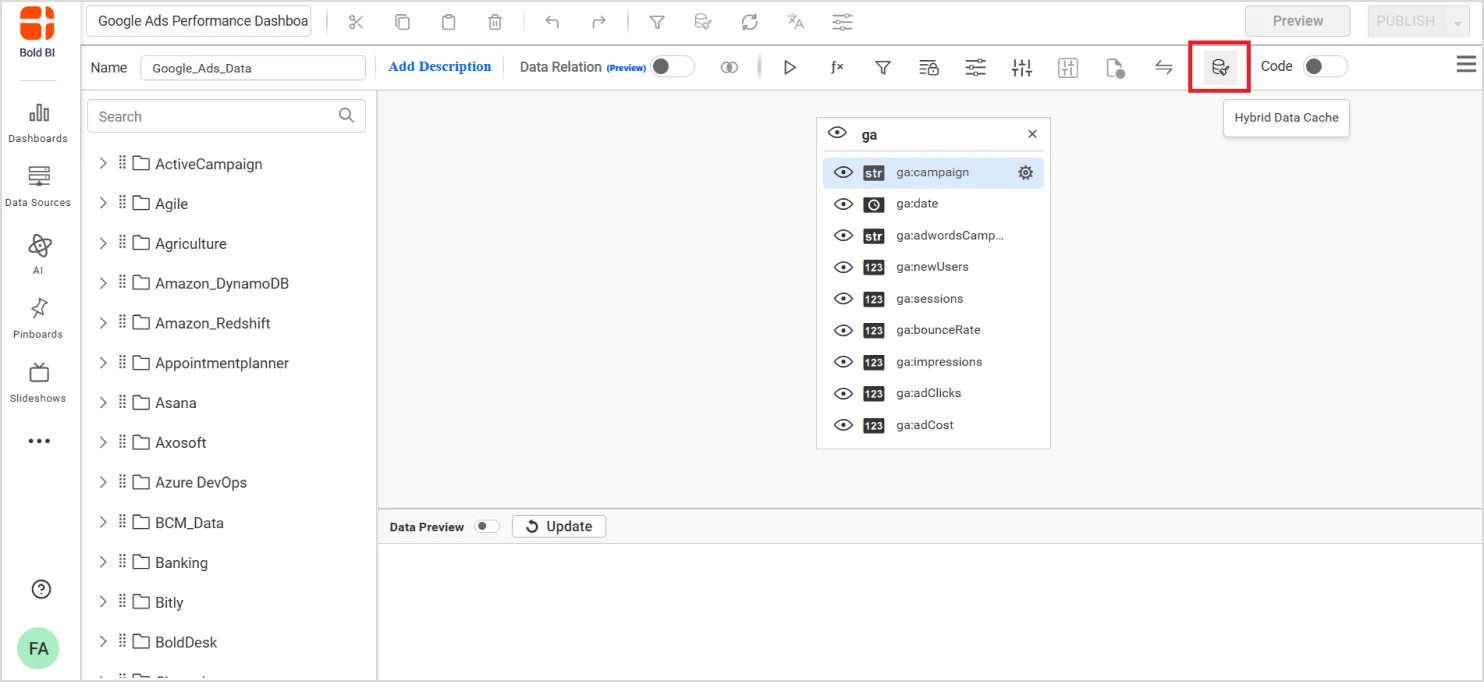
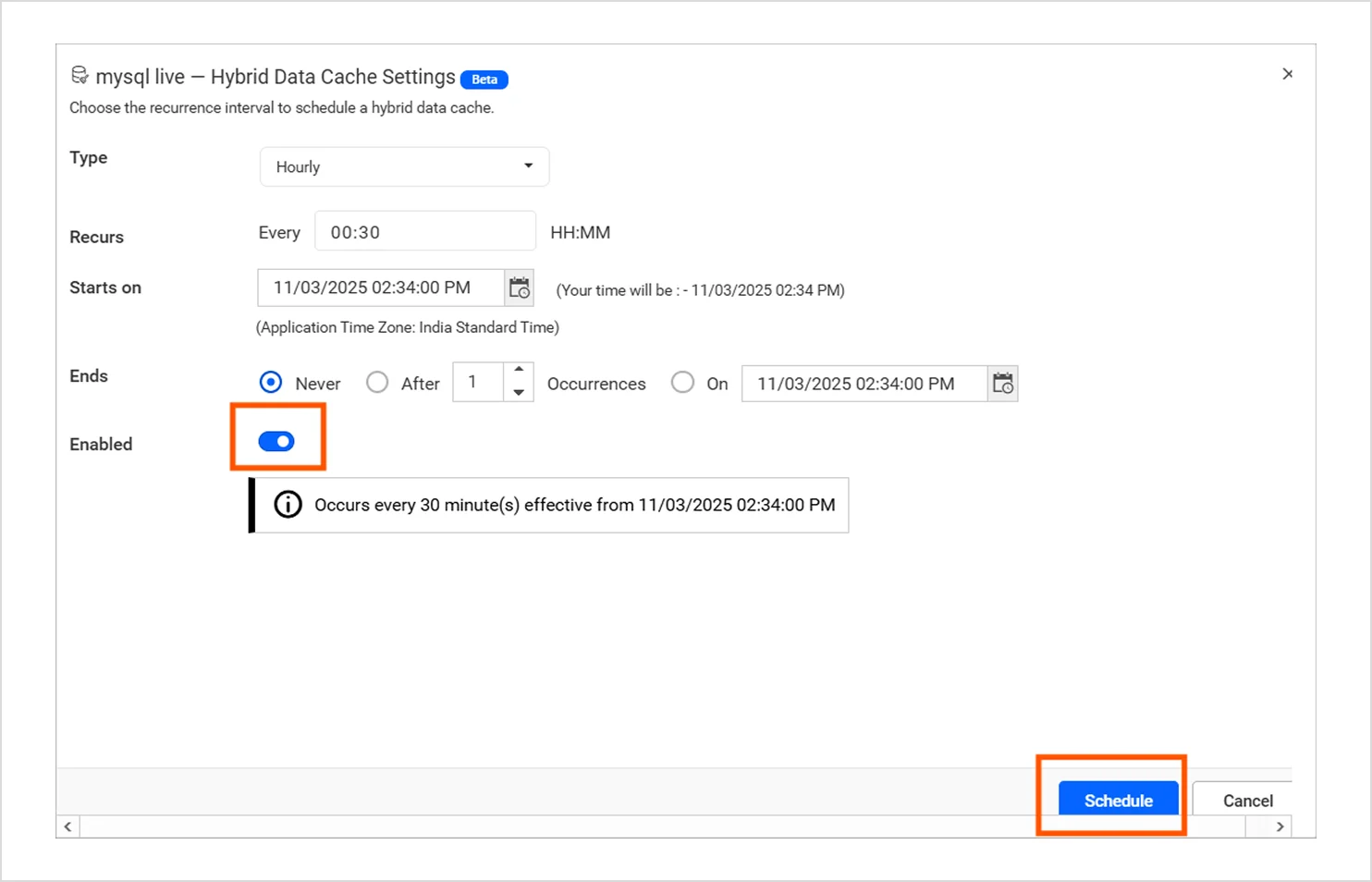
4. Configure the refresh cadence:
- Hourly
- Daily
Choose the Refresh start time and then click Schedule.
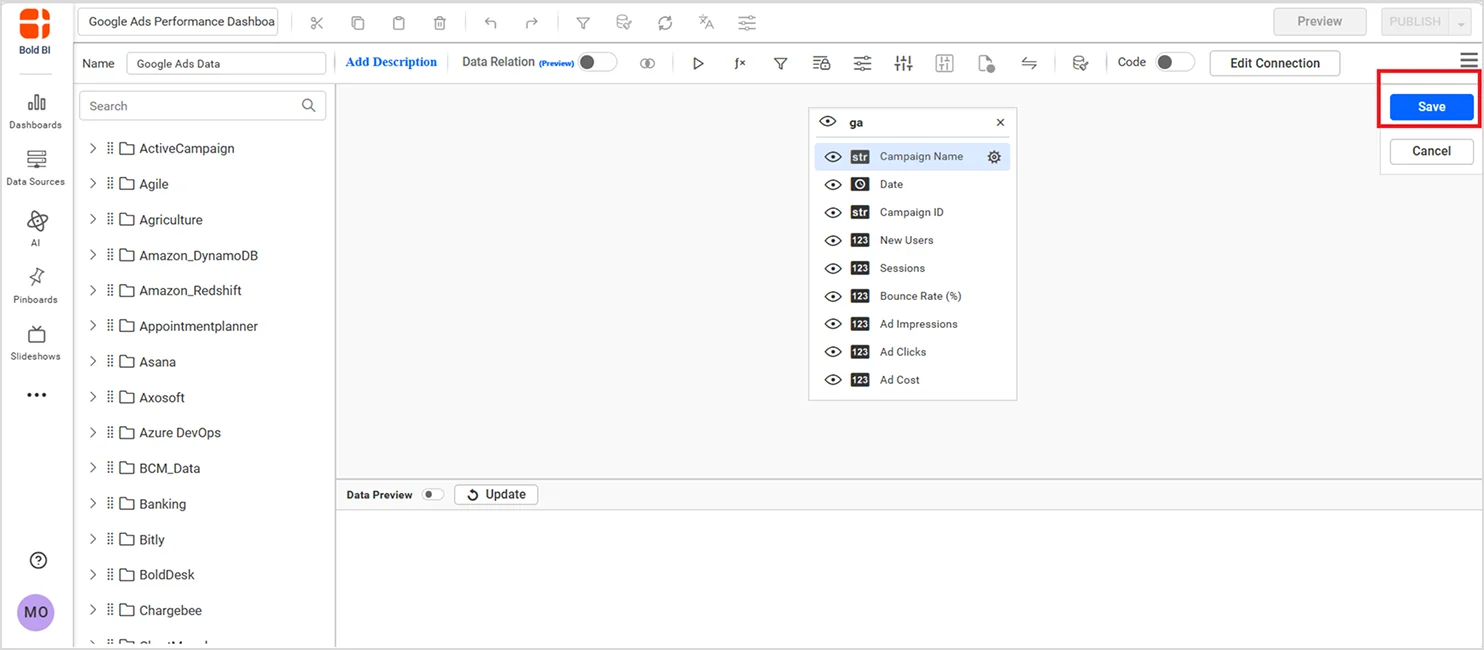
5. Click Save to apply the configuration.
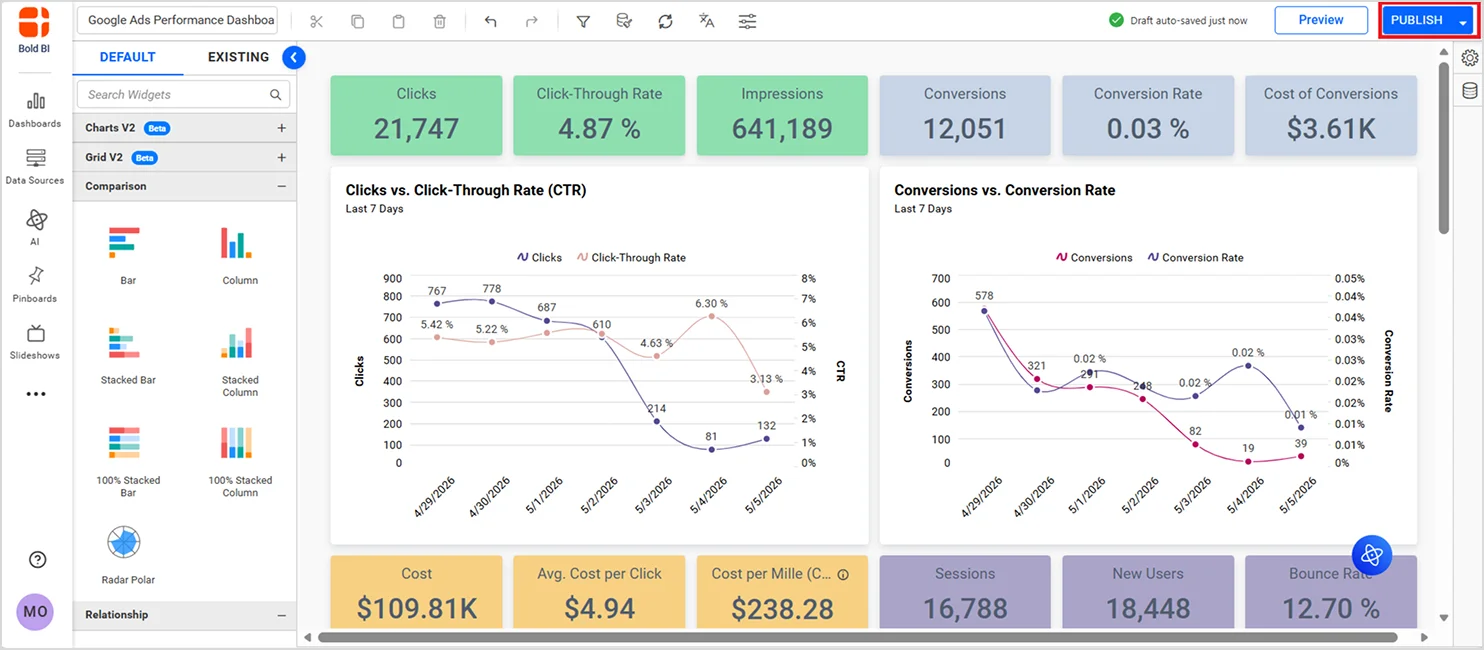
6. Publish the dashboard.
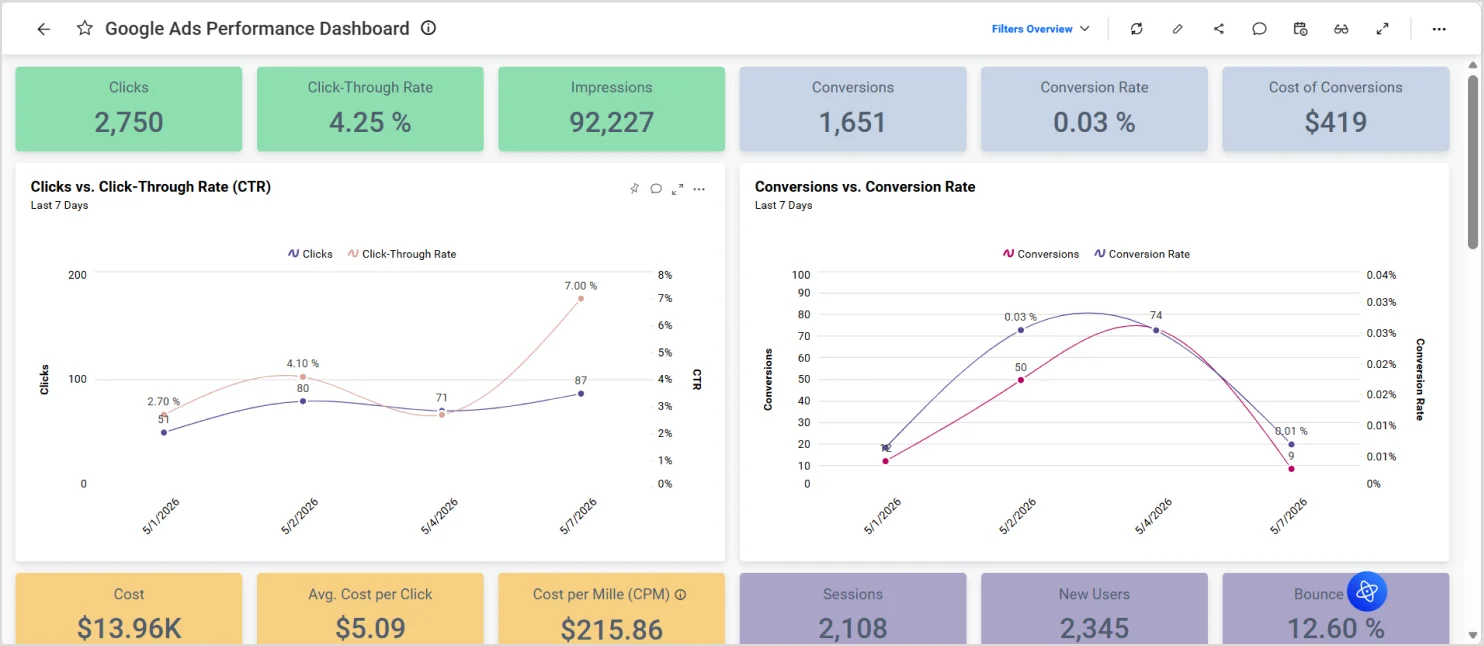
After enabling Hybrid Data Cache, it’s important to confirm that dashboards are actually benefiting from cached execution.
How to confirm Hybrid Data Cache is working
After enabling Hybrid Data Cache, verify that dashboards are benefiting from cached data retrieval instead of relying on continuous live database queries.
When caching is working correctly, you should notice:
- Faster dashboard load times
- Reduced live database queries
- More stable performance during high user traffic
- Smoother dashboard experience during peak usage hours
These improvements indicate that dashboard requests are being served from the cached dataset instead of directly hitting the live data source every time.
The following table highlights the typical improvements observed after enabling Hybrid Data Cache.
| Scenario | Before Hybrid Cache | After Hybrid Cache |
| Dashboard Load Time | 6.2 sec | 1.4 sec |
| Live DB Queries | Every dashboard load | Reduced by ~80% |
| Concurrent Users | Performance degrades | Stable performance |
| Database CPU Usage | High during spikes | Significantly reduced |
| SQL Server Connections | High number of active SQL connections | Avoided unnecessary SQL Server connections |
| Parallel Widget Execution | Multiple concurrent DB hits | Reduced concurrent query execution |
Results are based on internal benchmark testing with dashboards using large datasets containing millions of records under concurrent user access. To better understand where Hybrid Data Cache delivers the most value, let’s look at a common embedded SaaS analytics scenario.
Real-world use case: Improving dashboard performance in a SaaS application
Consider a SaaS platform that delivers embedded, customer-facing analytics dashboards across multiple tenants (organizations). Each tenant accesses shared application infrastructure, but expects strict data isolation, secure access control, and consistently fast dashboard performance.
In a typical setup, every dashboard interaction, loading a view, applying filters, or drilling into data, triggers live queries against the production database. As usage scales across tenants and concurrent users, this introduces several SaaS-specific challenges:
- Repeated execution of identical or similar queries across tenants and sessions.
- Increased load on the transactional database, impacting core application performance.
- Challenges in enforcing row-level security (RLS) while maintaining performance.
- Risk of SLA breaches for customer-facing analytics during peak demand.
This becomes particularly problematic in multi-tenant environments where many users access the same datasets with similar query patterns but expect isolated and secure results.
By enabling Hybrid Data Cache in Bold BI, the platform can decouple analytical query workloads from the production database. Instead of executing queries against the live database on every interaction, dashboards retrieve data from the cache layer, which is refreshed at defined intervals based on business tolerance for data freshness.
This approach allows the SaaS platform to:
- Preserve tenant isolation and secure data access while serving cached datasets.
- Reduce repeated query execution across tenants and sessions.
- Support row-level security efficiently without reprocessing complex queries each time.
Hybrid Data Cache is especially valuable when customer-facing dashboards rely on frequently reused datasets, and the business can tolerate scheduled refresh intervals rather than real-time queries for every interaction.
In embedded SaaS analytics environments, such as customer success dashboards, operational reporting, or usage metrics, this model ensures high performance, scalability, and reliability without compromising data security or application stability.
Boost embedded dashboard performance with Bold BI
Hybrid Data Cache helps embedded analytics teams balance performance, scalability, and infrastructure efficiency without sacrificing user experience. By serving dashboard requests from cached datasets instead of continuously querying production systems, teams can achieve more scalable and reliable embedded analytics delivery.
For SaaS applications and high-concurrency dashboards, Hybrid Data Cache provides a practical balance between performance, scalability, and controlled data freshness.
Start a free trial of Bold BI to evaluate Hybrid Data Cache using your own dashboards and datasets or schedule a demo to explore embedded analytics performance optimization for high-concurrency environments.
Frequently asked questions
- 1.
What is the difference between Data Cache and Hybrid Data Cache in Bold BI?
Data Cache temporarily stores widget-level query results to improve rendering speed, while Hybrid Data Cache stores an encrypted copy of the full dataset locally and refreshes it on a schedule to reduce repeated live database queries.
- 2.
How does Hybrid Data Cache improve embedded analytics performance?
Hybrid Data Cache improves embedded analytics performance by reducing repeated live database queries and serving dashboard requests from locally cached datasets. This helps improve dashboard responsiveness, support high-concurrency dashboards, and reduce backend database pressure.
- 3.
Does Hybrid Data Cache support embedded analytics?
Yes, it is specifically designed for embedded analytics scenarios where performance and scalability are critical.
- 4.
Does Hybrid Data Cache support row-level security?
Yes, row-level security and user access permissions continue to apply and should be validated during implementation.
- 5.
When should I use Hybrid Data Cache instead of live queries?
Hybrid Data Cache is ideal when dashboards are accessed frequently, and slight refresh delays are acceptable. Live queries are better for real-time scenarios where every interaction must reflect the latest database updates instantly.