White-Label Analytics: Benefits and Build vs. Buy Guide


 13 min read
TL;DR: White-label analytics means embedding dashboards in your own product under your own brand, with no vendor name or logo visible to your customers. Buying a platform is usually faster than building one when you need multi-tenancy, row-level security, and, in self-hosted deployments, single sign-on. In Bold BI®, white-labeling is included at no extra cost on paid editions (the free Community License excludes it), and licenses are available per user, per application, or as an enterprise license.
This guide covers white-label analytics for any product, portal or managed service, including build vs. buy and multi-tenancy. For SaaS-specific features and use cases, see White-Label Analytics for SaaS: Key Features & Benefits.
What Is White-Label Analytics?
White-label analytics is the practice of embedding analytics dashboards into a product and presenting them under your brand.
With a white-label analytics solution, users interact with dashboards that feel like a native part of your application. Your logo, colors, navigation, and branding stay consistent throughout the experience, while a third-party analytics platform powers the underlying technology.
Instead of customers seeing multiple products stitched together, they experience a single, unified application. White-label analytics enables organizations to deliver a fully branded analytics experience while relying on a third-party platform for data processing, visualization, and security. Customers interact with dashboards as a native part of the application, while the underlying analytics infrastructure remains managed behind the scenes.
Who Is This White-Label Analytics Guide For?
This white-label analytics guide is written for:
- Independent software vendors (ISVs) looking to embed analytics into their products.
- Software and technology providers adding branded analytics experiences.
- Managed service providers (MSPs) delivering customer-facing analytics.
- Technology consultants offering analytics solutions to clients.
- Product managers and product leaders evaluating analytics capabilities.
- Teams assessing customer-facing analytics platforms for deployment.
Software vendors, consultants, and technology providers can offer analytics as part of their own product experience without building an analytics platform from scratch.
This is where white-label analytics comes in.
White-label analytics enables organizations to embed dashboards and data visualizations into their applications under their own brand. Instead of investing significant time and resources in developing analytics capabilities internally, companies can deliver a fully branded analytics experience and focus on their core products and services.
How White-Label Analytics Works
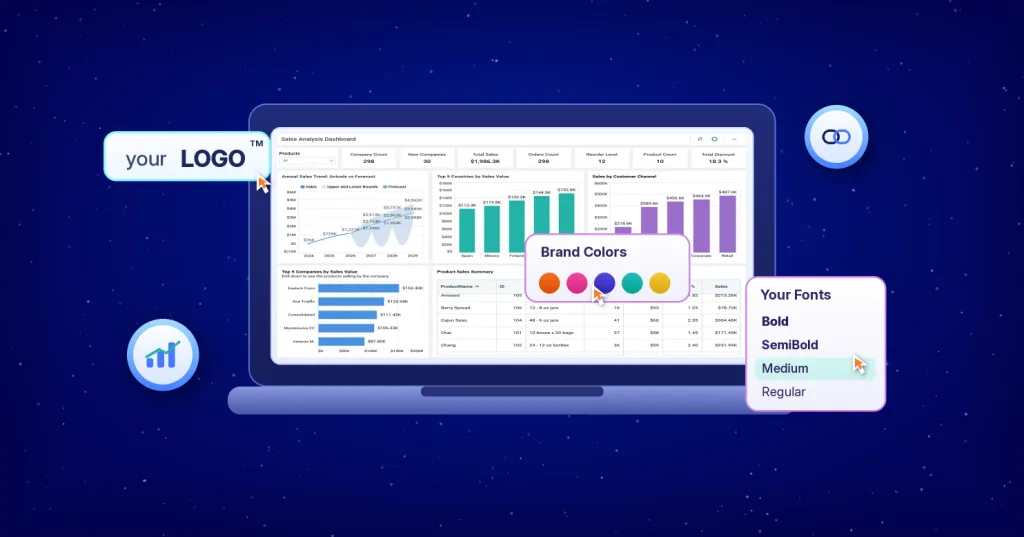
Most branding is configured rather than custom developed. In Bold BI, white-label branding covers four areas: custom identity (logo, colors, fonts, and favicon), themed login and navigation experiences, custom domain mapping, and zero vendor attribution.
White-label analytics works in five steps:
- Connect data.
- Process and visualize it.
- Embed the dashboards.
- Apply your branding.
- Let end users open them inside your app.
Branding covers more than colors. In practice, the changes fall into a few groups, starting with how your product presents itself to customers.
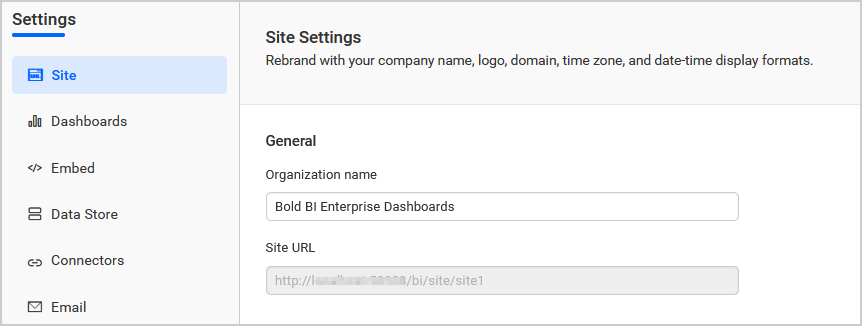
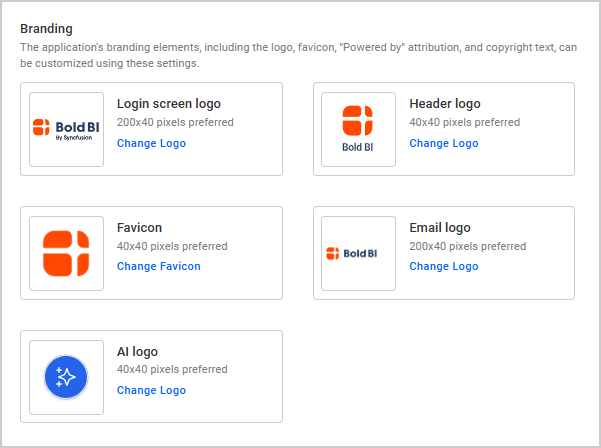
Your name, logo and favicon
Your product name appears in the browser title and in system emails, so customers never see a stranger’s name in their inbox. Your logo replaces the vendor’s on the login screen, at the top of the side navigation menu, and in outgoing emails, and a favicon keeps the browser tab consistent with the rest of your product.
Colors, themes and fonts
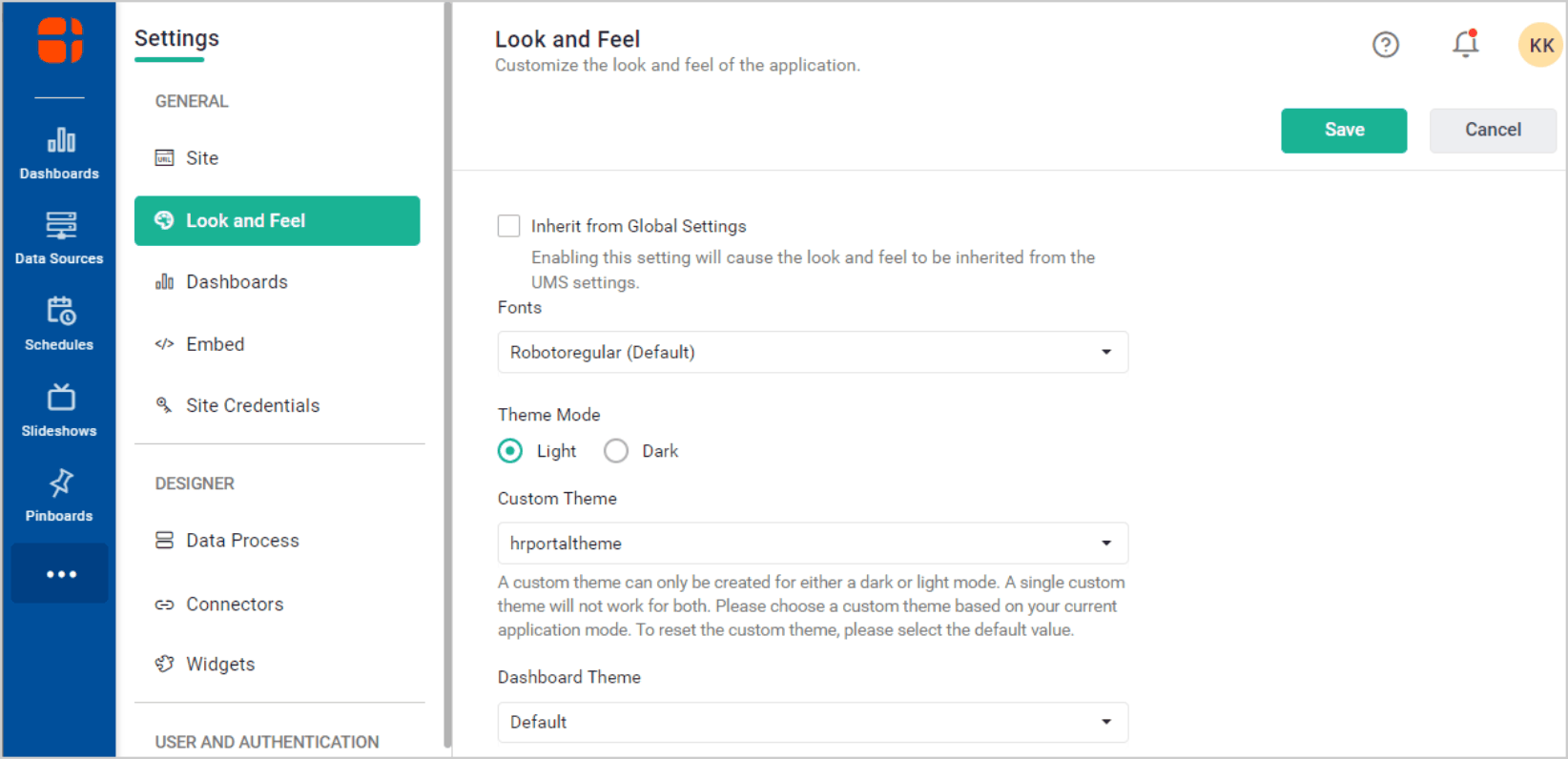
Once identity is in place, the look of the dashboards needs to match. Light and dark themes can be matched to your interface, and custom fonts keep typography consistent, so the dashboards read as part of the product rather than a bolted-on tool.
Sign-in and domain
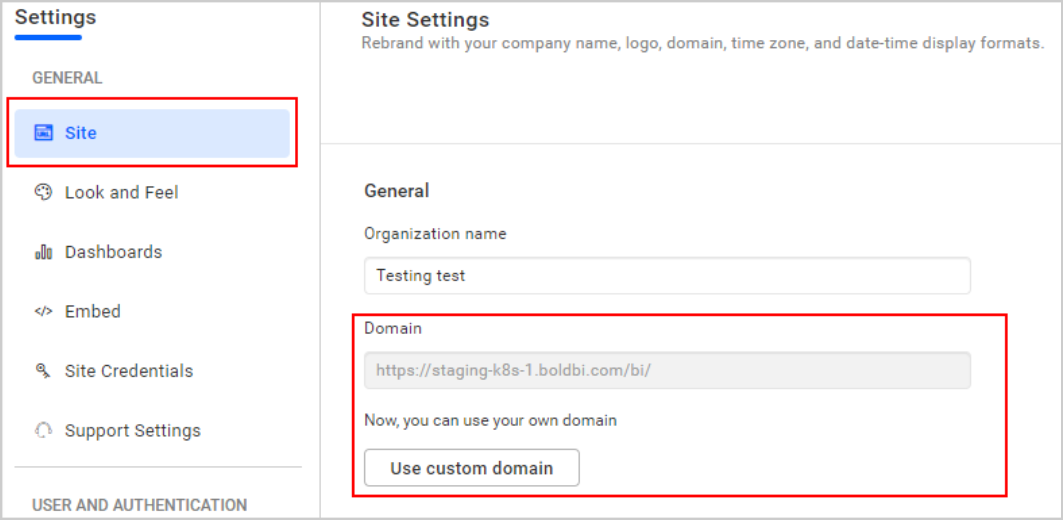
Customers should not have to log in to a second system. In Managed Private Cloud and On-Premises deployments, analytics can redirect users to your own identity provider, such as Microsoft Entra ID (Azure AD), Windows Active Directory, OAuth 2.0, or OpenID Connect, so they sign in with the credentials they already use. For the web address, cloud deployments can run on a default subdomain or on a custom domain such as analytics.yourproduct.com.
Footers and attribution
In Bold BI, white-label deployments show no vendor attribution, so customers see only your brand.

Language, dates and time zones
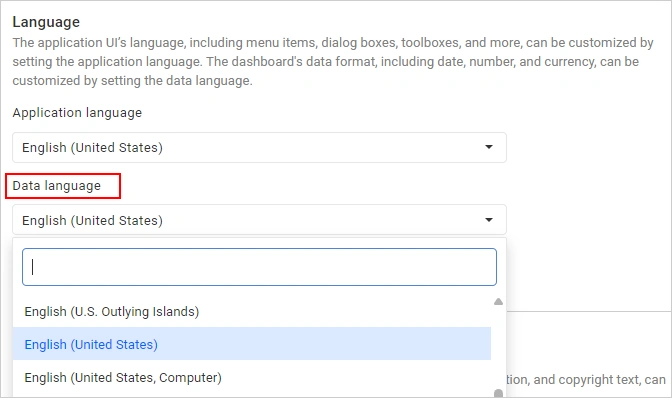
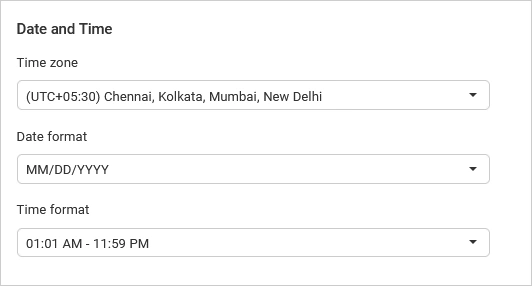
Customers in different regions expect their own language, date formats, and currencies. The application language localizes the interface, and the data language controls how dates, numbers, and currencies appear in dashboards. Time zones and formats can also follow each customer’s browser settings. Localization is available on-premises but not on Cloud Edition.
Shared branding across customers
For SaaS vendors running one platform for many customers in Managed Private Cloud and On-Premises deployments, branding can be defined once and inherited by every tenant. Each customer gets a consistent experience without anyone rebuilding the theme for each account.
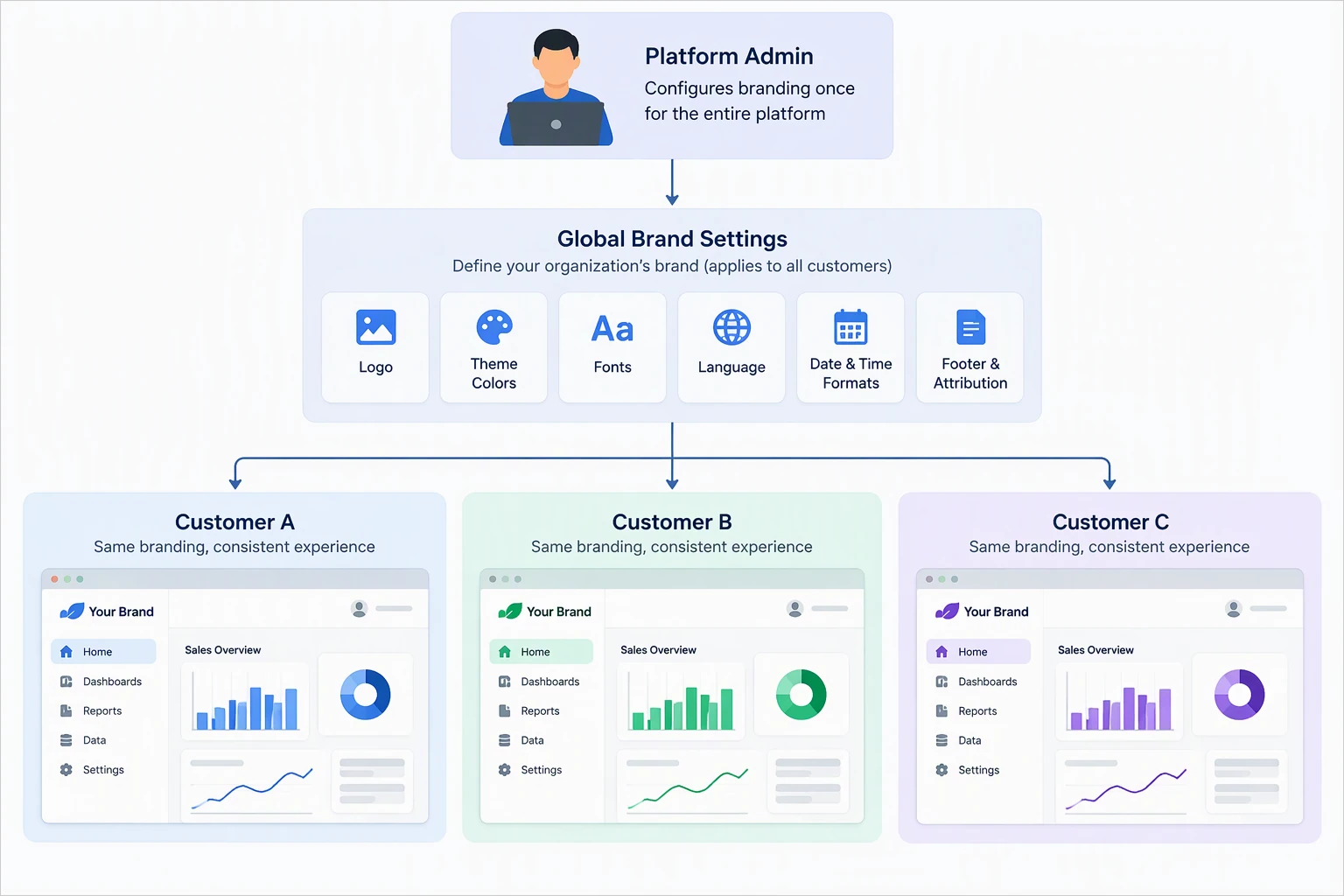
The result is analytics that runs inside the product’s own pages, login, and domain, not in a separate tool. Dashboards can be embedded through either an iFrame or JavaScript SDK depending on application requirements.
White-Label Analytics vs. Embedded Analytics
Although these terms are often used interchangeably, they are not identical. Embedded analytics integrates dashboards and visualizations directly into an application (embedded analytics). White-label analytics takes embedded analytics a step further by enabling organizations to fully customize branding so the analytics experience appears entirely under their own identity.
| Feature | Embedded Analytics | White-Label Analytics |
|---|---|---|
| In-app dashboards | ✓ | ✓ |
| Visualizations | ✓ | ✓ |
| Custom branding | Depends on the platform’s branding settings | Logo, colors, fonts, login page, navigation, and domain |
| Vendor visibility | Depends on the platform | Typically removed |
| Reselling opportunities | Depends on the license | Supported when the license includes OEM or resale rights |
| Branded customer experience | Partial | Complete |
In many cases, white-label analytics builds on embedded analytics capabilities. Organizations that offer analytics as part of their own products or services typically require the branding flexibility that white-label analytics provides. This distinction is especially important for businesses looking to monetize analytics or strengthen their product experience.
Why Do Companies Choose White-Label Analytics?
Businesses rarely adopt white-label analytics solely for branding purposes. The broader value lies in accelerating product development, improving customer experiences, and creating new business opportunities.
-
Faster time-to-market: Building dashboards, permission systems, and visualization frameworks internally can significantly extend development timelines. White-label analytics helps teams launch analytics capabilities faster while allowing engineering resources to focus on core product innovation.
-
Consistent brand experience: Customers expect a unified experience. When analytics aligns with the application’s design, navigation, and workflows, users stay immersed in a single environment instead of moving between multiple tools.
-
Reduced development and maintenance effort: Building analytics requires ongoing investment in security, performance, data connectivity, and platform maintenance. A dedicated analytics platform reduces these responsibilities, letting teams focus on their core products and services.
-
New revenue opportunities: Organizations often offer analytics as premium features, tiered plans, executive analytics, or other value-added services. This turns analytics into a revenue-generating capability rather than just a supporting feature.
-
Increased customer engagement: When customers can access insights directly within a product, they are more likely to engage with the application regularly. As organizations realize these benefits, white-label analytics is entering a wide variety of business models.
Can You Resell Analytics Under Your Own Brand?
One of the most common questions buyers ask is: “Can I resell analytics under my own brand?”
The answer is yes, as long as the platform’s license allows it. In Bold BI, OEM licensing is included, with no restriction on how you price or package the analytics for resale. Resellers also get a 20% discount through the Bold BI Reseller Program.
Common examples include:
- Independent software vendors (ISVs): Software vendors embed analytics into their products and present them as a native feature.
- Technology consultants: Consulting firms package analytics as a branded service for clients, providing dashboards without exposing the underlying analytics provider.
- Managed service providers (MSPs): MSPs deliver analytics as part of their customer portal, helping clients monitor performance and operational metrics.
- Industry-specific platforms: Organizations serving healthcare, finance, and logistics sectors often provide branded dashboards tailored to customer needs.
The ability to package analytics under your own brand enables organizations to expand offerings while maintaining ownership of the customer relationship.
How Organizations Monetize White-Label Analytics
Organizations monetize white-label analytics by selling it as an add-on, a premium tier, or an industry-specific analytics module.
Common monetization approaches include:
- Analytics add-ons
- Premium analytics
- Executive dashboards
- Tiered subscription plans
- Industry-specific analytics modules
- Customer benchmarking services
By packaging analytics as part of premium product offerings, organizations can create additional revenue streams while increasing customer value.
The pricing model behind the platform affects your margin. Bold BI offers per-user, per-application, and enterprise licenses.
Common White-Label Analytics Use Cases
Bold BI white-label analytics serves four kinds of teams that embed branded analytics in their own products and portals: SaaS and software vendors, healthcare and life sciences, financial services and fintech, and real estate and property management.
Software Vendors and SaaS Platforms
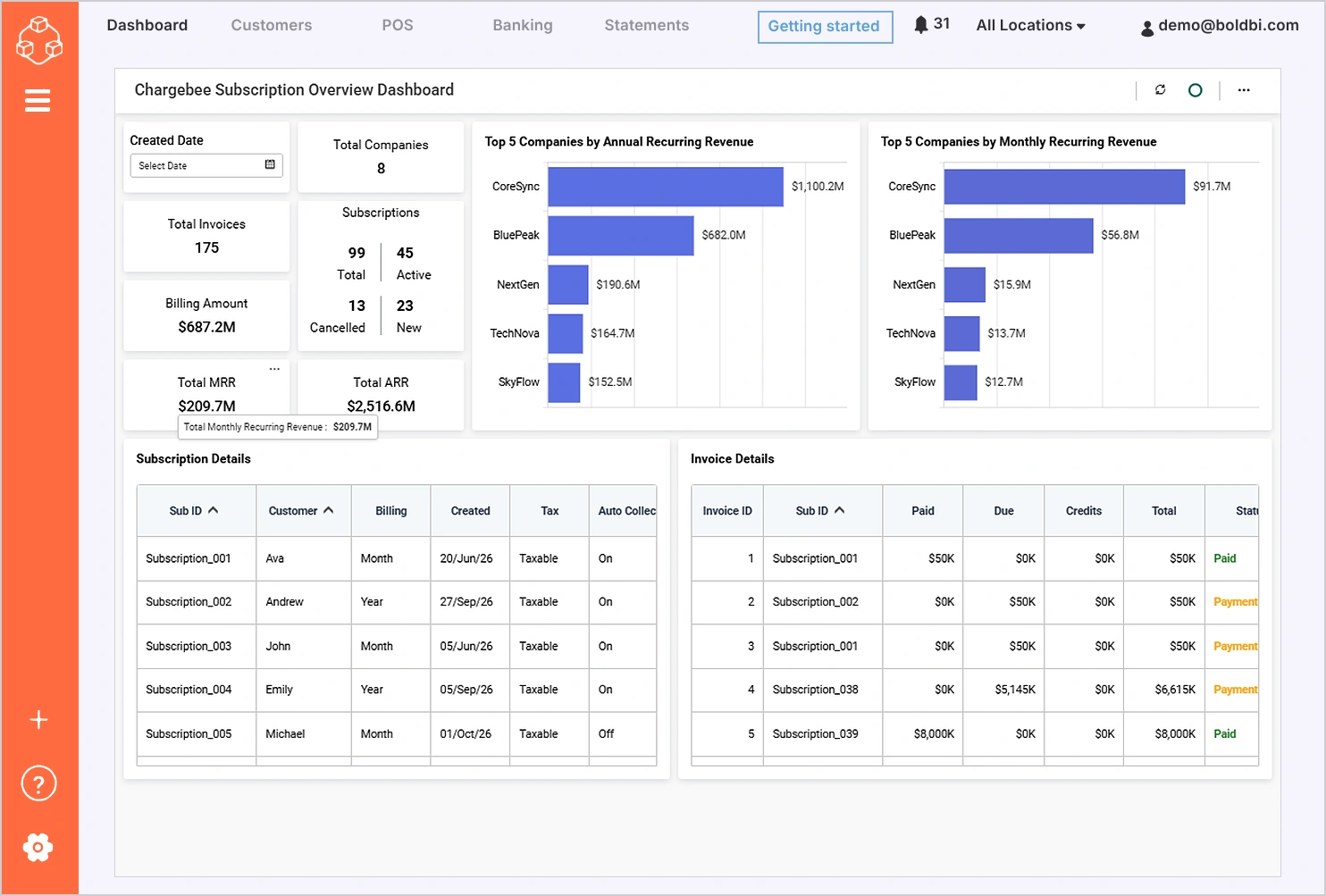
- Illustrative scenario: A software vendor embeds a subscription analytics dashboard within its application under its own brand.
- Challenge: Customers expect subscription and revenue insights within the application.
- How white-label analytics helps: Embed branded dashboards, such as the Chargebee Subscription Overview Dashboard, directly into the product.
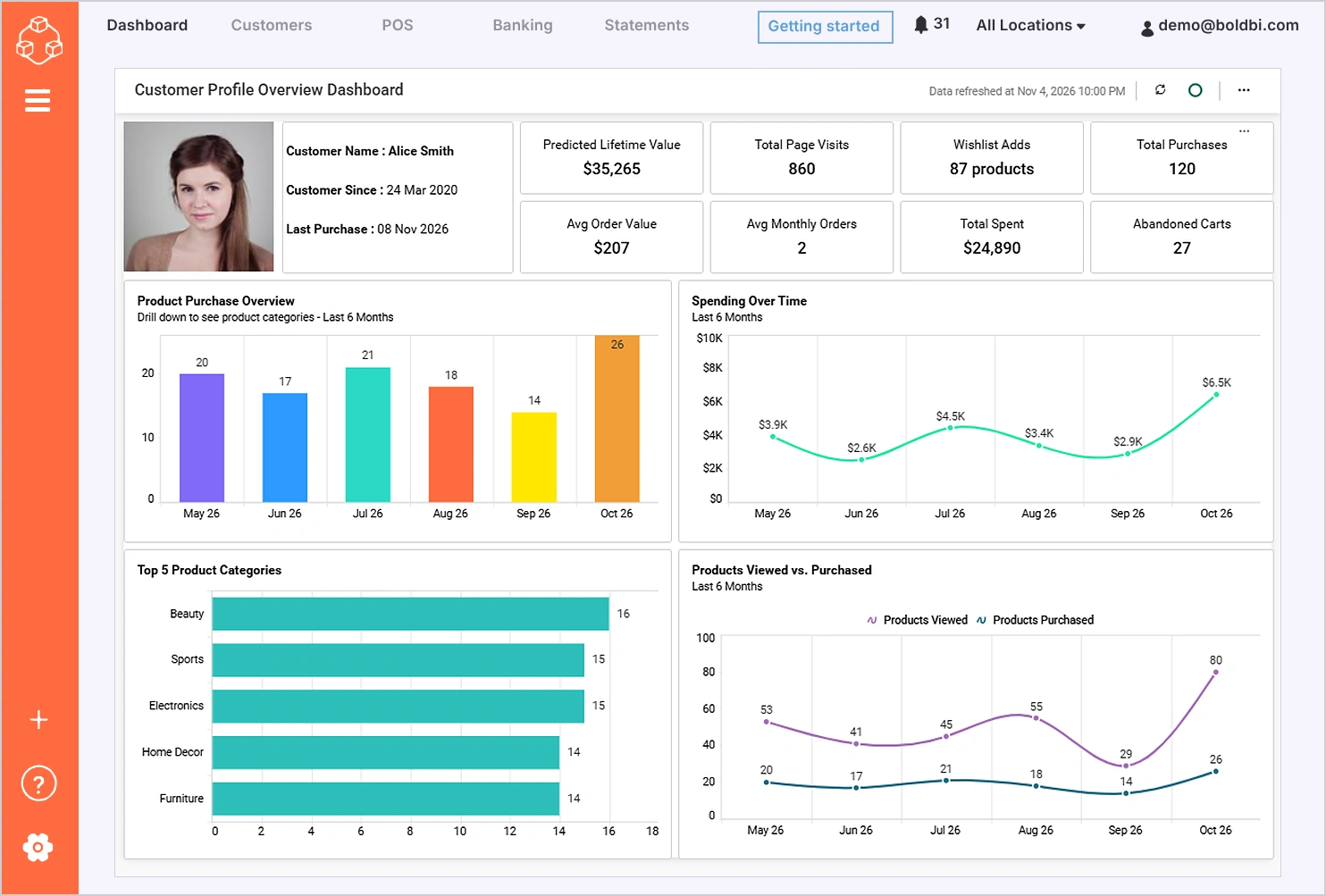
- Second scenario, customer portals: A customer portal provides branded operational and performance dashboards directly within the customer experience.
- Challenge: Customers need real-time access to account and performance data.
- How white-label analytics helps: Deliver branded dashboards, such as the Customer Profile Overview Dashboard, within customer portals.
Healthcare and Life Sciences
Deliver white-labeled analytics for hospital systems, clinical platforms, and health tech under your own brand. A signed Business Associate Agreement can be requested for eligible deployments.
Financial Services and Fintech
Offer branded analytics inside banking portals, financial planning tools, and payment platforms. Bold BI connects to Google BigQuery and Amazon Redshift, and enforces row-level security at query time.
Real Estate and Property Management
Give property managers branded dashboards for occupancy, revenue, and maintenance, with row-level security applied to each account.
Build vs. Buy: Which Approach Makes Sense?
Buy a white-label analytics platform when analytics supports your product but is not the product itself. Build in-house only when analytics is your core differentiator and you can fund a dedicated team to maintain it.
| Evaluation Area | Build Internally | Buy a White-Label Analytics Platform |
|---|---|---|
| Development control | Maximum control over architecture and features | Pre-built capabilities with configurable customization |
| Implementation time | Longer development and release cycles | Faster time-to-market |
| Dashboard creation | Must be developed from scratch | Available out of the box |
| Data connectivity | Requires custom integrations and maintenance | Built-in connectors and integrations |
| User management | Must be designed and maintained internally | Included as part of the platform |
| Embedding capabilities | Requires custom development | Built-in embedding support |
| Analytics features | Must be developed and enhanced over time | Available immediately |
| Security | Full responsibility for security design and updates | Built-in security controls and governance features |
| Scalability | Requires continuous infrastructure planning | Designed to scale with business growth |
| Ongoing maintenance | Continuous updates, bug fixes, and feature enhancements | Managed by the platform provider |
| Total cost of ownership | Higher long-term development and maintenance costs | Reduced internal development and maintenance requirements |
While building an analytics solution provides greater control and customization, it can quickly evolve into a large-scale software project that requires ongoing development, maintenance, security management, and scalability planning. For a deeper look at the trade-offs between developing in-house and adopting a ready-made platform, explore Build vs Buy Analytics: Which Is Better for Your Business? and Choosing Embedded BI: Build or Buy?. Understanding these considerations can help organizations determine whether to invest in building a custom solution or adopt a platform that accelerates deployment while reducing long-term maintenance overhead. For many organizations, the next step is evaluating which platform best aligns with their branding, security, deployment, and scalability requirements.
White-Label Analytics Platform Evaluation Checklist
Not all analytics platforms are designed for customer-facing applications. Before selecting a vendor, evaluate the following areas:
| Evaluation Area | Key Questions |
|---|---|
| Branding | Can logos, themes, domains, and navigation be customized? |
| Multi-tenancy | Can customer environments be isolated securely? |
| Security | Does it support row-level security and access controls? |
| Authentication | Are SAML, OAuth, and OpenID Connect supported? |
| Support and documentation | What support resources and developer documentation are provided? |
| APIs and SDKs | Are developer tools available for customization? |
| Deployment | Does it support cloud, private cloud, or self-hosted deployment? |
| Scalability | Can it support business growth and increased usage? |
| Administration | How are upgrades, maintenance, and user management handled? |
Using a structured evaluation framework helps teams move beyond feature comparisons and focus on long-term business requirements.
Why Multi-Tenancy Matters for White-Label Analytics
Organizations deploying white-label analytics often need to serve multiple customers, clients, departments, or business units from a single analytics platform. In these scenarios, ensuring that each customer can access only their own dashboards and data is critical for both security and compliance.
A multi-tenant architecture lets organizations efficiently support multiple customers in a shared environment while maintaining strict separation of data and resources. This approach simplifies administration, improves infrastructure utilization, and makes it easier to scale customer-facing analytics as adoption grows.
When evaluating a white-label analytics platform, look for tenant isolation, row-level security, role-based access control, customer-specific branding, and secure authentication options. Together, these features keep analytics experiences secure, personalized, and scalable as your customer base grows.
Multi-tenancy is available in Managed Private Cloud and On-Premises deployments. Cloud Edition does not support multi-tenancy.
To learn more about securing customer data in multi-tenant environments, read our guide on tenant isolation in embedded analytics. In Managed Private Cloud and On-Premises deployments, per-tenant SSO and OAuth can be configured independently, allowing different customers to authenticate through different identity providers while maintaining tenant isolation.
Security Considerations for White-Label Analytics
Security often plays a significant role in platform selection.
A secure analytics environment should provide multiple layers of protection:
- Authentication: User identities should be verified before granting access to dashboards.
- Authorization: Role-based permissions help ensure users only access resources relevant to their responsibilities.
- Data isolation: Organizations supporting multiple customers should prioritize strong tenant isolation practices.
- Auditability: Activity tracking and audit logs can support governance and monitoring initiatives.
- Deployment control: Some organizations require additional control over infrastructure through private cloud or self-hosted deployments.
By incorporating security considerations early in the evaluation process, organizations can reduce risk and create a more trusted analytics experience. In self-hosted deployments, Bold BI supports single sign-on through Microsoft Entra ID (Azure AD), Azure AD B2C, OpenID Connect, OAuth 2.0, JWT-based SSO, Windows Active Directory, ADFS, and SAML. Cloud Edition does not support SSO. Self-hosted deployments can also configure separate SSO and OAuth providers for individual tenants.
How Bold BI Supports White-Label Analytics
Bold BI, developed by Syncfusion®, is an embedded analytics and dashboard platform that lets organizations embed dashboards in their own products, separate from Bold Reports®, BoldDesk®, and BoldSign®. Organizations that want to deliver analytics under their own brand often need a combination of customization, security, flexibility, and scalability.
Bold BI supports white-label analytics initiatives through capabilities such as:
- White-labeling is included at no extra cost: logo, colors, fonts, favicon, themed login and navigation, custom domain mapping, and no “Powered by Bold BI” badge.
- OEM licensing is included, with no restriction on how you price or package the analytics.
- Dashboards embed through the JavaScript SDK or an iFrame.
- Multi-tenancy with per-tenant branding in Managed Private Cloud and On-Premises deployments.
- Licensing is per user, per application, or enterprise.
These features help organizations integrate analytics into products and portals while maintaining a consistent branded experience for end users.
Final Thoughts
White-label analytics has evolved beyond simply embedding dashboards into applications. Today, organizations use it to deliver branded analytics experiences, create new revenue opportunities, improve customer engagement, and provide self-service insights without building a complete analytics platform from scratch.
By evaluating platforms for branding flexibility, security, multi-tenancy, deployment options, developer tooling, and scalability, organizations can choose a solution that supports current needs and future growth.
Ready to deliver analytics under your own brand? Discover how Bold BI helps organizations embed, customize, and scale customer-facing analytics experiences.
Frequently Asked Questions
- 1.
What branding elements can be customized in a white-label analytics deployment?
In Bold BI, organizations can customize branding through logos, colors, fonts, favicons, themed login experiences, navigation elements, and custom domains, while removing vendor attribution from the user experience.
- 2.
What is a white-label BI platform?
A white-label BI platform provides analytics functionality that can be customized and delivered under another company's brand.
- 3.
What is the difference between white-label analytics and embedded analytics?
Embedded analytics focuses on integrating analytics into an application, while white-label analytics adds branding customization so the experience appears entirely under the organization's identity.
- 4.
Can I resell analytics under my own brand?
Yes, as long as the platform's license allows it. In Bold BI, OEM licensing is included, with no restriction on how you price or package the analytics, so you can sell it as part of your own product. Resellers get a 20% discount through the Bold BI Reseller Program.
- 5.
What features should a white-label analytics platform provide?
Key capabilities include branding customization, embedding support, APIs, SDKs, multi-tenancy, row-level security, SSO integration, and flexible deployment options.
- 6.
Is white-label analytics suitable for customer-facing applications?
Yes. White-label analytics is commonly used in customer portals, software products, consulting solutions, managed services, and other customer-facing environments.
- 7.
Is white-labeling included in every Bold BI edition?
Yes, white-labeling is included at no extra cost on every paid edition. The free Community License excludes white-labeling. White-labeling covers your logo, colors, fonts, favicon, login page, custom domain, and removes the "Powered by Bold BI" badge.
- 8.
How is white-label analytics priced in Bold BI?
Bold BI is licensed per user, per application, or as an enterprise license. Every edition is priced by custom quote.