
Tenant Isolation in Embedded Analytics Is a Product Decision
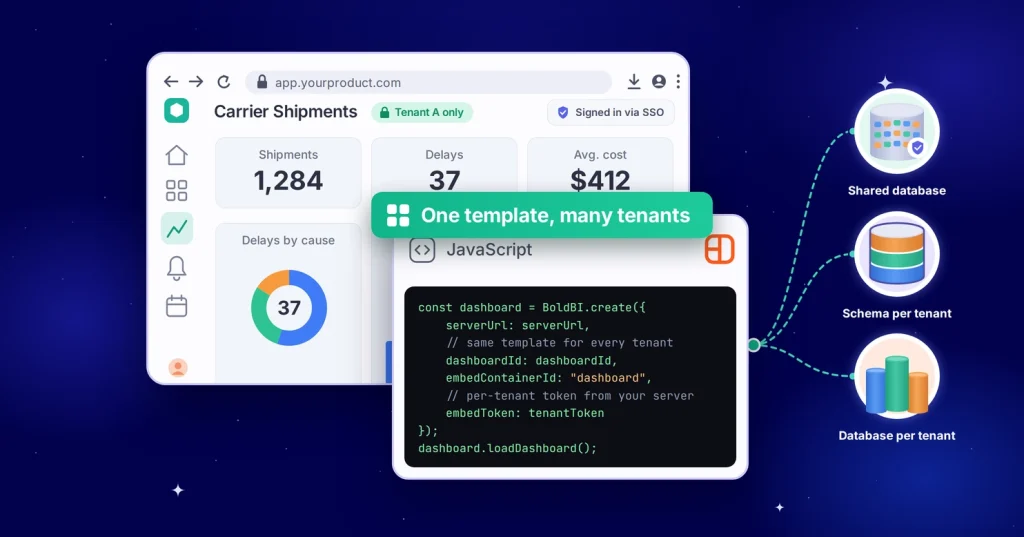
TL;DR: How you separate customer data in embedded analytics decides which deals you can close, how you price your tiers, and what your sales team can promise. Too often, engineering settles it as a database question when product leaders should own it. Changing it later costs far more than choosing it well now.
Tenant isolation is easy to treat as a simple plumbing decision. Engineering picks a model in the first sprint, often the cheapest one, and the product team never hears about it again.
Then an enterprise prospect asks three questions in the security review. Can our data live in its own database? Can it stay in the EU, under the EU’s rules on international data transfers? Can we get a custom metric nobody else sees?
The answers may have been decided months earlier by someone who never saw the pricing page. Nobody made a bad call. The call was simply made in the wrong room. That’s why tenant isolation in embedded analytics is a product decision, not only an architecture one.
The decision hiding inside “which database model”
On paper, tenant isolation is a technical choice between a few patterns. In practice, each pattern is a promise you make to customers, and some promises are hard to take back.
Picture a hypothetical logistics platform. It gives each of its 300 carrier organizations a dashboard of shipments, delays and costs. All carriers share one database, and row-level rules keep their data apart. That works well until the largest carrier asks for two things:
- A separate database in its own region, to meet its data residency rules.
- Two custom metrics that only it can see.
How the platform answers depends on its analytics layer:
- If it can only filter rows in one shared database, the answer is “no” or “a custom project.”
- If it can point each tenant at its own database from the same dashboard template, the answer is “yes, on the Enterprise tier.”
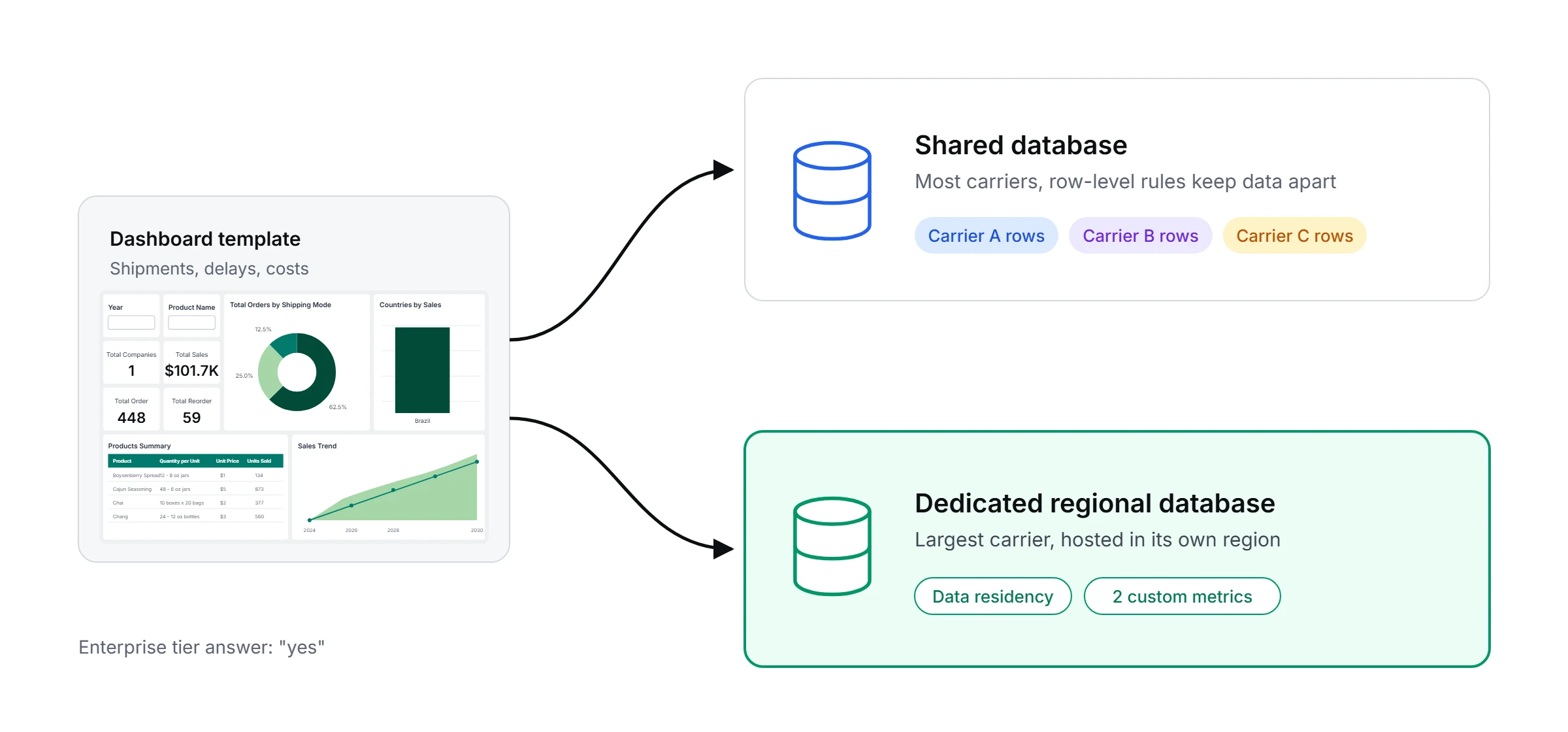
Same product, same dashboards, very different deal. Shared databases also carry a performance risk known as the noisy-neighbor problem: one tenant’s heavy queries can slow down dashboards for everyone else.
Three tenant isolation models, three different products
Each isolation model comes with its own balance of flexibility, cost, operational effort, and customer appeal.
| Model | What you can promise | What it costs you | Natural fit |
| Shared database, row-level rules | Fast onboarding, consistent features. | Lowest infrastructure cost; one mistake in the rules affects everyone. | Self-serve and midmarket tiers. |
| Schema per tenant | Cleaner separation, easier per-tenant changes. | More objects to manage and migrate. | Growing accounts with custom needs. |
| Database per tenant | Strong separation, per-tenant hosting and region, easier audits. | Highest cost and operational effort. | Enterprise and regulated customers. |
None of these is “correct.” The mistake is picking one for every customer, forever, before you know who they’ll be. The differences become most visible when larger customers begin evaluating your product.
The enterprise deal that forces the question
Enterprise buyers may not ask about isolation models by name. They ask about risk: whose data sits next to ours, where does it live, and what happens if a rule is misconfigured? A shared model with good row-level security can be perfectly safe. It’s just harder to explain than “your data is in its own database.”
That’s the product insight. Isolation isn’t only about preventing leaks. It’s about what your sales team can say in one sentence, with a straight face, to a buyer’s security lead.
Why changing it later hurts
Switching isolation models after launch is rarely a config change. Data has to move. Dashboards, filters, and permissions have to be retested for every tenant. Support has to explain the change to customers who never asked for it. And while all that happens, the enterprise deal that triggered it is waiting.
Planning for more than one model from the start avoids much of this. Teams that plan ahead still do the work, but once, and on their own schedule.
Design for tiers, not for one model
Instead of choosing one isolation model for every customer, decide which model each tier gets. Then choose an analytics layer that can serve all of them. When you evaluate one, look for:
- One template for many databases: In Bold BI®, custom attributes can switch a dashboard’s data source for each tenant when the dashboard loads. Smaller customers can use a shared database and larger ones their own database, all from one template.
- Matching schemas: Each database must have the same structure for this to work. That’s a real design constraint, so your data team should plan for it early.
- Row-level security in every model: Row-level rules still apply inside each database, so customers who share one stay separated.
- Pricing that doesn’t grow with users: If embedded analytics is billed per viewer, every new customer user adds cost, which pushes teams toward the cheapest isolation model everywhere. Bold BI ties its license to the application, not to users or tenants. Check the current terms for your case.
- Hosting options for every customer: Some enterprise customers want analytics inside their own cloud or network, sometimes a year after signing. Bold BI runs as a cloud service, as a managed private cloud or on premises, so a hosting request doesn’t mean a rebuild.
- Isolation beyond the database: Analytics tools often cache query results or store data extracts to speed up dashboards. Check that caches and extracts are kept separate per tenant too, or data can leak even when databases are separate.
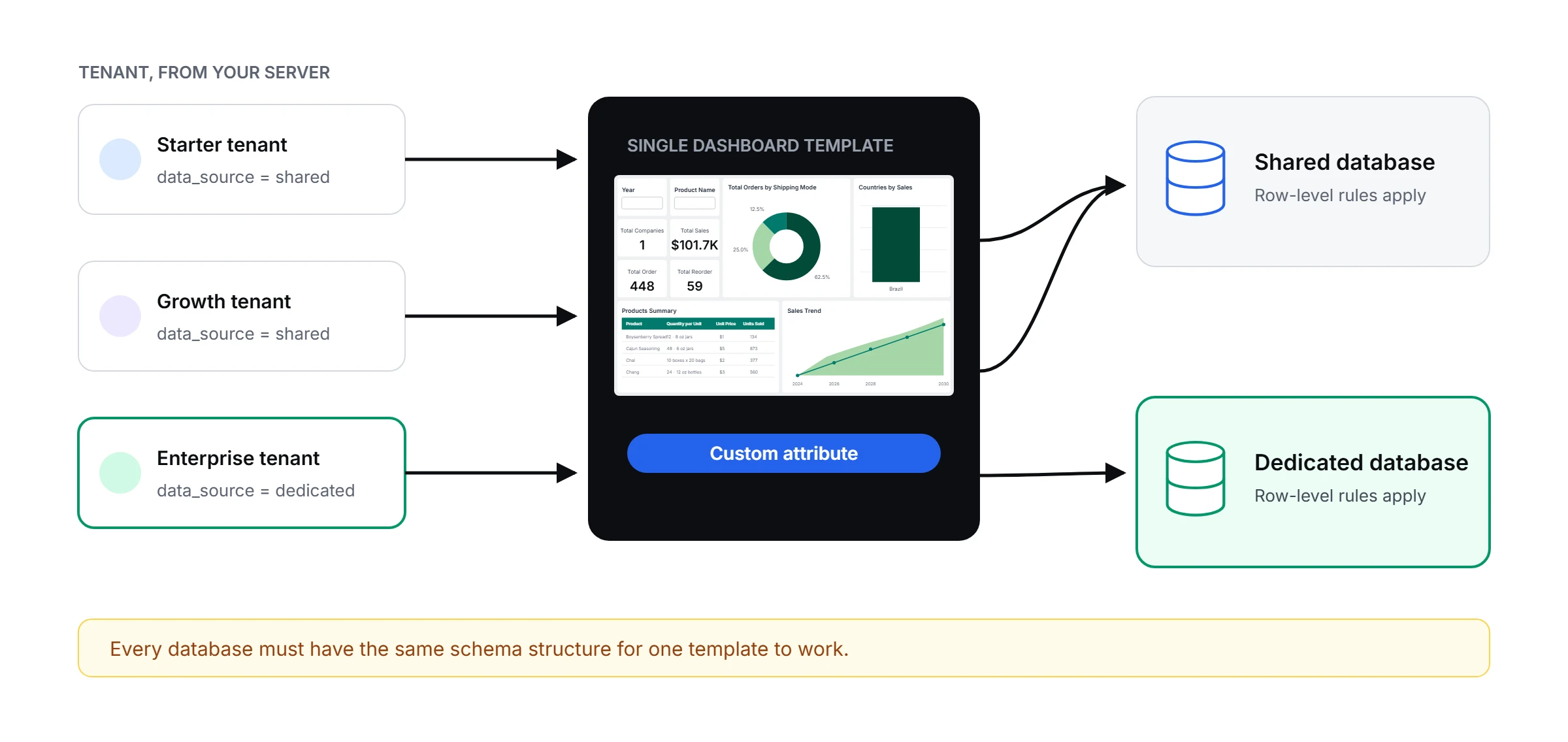
To see how it’s set up, explore the Bold BI multitenancy overview. Developers can use the guide to data filters versus custom attributes to see how it’s wired up.
Tier-mapping example
Here’s how a hypothetical SaaS product might map tiers to models:
| Tier | Isolation model | Hosting | Custom metrics |
| Starter | Shared database (pool) | Our default region | No |
| Growth | Schema per tenant (bridge) | Customer picks from our regions | Limited |
| Enterprise | Database per tenant (silo) | Customer’s Choice | Yes |
What to decide before engineering starts
- Which tiers get which model? Write it into the packaging, not just the architecture document.
- What will you promise in security reviews? Draft the one-sentence answer for each tier now.
- Where can customer data live? List the regions and hosting options you’ll support, and which tier includes each one.
- Who can create custom metrics? Decide whether per-tenant metrics are a premium feature or a support burden.
- How will you prove isolation works? Agree on the evidence you’ll share, such as audit logs, penetration-test reports and compliance documents, and run an isolation test on every release.
- What would make you change models? Name the trigger, such as a tenant size, a region or a contract clause. Then the switch is a plan, not a surprise.
- How will your app tell the analytics layer who the user is? Pass tenant identity from your server through SSO or secure embed tokens, never from the browser, where it can be changed.
- Will AI features respect tenant boundaries? Make sure AI assistants and natural-language queries follow the same row-level and tenant rules as dashboards, so a question typed in plain English can never return another customer’s data.
Answer these eight questions, and tenant isolation stops being a hidden constraint and becomes a business capability that product, sales, and security teams can confidently support.
Final thoughts
Choose your isolation model per tier, write it into your packaging, and pick an analytics layer that can serve every tier from one template. Bold BI® helps organizations deliver secure and scalable analytics experiences with flexible deployment and tenant-aware data access.
Ready to build secure customer-facing analytics? See how one template serves many tenants with Bold BI: explore the embedding showcase or book a demo focused on multi-tenant packaging today.
Frequently asked questions
- 1.
What is tenant isolation in embedded analytics?
Tenant isolation is how an analytics product keeps each customer’s data, dashboards and permissions apart. You can enforce it with row-level rules in a shared database, with separate schemas, or with a separate database for each tenant.
- 2.
Is row-level security enough for tenant isolation?
It can be if the server enforces the rules and you test them for every tenant. There’s a tradeoff, though: one mistake can affect every tenant. A shared database is also harder to explain to a security reviewer.
- 3.
Can one dashboard serve tenants with different isolation models?
In Bold BI, custom attributes can switch a dashboard’s data source per tenant. One template can point smaller tenants at a shared database and larger ones at dedicated databases. The schemas must match.
- 4.
Who should own the isolation decision?
Product should own it, with engineering and security involved. The choice sets what you can promise, how you price tiers and where data can live. Name one owner and write the decision into the packaging.
- 5.
How does Bold BI keep each tenant’s data separate?
You can choose between two setups. With multi-site, each customer gets its own site, database and embed key. With single-site, customers share one site, and row-level security shows each customer only its own data. You can mix both, for example single-site for smaller customers and multi-site for enterprise ones.
- 6.
How does Bold BI know which customer is viewing a dashboard?
Your application tells Bold BI who the user is, through single sign-on or a secure token sent from your server. Bold BI then shows only that customer’s data. The user’s browser can’t change this, so no one can see another customer’s data.
- 7.
Does Bold BI cost more as I add customers?
No. Bold BI charges per application, not per customer or user, so adding customers doesn’t add licensing costs. See the pricing page for current terms.
- 8.
Can I set up and brand new customers automatically?
Yes. You can create a new customer account in Bold BI automatically through its API. Each customer can have its own logo, colors and fonts, and you can remove Bold BI branding completely.