



Supply Chain Inventory Management Dashboard
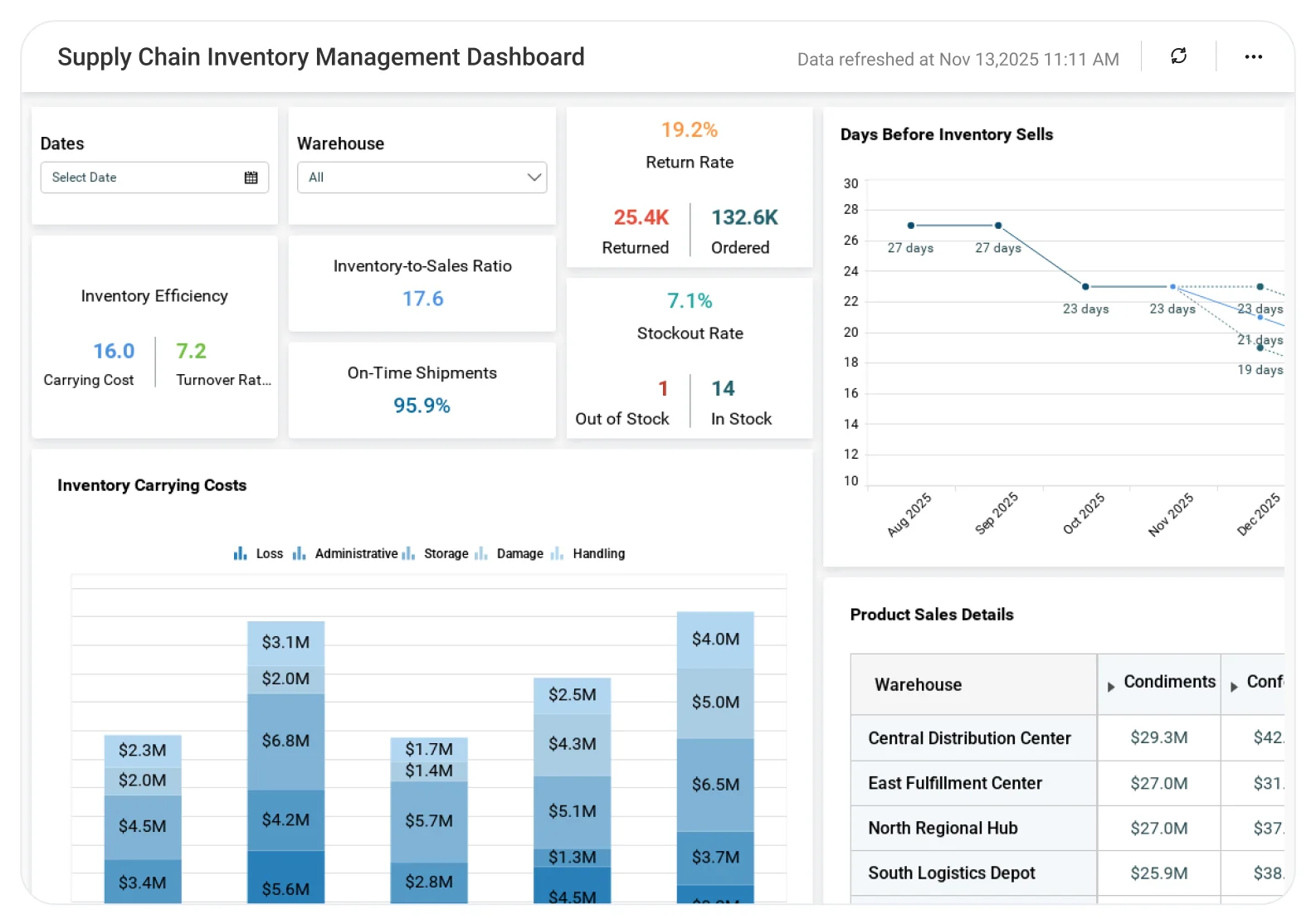
Bold BI’s Supply Chain Warehouse Management Dashboard brings your most important inventory metrics—turnover, stockouts, backorders, returns, and carrying costs—into one real-time view. Identify inventory issues early, reduce unnecessary costs, and keep warehouses running smoothly.
TL;DR: What You’ll Get in the First Week
-
Stock performance tracking: Out-of-stock percentages, backorder rates, and product availability.
-
Operational efficiency: Inventory turnover, inventory-to-sales ratio, and days of supply.
-
Cost insights: Inventory carrying costs and product return rates.
-
Product details: Warehouse-level stock counts, ordered units, and returns.
-
Data filtering: Analyze performance by warehouse and time period.
Why Bold BI is the Right Fit
Bold BI gives warehouse and supply chain teams clear visibility into inventory operations across locations. It helps cut down on stock discrepancies and boosts overall warehouse efficiency.
-
Seamless data integration: Integrate inventory data from Excel, SQL databases, SharePoint and order management systems.
-
Instant warehouse benchmarking: Benchmark the health of your stock by looking at warehouses. Check by category or even by specific SKU.
-
Secure access: Bold BI uses Row Level Security(RLS), Single Sign-On(SSO), Role-Based Access Control(RBAC), and token authentication for secure access.
-
Flexible deployment of the dashboards in cloud or self-hosted.
-
Effortless embedded analytics: Embed the dashboards right into your warehouse portal. Put them directly in supply chain applications too.
What is a Supply Chain Warehouse Management Dashboard? (30-second answer)
A Warehouse Management Dashboard provides an analytical view of key inventory metrics to measure performance and operational efficiency across warehouses.
With Bold BI, combine warehouse inventory data with advanced visual analytics. This identifies stock shortages, analyzes carrying costs, and streamlines fulfilment processes.
What You’ll Track
Using Bold BI dashboards, you will track important KPIs such as:
-
Availability and fulfilment: Back-order rates and out-of-stock percentages to see how well demand is being met.
-
Product stock overview: Units in warehouse, units ordered, and items available for sale across categories and locations.
-
Return patterns: Return rates that highlight quality issues or customer dissatisfaction.
-
Inventory cost insights: Carrying-cost breakdowns to spot costly warehousing practices.
-
Inventory efficiency: Turnover, inventory-to-sales ratio, and days of supply to measure overall performance.
Filter Your Data
With filters for warehouse and date, supply chain analysts can focus on specific facilities or time periods.
Examples
-
View performance for Warehouses 2 and 3 for the first week of January.
-
Check Warehouse 4 metrics for a single day in December.
Resetting the filters shows aggregate performance across all warehouses.
This enables insightful decision-making into warehouse inefficiencies and seasonal stocking patterns.
How does this dashboard help improve warehouse operations
-
It reduces stockouts and back orders, which improves fulfilment.
-
It manages operational costs through analysis of inventory carrying costs and returns patterns. This helps teams refine warehouse processes and reduce operational inefficiencies.
-
It improves inventory efficiency with turnover and days-of-supply metrics. Stocking strategies optimize as a result.
-
It supports data-driven supply chain decisions using historical warehouse data. Teams forecast demand, plan replenishment, and align storage costs with sales volume.
How it Works (No-Nonsense Setup)
-
Apply Warehouse Management sample Dashboard.
-
Blend stock, order, and cost data.
-
Securely share your dashboards with CFOs, controllers, and department leads.
-
Set data alerts for overspending, missed targets, or significant variance spikes.
Why supply chain teams choose Bold BI over static reporting
-
Advanced analytics: Predict future stock needs and identify product trends.
-
Embeddable dashboards for executive and board reporting.
-
Cloud or on-premises deployment for strict financial confidentiality.
More Articles About Balance Sheet
-
Role of Business Intelligence in Supply Chain Management
 This blog explains how BI tools enhance supply chain visibility, improve agility, and optimize inventory for cost savings and better decisions.
-
Manage Your Supply Chain Warehouse Efficiently with Embedded Analytics
This blog helps you learn how embedded analytics improves warehouse operations, reduces risk, and ensures proper inventory management for efficiency.


