
Budget vs Actual Dashboard for Finance Teams
Compare budgeted versus actual income and expenses accurately.
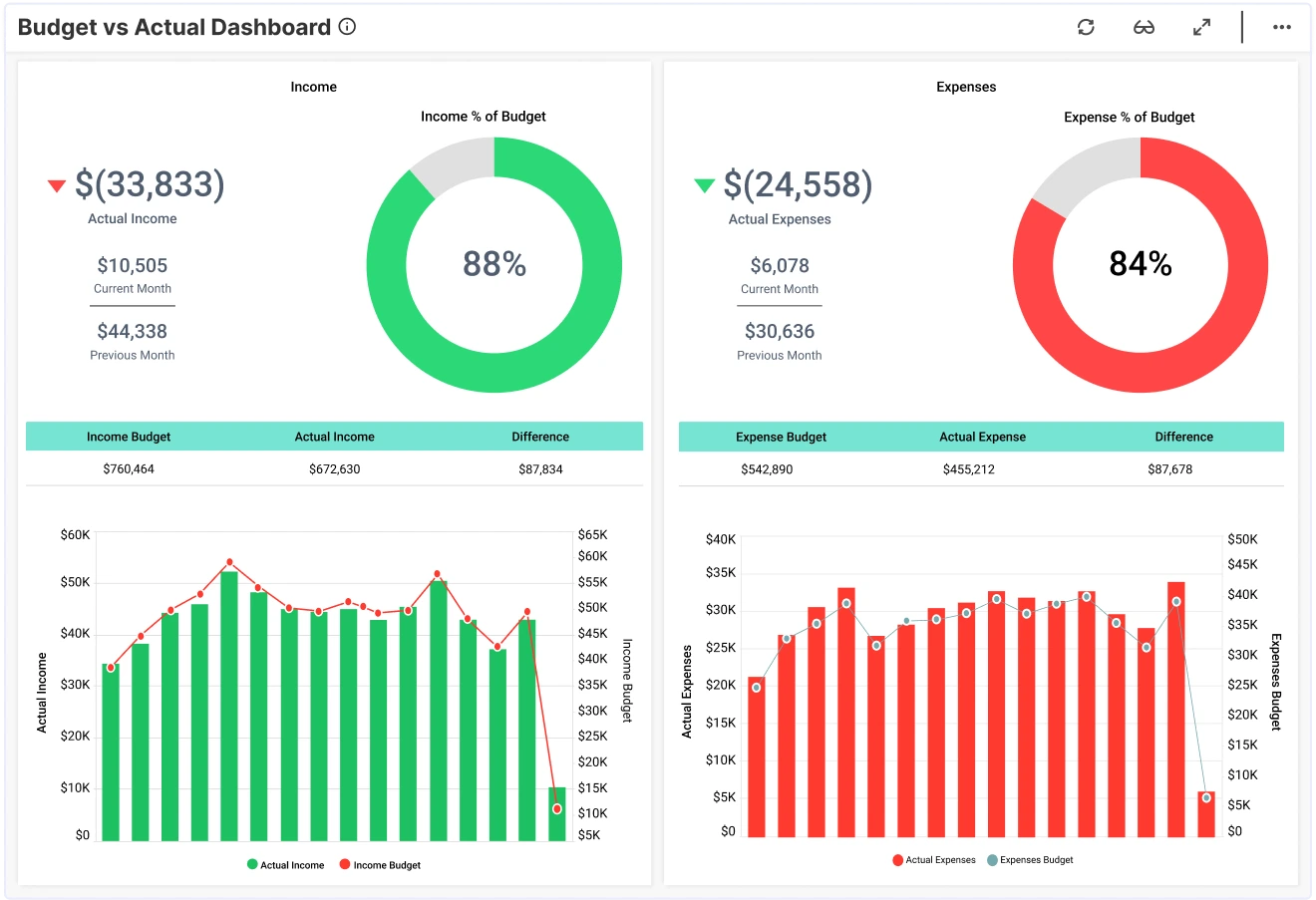
The Budget vs Actual Dashboard in Bold BI allows you to track actual income and expenses and analyze financial performance over time. Connect ERP, accounting systems, Excel, or SQL databases to centralize your company’s financial data in one interactive, drillable view.
TL;DR: What You’ll Get in the First Week
-
Real-time budget vs. actual comparison for income and expenses.
-
15-month financial trend analysis for forecasting and long-term planning.
-
Category-level breakdowns to identify cost drivers and revenue patterns.
-
Executive view of financial stability, efficiency, and goal alignment.
Why it Matters to Finance Managers
Financial stability starts with visibility. When budget data is locked in databases or spreadsheets, it is more challenging to understand trends, identify overspending, or assess whether revenue goals are realistic.
Bold BI gives finance teams one source of financial truth, helping them answer:
-
How much income have we actually earned?
-
What are our true operating expenses?
-
Are we trending above or below budget over time?
-
Which categories are driving revenues compared to others?
Why Bold BI is the Right Fit for Budget vs Actual Reporting
-
Combine ERP + accounting systems + spreadsheet data into one governed dashboard.
-
Automate variance analysis and eliminate manual updates.
-
Drill from summary insights to monthly or category-level details.
-
Flexible deployment—cloud or self-hosted.
-
Embedding capabilities of the dashboards for internal finance portals and executive workspaces.
What is a Budget vs Actual Dashboard? (30-second answer)
A Budget versus Actual Dashboard visually compares budgeted and actual financial results for tracking performance and guide future budgeting cycles.
In Bold BI, this means interactive charts showing income, expenses, trends, and category-level variance—all updated in real time.
What You’ll Track
Using Bold BI dashboards, you will track important KPIs such as:
-
Income performance: Monitor how your actual income compares to budget, month-to-month trends and category contributions.
-
Expense performance: See where your spending sits vs. budget and which areas are driving spikes.
-
Category insights: Understand a clear breakdown of income and expenses by category, including variances and contribution.
-
Budget accuracy: Get simple views that show where you’re overspending or underspending across teams or departments.
-
Financial trends: Analyze long-term patterns that help you understand how your numbers are shifting over time.
All samples are easy to tailor—add your own KPIs, tweak thresholds, or connect data from any department.
Review Your Income and Expenses
This dashboard allows leaders to find a simple, intuitive visual reference to monitor revenue, spending patterns, and budget alignment.
With these insights, finance executives can:
-
Identify over- or under-performance early.
-
Address emerging risks.
-
Improve accuracy in future financial planning.
-
Ensure the business is on track to meet organizational goals.
How it Works? (No-Nonsense Setup)
Why Finance Teams Choose Bold BI
More Articles About Budget vs. Actual
-
Empower Finance Departments with Embedded Analytics
This blog explains how embedded analytics improves financial management by integrating dashboards into everyday workflows. Shows how embedding the Budget vs. Actual Dashboard enables real-time financial insights for better decision-making.
-
Top 10 Finance Dashboards for Global Businesses
This blog highlights ten powerful finance dashboard examples designed for global businesses. It serves as a guide for selecting and implementing dashboards that improve efficiency and transparency in global finance operations.
-
How to Build a Budget vs. Actual Dashboard in Bold BI
This video will guide you through adding and configuring widgets on a budget versus actual dashboard in Bold BI. It includes setting up the text, KPI cards, a radial gauge, column charts, and grid widgets.
