
Bold BI dashboard designer supports connecting JSON, XML and CSV files.
Build dashboards using CSV data to get a more informed view of your metrics. 
Easily connect to CSV files from local or online storage to create analytical dashboards.
Join CSV data from different data sources using shared tables.
Configure data refreshes to keep your dashboard up to date.
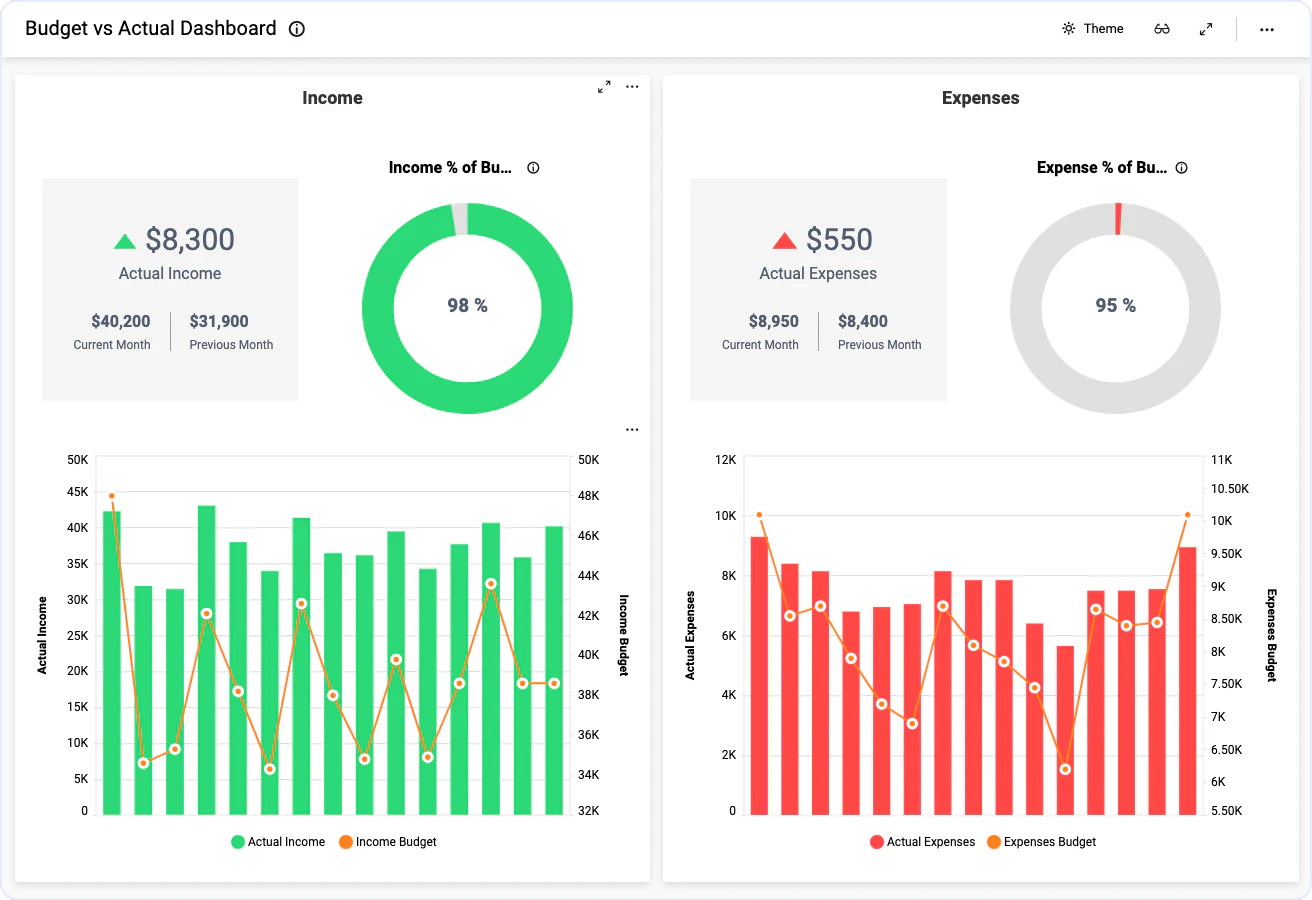
The Budget vs. Actual Dashboard enables you to monitor the overall budget and expenses of the company over a period of time. By creating unique dashboards, financial managers can make the right investment decisions for the business.
Integrate CSV data with other integrations, like of SQL or web data sources, and create dashboards with multiple data sources. Embed these dashboards into your application for powerful data visualization.
Integrations
Your data, wherever it lives. SQL databases, REST APIs, cloud warehouses, flat files, and SaaS tools connect without a custom pipeline.





Explore Bold BI with a 30-day free trial. Embed dashboards, connect data sources, and empower your team with actionable insights.
No credit card required.