
What Is the Bold BI Free Tier? Features and How to Get Started
TL;DR: The Bold BI Free Tier is a fully managed evaluation environment that allows organizations to evaluate dashboard creation, data connectivity, embedded analytics, user management, and reporting capabilities without installation or infrastructure management. It helps teams validate analytics requirements and determine whether Bold BI meets their business and technical needs before deployment.
Evaluating a business intelligence platform should help organizations quickly understand its capabilities without time-consuming installation and complex infrastructure setup. Yet many analytics platforms require teams to configure environments and manage technical prerequisites before they can begin exploring features.
The challenge is that organizations often need a practical way to assess embedded analytics capabilities before committing to a deployment strategy. The assessment process should focus on determining business value rather than managing infrastructure.
This is where the Bold BI Free Tier comes in. Bold BI, developed by Syncfusion® , provides a fully managed evaluation environment that enables organizations to assess dashboarding, data connectivity, and embedded analytics capabilities without managing infrastructure. It provides a fully managed environment hosted by Bold BI, allowing organizations to explore analytics capabilities without ongoing infrastructure management. Designed specifically for evaluation, the Free Tier enables organizations to experience the platform and assess how it fits their analytics requirements.
In this blog, you’ll learn what the Bold BI Free Tier is, the features available in the evaluation environment, current limitations, how to get started, and when to consider a full deployment option.
What is the Bold BI Free Tier?
The Bold BI Free Tier is a fully managed evaluation environment that allows organizations to evaluate dashboard creation, data source connectivity, embedded analytics, and user management capabilities without installation or infrastructure management. It is designed for organizations that want to assess Bold BI before selecting a deployment option.
With the Free Tier, organizations can:
- Explore dashboard creation capabilities.
- Connect to 140 supported data sources, cloud platforms, and business applications.
- Build and test analytics workflows.
- Assess embedded analytics use cases.
- Explore platform administration and user experiences.
To better understand the value of the Free Tier, let’s look at the key areas you can explore.
What features are available in the Bold BI Free Tier?
The Free Tier includes essential core capabilities to help organizations evaluate Bold BI:
- Interactive dashboard creation: Build and customize dashboards using a variety of visualization widgets to analyze and present data effectively.
- Data source connectivity: Connect to more than 140 supported databases, cloud platforms, and business applications.
- Embedded analytics: Evaluate how dashboards can be embedded into web applications, customer portals, and internal business systems using Bold BI’s embedded analytics capabilities.
- Dashboard templates and sample data: Get started quickly with prebuilt templates, sample dashboards, and datasets available in the environment.
- User management and secure sharing: Test user permissions, role-based access control, and dashboard-sharing capabilities commonly used in production BI deployments.
Beyond these, the Free Tier offers several advantages that simplify the assessment process.
Why organizations use the Bold BI Free Tier for evaluation?
These features of the Free Tier help organizations focus on evaluating analytics capabilities and real-world use cases:
- Quick setup experience: Start evaluating Bold BI immediately in a fully managed environment where hosting, updates, maintenance, and infrastructure management are handled by Bold BI, allowing teams to focus entirely on validating analytics requirements.
- Quick access to analytics capabilities: Gain immediate access to dashboards, visualizations, data connectivity, and reporting features, helping teams assess core platform functionality from the first day of evaluation.
- Designed specifically for evaluation: The Free Tier enables organizations to validate reporting requirements, test embedded analytics scenarios, and assess dashboard functionality before committing to a deployment approach.
- Easy way to assess embedded analytics functionality: Evaluate how dashboards can be embedded into applications, portals, and websites, helping teams determine whether embedded analytics capabilities align with their product and business requirements.
Which features are not available in the Bold BI Free Tier?
The Free Tier focuses on evaluating dashboarding, analytics, and data connectivity capabilities. The following platform administration and deployment features are not available in the Free Tier:
- Multisite management
- Data process settings
- Authentication settings
- Email settings
Which features are not available in the Bold BI Free Tier?
Some features are available in the Free Tier but have restricted functionality:
- Branding customization options: Advanced branding and appearance customization features are restricted because the user management system (UMS) settings are not available in the Free Tier.
- Site configuration: Some site-level administrative settings cannot be fully configured due to the absence of UMS-related functionality.
- Limited user directives support: User directives work only with Azure AD and database integrations. Windows AD-based directives are not supported in the Free Tier.
To explore the limitations in more detail, refer to the Bold BI Free Tier environment limitations documentation.
Bold BI Free Tier vs Full Deployment
The following table highlights the key differences between the Bold BI Free Tier and a full deployment.
| Capability | Bold BI Free Tier | Full Deployment |
|---|---|---|
| Primary Purpose | Product evaluation and proof of concept | Production and enterprise use |
| Dashboard Creation | ✅ Available | ✅ Available |
| Data Source Connectivity | ✅ Available | ✅ Available |
| Embedded Analytics | ✅ Available | ✅ Available |
| Dashboard Templates and Sample Data | ✅ Available | ✅ Available |
| User Management and Permissions | ✅ Available | ✅ Available |
| Secure Dashboard Sharing | ✅ Available | ✅ Available |
| Branding Customization | ⚠️ Limited | ✅ Full Support |
| Site Configuration | ⚠️ Limited | ✅ Full Support |
| User Directives | ⚠️ Limited support (Azure AD and Database integrations only) | ✅ Full Support |
| Multisite Management | ❌ Not Available | ✅ Available |
| Authentication Settings | ❌ Not Available | ✅ Available |
| Email Settings | ❌ Not Available | ✅ Available |
| Data Process Settings | ❌ Not Available | ✅ Available |
| Infrastructure Management | Managed by Bold BI | Managed by the organization |
| Intended for Production Workloads | ❌ No | ✅ Yes |
How to get started with the Bold BI Free Tier
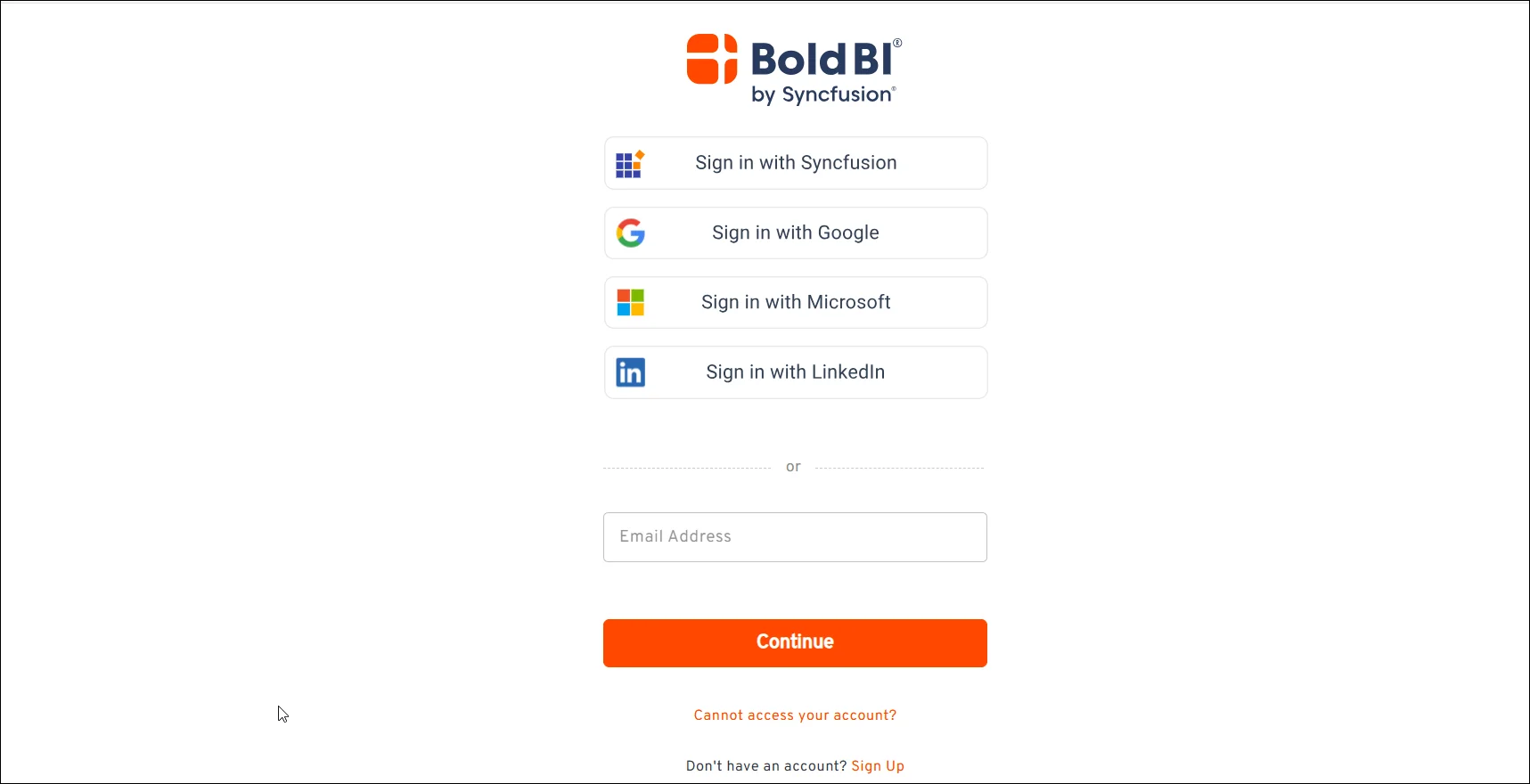
Step 1: Sign up or create an account
To access the Bold BI Free Tier, create an account on the Bold BI website or sign in if you already have one.
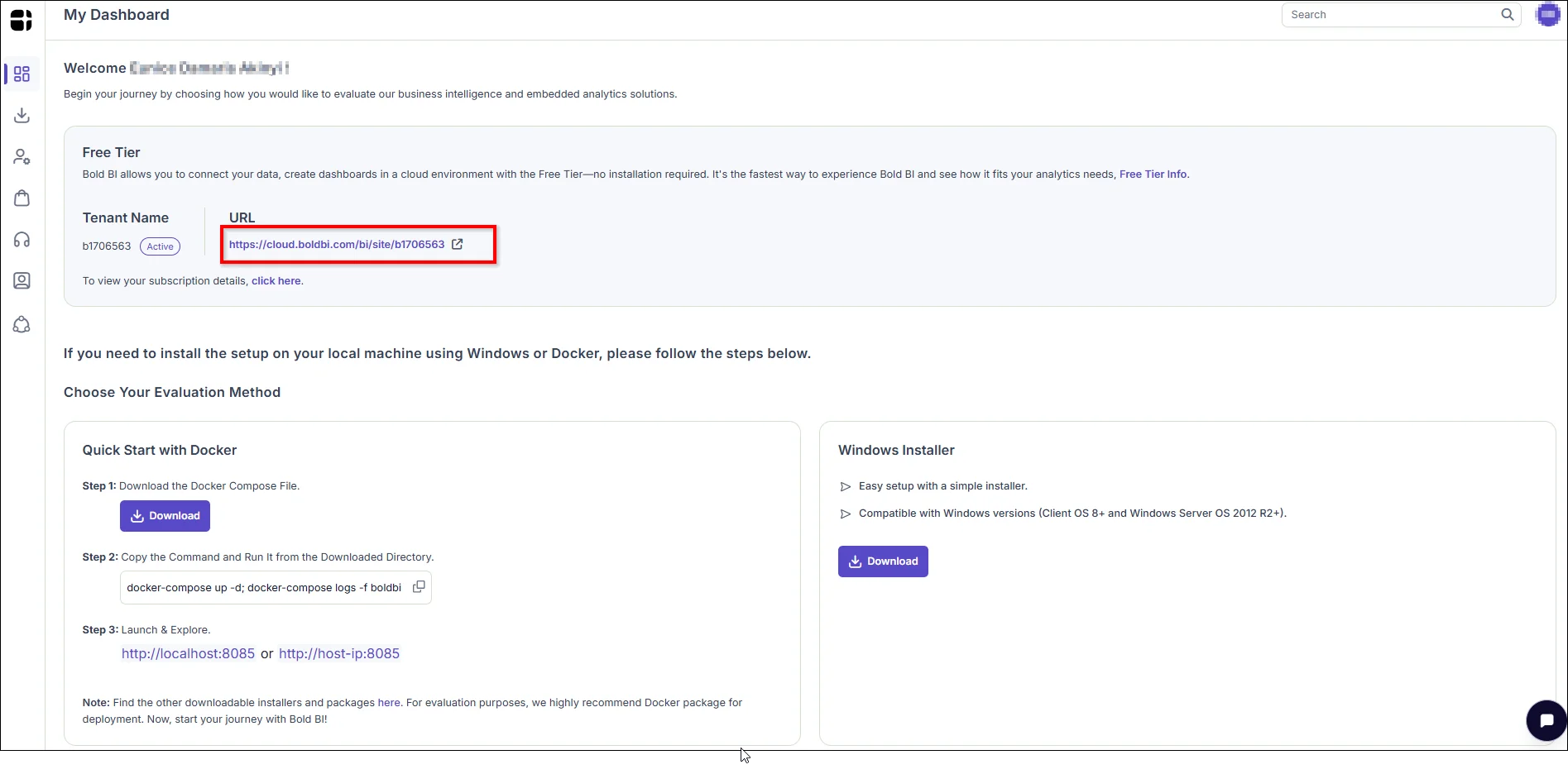
Step 2: Click the Free Tier URL
After signing in, your Free Tier environment details are shown at the top of the My Dashboard page. Click the link under URL, to the right of Tenant Name, to launch your Bold BI Free Tier instance.
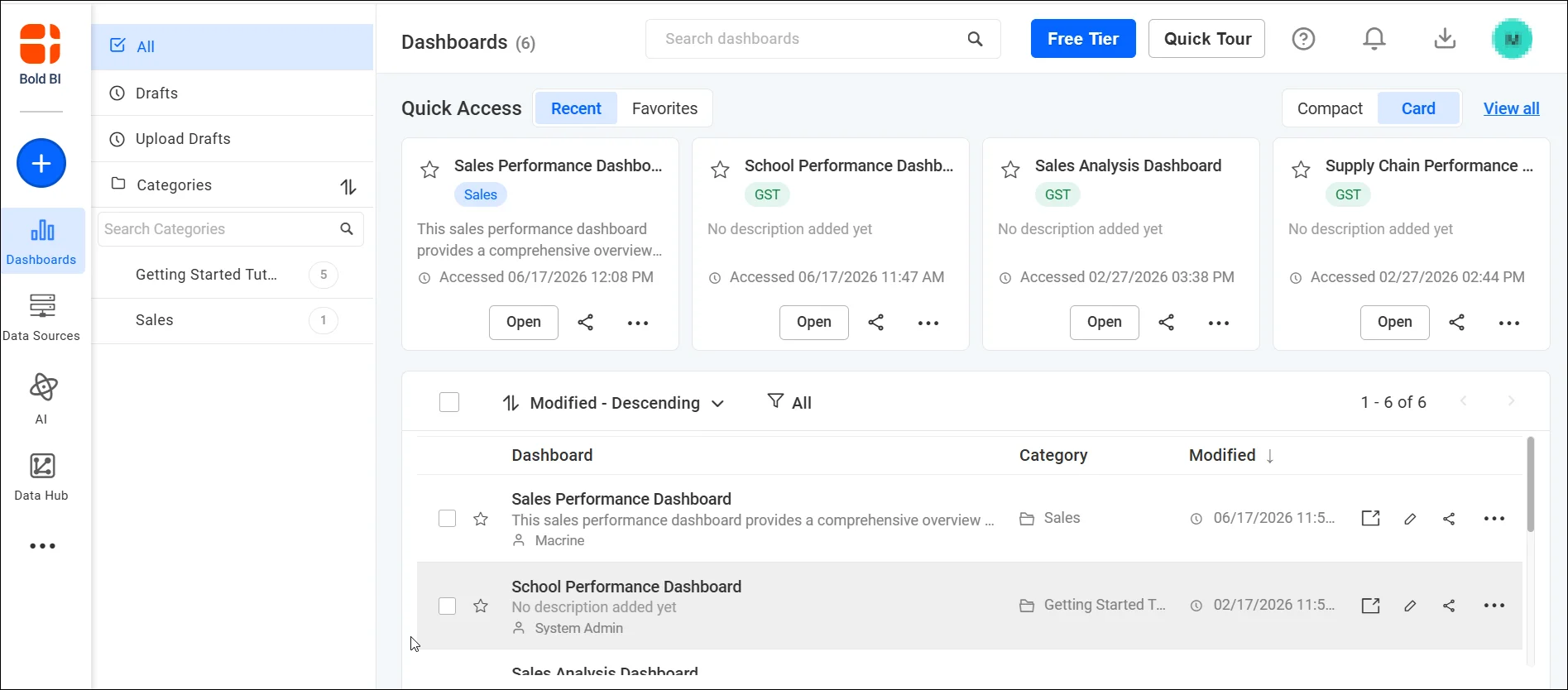
Step 3: Explore the Free Tier
Start exploring sample dashboards, create new dashboards, and connect data sources to evaluate Bold BI.
After accessing the Free Tier, following a structured evaluation approach can help maximize its value.
How Bold BI supports product evaluation
The Bold BI Free Tier is designed to help organizations evaluate key analytics capabilities in a controlled environment. Teams can create dashboards, connect business data sources, test embedded analytics workflows, configure user permissions, and assess reporting capabilities in a managed evaluation environment.
How to evaluate the Bold BI Free Tier effectively
- Use representative business data: Connect data that closely reflects your real-world reporting needs so you can accurately assess dashboard design, data modeling, and visualization capabilities.
- Test real analytics requirements: Create dashboards and reports that mirror actual business scenarios, such as sales tracking, marketing performance, or operational monitoring, to determine how well the platform meets your needs.
- Evaluate different use cases: Explore a variety of analytics scenarios, including executive dashboards, self-service reporting, and departmental reporting, to understand the platform’s flexibility.
- Explore embedded analytics capabilities: If you plan to integrate analytics into an application or portal, test dashboard embedding, customization options, and user interactions to evaluate the embedded experience.
- Assess user experience and performance: Review dashboard responsiveness, navigation, visualizations, and overall usability to ensure the platform delivers a smooth experience for end users.
- Consider administrative limitations: Keep in mind that the Free Tier is intended for evaluation and does not include all platform administration features available in self-hosted or fully managed deployments.
Following these practices will help you decide whether Bold BI aligns with your analytics, embedding, and deployment requirements. One final consideration is whether the Free Tier is appropriate for production environments.
When should you use the Free Tier?
The following table outlines common scenarios and whether the Bold BI Free Tier is the recommended option.
| Scenario | Recommended |
|---|---|
| Product Evaluation | Yes |
| Dashboard Prototyping | Yes |
| Embedded Analytics Testing | Yes |
| Production Environment | No |
Is the Free Tier suitable for production use?
The Free Tier is designed exclusively for evaluation and proof-of-concept activities. Organizations requiring advanced administration capabilities, deployment customization, authentication management, multisite support, or production-grade environments should use a full Bold BI deployment instead.
If you need access to the complete set of Bold BI features, a self-hosted deployment is recommended. A self-hosted environment provides access to the full range of functionalities available in Bold BI.
If you require a cloud-based trial environment without the Free Tier limitations, the Bold BI presales team can provide a free managed installation for evaluation purposes upon request through a support ticket. For more information about self-hosting, see the Bold BI deployment.
Conclusion
The Bold BI® Free Tier provides a practical way for organizations to evaluate dashboard creation, data connectivity, embedded analytics, reporting, and user management capabilities without installation or infrastructure management. While certain administration features are unavailable, the environment offers a structured way to assess whether Bold BI aligns with business, technical, and deployment requirements before moving to a full implementation.
Whether you’re evaluating customer-facing analytics or embedded BI scenarios, the Free Tier helps you explore Bold BI’s core capabilities and assess its fit for your business needs.
As you evaluate the platform, you can follow the built-in quick tour to get started quickly, request a personalized demo to see Bold BI in action and discuss deployment options with the team, and access the support portal whenever you need assistance.
Frequently Asked Questions
- 1.
What is the Bold BI Free Tier?
The Bold BI Free Tier is a fully managed evaluation environment that allows organizations to explore dashboarding and analytics capabilities without installing or maintaining infrastructure.
- 2.
Who can use the Free Tier?
Organizations evaluating business intelligence, dashboarding, reporting, or embedded analytics solutions can use the Free Tier to assess Bold BI before selecting a deployment option.
- 3.
What can I evaluate in the Free Tier?
You can evaluate dashboard creation, data source connectivity, embedded analytics, reporting workflows, user permissions, and overall platform usability within a fully managed environment.
- 4.
Is the Free Tier intended for production use?
No. The Free Tier is designed solely for evaluation and testing purposes.
- 5.
What features are not available in the Bold BI Free Tier?
Some platform administration and deployment-related features are not available in the Free Tier, including multisite management, data process settings, authentication settings, and email settings.
- 6.
What features are partially supported in the Bold BI Free Tier?
Certain features are available with limitations, including look-and-feel settings, site settings, and user directives. Some functionality is restricted because user management system settings are not available in the Free Tier environment.
- 7.
How can I access all Bold BI features?
Organizations that require the complete feature set, advanced administration capabilities, or production-ready deployments can explore self-hosted deployment options. If you require a cloud-based evaluation without Free Tier limitations, the Bold BI presales team can provide a managed trial environment.
- 8.
Can I connect my own data sources to the Bold BI Free Tier?
Yes. The Free Tier allows organizations to connect supported databases, cloud platforms, and business applications to evaluate dashboarding and analytics capabilities using their own data.
- 9.
Can I test embedded analytics in the Bold BI Free Tier?
Yes. Organizations can evaluate how dashboards can be embedded into web applications, customer portals, and internal business systems using Bold BI’s embedded analytics capabilities.
- 10.
What is the difference between the Bold BI Free Tier and a full deployment?
The Free Tier is intended for evaluation and includes certain administrative limitations. A full deployment provides access to all platform capabilities, including production features, deployment customization, and advanced administration settings.