
Embedded Analytics Audit Trail: A Guide to Governance

TL;DR: Built-in Audit trails help organizations track user activity, system changes, and administrative actions without requiring a dedicated governance platform. By improving visibility across analytics environments, they strengthen accountability, security, and compliance. As embedded analytics, SaaS applications, AI-assisted workflows, and multi-tenant deployments grow, Audit trails provide a foundation for transparency, trust, and operational oversight.
Introduction
An embedded analytics audit trail helps organizations track user activity and system changes within embedded analytics environments. As analytics becomes increasingly embedded across applications, organizations need better visibility into administrative actions, access changes, and governance-related events.
As analytics adoption grows, organizations increasingly need answers to questions such as:
- Who performed a recent administrative change?
- When were permissions changed?
- Which administrator updated system settings?
- What actions occurred across tenants or environments?
Without clear answers to these questions, troubleshooting slows, administrative control becomes harder, compliance efforts become harder to support, and accountability gaps can emerge across the organization. Organizations need a reliable way to track user activity and administrative changes.
Audit trails play a critical role. They provide a record of actions across analytics environments, helping teams improve accountability. For embedded analytics deployments, solutions such as Bold BI® provide built-in Audit trails that help organizations monitor activity, investigate issues, and maintain oversight without requiring a separate platform.
In this article, we’ll explore what Audit trails are, why they matter, common use cases, and how they support modern analytics governance.
What Is an Embedded Analytics Audit Trail?
An embedded analytics audit trail is a secure, chronological record of user actions and permission-related changes within an analytics environment. It shows who performed an action, what changed, and when, helping organizations maintain accountability, monitor activity, and support governance initiatives.
Every significant action generates a log entry that can be reviewed for operational monitoring, troubleshooting, security investigations, and compliance analysis.
Audit trails typically capture:
- User identity
- Action performed
- Timestamp
- Affected resource
- Tenant or environment context
For organizations that do not require a dedicated governance platform, built-in Audit Trails provide an effective way to improve operational visibility while simplifying administration.
Why Embedded Analytics Audit Trails Matter for Modern Governance
Key benefits of embedded analytics Audit trails include:
- Improve transparency and accountability: Audit trails provide a clear record of user and administrative actions, making it easier to understand who changed what and when.
- Accelerate troubleshooting and root cause analysis: Activity logs help teams quickly identify the source of dashboard issues, configuration changes, and unexpected system behavior.
- Strengthen security and access control: Tracking permission changes, role updates, and settings-related activities helps organizations maintain better control over analytics access.
- Support multi-tenant SaaS operations: Audit trails provide activity monitoring across tenants and administrative environments, helping organizations govern multi-tenant analytics deployments more effectively.
- Simplify compliance and audit readiness: Historical activity records help support compliance and audit readiness, including initiatives aligned with ISO 27001, SOC 2, and GDPR.
Real-World Applications of Embedded Analytics Audit Trails
Audit trails are particularly important in customer-facing analytics environments where organizations need visibility across multiple customers, users, and tenants.
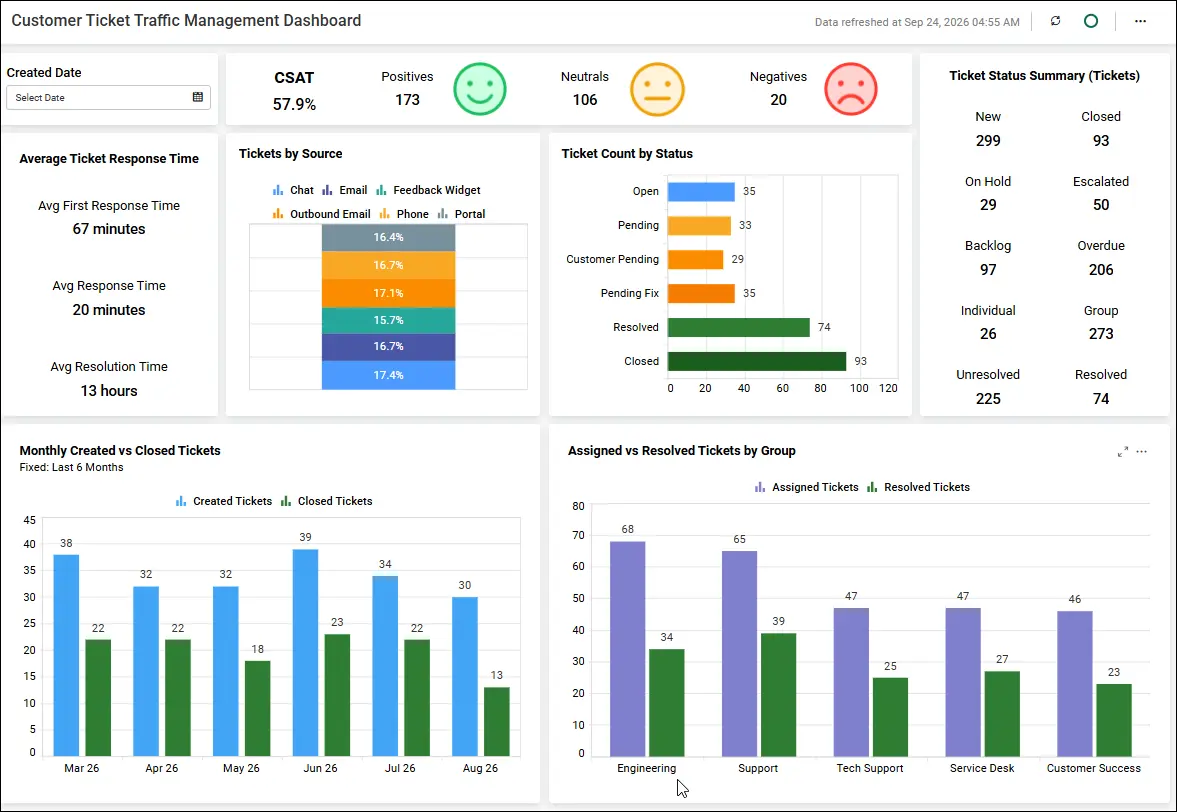
Customer Support Dashboard
Organizations use customer support dashboards to monitor ticket volumes, response times, agent performance, and customer satisfaction.
- Scenario: A support manager notices a sudden drop in customer satisfaction scores reported on the dashboard.
- Challenge: The team needs to determine whether the issue resulted from dashboard modifications, configuration changes, or data source updates.
- How Audit Trails Help: Audit trails help administrators review user, permission, and settings changes to better understand what actions occurred within the analytics environment.
- Business Outcome: Faster issue resolution, improved customer satisfaction, reduced troubleshooting effort, and stronger accountability.
Sales Performance Dashboard
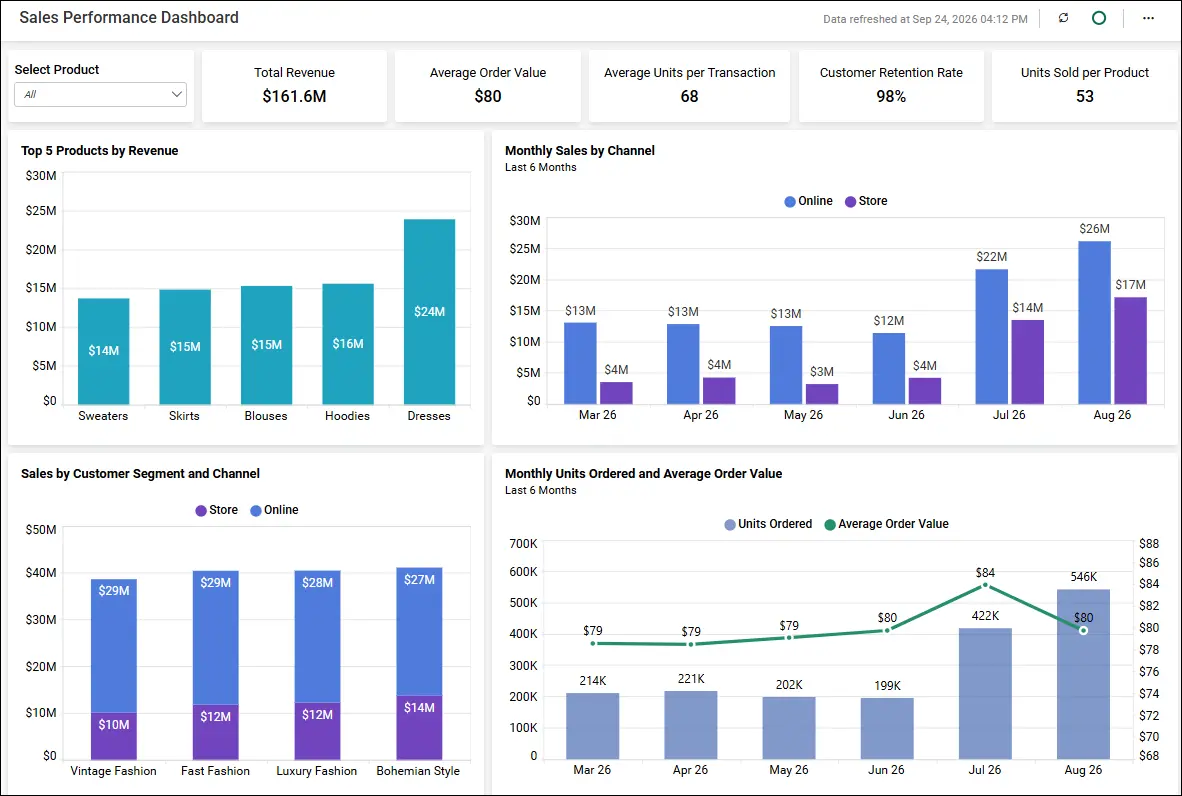
Sales teams use dashboards to track revenue, pipeline performance, deal conversions, and sales trends across regions and teams.
- Scenario: Sales leaders discover that quarterly revenue figures differ from previously reported results.
- Challenge: The organization must determine whether recent administrative actions, permission updates, or configuration changes contributed to the issue.
- How Audit Trails Help: Audit trails help administrators review user, permission, and settings changes to better understand what actions occurred within the analytics environment.
- Business Outcome: Greater trust in sales data, faster root-cause analysis, improved access control, and more confident decision-making.
Marketing Performance Dashboard
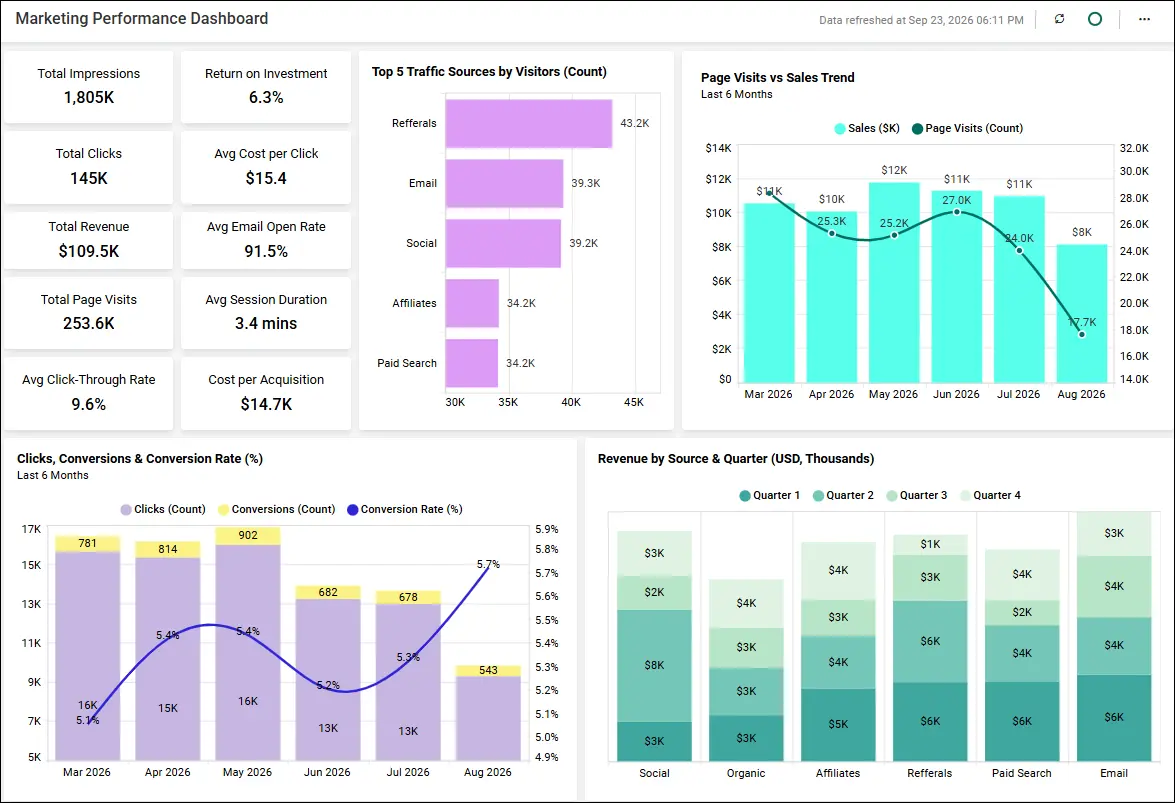
Marketing teams rely on dashboards to measure campaign performance, website traffic, lead generation, and conversion rates.
- Scenario: A marketing manager notices an unexpected decline in reported lead conversions after a campaign launch.
- Challenge: The team needs to verify whether the change resulted from campaign performance or modifications to dashboard configurations and data sources.
- How Audit Trails Help: Audit logs capture user actions, permission updates, and administrative changes, enabling teams to investigate unexpected discrepancies more efficiently.
- Business Outcome: More reliable campaign analytics, reduced investigation time, and improved marketing accountability.
The Growing Need for Audit Trails in Modern Embedded Analytics
As analytics adoption grows across applications, customer portals, and embedded platforms, organizations need robust governance to maintain transparency, accountability, and trust.
Audit trails help address these needs by:
- Greater accountability for user and administrative actions
- Stronger security oversight across analytics environments
- Improved monitoring of user, permission, and settings-related activities
- Faster investigation of incidents and unexpected modifications
- Better oversight of governed metrics and semantic-layer-driven analytics
- Clear audit records to support compliance reviews
What to Look for in an Embedded Analytics Audit Trail
When evaluating an embedded analytics Audit trail solution, organizations should consider several key capabilities:
- Activity monitoring: Provides insight into user actions and administrative events.
- Search and filtering: Allows administrators to quickly locate relevant events using date ranges, categories, and event types.
- Export and integration options: Supports exporting audit records and integrating with SIEM and monitoring platforms.
- Access control: Ensures only authorized administrators can review audit records.
- Multi-tenant visibility: Helps organizations monitor activity across tenant environments while maintaining isolation.
- Retention and historical tracking: Supports compliance initiatives and operational investigations through historical activity records.
While these capabilities provide a useful framework for evaluating audit trail solutions, organizations often need a practical way to assess whether a platform meets their governance and monitoring requirements. The following checklist summarizes the key features organizations should look for when evaluating an embedded analytics audit trail solution.
How Bold BI Audit Trails Support Embedded Analytics Governance
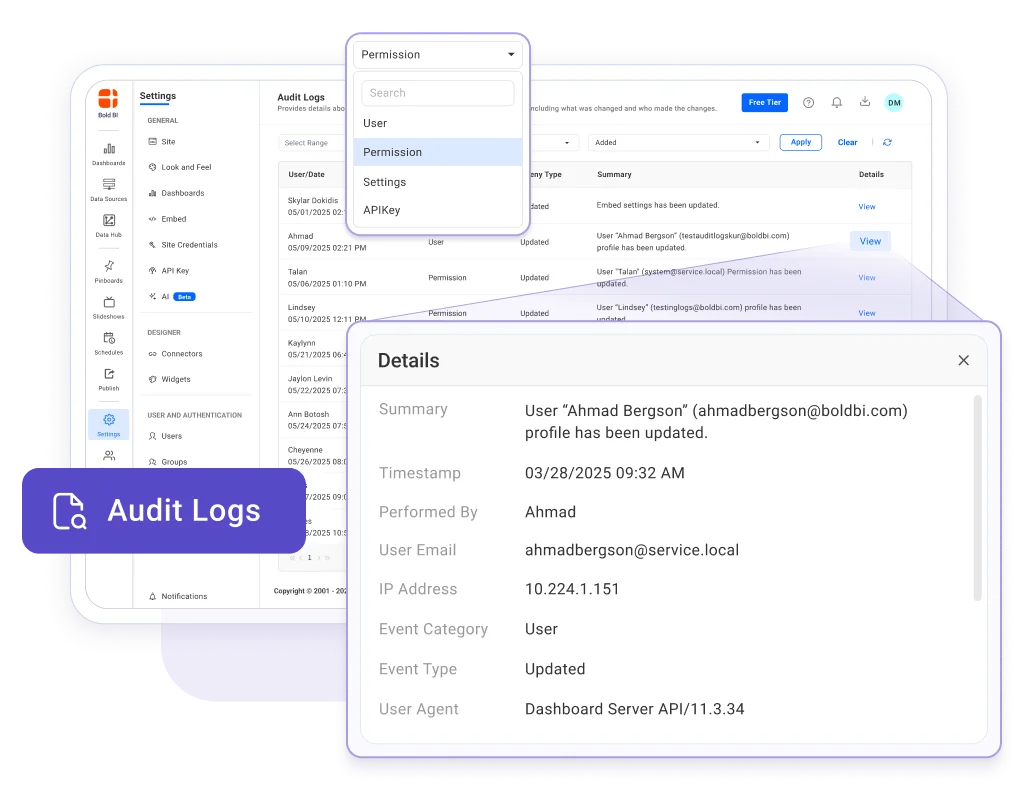
Bold BI’s Audit Logs feature helps administrators monitor user actions and system changes within a tenant while improving accountability across analytics environments.
Key capabilities include:
- Track user activity and system changes by maintaining a chronological record of actions performed within a tenant.
- Monitor who performed an action and when it occurred, helping teams improve transparency and accountability.
- Review detailed audit records that include the user, date and time, event category, event type, activity summary, and additional information related to the action.
- Filter audit logs by date range to quickly investigate activity during a specific period.
- Narrow results using event category filters, including user, permissions, and settings events.
- Filter by event type, such as added, updated, and deleted, to locate specific changes more efficiently.
- View detailed change information for individual audit entries to better understand what was modified and by whom.
- Support governance, security monitoring, troubleshooting, and compliance initiatives through centralized visibility into tenant-level activity.
To better understand how Audit Logs help administrators investigate issues and maintain governance, consider the following example:
Example: Investigating an Issue
Suppose an administrator notices unexpected behavior within the analytics environment. They can review audit logs, filter records by date range, examine User, Permissions, or Settings events, and identify recent changes. This helps teams determine whether an administrative action or configuration change may have contributed to the issue. For detailed instructions on accessing and reviewing audit logs, refer to the Bold BI Audit Logs article: “How to Get User Audit Logs in a Bold BI Tenant to Monitor User Actions and Changes Within the System.”
Audit logging capabilities are available directly within the Bold BI platform, allowing administrators to review and filter audit records without relying solely on external governance solutions. Activity records can also be exported for further review and reporting, helping organizations strengthen oversight while simplifying governance workflows.
By providing a clear history of user actions, permission updates, and settings changes, Bold BI Audit Logs help organizations strengthen accountability and improve operational oversight.
Extending Audit Trail Visibility Through Integrations
Many organizations rely on centralized monitoring, security, and governance platforms to manage activity across multiple systems. Integrating Audit trail data into these broader operational workflows helps accelerate investigations and strengthen governance processes.
Bold BI Audit trail supports API-based access, REST APIs, webhooks, and log export capabilities, enabling organizations to connect audit records with existing monitoring and security ecosystems. Audit logs can be exported or integrated with SIEM platforms such as Splunk, Microsoft Sentinel, AWS CloudWatch, and other monitoring solutions, depending on organizational implementation requirements.
These integration capabilities help organizations consolidate activity records, automate monitoring workflows, support long-term retention requirements, and improve operational oversight across distributed analytics environments.
Are Built-In Audit Trails Always Enough?
Built-in Audit trails are sufficient for many organizations seeking visibility into user activity, permission updates, administrative actions, and tenant-level events. However, organizations with highly complex compliance requirements, enterprise-wide governance programs, or long-term archival needs may choose to complement Audit trails with dedicated governance platforms.
For many embedded analytics use cases, built-in Audit trails provide the visibility organizations need without introducing additional tools, integrations, or governance complexity.
Auditing AI-Assisted and Agent-Driven Analytics
As organizations increasingly adopt AI-assisted analytics, automation, and agent-driven workflows, accountability matters more than ever. As organizations adopt AI copilots and AI agents to generate dashboards, configure analytics resources, and recommend actions, they need visibility into the resulting changes.
Audit trails help maintain traceability by recording user-initiated and system-level activities associated with analytics operations, supporting transparency and governance in AI-assisted environments.
AI can help accelerate decision-making, automate routine tasks, and streamline analytics processes. However, organizations still need visibility into the user actions, permission updates, and system changes that occur within analytics environments.
Audit trails provide the traceability needed to understand what changed, when it changed, and who initiated the action. This helps teams investigate unexpected outcomes, support governance requirements, and maintain accountability across analytics operations.
As AI-assisted capabilities continue to evolve, Audit trails remain an important foundation for transparency, operational oversight, and responsible analytics governance.
The Future of Analytics Governance
As analytics ecosystems become more distributed and AI-driven, organizations will require stronger governance processes, centralized monitoring, and reliable activity records to support operational oversight and compliance initiatives.
Audit trails will continue to play an important role by helping organizations maintain historical activity records that support governance reviews and regulatory frameworks such as GDPR, SOC 2, HIPAA, and ISO 27001.
Conclusion
An embedded analytics Audit trail helps organizations maintain governance across modern analytics environments. Many organizations can achieve the control they need using built-in Audit trail capabilities without immediately requiring a separate governance platform. Built-in Audit trails help monitor user actions, system changes, administrative events, and compliance-related activities while improving operational oversight.
As analytics expands across embedded applications, SaaS platforms, multi-tenant environments, AI-powered workflows, and governed data ecosystems, activity monitoring becomes essential for maintaining trust and control. By tracking user activity, permission changes, administrative actions, and system events, Audit trails strengthen security and support scalable analytics governance across embedded environments.
Ready to gain deeper visibility into your analytics environment?
Start a free 30-day trial or request a personalized demo to see how Bold BI® helps organizations monitor user activity, track system changes, and strengthen analytics governance through comprehensive Audit trail capabilities.
Frequently Asked Questions
- 1.
What is an audit trail in Bold BI, and how does it help?
An Audit trail is a secure record of user actions, system changes, and permission updates within Bold BI. It improves visibility, accountability, governance, and compliance by tracking who performed an action, when it occurred, and what changed.
- 2.
How do audit trails support analytics governance?
Audit trails provide visibility into user activities, system changes, and administrative actions, helping organizations maintain accountability, governance, and operational oversight.
- 3.
Can audit trails help with compliance and internal audits?
Yes. Audit trails maintain historical records of user and system activities, making it easier to support compliance requirements and internal audit reviews.
- 4.
What should organizations look for in an embedded analytics audit trail?
Organizations should look for activity tracking, administrative event logging, searchable records, filtering capabilities, data export options, and monitoring integrations.
- 5.
How can audit trail data be integrated with monitoring systems?
Audit trail data can be connected to monitoring and security tools through APIs or log exports, enabling alerts and incident investigation.
- 6.
Why are audit trails important in multi-tenant SaaS applications?
Audit trails help track tenant-specific activities, support compliance, investigate issues, and maintain accountability across shared SaaS environments.