How JWT Authentication Enables Seamless Dashboard Embedding

 8 min read
TL;DR: Embedding dashboards directly into SaaS applications, customer portals, and business platforms helps users access insights without leaving their workflows. However, providing seamless access while maintaining security can be challenging. JWT authentication helps organizations securely authenticate users, support single sign-on (SSO), and deliver embedded dashboards without requiring separate login experiences, creating a more secure and user-friendly analytics environment.
Introduction
Organizations increasingly embed dashboards into SaaS applications, customer portals, and business platforms to deliver analytics within existing user workflows. As embedded analytics adoption grows, providing secure access without disrupting the user experience becomes a critical requirement. Users expect to sign in once and access all application features, including embedded dashboards, without additional login prompts. At the same time, organizations must ensure that only authorized users can access analytics content.
JWT (JSON Web Token) authentication helps address this challenge by securely passing authenticated user information between applications and embedded dashboard environments. This enables seamless Single Sign-On (SSO), reduces login friction, and supports secure dashboard access across modern embedded analytics deployments.
What Is JWT Authentication?
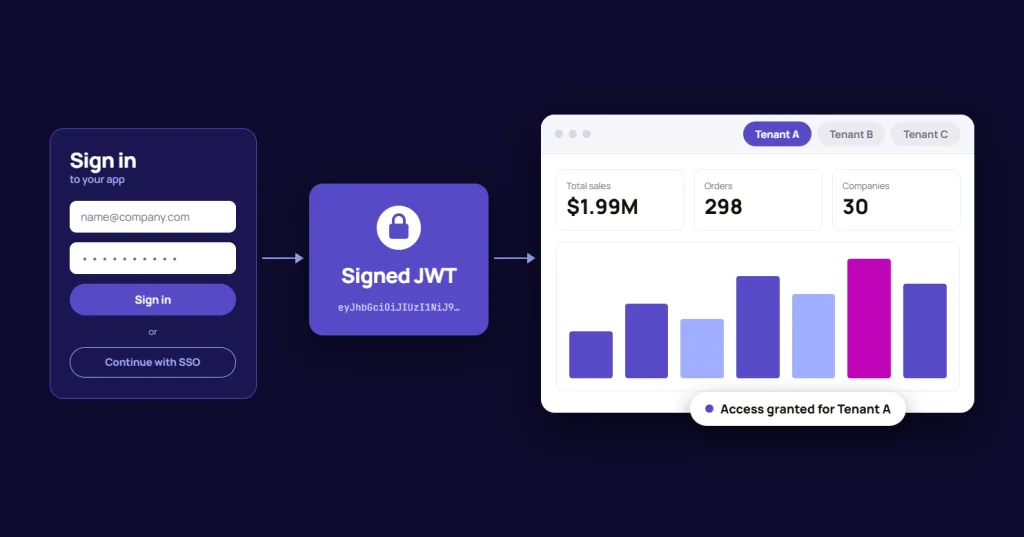
JWT (JSON Web Token) is an open standard for securely transmitting authenticated user information between systems. In embedded dashboard environments, applications generate signed tokens that allow dashboards to verify user identities without requiring a separate login.
Because the token is digitally signed, the receiving system can validate its authenticity before granting access. This makes JWT authentication a practical approach for enabling secure Single Sign-On (SSO) and seamless dashboard access within SaaS applications, customer portals, and other embedded analytics environments.
How JWT Authentication Simplifies Dashboard Embedding
As organizations embed dashboards into customer portals, SaaS applications, and business platforms, authentication plays a critical role in delivering a secure and seamless user experience. JWT authentication helps simplify dashboard embedding by enabling trusted access between applications and analytics environments.
JWT authentication helps organizations:
- Enable Single Sign-On (SSO): Allow users to access embedded dashboards using their existing application credentials without requiring separate logins.
- Improve User Experience: Create a seamless dashboard experience by reducing authentication friction and minimizing interruptions during user workflows.
- Establish Trusted Authentication: Securely transfer authenticated user information between applications and embedded dashboards using signed JWT tokens.
- Simplify Integration: Connect embedded dashboards with existing authentication systems without requiring users to manage multiple sets of credentials.
- Support Secure Access Management: Validate user authentication before granting access to embedded dashboards and analytics resources.
By simplifying authentication and reducing login friction, JWT authentication helps organizations deliver embedded dashboard experiences that are both secure and user-friendly.
When Should You Use JWT Authentication?
JWT authentication is most valuable when embedded dashboards need to feel like a seamless part of your application rather than a separate analytics platform. By allowing applications to securely pass authenticated user information, JWT helps simplify access while maintaining security.
Organizations commonly use JWT authentication for:
- Customer portals that provide personalized analytics
- SaaS applications with embedded dashboards
- Multi-tenant environments that require user-specific data access
- Partner portals that share analytics with external stakeholders
- Customer-facing dashboards that require secure single sign-on experiences
In these scenarios, JWT authentication helps reduce login friction while ensuring users can securely access the data and dashboards relevant to them.
JWT Authentication vs Traditional Login Workflows
Organizations embedding analytics into customer-facing applications often need to balance security and user experience. While traditional login workflows may require users to authenticate separately for analytics access, JWT authentication enables a more seamless experience by securely transferring authentication information between systems.
| Area | Traditional Login Workflow | JWT Authentication |
|---|---|---|
| User Experience | Users may need to log in separately to access analytics | Provides a seamless single sign-on experience |
| Dashboard Access | Additional authentication steps may be required | Users can access dashboards directly from the application |
| Embedded Analytics | Can introduce friction into the user journey | Helps create a more integrated experience |
| Session Management | Authentication is handled across multiple systems | Authentication information is securely passed through signed tokens |
| Scalability | May require additional configuration for embedded scenarios | Well suited for SaaS applications and multi-tenant environments |
For organizations embedding analytics into customer portals, SaaS applications, partner portals, or other customer-facing solutions, JWT authentication helps streamline access while maintaining secure control over user permissions and dashboard visibility.
How Bold BI Supports JWT Authentication for Embedded Dashboards
Bold BI® helps organizations implement JWT authentication for embedded dashboards by providing the capabilities below. JWT-based SSO is available in self-hosted deployments (Managed Private Cloud and On-Premises); Cloud Edition does not support SSO.
- JWT-Based Authentication: Authenticate users through signed JWT tokens and securely deliver embedded dashboards within SaaS applications, customer portals, and multi-tenant environments.
- Single Sign-On (SSO): Allow users to access embedded dashboards using existing application credentials without requiring separate analytics logins.
- Secure Dashboard Access: Validate authenticated user information before granting access to dashboards and analytics content.
- Embedded Analytics Integration: Embed dashboards directly into applications while maintaining a seamless user experience across authentication workflows.
- Support for Multi-Tenant Environments: In Managed Private Cloud and On-Premises deployments, combine JWT authentication with access controls to help ensure users only access the dashboards and data relevant to them.
- Security Controls for Authentication Workflows: Strengthen authentication security through token validation, encryption options, and secure callback workflows.
By combining JWT authentication with embedded analytics, organizations can simplify dashboard access, reduce login friction, and support secure customer-facing analytics deployments.
How JWT Authentication Works in Embedded Dashboards
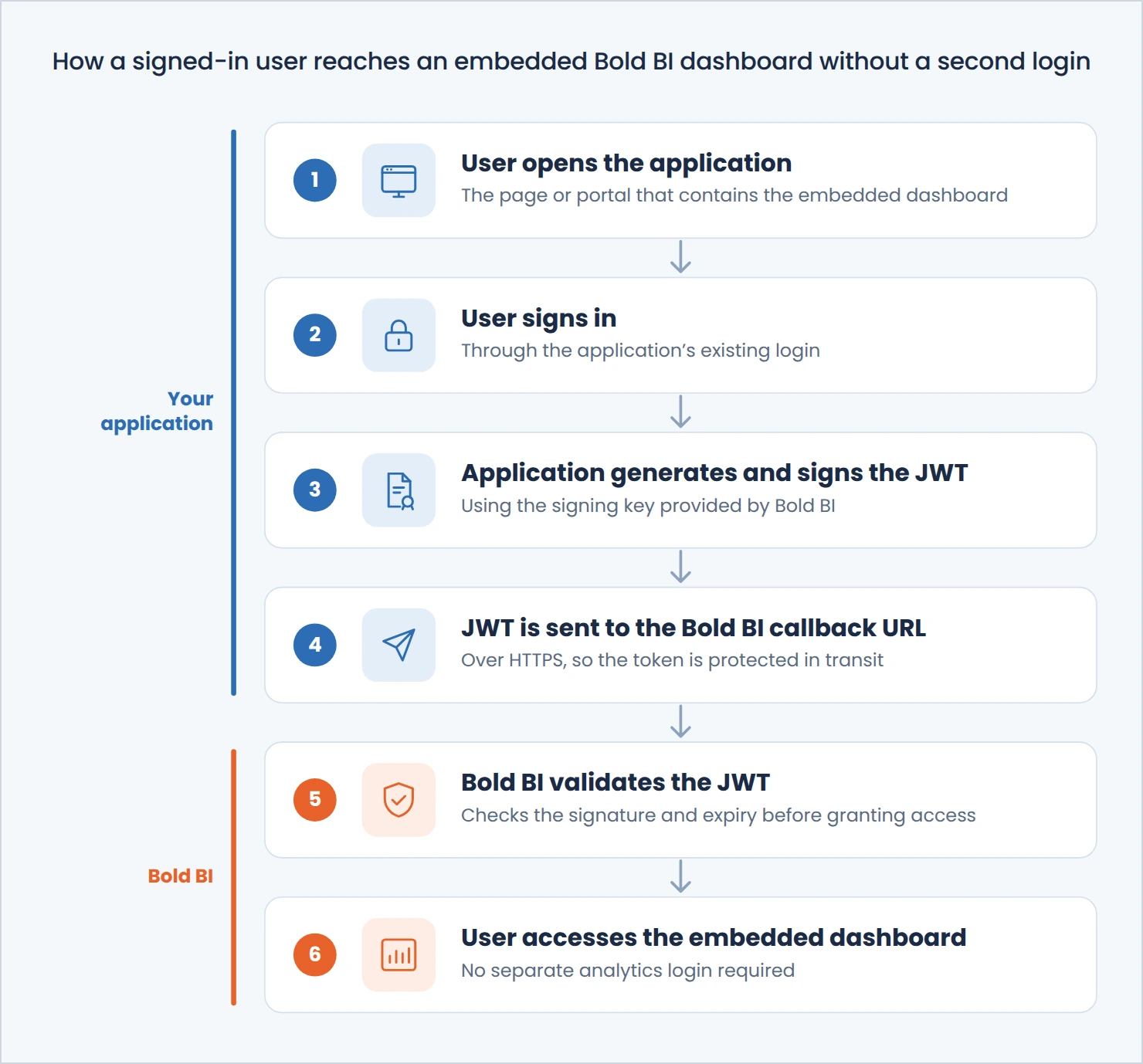
JWT authentication enables organizations to provide secure Single Sign-On (SSO) access to embedded dashboards without requiring users to maintain separate analytics credentials. In Bold BI, the authentication workflow helps establish a trusted connection between the host application and the embedded dashboard environment. The following workflow illustrates how authenticated user information flows between the host application, JWT authentication layer, Bold BI, and the embedded dashboard environment.
How to Implement JWT Authentication in Bold BI
After understanding how JWT authentication works, organizations can configure JWT authentication in Bold BI to provide secure, seamless access to embedded dashboards. JWT authentication is configured in self-hosted deployments (Managed Private Cloud and On-Premises).
Step 1: Configure JWT Authentication
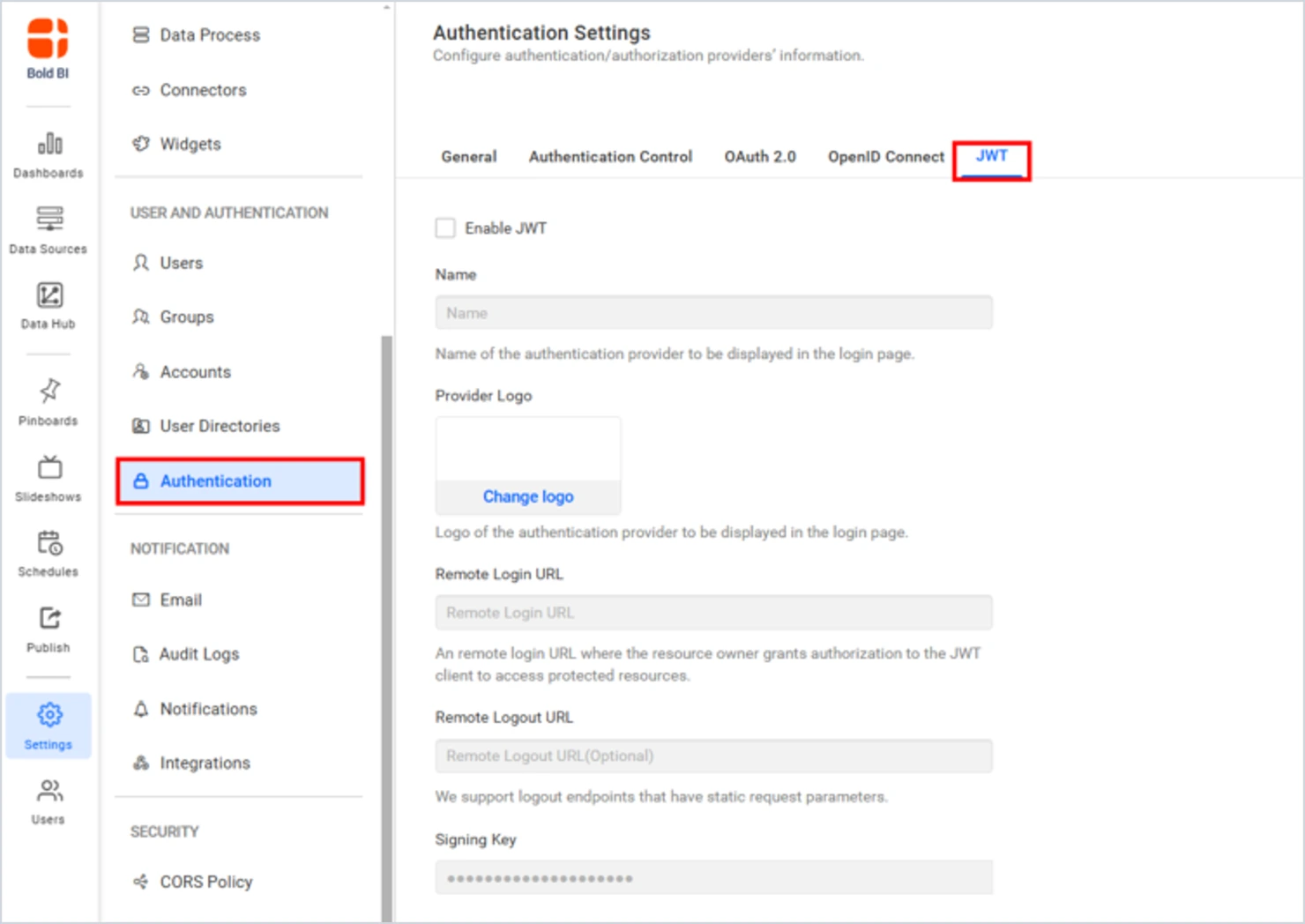
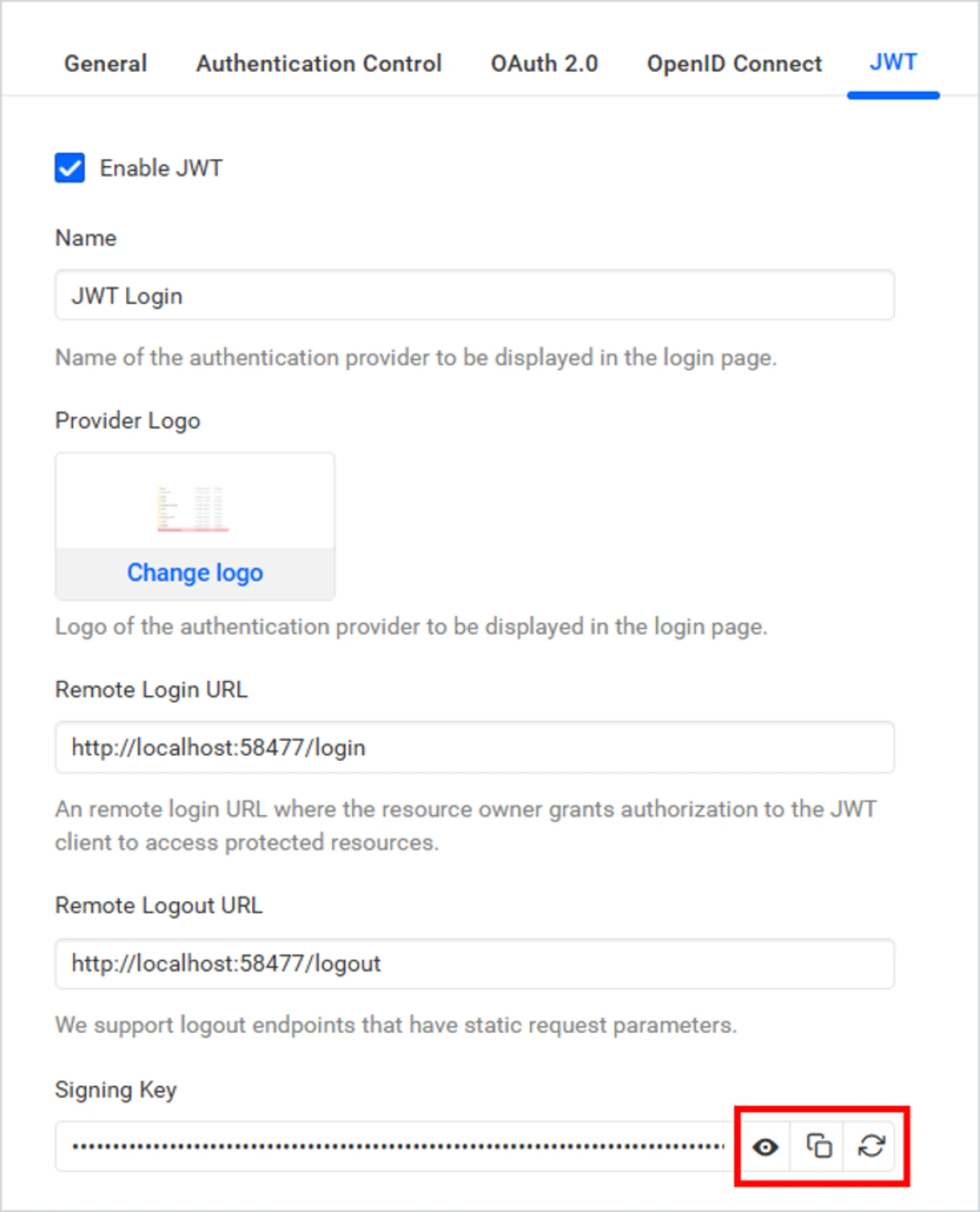
In the Bold BI Dashboard Designer, navigate to the JWT authentication settings and configure the required provider details, including the remote login URL and logout URL used during authentication. The remote login URL is used to redirect users to the application’s login page when authentication is required, helping establish secure communication between the application and embedded dashboards.
Step 2: Generate and Secure the JWT Credentials
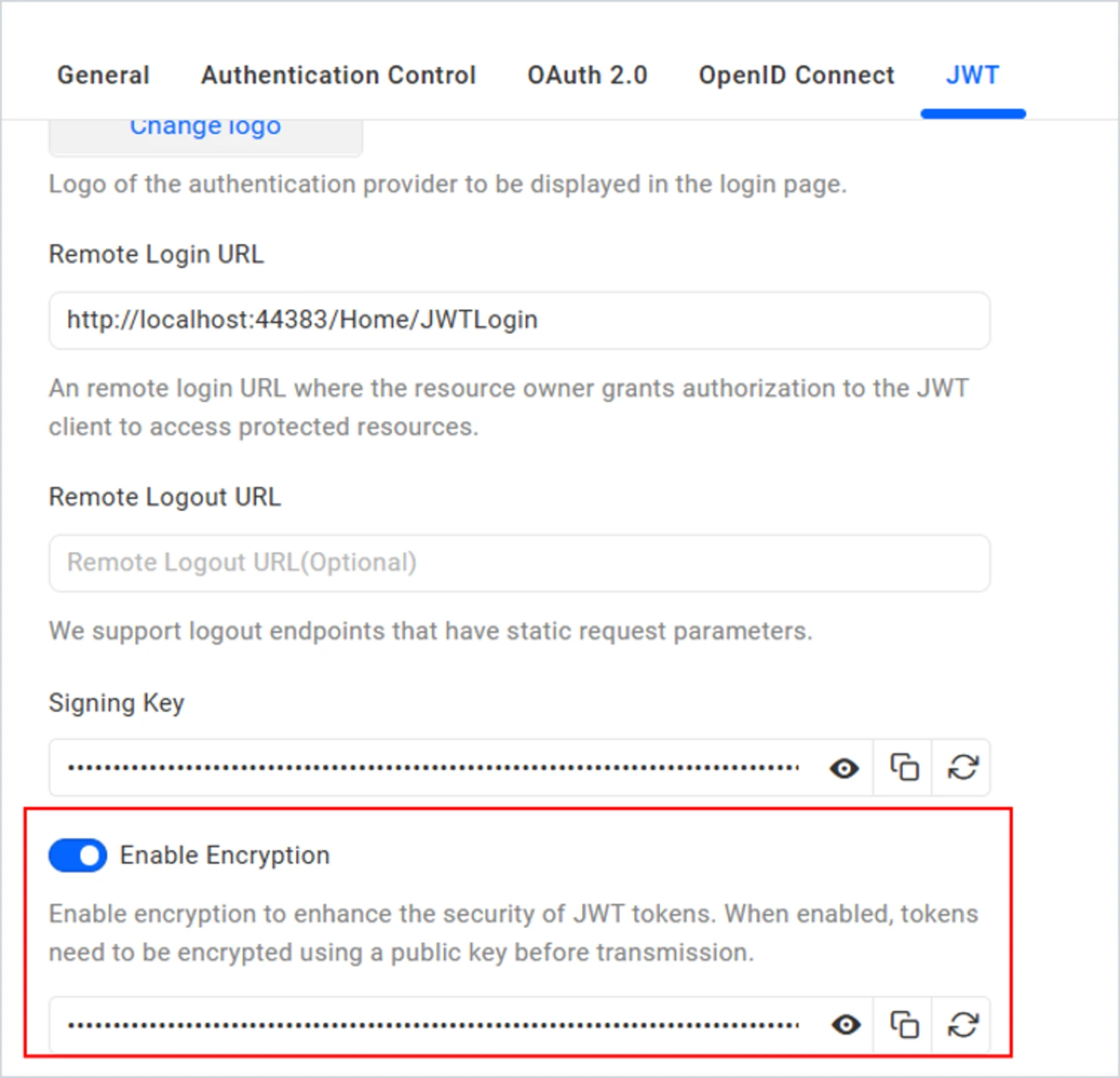
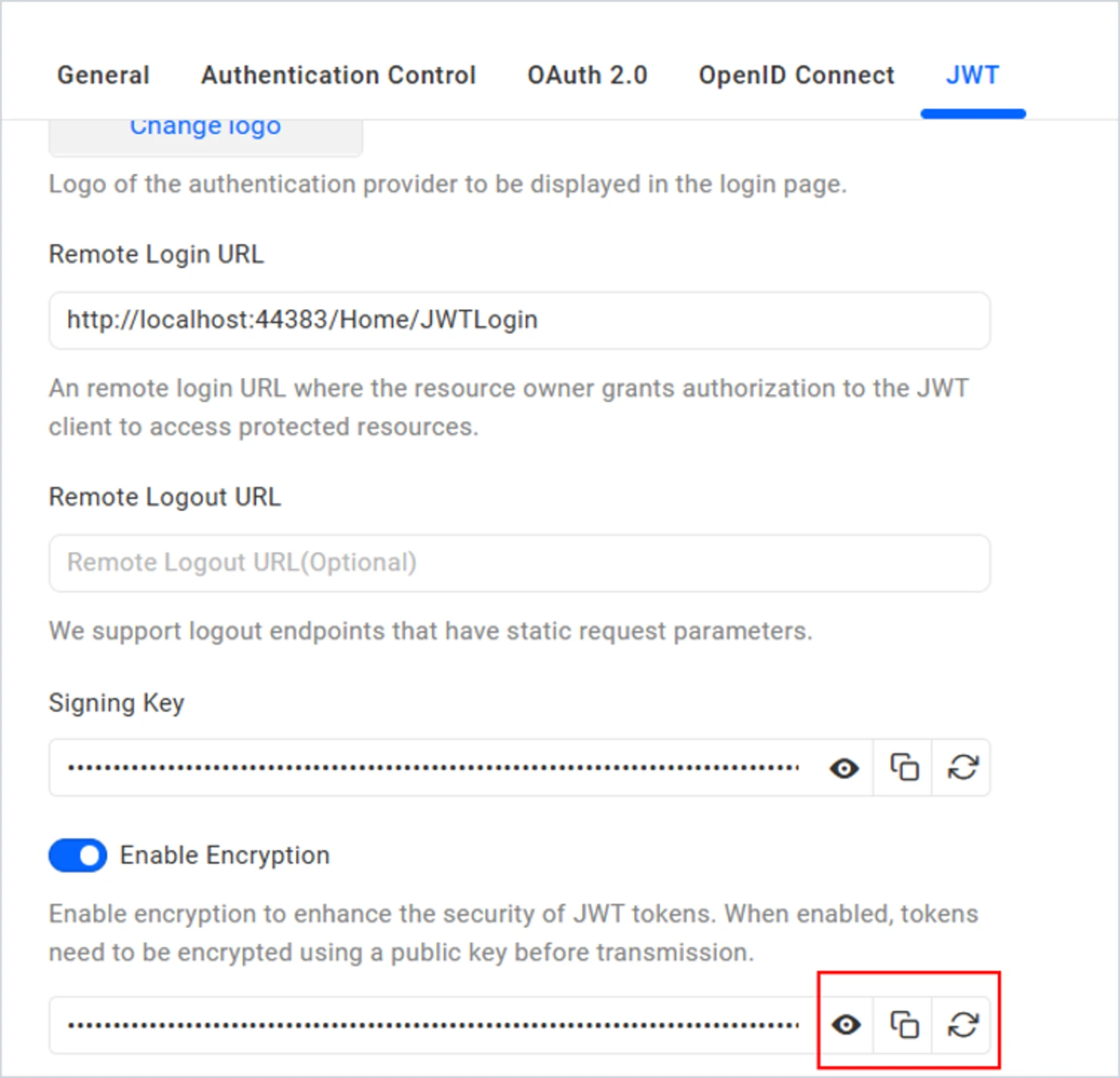
After the JWT configuration is saved, Bold BI generates a signing key that applications use when creating JWT tokens. Organizations can also enable JWT encryption to add an extra layer of protection for authentication data.
Step 3: Authenticate the User
When a user attempts to access an embedded dashboard, authentication occurs through the organization’s existing application. This allows businesses to maintain a familiar login experience while supporting seamless access to analytics resources.
Step 4: Validate the Authentication Request
Once authentication is completed, the application passes the JWT token through the configured callback flow. Bold BI then validates the JWT response before granting access to dashboards and analytics content.
Step 5: Enable Secure Access Across Environments
By default, Bold BI uses secure HTTP methods for JWT authentication. Organizations that require legacy workflows can configure request handling settings, helping ensure authentication aligns with their deployment requirements.
Step 6: Access Embedded Dashboards
After the JWT response is validated, users can access embedded dashboards without completing a separate login process. This creates a seamless analytics experience while maintaining secure authentication across systems.
By combining JWT-based Single Sign-On with embedded dashboards, organizations can simplify user access, reduce login friction, and deliver a more integrated analytics experience within their applications.
Want to implement JWT authentication in your application? Explore the Bold BI JWT Authentication documentation.
Authentication Considerations for JWT-Based Dashboard Embedding
Implementing JWT authentication for embedded dashboards requires careful planning to ensure secure, reliable, and seamless access across applications and analytics environments. While JWT simplifies authentication and supports single sign-on experiences, organizations should follow several best practices during implementation.
- Use Secure Signing Keys: JWT tokens should be signed using a trusted signing key to help verify the authenticity of authentication requests. Protecting signing keys is essential for maintaining a secure authentication workflow.
- Configure Appropriate Token Expiration: Setting reasonable token expiration periods helps reduce security risks while ensuring users can access dashboards without unnecessary interruptions.
- Consider Token Encryption When Needed: For environments with additional security requirements, JWT encryption can provide an extra layer of protection for authentication data contained within token payloads.
- Validate Authentication Requests: Authentication requests should be validated before granting access to embedded dashboards. Proper validation helps ensure that only authorized users can view analytics content.
- Use Secure Transport Methods: JWT tokens should always be transmitted over HTTPS to help protect sensitive authentication information during transit. When available, secure request methods such as HTTP POST can help reduce exposure risks compared to passing tokens through URLs.
- Manage User Access Carefully: User identities, roles, and permissions should be aligned with organizational access policies to ensure users can only view the dashboards and data relevant to them.
By following these practices, organizations can build a secure and scalable JWT authentication framework that helps protect embedded analytics environments while delivering a seamless user experience.
Conclusion
Embedded dashboards have become a key component of modern SaaS applications, customer portals, and digital business platforms. However, delivering dashboards securely without creating login friction remains a significant challenge.
JWT authentication helps organizations simplify dashboard access by securely sharing authenticated user identity information between systems. This enables seamless single sign-on experiences, improves security, and reduces authentication complexity.
For businesses looking to provide secure and user-friendly embedded dashboard experiences, JWT authentication offers an effective foundation for modern authentication workflows. By combining secure authentication with embedded analytics, organizations can improve user adoption, reduce login friction, and deliver a more connected analytics experience.
Looking to implement secure JWT authentication for embedded dashboards?
Start a free trial or schedule a personalized demo to see how Bold BI® helps organizations deliver secure, seamless access to embedded analytics through JWT-based authentication and Single Sign-On.
Frequently Asked Questions
- 1.
What is JWT authentication?
JWT authentication uses digitally signed tokens to securely transmit authenticated user information between systems.
- 2.
Why is JWT authentication useful for embedded dashboards?
JWT authentication allows users to access embedded dashboards without repeated login prompts while maintaining secure identity verification.
- 3.
Does JWT authentication support single sign-on?
Yes. JWT authentication is commonly used to provide seamless single sign-on experiences across connected applications.
- 4.
Is JWT authentication secure?
When implemented with token validation, HTTPS, secure key management, and expiration controls, JWT authentication provides a secure authentication framework.
- 5.
Can JWT authentication be used in SaaS applications?
Yes. JWT authentication is widely used in SaaS applications to provide secure user authentication and improve user experiences across integrated systems.
- 6.
How does Bold BI support JWT authentication?
Bold BI supports JWT-based authentication, enabling organizations to authenticate users and provide seamless access to embedded dashboards and analytics experiences. JWT-based SSO is available in self-hosted deployments (Managed Private Cloud and On-Premises); Cloud Edition does not support SSO.