
Semantic Layers for AI Governance: Building Secure Analytics
TL;DR: Many AI analytics errors are semantic rather than hallucinations. The model picks the wrong metric definition, joins at the wrong grain, or reads rows the user may not see. A semantic layer guards against all three, but only if its definitions and security rules follow your data into every dashboard, tenant, and AI answer.
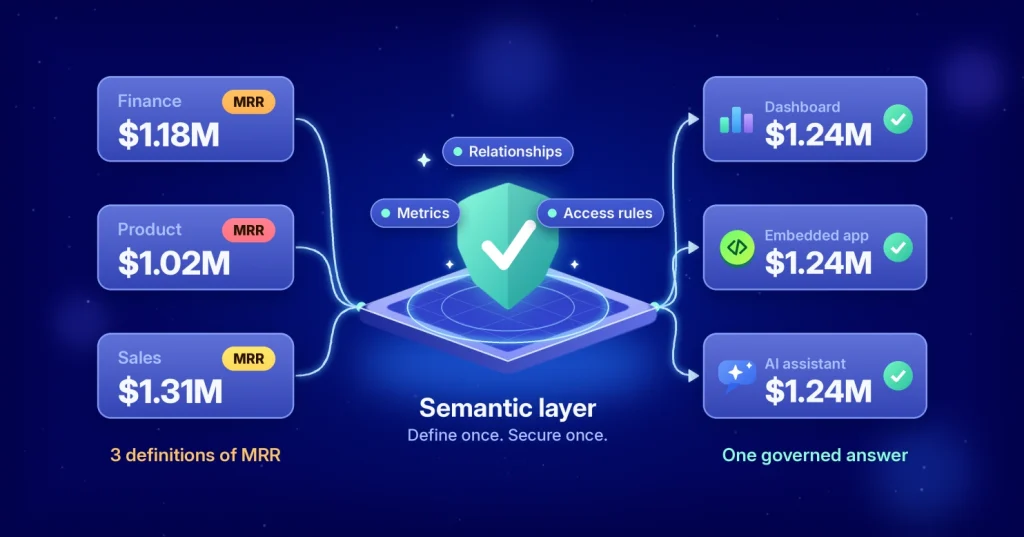
Ask an AI assistant for last quarter’s MRR, and you get a number in seconds. Without a semantic layer, the harder question is which MRR. Finance divides annual contracts into twelve. The product team excludes free trials. Sales counts discounted deals at list price.
That’s already three dashboards with three answers. Now an AI adds a fourth, delivered with total confidence and no formula to inspect. A dashboard with a bad metric misleads the people who open it. An AI assistant with a bad metric misleads everyone who asks. Governed AI is not a model feature. It’s a property of your architecture, and the semantic layer is where it lives.
What a semantic layer does for AI
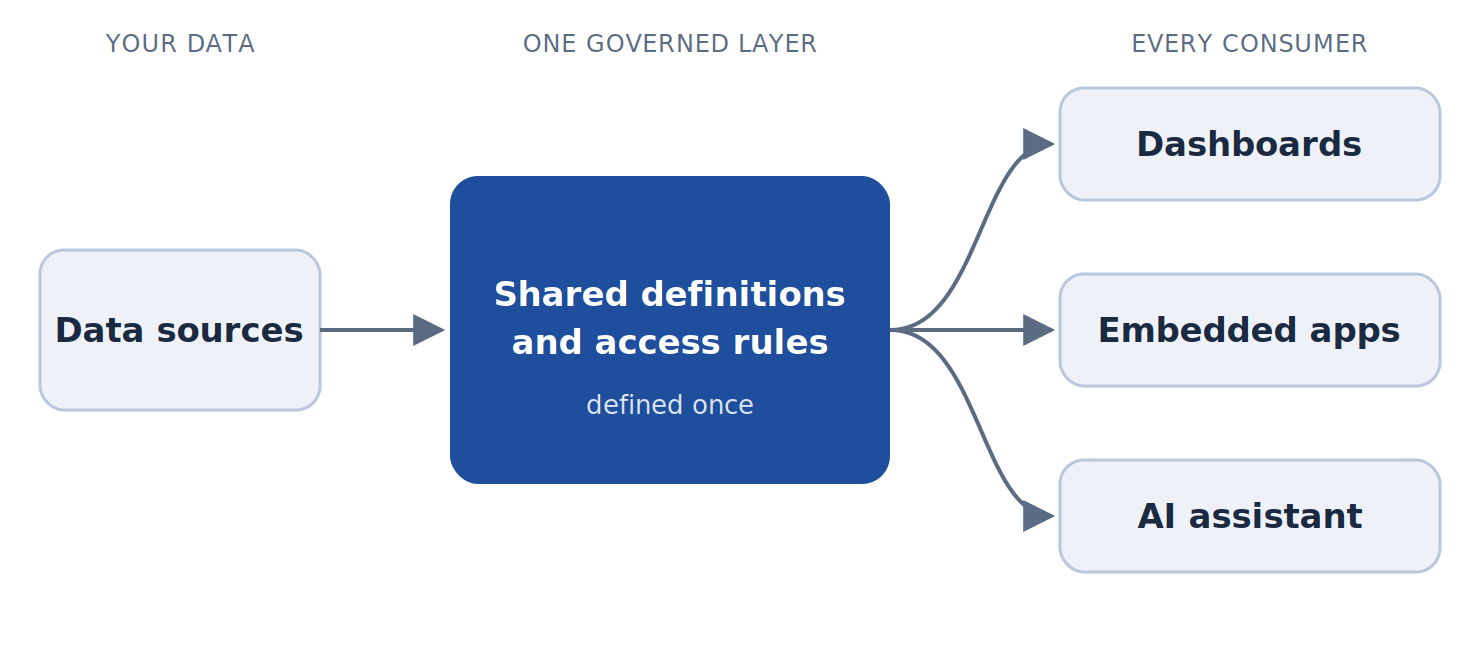
A semantic layer is the governed translation between raw data and everything that uses it. It defines metrics, relationships, and access rules once. Dashboards, embedded apps, and AI assistants then answer the same question with the same answer.
Your warehouse stores data. Your dashboards display it. The semantic layer decides what it means and who may see it.
Three ways AI fails without one
- Wrong definition: The model finds three columns that look like revenue and picks one. The answer is plausible, nicely formatted, and wrong.
- Wrong grain: It joins orders to order lines and adds a header-level discount once per line. Totals inflate quietly, with no error message.
- Wrong access: This is the failure teams underestimate. If an agent queries as a service account instead of as the person asking, it can see everything that account can see.
On any platform, an agent must act as the user. Otherwise your rules stop at the agent’s door.
What a semantic layer contains
Each part involves a decision with a trade-off.
- Metric definitions: Monthly recurring revenue (MRR), the predictable subscription revenue expected each month from active subscriptions, along with churn and active users, written once. Decide who can change them. Locking them to the data team protects consistency. It also slows analysts, so good setups allow clearly labeled local calculations.
- Relationships and grain: How tables join and at what level a metric is valid. This stops the discount double-count. The cost is an upfront modeling effort.
- Business context: Names, descriptions, and synonyms. These are now the instructions an AI reads to decide which field answers “How many customers did we lose?”
- Access rules: Row-level and column-level security, plus tenant isolation. Put them in the layer, not in individual dashboards. Otherwise, every new dashboard and AI surface is another place to forget them.
Where it can live
| Pattern | Best for | Advantage | Trade-off |
| Inside your BI platform | One platform serves dashboards, embedding, and AI | Definitions, security, and AI governed together | Hard to reuse from other tools |
| In your warehouse | Teams standardized around one warehouse | Logic sits next to the data | Tied to that warehouse; user-level security still needed at the app |
| Universal or headless layer | Many tools consuming the same metrics | One definition for every consumer | Another system to run, secure, and keep in sync |
Many enterprises combine them: core logic in the warehouse or a tool such as dbt, with governance and tenant security in the BI layer. The real mistake is letting definitions drift with nobody owning them.
How to choose: If dashboards, embedding, and AI primarily run through one BI platform, managing governance there is often the simplest approach. If multiple tools must share the same metric definitions, keep core business logic in the warehouse or a universal semantic layer and apply platform-specific security where data is consumed. The best choice depends less on technology and more on how many systems need to share the same governed definitions.
What Bold BI covers, and what it doesn’t
Bold BI® governs metric definitions, row-level security, and AI access inside its own platform, so every dashboard, embedded app, and AI answer built on it inherits the same rules. That governance lives inside the Bold BI platform. If several other tools must share the same metric definitions, keep the core logic in your warehouse or a universal layer, and let Bold BI add access rules and AI governance on top.
Inside the platform, three things carry the weight:
- Shared vs. local definitions: Data source expressions are stored with the data source. Every dashboard built on it can use them, and only users who can edit that data source can change them. Dashboard expressions stay inside one dashboard. Put MRR in a data source expression, and every dashboard inherits one definition.
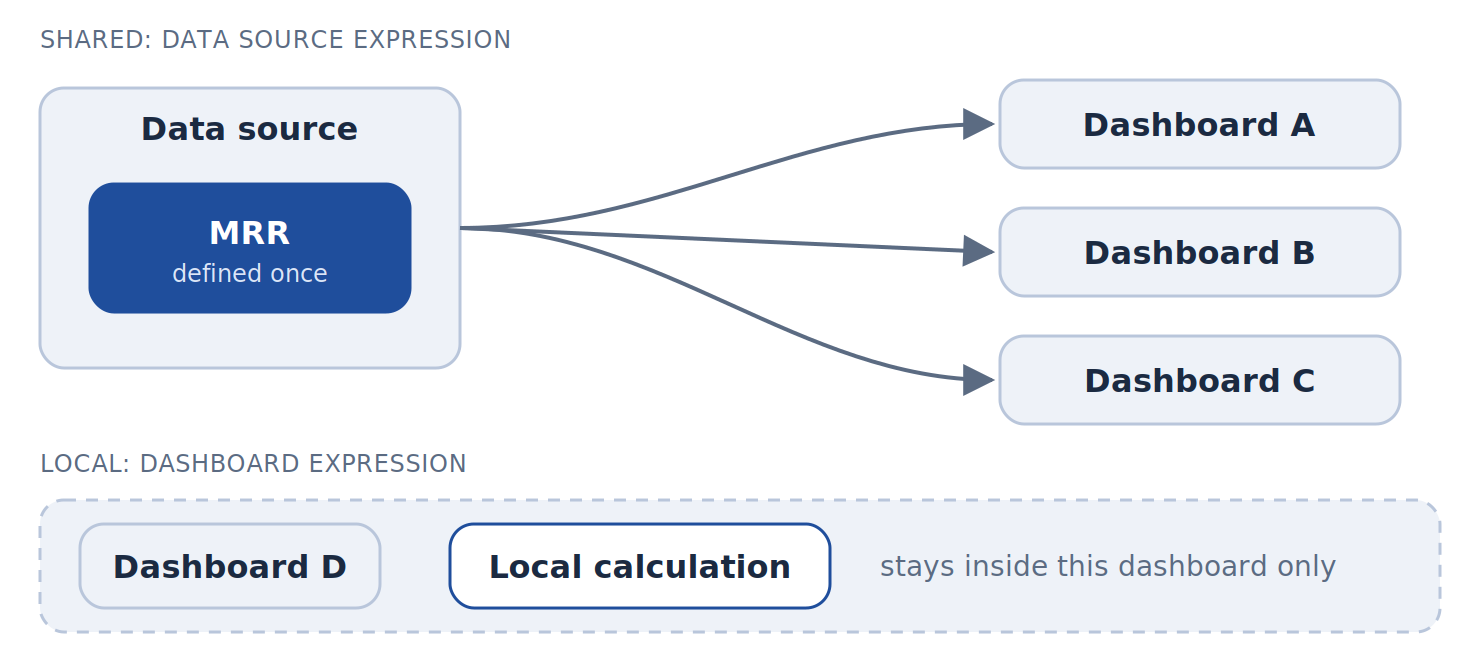
One MRR definition, stored once, inherited by every dashboard
- Security set outside the dashboard: Row-level security can use user filters, custom attributes at user, group or site level, or a site-level isolation code. For embedded dashboards, filters are passed server-side in the embed token, so the filter logic isn’t exposed to end users.
- AI that inherits the rules: Bold BI states that SSO and row-level security carry into embedded sessions of its AI Assistant. It embeds with a token generated on your server, and standalone embedding needs version 14.1 or later.
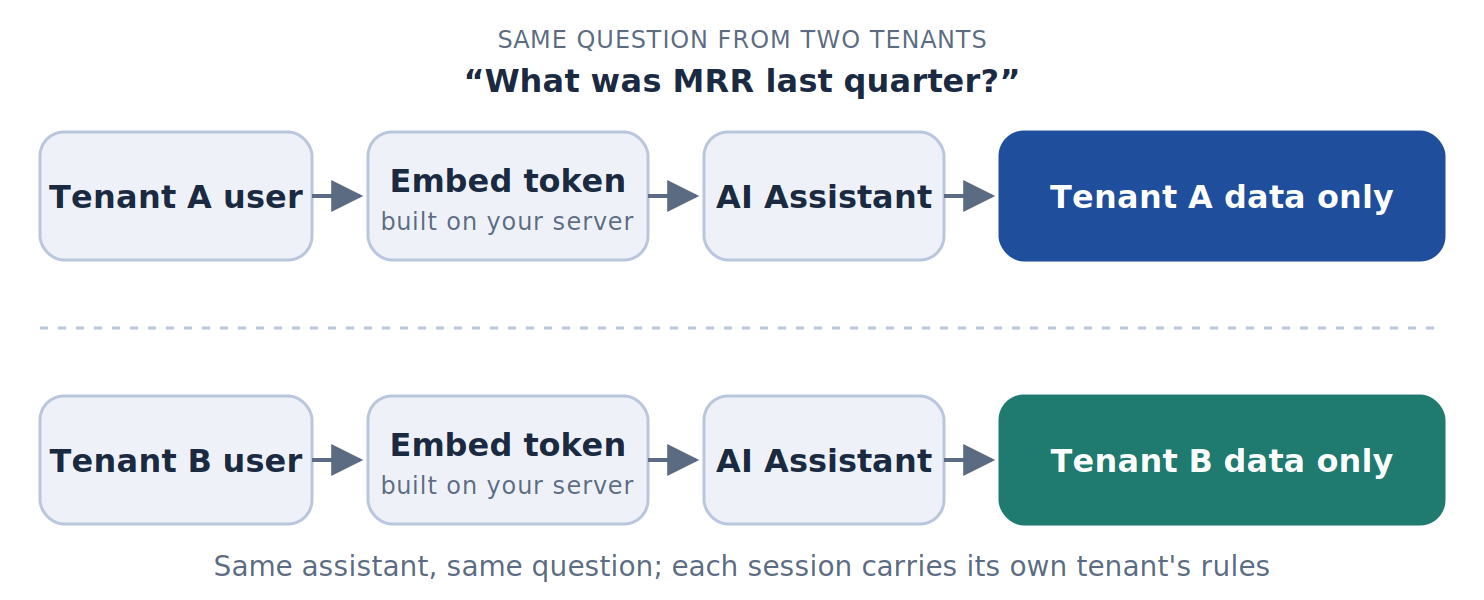
Same question, same model, each tenant sees only their own churn
Two limits to plan around:
- The AI Assistant queries one data source or one dashboard at a time, so design data sources around business domains such as billing or product usage.
- Bold BI’s hosted MCP Tool lets assistants such as Claude list dashboards, review permissions and export content, acting with the permissions of the API key they hold. Use a least-privilege account. Because it’s hosted, it isn’t an option inside a fully air-gapped network.
Rules that travel with your data
Governance has to hold across three boundaries.
- Across tenants. “Show me churn” must mean this customer’s churn, resolved from one shared model. Custom attributes can point one dashboard template at each tenant’s database, as long as the databases share a schema. See multitenancy in Bold BI.
- Across deployments. Bold BI runs as a cloud service, in a managed private cloud, or on your own servers, with the same features in each. The on-premises edition fits cases where policy keeps analytics inside your network. Check where the AI model runs and what data it receives.
- Across AI surfaces. The in-dashboard agent, the embedded assistant, and any external agent should all act as the user and resolve through the same rules.
How to implement a semantic layer
You don’t need to model everything first. Start with the metrics people argue about.
- List the ten metrics people ask about most, and note how many definitions each one has.
- Name an owner for each metric, and decide who can change it.
- Define each metric once, at the data source level, and retire the copies.
- Put row-level, column-level, and tenant rules in the same layer.
- Test with real users from two roles or tenants, then ask the AI the same questions.
- Review changes on a schedule, and retire definitions nobody uses.
In Bold BI, steps 3 and 4 map to data source expressions and the row-level security settings on the data source. The common mistakes are modeling everything up front, leaving metrics without an owner, and keeping local copies of shared definitions.
A five-question test for your stack
- If you change the definition of MRR today, how many places need updating?
- Can your AI assistant answer a question the user couldn’t answer through a dashboard?
- Does tenant isolation live in the model, or in each embedded dashboard?
- Can your layer and your AI run in a customer’s private environment with identical behavior?
- Can you see which AI questions were asked, by whom, against which data?
If any answer is “it depends,” start there. For a hands-on version of questions 1 and 2, the modeling guide shows how shared calculations and user filters are set up.
What AI governance looks like in practice
Take a hypothetical B2B SaaS company that embeds a subscription dashboard like Bold BI’s Subscription Management Dashboard in its product. Finance, product, and each customer track the same KPIs there: MRR by customer, subscription cancellation rate, active subscriptions, and earned vs. deferred revenue. Now each of them can also ask the AI Assistant about those numbers.
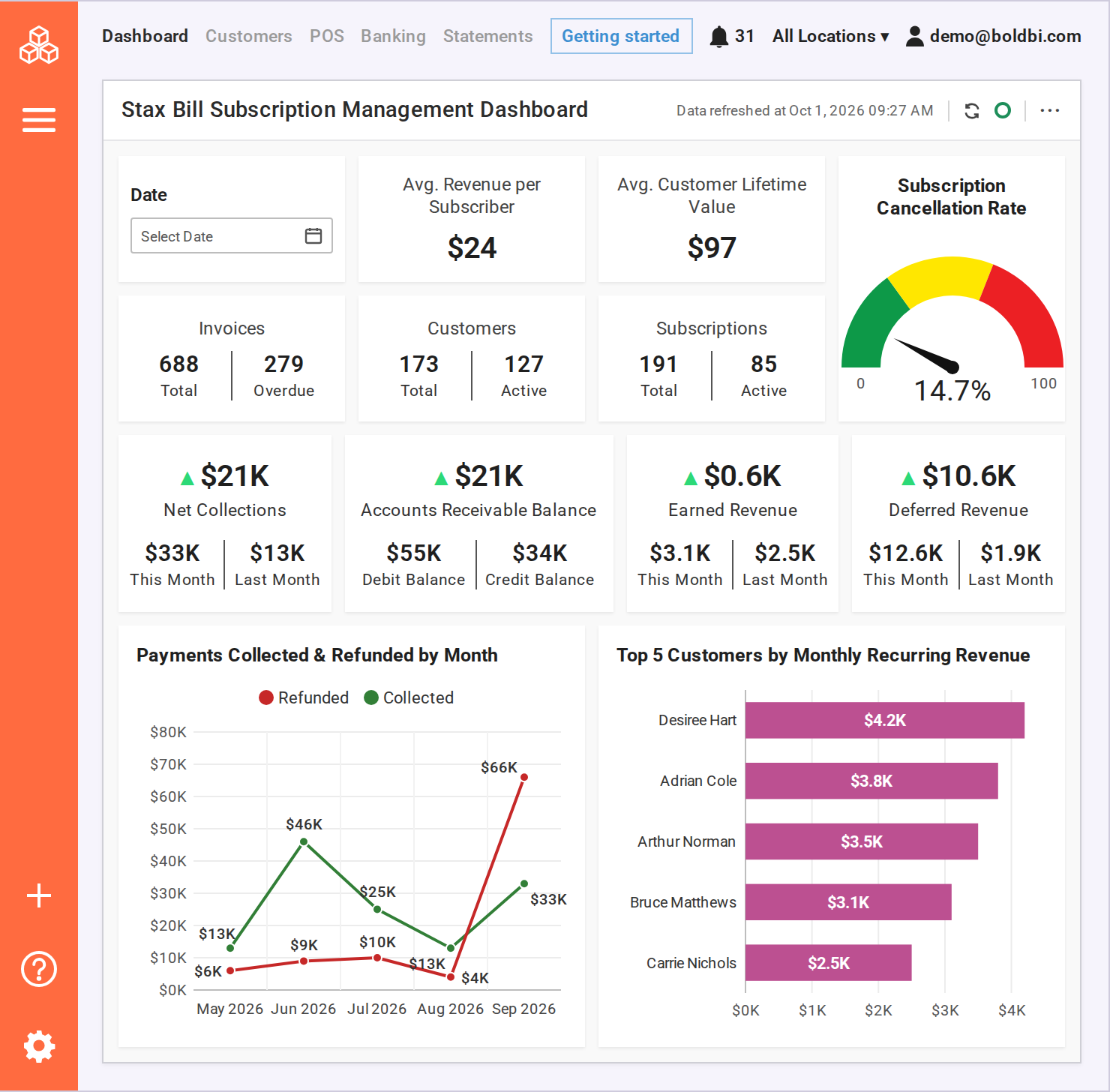
Here’s how governance keeps every answer consistent:
- One MRR definition: MRR lives once, as a data source expression. The Top 5 Customers by MRR chart, finance’s board report, and the AI Assistant all use the same formula, so “What was MRR last quarter?” gets one answer everywhere.
- Cancellations scoped to the right customer: A custom attribute in the embed token points each session to that customer’s own database. When a customer views the cancellation rate or asks the AI about cancellations, they see only their own subscriptions.
- Revenue views limited to the right roles: Row-level security can keep sensitive views, such as earned vs. deferred revenue or top customers by revenue, visible only to the roles that should see them. The embedded AI Assistant inherits the same SSO and row-level security, so its answers follow the same access rules as the dashboard.
The business result: teams spend less time debating whose MRR is right and can act sooner on pricing and retention. The company also applies one set of access rules to dashboards and AI answers, instead of maintaining separate ones.
Final Thoughts
Semantic layer decisions come down to one habit: define it once, secure it once, and let every dashboard and AI answer inherit both. Bold BI® helps organizations combine embedded analytics, enterprise governance, and multi-tenant analytics so the dashboards, embedded apps, and AI answers built on it follow the same definitions and access rules.
Ready to modernize your analytics strategy? Start a free trial to see how Bold BI helps organizations deliver governed, AI-ready analytics experiences. Test it on your own data: book a demo focused on data source modeling, row-level security and the embedded AI Assistant in the deployment you need.
Frequently Asked Questions
- 1.
Is a semantic layer the same as a data model?
No. A data model describes how tables relate. A semantic layer adds business definitions, context, and access rules, then serves them consistently to every tool and AI surface.
- 2.
Do I still need one if I use dbt?
Often yes. dbt can define metrics, but tenant isolation, per-user security and AI access controls are usually enforced where data is consumed.
- 3.
Can an AI assistant bypass row-level security?
It can if it authenticates as a service account or queries raw tables. Make every AI request carry the asking user’s identity and resolve through the same rules as dashboards.
- 4.
Does a semantic layer slow queries?
A well-modeled layer typically adds little overhead. Speed depends on query mode and data modeling: live queries follow the source system, while extracts are faster but only as fresh as the last refresh.