
AI Assistant for Business Intelligence: What It Is & Benefits
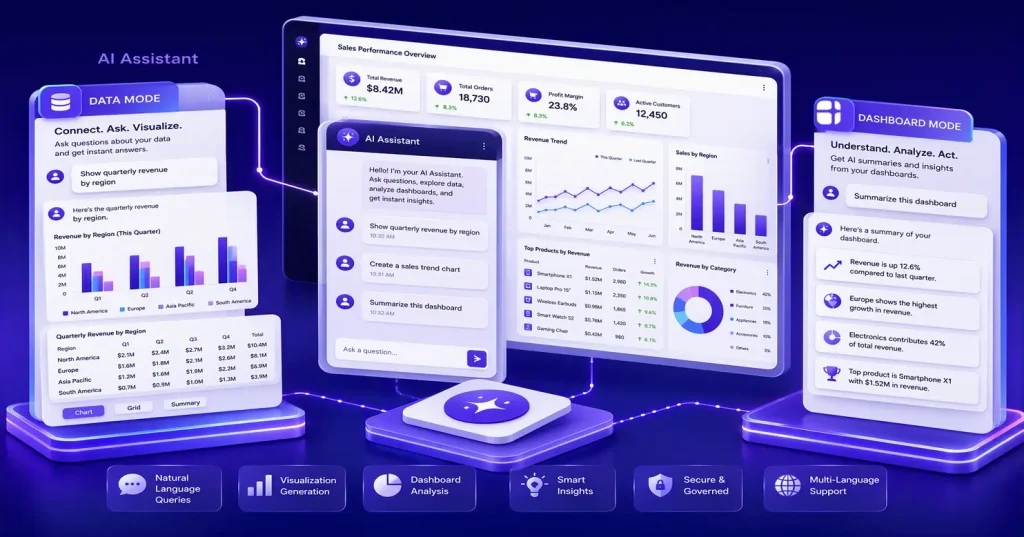
TL;DR: An AI assistant for business intelligence helps you explore data, create visualizations, and analyze dashboards using natural language. Solutions like Bold BI® AI Assistant make analytics more accessible by enabling you to ask questions, uncover insights, and interact with data through simple conversations.
Introduction
“How did sales perform last quarter?” In many organizations, answering a question like this isn’t as simple as it sounds. You may need to open multiple dashboards, apply filters, locate the right insights, or even request help from an analyst. The challenge is often not a lack of data, but the time required to turn that data into answers. When insights take longer to find, decisions can be delayed and opportunities may be missed.
As AI-powered tools become part of everyday workflows, you increasingly expect the same conversational experience from analytics platforms. Instead of navigating dashboards to search for insights, you want to ask questions naturally and receive answers instantly.
This shift has fueled the rise of the AI assistant for business intelligence, a new analytics experience that enables you to interact with data, generate visualizations, and uncover insights through natural language conversations.
That’s the idea behind Bold BI AI Assistant. It helps you explore data, create visualizations, analyze dashboards, and understand business performance through simple conversations. In this article, you’ll learn what an AI assistant for business intelligence is, why it matters, how it differs from AI agents and AI copilots, and how organizations use it to explore data, uncover insights, and make more informed decisions.
What is an AI Assistant for Business Intelligence?
An AI assistant for business intelligence helps you interact with data using natural language instead of relying on dashboards, filters, or manual queries. You can ask questions, explore metrics, create visualizations, analyze dashboards, and receive answers in the form of charts, summaries, explanations, or data tables.
By combining AI with analytics, AI assistants make it easier for both technical and non-technical users to uncover insights and make data-driven decisions. Rather than navigating multiple dashboards or learning complex analytics workflows, you can simply ask questions and receive relevant answers in seconds.
A variety of AI assistants are available today, each designed to simplify data exploration and analytics. One example is Bold BI AI Assistant, which combines conversational analytics, data exploration, and dashboard analysis into a single experience. It supports two modes:
- Data Mode: Query a selected data source and receive responses as charts, grids, tables, or written explanations.
- Dashboard Mode: Analyze dashboards through AI-generated summaries, widget insights, and contextual explanations.
By bringing together data exploration and dashboard analysis, Bold BI AI Assistant helps you find answers faster and make better-informed decisions.
As AI-powered analytics continues to evolve, it’s important to understand how AI assistants differ from other AI technologies commonly used in business intelligence.
AI Assistant vs. AI Agent vs. AI Copilot vs. Traditional BI: Key Differences
While these technologies use artificial intelligence, they serve different purposes within the analytics workflow and support different types of user interactions. Here are the differences:
| Capability
|
AI assistant
|
AI agent
|
AI copilot
|
Traditional BI
|
| Primary purpose | Conversational data exploration and dashboard analysis | In-dashboard, read-only Q&A about the dashboard you’re currently viewing | Dashboard and visualization creation assistance | Manual analytics and dashboard navigation |
| Interaction style | Natural language questions and answers | Natural language Q&A scoped to the dashboard you’re currently viewing, not saved as a resumable thread | Guided creation through prompts | Filters, menus, and dashboards |
| Best suited for | Exploring data and understanding dashboards | Investigating trends and following up on previous analyses | Building dashboards faster | Traditional analytics workflows |
| Context retention | Saved, resumable conversations | Dashboard-focused interactions | Limited | None |
| User effort | Low | Low | Moderate | High |
While AI assistants, AI agents, and AI copilots all support analytics workflows, they solve different problems. AI assistants focus on helping you explore and understand data through conversation, making them an accessible entry point into AI-powered analytics.
Why AI Assistants Are Important for Business Intelligence
Modern organizations generate vast amounts of data, but accessing meaningful insights often remains a challenge. AI assistants help bridge this gap by making analytics more accessible, faster, and easier to use.
Bridge the gap between data and decisions
Traditional BI platforms provide powerful analytics capabilities, but many users still spend significant time navigating dashboards, applying filters, and locating the right dashboards.
Instead of adapting to analytics tools, AI assistants allow you to interact with data using natural language. You can ask questions directly and receive answers in a format that is easier to understand and act upon.
Benefits include:
- Reduced reliance on complex navigation.
- Faster access to relevant information.
- Lower learning curves for new users.
- Broader analytics adoption across teams.
Improve self-service analytics
Self-service analytics aims to help users find answers independently, but many business users still rely on analysts for routine requests.
For example, instead of asking an analyst to create an analysis showing quarterly revenue by region, you can ask an AI assistant the question and receive the answer immediately.
As a result, organizations can:
- Reduce analyst workload.
- Encourage data-driven decision-making.
- Improve business agility.
- Enable faster responses to business questions.
Accelerate insight discovery
Finding insights often involves reviewing multiple dashboards, comparing metrics, and manually searching for trends. AI assistants help simplify this process by presenting relevant information through summaries, visualizations, and conversational responses. Rather than searching through dashboards, you can focus on understanding what the data is telling you.
This can help you identify:
- Emerging trends.
- Performance issues.
- Growth opportunities.
- Important business changes.
The result is faster decision-making and a more efficient analytics experience.
Support broader analytics adoption
One of the biggest barriers to analytics adoption is usability. According to a global survey by BARC and Eckerson Group, adoption rates for BI and analytics tools remain around 20% of users, highlighting the challenge many organizations face in making analytics accessible across the business.
By enabling natural language interactions, AI assistants make analytics easier to use for business teams, managers, and non-technical stakeholders. As a result, more users can engage with data and make informed decisions.
AI assistants and the rise of AI-native analytics
Traditional business intelligence experiences are largely dashboard-driven, requiring users to navigate reports, apply filters, and manually search for insights before making decisions.
As analytics evolves, organizations are moving toward AI-native analytics, where users interact with data through natural language conversations instead of traditional dashboard workflows.
Key characteristics of AI-native analytics include:
- Asking business questions in natural language instead of navigating dashboards.
- Receiving instant answers, visualizations, summaries, and recommendations.
- Reducing dependence on technical teams for routine analysis.
- Accelerating insight discovery across the organization.
- Increasing analytics adoption among both technical and non-technical users.
AI assistants play a central role in this shift, making analytics more accessible and conversational for both technical and non-technical users.
Features of an AI Assistant in Business Intelligence
Modern AI assistants go beyond simple question-and-answer interactions, offering capabilities that support data exploration, dashboard analysis, and insight discovery.
Query data using natural language
One of the most valuable capabilities of Bold BI AI Assistant is its ability to query data using natural language and receive relevant answers.
You can ask questions such as:
- Which region generated the highest revenue last quarter?
- What products showed the fastest growth this month?
- How did customer acquisition change over time?
Instead of focusing on query syntax or technical configuration, you focus entirely on the business question.
Create visualizations through conversation
AI assistants can help you create visualizations simply by describing what you want to see.
For example: “Show quarterly sales by region in a bar chart.”
Within moments, the assistant can generate a corresponding visualization and allow further refinement through follow-up prompts.
Explore data in multiple formats
Different users prefer different ways of consuming information. To support varying analytical preferences, AI assistants can present responses as:
- Visualizations.
- Grids and tables.
- Written explanations.
- Summaries.
This flexibility helps make analytics useful across different roles and levels of expertise.
Analyze dashboards more effectively
AI assistants can analyze dashboards and provide:
- Dashboard summaries.
- Widget insights.
- Contextual explanations.
- Follow-up recommendations.
Instead of manually reviewing every widget, you can quickly understand what matters most.
Suggested questions for faster exploration
To help you get started quickly, AI assistants provide suggested questions for faster exploration based on available data and metadata.
These suggestions can:
- Guide new users.
- Encourage deeper analysis.
- Reduce uncertainty.
- Help users get started faster.
The result is a more approachable analytics experience that feels conversational from the very first interaction.
Multilingual analytics experiences
Organizations increasingly operate across regions, departments, and languages. By supporting multilingual interactions, the assistant makes analytics more accessible to global teams. You can engage with data in ways that feel more natural and comfortable, helping drive broader adoption across the organization.
Combined with natural language analytics, multilingual support helps remove communication barriers that can otherwise limit analytics engagement.
Persistent conversations and chat history
With persistent conversations and chat history, you can save discussions and return to them whenever additional analysis is needed.
This allows you to:
- Continue previous discussions.
- Preserve analytical context.
- Organize investigations by topic.
- Return to valuable insights when needed.
Instead of treating analytics as a one-time activity, teams can build a more continuous and collaborative discovery process.
Secure and governed data access
AI-powered analytics should never come at the expense of security or governance. Bold BI AI Assistant is designed to work within existing security frameworks, helping organizations maintain control over data access while benefiting from AI-powered analytics.
Key capabilities include:
- Support for OAuth and SAML-based single sign-on (SSO).
- Row-level security and existing access permissions.
- Visibility into AI-related activity for on-premises administrators.
- Bring your own key (BYOK) support for OpenAI and Azure OpenAI, with Anthropic Claude BYOK available since Bold BI v16.1.90.
- Governance controls that determine what information users can access.
These controls help organizations manage AI integrations within their existing security and governance frameworks, providing greater visibility and oversight into how AI is used.
In addition to securing access to analytics data, governance helps organizations adopt AI responsibly. As AI becomes increasingly embedded within analytics workflows, organizations need greater visibility into how AI-generated insights are produced, who can access them, and how data is governed throughout the analysis process. Strong governance practices help ensure compliance, accountability, and responsible use of AI-powered analytics across the enterprise.
Understanding these capabilities is only part of the story. The next step is learning how to apply them in practice.
How to Use an AI Assistant for Business Intelligence
An AI assistant simplifies business intelligence by enabling users to explore data, identify trends, and gain insights using natural language. Business intelligence platforms like Bold BI integrate AI-powered capabilities to analyze data, generate visualizations, and summarize dashboards, helping organizations make faster and more informed decisions. Getting started with the AI Assistant in Bold BI requires only a few simple steps, allowing users to explore data and dashboards through conversational interactions.
Before getting started, ensure that AI capabilities are enabled in your Bold BI environment and that your license supports AI features.
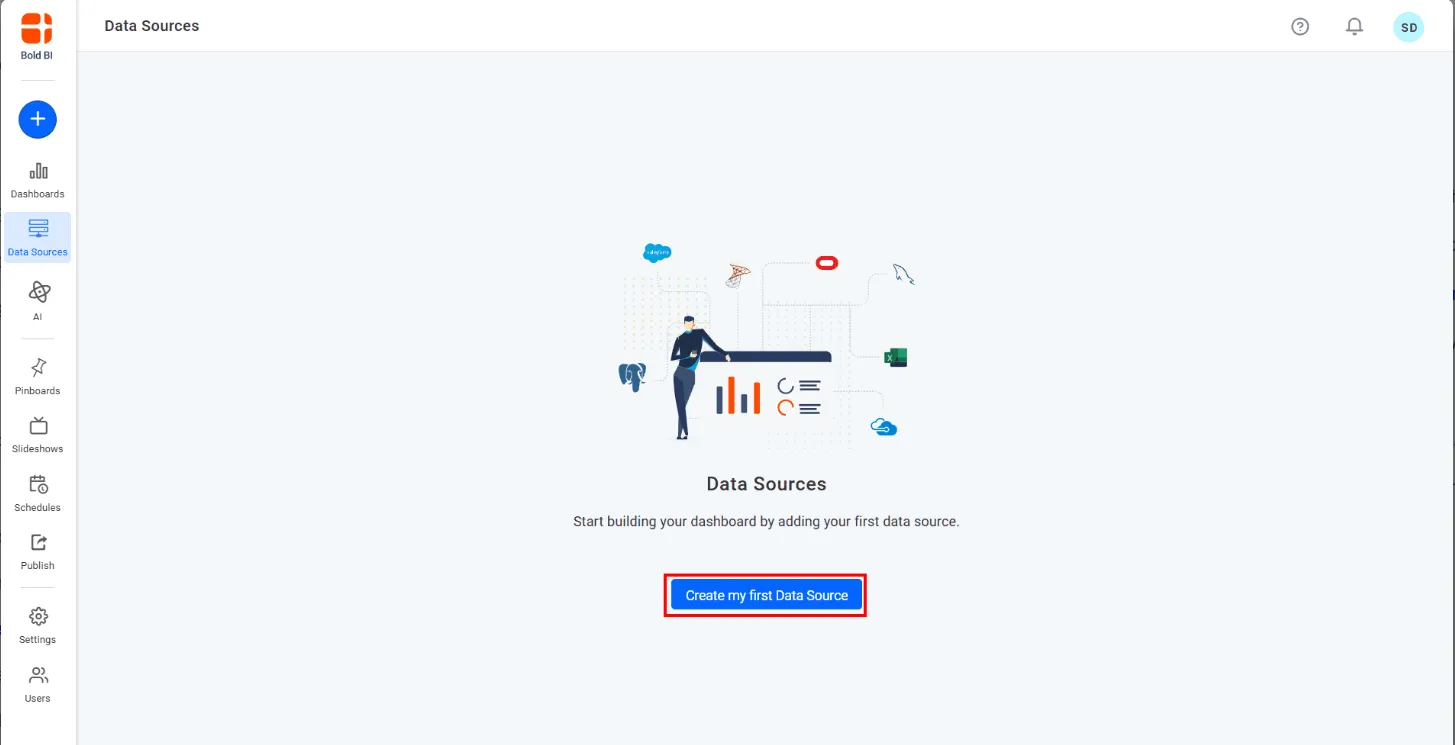
Step 1: Connect your data source
Add and connect a Data Source in Bold BI so the AI Assistant can access and analyze your data.
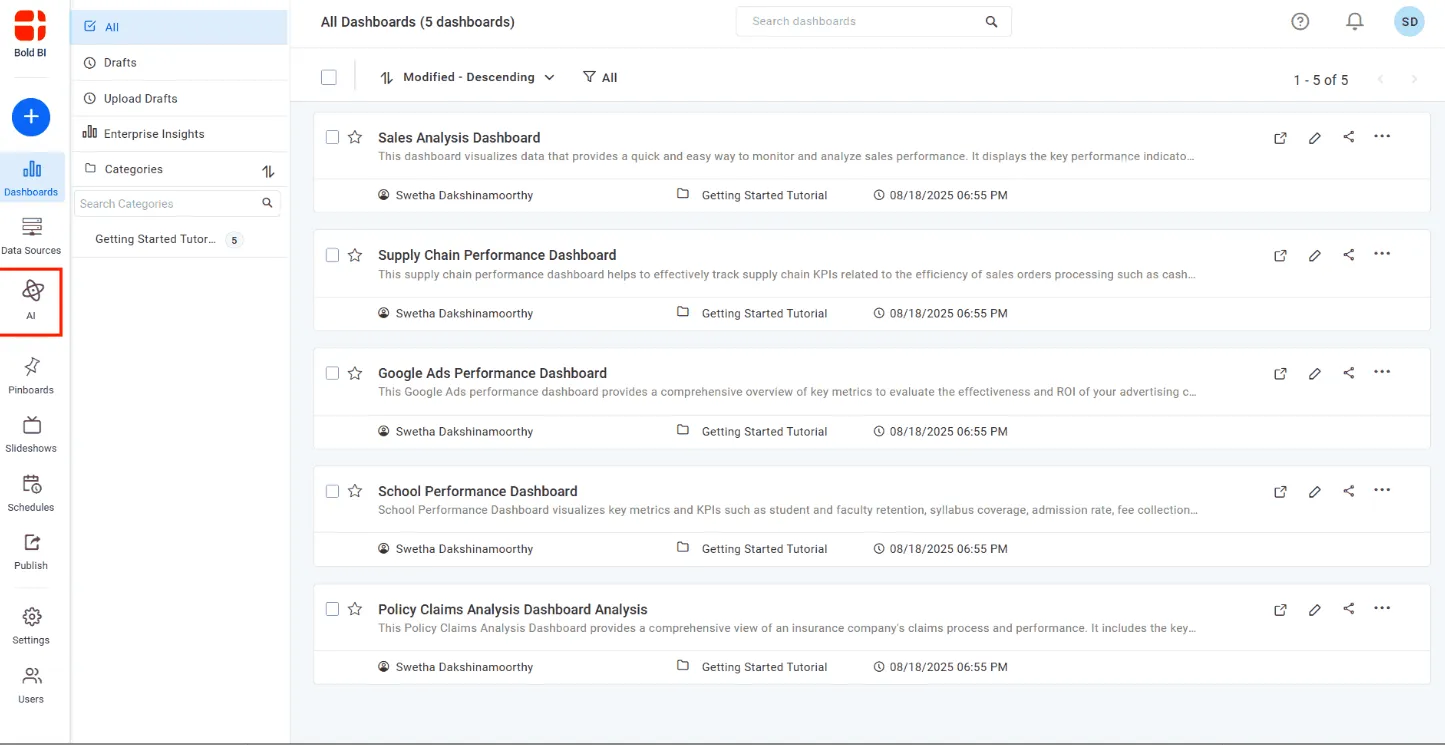
Step 2: Open the AI Assistant
Select the AI option from the left-side navigation panel to launch a new AI Assistant session.
Step 3: Choose a mode
Select the mode that fits your goal:
- Data Mode: Query data sources and generate visualizations.
- Dashboard Mode: Analyze dashboards and generate summaries.
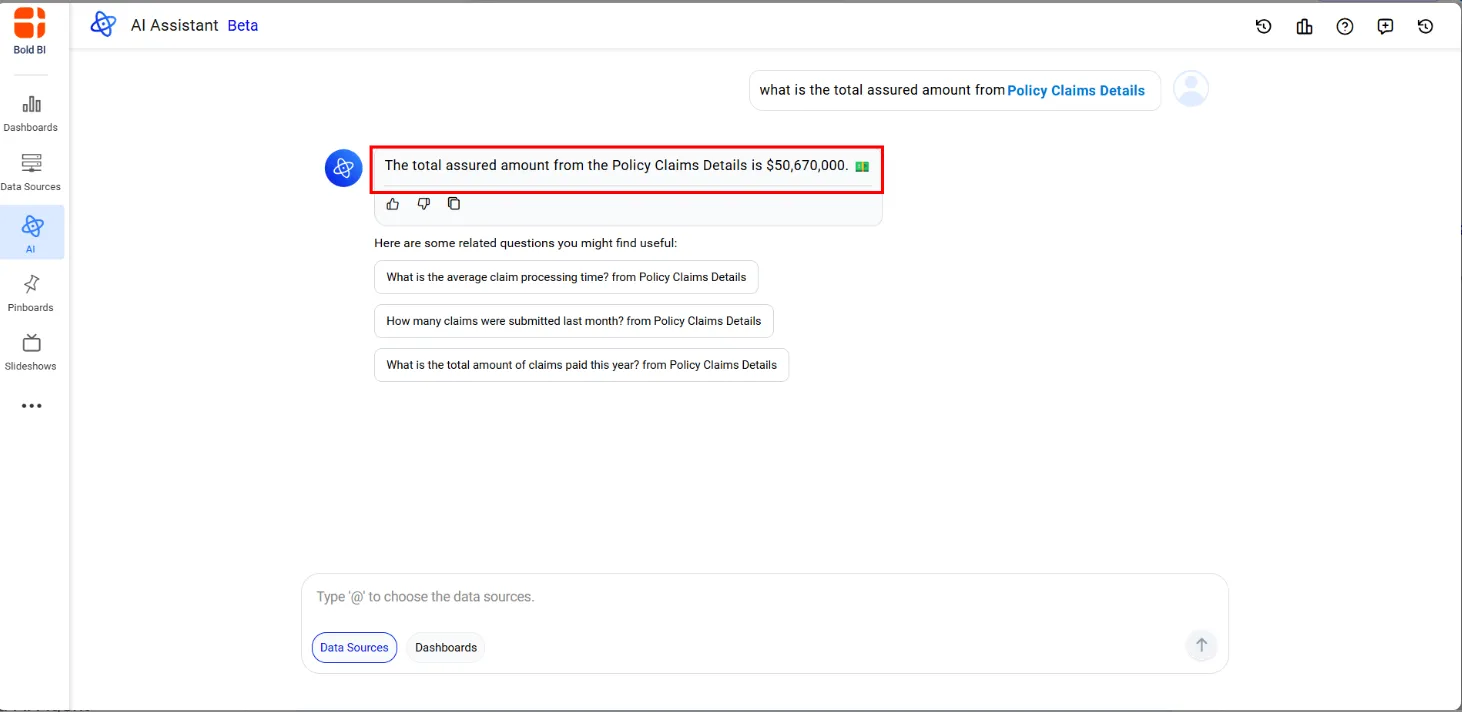
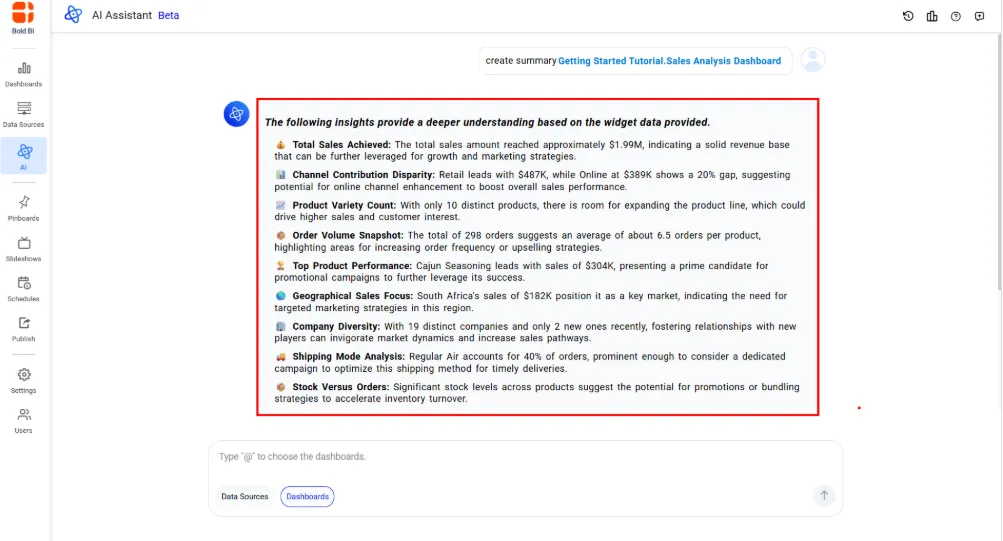
Step 4: Ask a question
Enter a natural language prompt to explore your data or dashboard. When working with multiple data sources, you can reference a specific source by typing @ followed by the data source name.
Examples:
- Show revenue trends by region.
- Compare quarterly performance.
- Summarize this dashboard.
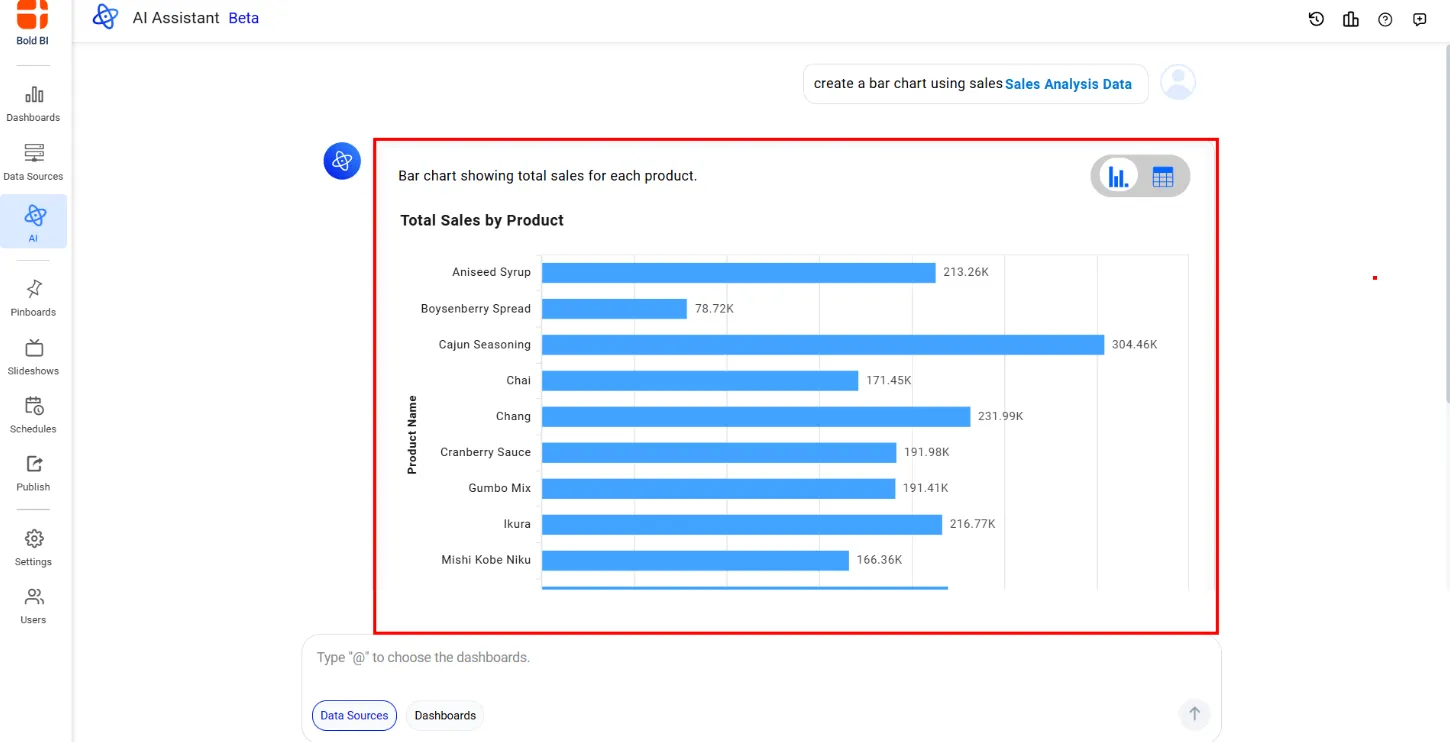
Step 5: Review results and continue exploring
Review the generated charts, tables, summaries, or explanations. Use follow-up questions to refine your analysis and uncover deeper insights.
Step 6: Access chat history
View previous conversations, switch between sessions, and continue past analyses using the built-in chat history feature.
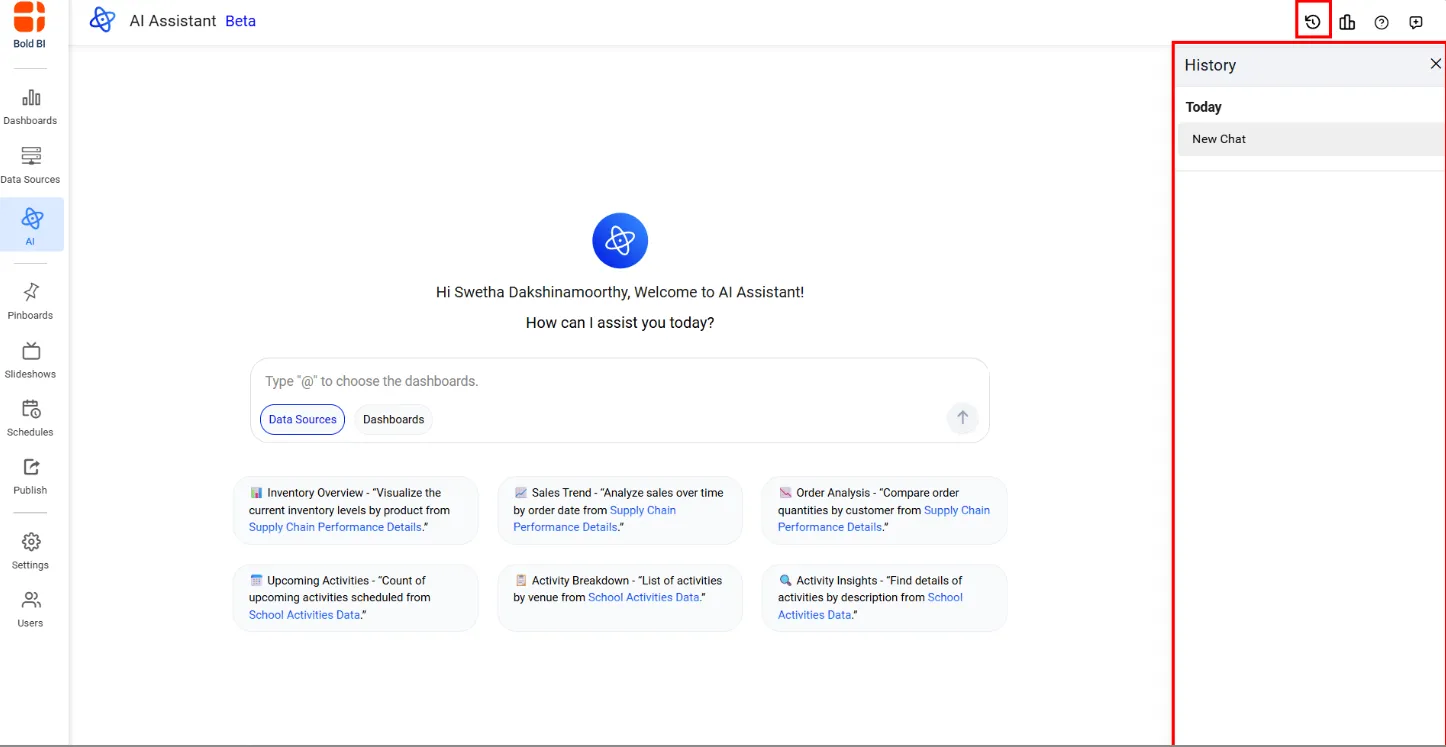
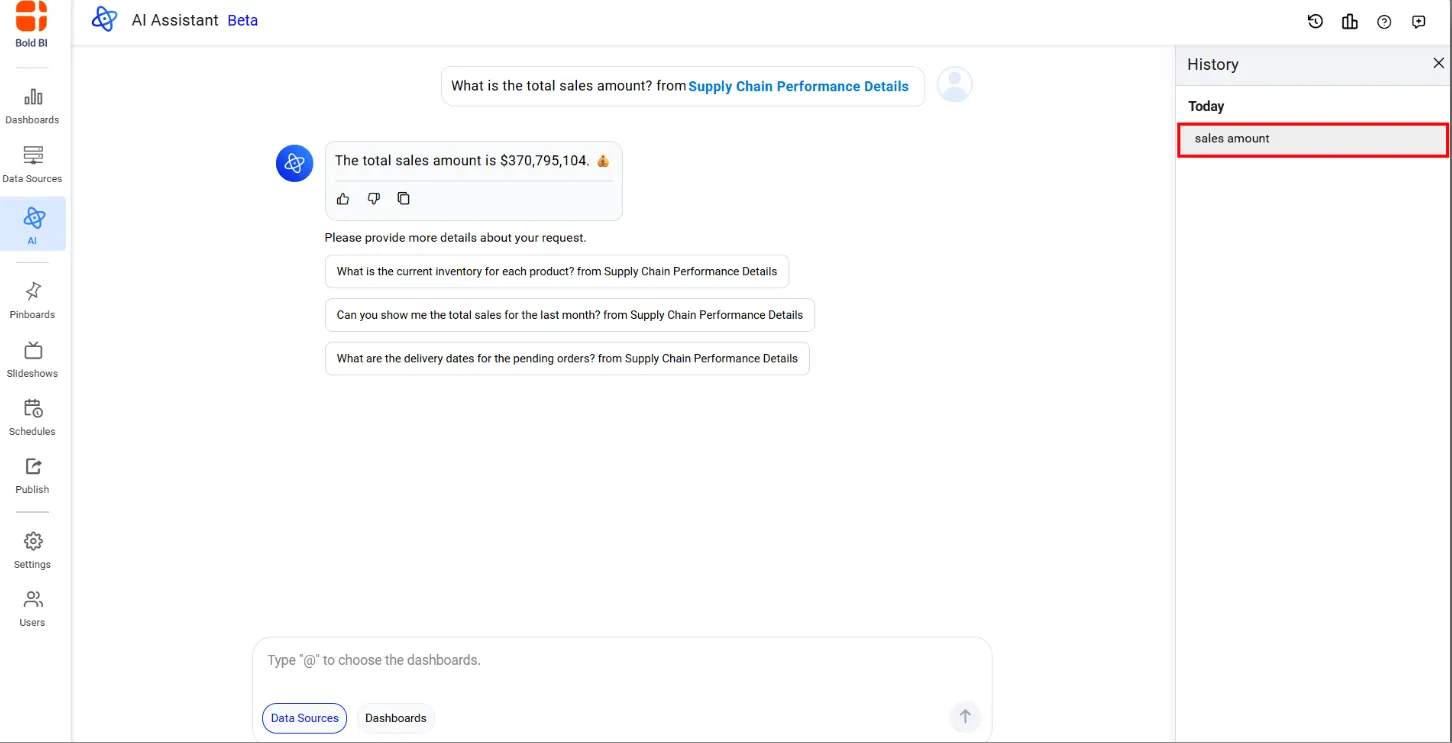
From the chat history panel, you can revisit previous conversations, switch between sessions, or start a new session to explore a different analysis path.
These six steps are all it takes to start using AI Assistant effectively, from connecting a data source to reviewing your first AI-generated answer. To see them come together, consider how a sales manager might apply this same workflow to prepare for a quarterly review.
Sales: Tracking quarterly revenue performance
This is just one example. Whether you’re in sales, HR, finance, operations, SaaS, or any other function, the same six steps apply: connect your data, open AI Assistant, ask your question in plain language, and get an answer back as a chart, table, or explanation. You don’t need to be technical, and you don’t need to wait on an analyst, if you can ask the question, AI Assistant can help you find the answer.
For a closer look at how AI Assistant and AI Agent work together across Bold BI, see our help documentation.
While AI assistants simplify analytics, following a few best practices can help you generate more accurate insights and get the most value from your data.
Best Practices for Using an AI Assistant for Business Intelligence
To maximize outcomes, organizations should pair AI capabilities with effective analytics practices and understand how AI assistants work within their intended scope.
- Start with quality data: Well-structured datasets, consistent naming conventions, and accurate metadata improve response quality and analysis accuracy.
- Ask specific questions: Detailed prompts produce more meaningful insights than broad or ambiguous requests.
- Use follow-up questions: Build on previous responses to refine analyses and explore trends in greater depth.
- Focus each conversation on a single source: For the best results, work with one data source or one dashboard per conversation. This helps maintain context and produce more accurate responses.
- Understand the assistant’s role: AI assistants aren’t a replacement for your analysts — they’re designed to help explore, analyze, and explain data so analysts spend less time on routine requests and more time on complex, high-value analysis. Dashboard modifications and configuration changes should continue to be performed through the BI platform.
- Validate critical insights: AI-generated responses should be reviewed alongside business objectives and organizational knowledge before making important decisions.
- Maintain strong governance: Apply existing permissions, security roles, and access controls to ensure secure and responsible use of analytics data. Accessible information will continue to be governed by your organization’s security settings.
Beyond AI Assistants: The Future of Analytics
AI assistants represent an important step in the evolution of business intelligence, but they are only the beginning of a broader shift toward AI-native analytics experiences.
Organizations are increasingly exploring advanced capabilities that move beyond question-and-answer interactions, including:
- AI agents that maintain context across conversations and support ongoing analytical investigations.
- Conversational analytics that enable users to interact with data naturally rather than relying on traditional dashboard workflows.
- Model Context Protocol (MCP) integrations allow AI models to securely access and work with business data and analytics resources.
- Governed AI experiences that combine AI-powered insights with enterprise security, compliance, and access controls.
- Autonomous insight discovery that proactively identifies trends, anomalies, opportunities, and risks without requiring users to manually search for them.
As these technologies continue to mature, future analytics platforms will increasingly:
- Understand business context and user intent.
- Deliver proactive insights instead of waiting for queries.
- Support conversational and agent-based interactions.
- Integrate AI governance and security controls by design.
- Help users move from insights to actions with fewer manual steps.
The future of analytics is shifting from dashboards that simply display information to intelligent systems that help users explore data, uncover opportunities, and make decisions more effectively. AI assistants, AI agents, and governed AI experiences will continue to play a central role in making analytics more accessible, actionable, and impactful across the enterprise.
How Bold BI’s Approach Compares
Every major BI platform now offers some form of AI assistant, and the differences often come down to how much control you keep over your AI stack: which model powers it, where your data goes, and how it fits your existing security setup.
Bold BI AI Assistant is built to work within your existing governance and permissions, and supports Bring Your Own Key (BYOK) with OpenAI and Azure OpenAI, with Anthropic Claude BYOK available since Bold BI v16.1.90. That means you choose which AI provider powers your analytics, rather than being tied to one. For detailed insight, refer to our Claude AI in Bold BI with BYOK for Secure, Governed Analytics blog.
See how Bold BI compares in more depth: Power BI Alternative, Tableau Alternative, Qlik Sense Alternative, and Sisense Alternative.
Get Started with Bold BI AI Assistant
If you’re ready to make analytics more conversational and accessible, Bold BI® AI Assistant provides a practical starting point. You never have to begin with a blank prompt. Suggested questions help guide discovery, while existing permissions and governance settings continue to control access to data and dashboards.
For organizations building analytics-enabled applications, Bold BI AI Assistant can also be embedded directly into customer-facing experiences using SDKs and APIs. This enables development teams to integrate conversational analytics into existing SaaS applications, portals, and custom software while maintaining branding, security controls, user permissions, and governance requirements.
AI Assistant is your dedicated workspace for deeper analysis. Select a data source or dashboard, ask your questions, and return to the conversation whenever you need to. For quick answers without leaving what you’re already viewing, Bold BI AI Agent lets you ask questions directly inside any supported dashboard. When you need a new dashboard altogether, Prompt to Dashboard generates one from a single natural-language prompt. All three work within the same governed, secure framework, so you can move from exploring data to building and maintaining full analytics experiences without switching tools or compromising on access control
Start your free 30-day trial of Bold BI or request a personalized demo to discover how Bold BI AI Assistant can enhance your embedded analytics experience with AI-powered insights and natural language interactions.
Related resources:
- How to Embed AI Assistant in Your Software Application
- How to Activate AI Assistant in Your Analytics Embedded App
- Bold BI Introduces AI-Powered Embedded Analytics Assistant!
- AI Agent in Analytics: What It Is & How to Use It | Bold BI
- AI Copilot for Analytics: Build Dashboards Quickly | Bold BI
- What is AI Analytics? Why It Matters & 4 Use Cases | Bold BI
Frequently Asked Questions
-
- 1.
What is Bold BI AI Assistant?
Bold BI AI Assistant is a conversational workspace that lets you explore data, analyze dashboards, and generate insights using natural language.
- 2.
How is Bold BI AI Assistant different from AI Agent?
AI Agent answers questions about the dashboard currently open, while Bold BI AI Assistant is a standalone workspace with saved, resumable conversations that are not tied to a single dashboard.
- 3.
Can I query more than one data source in a conversation?
No. Bold BI AI Assistant works with one selected data source or dashboard per conversation.
- 4.
What happens to my past conversations?
Your conversations are automatically saved, allowing you to revisit, resume, rename, or delete them whenever needed.
- 5.
Do I have to start from a blank prompt?
No. Bold BI AI Assistant provides suggested questions based on the connected metadata, helping you get started quickly.
- 6.
Can I view results as a table instead of a chart?
Yes. In Data Mode, you can switch between visual and grid views to see results in the format that best suits your analysis needs.
- 7.
Does Bold BI AI Assistant support languages other than English?
Yes. Bold BI AI Assistant supports multiple languages when both the application language and data language are configured appropriately.
- 8.
Can I use my own AI provider?
Yes. Bold BI AI Assistant supports Bring Your Own Key (BYOK) with OpenAI and Azure OpenAI. Anthropic Claude BYOK has been available since Bold BI v16.1.90.
- 9.
How is AI Assistant usage billed?
Usage is billed through AI credits, which are calculated based on model token consumption and managed at the subscription level.
- 10.
Can Bold BI AI Assistant be used in embedded analytics applications?
Yes. Bold BI AI Assistant can be embedded into analytics applications using the Bold BI SDK. Embedded deployments support white-label experiences, carry forward existing authentication and security settings, and allow users to interact with analytics through natural language within your application.
- 1.