16.1.90
Released on July 15, 2026
What’s New
AI
Extended the Bring Your Own Key (BYOK) support
- #803536, Extended the Bring Your Own Key (BYOK) support to include Anthropic as an AI provider, enabling users to configure and use Claude models with their own Anthropic API credentials.
Improvements
AI
- #841236-Implemented currency-aware formatting for AI-generated insights, ensuring monetary values are displayed with appropriate currency symbols and standardized number formats for improved clarity and consistency.
Server
- The Dashboard Listing page has been enhanced with Recent and Favorite dashboard tiles for quicker access. The Quick Access section now supports Compact and Card views, while the Category Tree has improved alignment and displays the total count of child dashboards under each parent category, making navigation faster and more intuitive.
- Key cloak SSO Token Storage Support in OpenID Provider.
Designer
- Improved dashboard rendering performance by grouping widgets based on their data sources, reducing redundant data retrieval during dashboard loading.
- Extended the Duration Format feature with support for customizable fixed-duration formats, including Year-Month-Day representation.
Bug Fixes
AI
- #844655-Fixed an issue that caused incomplete yearly data to be displayed in AI-generated visualizations.
- Disabled dashboard summary generation during widget loading and enabled it automatically after all widgets were loaded successfully.
- Resolved widget summary generation failures by improving validation, error handling, and execution flow to ensure reliable AI-powered widget insights generation.
Server
- Fixed an issue when adding users to a group.
- Fixed Intermittent Azure AD Group Import Issue.
- Fixed an issue in the Microsoft SQL Server – single DB setup where users could not be added to groups and new groups could not be created. This enhancement ensures smoother user and group management during setup and configuration.
Data Sources
- #851015 – Fixed a data retrieval error that occurred while filtering date values using the browser time zone in PostgreSQL data source.
- #852609 – Fixed an issue where the data preview was not displayed when using an inner join in a combined data source for single-database tenants.
- #852084 – Improved Elasticsearch Connector performance through API optimization, retry mechanisms, and query metrics processing.
- #854283 – Fixed an issue where the data preview was not displayed correctly in the Trino Connector.
- Fixed a data retrieval error that occurred when filtering Boolean values in Elasticsearch data source.
Designer
- #844876 – Fixed an issue where the Exclude filter did not work correctly in the Column Chart.
- #844978 – Fixed an issue where filtering in the Period over Period (PoP) widget did not work correctly when two data sources contained identical columns.
- #840111 – Fixed an issue where the Legend position in the Classic Pie Chart configured with Multi Pie Chart was reset to Bottom when opening the dashboard in edit mode.
- #837966 – Fixed an issue where the Date Picker default filter was not applied after uploading a dashboard with data source replacement.
- #843665 – Fixed an issue where View Underlying Data failed to render after importing a BBIX file with data source replacement.
- #851135 – Fixed an issue where percentage values were not rounded correctly when applying 0-decimal percentage formatting in Classic Pie and Doughnut charts.
- #847518 – Fixed an issue where column alignment was not updated after changing the data type of an expression.
- #844070 – Fixed an issue where widgets inside the Tab widget disappeared when Lazy Load was disabled and no data was assigned.
- #840367 – Fixed an issue where values were not aligned correctly in cylinder-style bar formatting of the EJ2 Grid when text wrapping was enabled.
- Fixed an issue where the Initial Selection filter did not work after switching the data source in the Assign Data panel of a configured widget.
- Fixed an issue where the In-Memory Data Cache warming message was incorrectly displayed in Cloud environments.
- Fixed an issue where the secondary column generated by the Period over Period (PoP) widget was not exported during Grid Excel export.
- Fixed multi-selection behavior issues when changing the Types and changing the master widget state.
- Fixed an alignment issue with the filter icon in both Modern and Classic Pivot Grid widgets after applying filters.
- Fixed an issue where the Number Card ignored the Remove Time setting while formatting date values.
- Fixed an issue where updates to Tab widget headers were not reflected correctly.
- Fixed an issue where data labels were not displayed correctly in E2 Line and Spline charts.
- #846095 – Fixed an issue where the Range Slider tooltip displayed dates using an incorrect format instead of the configured global date format and culture.
- Fixed an issue by preventing aggregation functions from being used on date columns in calculated expressions.
- Fixed an issue where the Range Navigator and Text Filter widgets were not displayed in the Modern Widget Panel.
Data Hub
- #851865 – Fixed an issue where SSL Certificate verification failed while connecting Web connector in Datahub.
IDP
- Fixed an issue where non-admin users were unable to navigate using the links available on the cards displayed on the UMS homepage.
- SSO logout fix for OpenID provider.
Known Issues
Data Hub
- DataHub is currently not supported in dedicated OCI support when used without persistent volume.
16.1.80
Released on July 3, 2026
Bug Fixes
AI
- #849548 – Resolved the issue with AI visual creation for filter queries.
- Fixed an issue where the Value Synonyms dropdown UI did not render properly in dark theme.
- Fixed an issue where Scatter and Map widgets appeared blank when generated using AI.
- Resolved an issue where AI chat history was not retrieved for S3 and OCI storage providers.
Server
- #850301 – Fixed an issue where the build version was not being updated correctly in the database after the upgrade process, resulting in an incorrect version being displayed within the application.
- #528879 – Corrected and enhanced API error messages by providing more detailed and informative responses, ensuring clearer diagnostics, improved troubleshooting, and a better overall user experience.
- Updated the default access token expiration time from 1 hour to 24 hours for tokens used internally for dashboard design and viewing operations. This enhancement provides extended availability and reduces the need for frequent token renewals during internal communication workflows.
- #850301 – Addressed banner display issues during upgrade operations, improving visibility and enhancing the user experience.
Data Sources
- #842000 – Fixed an issue where connections to Microsoft SQL Server failed when SSL encryption was enabled.
- #844421 – Fixed an issue where an error dialog was displayed when users clicked the Run button after modifying the expression schema in Code View mode.
- #842154 – Fixed an issue where ComboBox and ListBox filters failed to display values that contained special characters.
- #850851 – Optimized the Web API Live connector in Data Migration by reducing unnecessary API calls during Query Designer actions.
- #847417 – Improved user-based filter handling by preventing unnecessary Server API calls when filter values are empty and restricting data access for public dashboards.
Designer
- #849443 – Fixed child widget overlapping and positioning issues during the initial load of Tabbed Widgets and resolved delays when switching between previously loaded tabs.
Data Hub
- Fixed an issue where transformation is not working in Azure Blob Storage.
- Fixed an issue where the CSV, JSON, and YAML connectors are not working in Azure Blob Storage.
- Improved dashboard rendering performance by 4 seconds when DataHub based data sources are used in the dashboard.
IDP
- #850300 – Fixed an issue in the PostgreSQL database where associated table records were not being properly deleted during site deletion.
- #528879 – Resolved a combinational deployment issue that could lead to deployment inconsistencies and cause Reporting Services to become unavailable.
Known Issues
Data Hub
- DataHub is currently not supported in dedicated OCI support when used without persistent volume.
16.1.70
Released on June 17, 2026
What’s New
Common
Upgraded to .NET 10
- Bold BI has been upgraded from .NET 8 to .NET 10, bringing the latest framework enhancements to the platform. This upgrade improves the application’s foundation with better performance, stronger security, and access to the latest .NET capabilities.
AI
Custom Prompt Support for Dashboard Summarization
- Bold BI now allows users to customize AI-powered dashboard summaries using custom prompts. This helps generate more relevant, business-focused summaries based on specific reporting needs, terminology, and dashboard context.
AI Credit Purchase Support
- Users can now purchase and manage AI credits directly from Bold BI. This makes it easier to continue using AI-powered features, track available credit balances, and manage AI usage based on organizational requirements.
Server
Default Authentication Settings APIs
- New APIs are now available to retrieve and update default authentication settings in tenant sites. Administrators can manage default authentication configurations more efficiently without relying only on manual setup.
Data Sources
Expression Creation Support in Dashboards
- Bold BI now supports dashboard-level expressions, allowing users to create and manage calculated fields directly within a dashboard based on the selected data source. These expressions are stored at the dashboard level and can be reused across multiple widgets within the same dashboard without modifying the underlying data source. Dashboard authors can also create and manage these expressions without requiring data source edit permissions.
Designer
Widget Panel
- Introduced a new Modern panel alongside the existing panel and enhanced the UI to clearly differentiate between Classic and Modern widgets.
New Modern Widgets
- Added modern versions of the following widgets to the Modern Widget Panel, providing an updated and consistent visual experience across dashboards while supporting modern design standards:
- Combo Chart
- Tree Map
- Proportional Charts
- Combo Box Filter
- Number Card
- KPI Card
- Added rendering status indicators and skeleton loading across widgets to provide better visibility into dashboard rendering progress and ensure a smoother, more responsive UI during data load.
Dashboard Performance
- Enhanced the dashboard execution framework through improvements to dashboard parameter processing, data retrieval, filtering workflows, and concurrent user access. These enhancements result in improved dashboard performance, scalability, and responsiveness.
Property Search Support
- Added a search bar to help users quickly find and navigate to widget and dashboard properties. This improves configuration efficiency and makes it easier to locate settings within the designer experience.
Data Hub
Presto and Trino Support in Bold Data Hub
- Bold BI Data Hub now supports Presto and Trino, expanding connectivity for large-scale data environments. Teams can connect to these distributed query engines and bring more data into their analytics workflows.
Primary Key Support for Redshift Destination
- Bold BI Data Hub now supports primary keys for the Redshift destination. This helps improve data structure, consistency, and destination management when working with Redshift.
IDP
Default Authentication Settings APIs
- New APIs are now available to retrieve and update default authentication settings in UMS. This gives administrators more control over authentication configurations and helps simplify identity management workflows.
Improvements
AI
- #827428 – Added AI conversational support for stored procedures, enabling users to explore procedure-based data more easily through natural language interactions.
- #825466 – Added right-to-left language support in Bold BI AI, improving layout, text rendering, and component alignment for RTL language users.
- #824116, #809067 – Added custom theming support for Bold BI AI, allowing organizations to align the AI experience with their application branding and visual standards.
- Improved synonym management with centralized access, helping users maintain business terms more easily and receive more consistent AI responses.
Server
- Enhanced application security with API rate limiting, CSRF protection, token exposure prevention, AI chat input sanitization, SAST fixes, and dependency vulnerability remediation.
- Modernized the application architecture by migrating Angular-based components to Razor Pages and JavaScript.
- Enhanced upgrade reliability by validating database upgrade script execution and reporting failures more clearly.
Data Sources
- #812732 – Added Extract mode support to the Presto connector.
- #800154 – Enhanced advanced data sampling in data sources, improving widget design and data preview for large datasets.
- #809858 – Added support for multi-value dashboard parameters in stored procedures when using Extract Mode, enabling flexible data filtering scenarios.
- #782413 – Enhanced the Query Join UI by displaying parent table columns, making it easier to build queries and understand table relationships.
- #843208 – Added search support to the column selection dropdown in the Data Relationship configuration.
- Implemented alert notifications for queries exceeding 1 million rows with multiple joins and no filters.
- Enhanced migration workflows by improving connection detail management and introducing limits for version file processing.
- Added a search option to the Expression dialog, enabling users to quickly find, locate, and manage expressions.
- Improved concurrency handling and system responsiveness through infrastructure optimizations.
- Optimized query generation for condition- and item-based dimension filters by removing redundant inner joins.
- Improved connection pooling for enhanced connection management and performance.
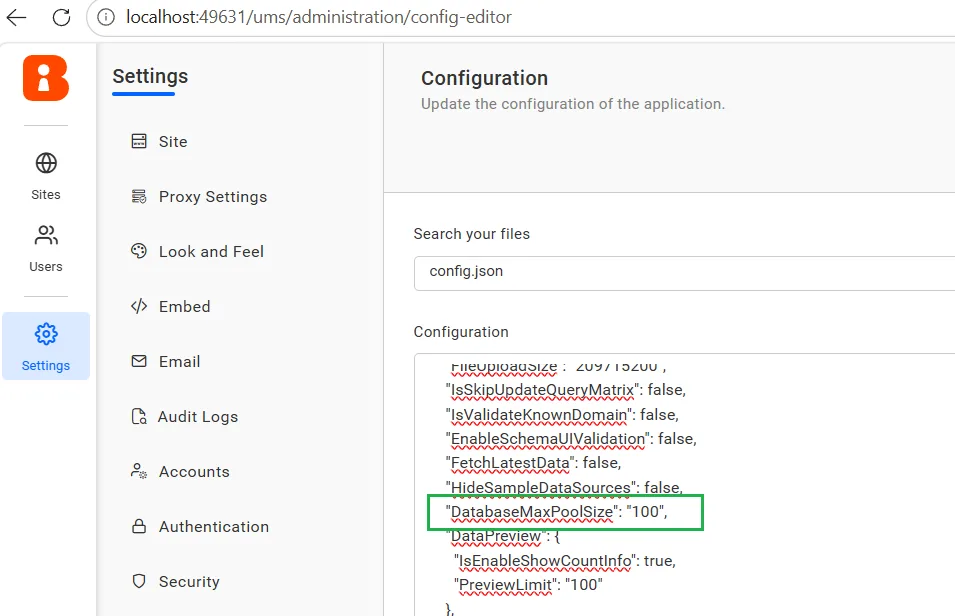
- Introduced property to configure Maximum Connection Pool Size for Data connections for enhanced usability for connection management.
Designer
- #808460 – Button widget now supports inter-widget linking.
- #821691 – Added support to trigger the beforeNavigateUrlLinking event when a Button widget is clicked on embedded dashboards.
- #800560 – Improved dashboard header icon visibility in fixed-size dashboards.
- #828646 – Added support to enable or disable hyperlinking for Pivot Grid summary value cells.
- #768594 – Added support to enlarge data points on hover in Modern Bar and Column charts.
- #839404, #812198, #784398 – Added an Inverse Scrollbar option for charts to support reverse scrolling directions.
- Added font family and font style customization support for Modern widgets.
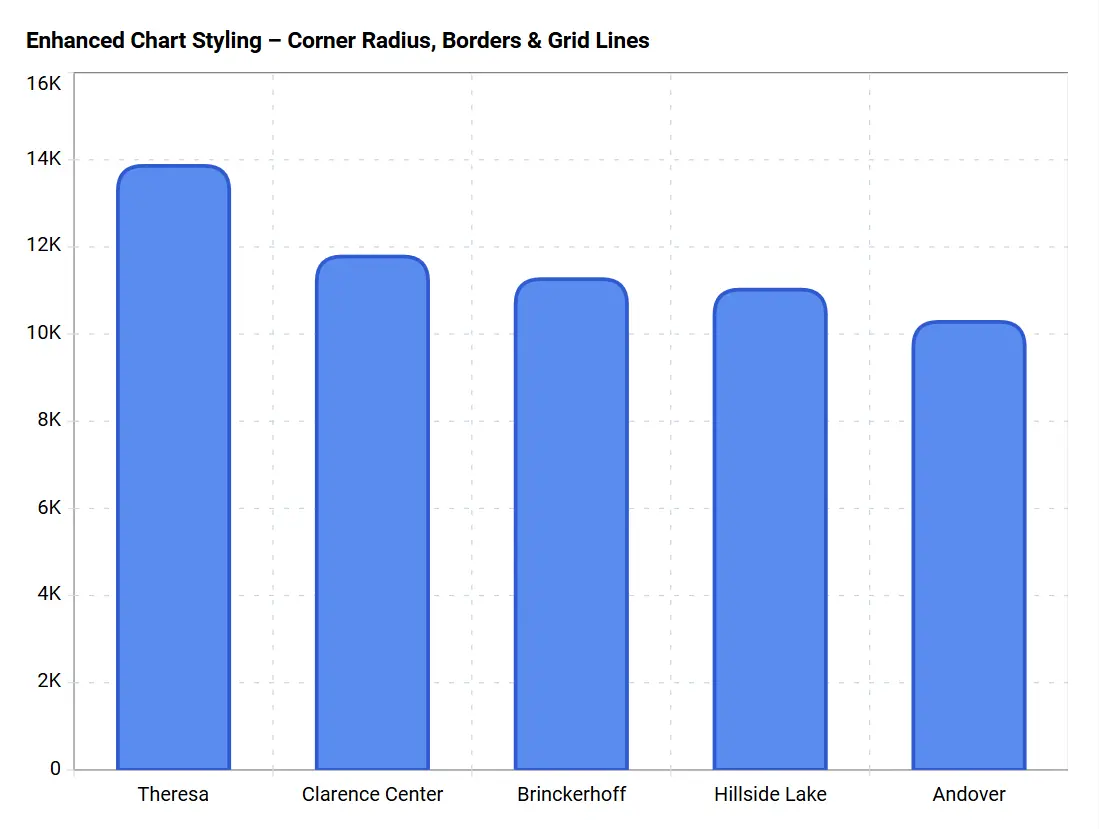
- Provided customization options for corner radius, border width, and axis grid lines in Modern Chart widgets, allowing improved visual styling and flexibility.
- Enhanced the Performance Metrics experience with a redesigned user interface, improved metric visualization, and additional diagnostic details to provide better insights into dashboard loading and rendering performance.
Data Hub
- Migrated StarRocks destination connectivity to the MySQL protocol for improved compatibility.
IDP
- Added support for handling both GET and POST requests in JWT authentication embedding scenarios.
- Same functionality is described in designer module so ignore this note.
- Modernized the application architecture by migrating Angular-based components to Razor Pages and JavaScript.
- Centralized application configuration management by storing configuration settings in the database.
- Added support for dedicated Azure Blob and Amazon S3 Storage containers for application content and attachments.
- Enhanced upgrade reliability by validating database upgrade script execution and reporting failures more clearly.
Bug Fixes
AI
- #808482 – Fixed an issue where the application became unresponsive without displaying a proper message.
- #796660- Fixed incorrect currency formatting in AI Agent aggregation responses to ensure accurate and consistent financial data representation.
- #817605 – Fixed an issue where synonyms were removed after updating a data source, ensuring configured business terms are retained properly.
- #796267 – Fixed improper handling of string data type in aggregation operations with clear validation messaging.
- #832059 – Fixed category mismatch issues in AI-suggested question submission.
Server
- #828834 – Improved dashboard loading performance by optimizing query execution.
- Fixed an issue where creating a new site using a previously deleted site’s identifier caused incorrect authentication behavior due to cache data.
- Fixed an issue where Azure Blob Storage configuration values were not properly initialized, resulting in errors during data source listing.
- Fixed a filename casing issue in Azure Blob Storage during migration from file storage to Blob storage. Blob storage uses lowercase filenames, whereas other storage types preserve the original casing.
- Fixed an issue where the DashboardInCategory permission added via API was saved successfully, but the scope value was not displayed in the UI.
- Fixed an issue where the Dashboard Viewed Count was not showing in the Usage Analytics Dashboard.
- Resolved an issue in Cloud sites where downgrading to a single‑user license plan caused Refresh Settings to malfunction.
Data Sources
- #825925 – Fixed a data retrieval error that occurred when uploading dashboards using Microsoft SQL Server Extract stored procedures.
- #823183 – Restricted the application of rule-based customization filters when using the Window Expression in widgets.
- #826668 – Resolved an issue where a data source could not be created when multiple CSV files were uploaded in the CSV connector.
- #833155 – Fixed the Relative Date Filter not working as expected for the Past Month.
- #826491 – Resolved the issue where Data Preview was not working when Cloudflare Cache was enabled.
- #827844 – Resolved inconsistent behavior in the Data Relationship Modeling UI.
- #826147 – Fixed an issue where the table disappeared unexpectedly when clicking the Play button.
- #821012 – Resolved the issue where the data preview record count was incorrect for tables with large data volumes and multiple joins.
- #830218 – Fixed the issue where the Apply option was not visible in the Filters panel.
- #831996 – Fixed the issue where NULL values were not supported across data filters, joins, and dashboard filters.
- #833072 – Fixed the COUNTD expression issue with DISTINCT in the View Underlying Data query.
- #820227 – Resolved an issue where newly created groups were not displayed in the dashboard’s normal view, although they were visible in preview mode.
- #835830 – Resolved the Amazon Redshift schema visibility and data loading issue.
- #811669 – Fixed the Oracle ORA-01795 error that occurred when applying more than 1000 records in an IN operation.
- #833451 – Fixed the issue where Top-N was applied when a measure column acted as a dimension in SQL.
- #837676 – Fixed an issue where LOOKUPTABLEMETADATAINFO was not updated properly after copying dashboards and data sources.
- #837880 – Fixed invalid SQL syntax issues in widgets after the version upgrade in the Snowflake connector.
- #835164 – Fixed the unhandled ArgumentOutOfRangeException in DataService while processing dynamic headers in Paid Cloud Production.
- #837107 – Fixed the issue with the tenant-specific connection string update utility.
- #832972 – Added the new encryption logic for all SQL and REST-related connectors.
- #840891 – Fixed a data retrieval error that occurred when excluding null values using data source filters.
- #842274 – Resolved an issue with Filter Widgets when using multiple expressions in ClickHouse.
- #837869 – Fixed an issue where query joins were not updated on the first attempt.
- #842332 – Fixed an issue where single quote special characters were not handled correctly in Combo Box and List Box filter widgets.
- #827116 – Resolved the issue where uploading to the Dashboard via REST API generated a blank page if existing data sources were present on the target site.
- #842945 – Resolved the issue where appending files was unsuccessful on a single database.
- Fixed the “Object reference not set to an instance of an object” error in ODBC on Linux environments.
- Fixed the issue that occurred when viewing a downloaded and re-uploaded dashboard using a file-based data source in single database and shared sites.
- Fixed the issue where Snowflake Extract did not support specific tables.
- Resolved the query-level bug that occurred when a condition filter was applied with a measure column in SQL widgets.
- Fixed lookup table column ordering for SQL Server, MySQL, and Oracle during the upgrade.
- Fixed the Data Preview failure (“Failed to connect to dashboard services”) that occurred after clicking Update in Preview mode.
- Fixed an issue where data sources created in earlier versions could not be accessed after upgrading due to encryption compatibility.
- Fixed an issue where the Custom Query Preview was disabled after switching between the “Custom Query” and “Table(s)” modes.
Embedding
- #810673 – Resolved an issue in the embed application where passing multiple values for custom attributes caused a data‑retrieval error when the data source was configured with a custom attribute in Table Mode.
- #810210 – Corrected the object model structure to properly handle the exclude widget property in JS‑based embedding.
- #821429 – Fixed a dashboard icons display issue in iframe embedding where certain icons were not shown properly when switching between dashboards.
Designer
- #804824 – Improved performance when using tabbed widgets.
- #815266, #827016 – Fixed an issue where widgets did not display data when lazy loading was enabled in the Tab widget.
- #828728 – Fixed an issue where incorrect values were displayed while searching and selecting columns in the data alert WHERE condition.
- #782504 – Fixed an issue that occurred while viewing underlying data when using field filter workaround with null value exclusions.
- #785882 – Fixed an issue where data was not displayed in the Text widget when using LabelParameter.
- #823222 – Fixed an issue where images were not rendered in exported dashboard Excel files.
- #824578 – Fixed a NullReferenceException that occurred when applying gradient-based advanced conditional formatting to columns containing null values.
- #831247 – Fixed an issue where renamed Y-axis display names were not reflected in scatter chart row legends.
- #824165 – Fixed an issue where Pivot Grid widgets inside a Tab widget were not rendered properly when Show Values in Row was enabled.
- #822673 – Fixed an issue where chart widget interactions were not applied properly in View Data.
- #831561 – Fixed a format exception that caused Excel export to fail.
- #791094 – Fixed an issue where underlying data was not displayed when selecting the Custom option in View Underlying Data.
- #816273 – Fixed an issue caused by appending the token in query parameters instead of passing it through request headers.
- #817605 – Fixed an issue where the three-dot menu in the RTE widget was not accessible when placed inside Combine or Tab widgets.
- #826611 – Fixed an issue where tooltip and description were not visible in the Number Card widget for zero values.
- #833758 – Fixed an issue where advanced formatting background was overridden when applying background color in card widgets.
- #828196, #838528 – Fixed an issue where the Grid widget date filter returned an incorrect month due to a time zone problem.
- #838570 – Fixed an issue where clicking the KPI Card widget caused a console error.
- #827054 – Fixed an issue where the Apply button was not working when dashboard parameters were applied in View mode.
- #825482 – Fixed an issue where clearing filters or searches in the Grid widget did not restore the original data correctly.
- #825037 – Fixed an issue where applied filter values were not retained when reopening the EJ2 Grid menu filter.
- #825482 – Fixed an issue where the Grid widget continued loading indefinitely when filtering non-existing values.
- #763509 – Fixed an issue where images in expression-based Pivot Grid columns disappeared when the Link option was enabled.
- #825624, #827047 – Fixed an issue where duplicate data sources were created while downloading and uploading dashboards from version 15.2.
- #817605 – Fixed an issue where column-level linking was not displayed in View mode for the EJ2 Grid widget.
- #821498 – Fixed an issue where the Grid header was displayed in Preview mode even when the Show Header property was disabled.
- #832566 – Fixed an issue where View Underlying Data in the Card widget threw an error when using custom fields with applied filters.
- #835432 – Fixed an issue where incorrect data was displayed in the Grid widget when using Combo Box display column binding.
- #834553 – Fixed an issue where uploading invalid file formats displayed a 400 error code.
- #832189 – Fixed an issue where bubble sizes in the Scatter Chart were not scaled correctly for large values.
- #838471 – Fixed an issue where sorting aggregated values against dimension fields did not work correctly in descending order in the EJ2 Grid.
- #828539 – Fixed an issue where the EJ1 Grid widget displayed “No records to display” when Allow Filter was enabled.
- #837690 – Fixed an issue where closing the maximized view of a child widget inside a Tab widget switched tabs and displayed blank data.
- #838834 – Fixed an issue where pressing the Tab key while renaming fields in the Assign Data section disrupted the designer layout.
- #833075 – Fixed an issue where the selected target value in the linking panel was not retained in the UI.
- #837387 – Fixed an issue where parameter-based filters were not applied on initial dashboard load with cross data sources.
- #810643 – Fixed an issue where value labels were not visible when rotated 90 degrees and positioned at the bottom.
- #834166 – Fixed an issue where applying a value label suffix caused errors in bar charts.
- #828687 – Fixed an issue where child widgets collapsed inside a maximized Tab widget when multiple widgets exceeded the single-page layout.
- #837966 – Fixed an issue where date picker filtering was not applied after uploading a dashboard with existing data source mapping.
- #826560 – Fixed an issue where multiple ampersand ‘&’ characters in query parameters caused data not to be displayed.
- #828652 – Fixed an issue where date values were not displayed properly in the Excel Filter popup and Grid for EJ1 and EJ2 Grid widgets.
- #827016 – Fixed an issue where widgets in the first visible tab of a Tab widget kept loading after page reload.
- #839672 – Fixed an issue where the custom widget was not rendered properly inside the Tab widget.
- Fixed an issue where selected values in the Combo Box displayed IDs instead of display names after filtering.
Data Hub
- #826574 – Fixed a schedule issue where daily schedules in CET time zone were being skipped silently without any log.
- #845663 – Fixed an issue where Python script–based incremental refresh replaced existing data even when IsDropTable is false.
- #833101 – Fixed the issue where data extraction failed when the direct_target_import property was used.
- #82843 – Fixed an issue where the Save as Draft button was not functioning properly in Bold BI Transform.
- Fixed the issue where the Snowflake datastore was not moving to the Bold BI flow.
- Fixed an issue where transforming tables by removing columns caused duplicate columns in the destination tables.
- Resolved the issue where the HubSpot connector was not working.
- Fixed the data extraction failure in destinations (Doris and ClickHouse).
- Fixed the issue where incremental refresh was not updating existing data in MSSQL.
- Fixed the incorrect max month-year selection for the updated column.
- Fixed the datasource creation failure in Bold BI when using MySQL as the datastore in Bold ETL.
- Fixed the issue where datastore settings could be saved without specifying the database name in Bold ETL.
- Fixed the issue where Apache Doris displayed the MySQL host information, causing confusion.
- Resolved an issue that prevented users from dragging and dropping the Add Pipeline button.
- Fixed the pagination display issue on the Transform page when viewed at 100% browser zoom.
- Resolved an issue in Linux environments with Oracle IMDB where transformed tables were not moved to the destination, and non-extracted tables were incorrectly displayed instead.
- Fixed file path restriction issues during data processing and extraction.
IDP
- Fixed an issue where a new PostgreSQL database could not be created due to a collation mismatch during application startup and site creation.
- Fixed an issue in MS SQL (Shared DB) where saving the JWT failed on the first attempt.
- Fixed an issue where updates to Proxy FullPath URL did not synchronize DNS values in tenant configuration, resulting in incorrect URL generation in site listings and the homepage. Enhanced proxy domain update handling and service restart behavior to ensure consistent domain resolution.
Important Notes
Common
To maintain a consistent naming standard across all Bold BI deployment modes and installation options, the installer packages and related GitHub repositories have been renamed. These changes are naming updates only and do not affect functionality, deployment procedures, or existing configurations.
Installer Package Renaming:
| Platform | Previous Package Name | New Package Name |
|---|
| Windows | BoldBIEnterpriseEdition.exe | BoldBIServerInstaller_x64.exe |
| Linux | BoldBIEnterpriseEdition_Linux.zip | BoldBIServerPackage_x64.zip |
GitHub Repository Renaming:
These updates align the naming convention across installers, deployment packages, and repository resources, making it easier to identify and manage Bold BI Server deployments across different environments.
Embedding
Known Issues
Data Hub
- Data Hub transformation operations and data extraction from CSV and JSON connectors are currently not supported when using dedicated Azure Blob Storage or OCI Storage without persistent volumes.