
MCP Tool vs. AI Assistant, Agent & Copilot: Key Differences
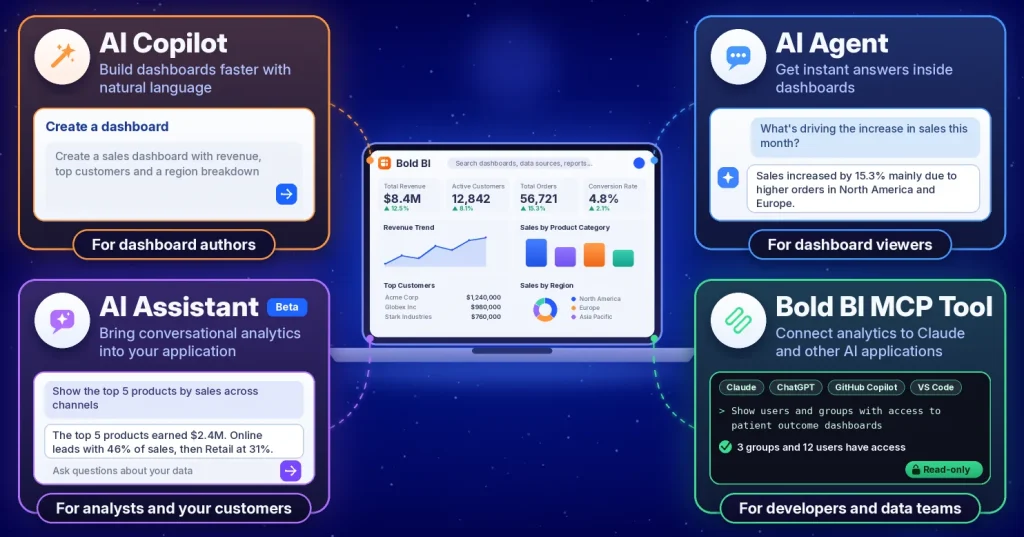
TL;DR: Bold BI® offers four AI experiences. AI Copilot helps authors build dashboards, AI Agent helps viewers explore them, AI Assistant brings conversational analytics into applications, and the Bold BI MCP Tool lets compatible AI platforms discover, inspect, query, and export Bold BI content, read-only. Choose by where users work and what they need to do.
Which Bold BI AI feature should we use? Teams ask because there are four, including the Bold BI MCP Tool, and choosing the wrong one can lead to an AI feature people never use. Dashboard authors, analytics consumers, application users, and developers all interact with data differently, so each group benefits from a different experience.
Each option supports a specific workflow, from dashboard authoring and exploration to embedded analytics and AI-assisted operations. This guide compares the four AI experiences by where they live, who uses them, and what they can and can’t do, so you can choose the right one for your organization.
Meet the four AI experiences in Bold BI
Before comparing individual capabilities, it’s helpful to understand where each experience fits.
| Option | Where it lives | Primary users | Primary outcome |
| AI Copilot | Dashboard Designer | Dashboard authors | Accelerates dashboard authoring |
| AI Agent | Dashboard Viewer | Dashboard viewers | Simplifies dashboard exploration |
| AI Assistant | Embedded applications or standalone workspace | Analysts and end users | Delivers conversational analytics |
| Bold BI MCP Tool | External AI platforms | Developers and data teams | Enables AI-powered analytics workflows |
Rather than competing with each other, these capabilities support different stages of analytics, from dashboard authoring and exploration to embedded analytics and AI-assisted operations.
How to choose the right Bold BI AI tool
Once you understand each option’s purpose, the decision becomes much simpler.
Build dashboards faster
AI Copilot helps dashboard authors build and edit widgets with natural-language prompts, reducing manual dashboard authoring.
Best for: Dashboard development and rapid prototyping.
Get answers without leaving the dashboard
AI Agent helps dashboard viewers ask questions about the open dashboard, such as trends, counts, and performance metrics, without changing its widgets.
Best for: Analytics consumers who need deeper insights without leaving the dashboard they are already using.
Deliver conversational analytics inside applications
AI Assistant allows organizations to bring conversational analytics directly into embedded and customer-facing applications.
Users can ask questions about their data, explore metrics, and continue analytical conversations without leaving the application.
Best for: Embedded analytics and customer-facing AI experiences.
Work from existing AI platforms
The Bold BI MCP Tool enables compatible AI platforms such as Claude, ChatGPT, GitHub Copilot, and VS Code to read, query, and export analytics resources, read-only, through natural-language requests.
Instead of manually navigating analytics resources or writing API calls, users can work directly from their preferred AI environment.
Best for: Developers, analysts, and internal teams already using AI-powered tools.
Bold BI MCP Tool vs. REST APIs vs. AI Assistant
Teams evaluating MCP frequently ask how it differs from traditional APIs and embedded AI experiences.
| Option | Best for | Interaction style |
| REST APIs | Application integrations | Developers write API calls |
| AI Assistant | Conversational analytics | Users ask questions inside applications |
| Bold BI MCP Tool | AI-powered workflows | AI platforms interact with analytics tools |
REST APIs remain the preferred option when building direct integrations.
AI Assistant is designed for people interacting with analytics.
The Bold BI MCP Tool serves a different purpose by enabling AI platforms to work with analytics resources using a standardized protocol and natural-language requests.
Simply put, AI Assistant is designed for people, while MCP is designed for AI-assisted workflows.
What makes the Bold BI MCP Tool different?
Model Context Protocol (MCP) is an open standard that lets AI applications connect to and use external tools and systems. Learn more in this documentation.
With the Bold BI MCP Tool, compatible AI platforms can access analytics resources through controlled permissions and natural-language interactions.
Depending on deployment and access configuration, organizations can use MCP-enabled workflows to work with resources such as:
The MCP Tool offers more than 50 tools at the time of writing. It is read-only: it discovers, inspects, queries, and exports content, and never creates, edits, or deletes it. It runs with the permissions of the user the API key belongs to.
The key advantage is that MCP extends beyond chat experiences and enables AI-assisted operational workflows.
For example, organizations may use MCP-enabled AI platforms to:
- Review dashboard access permissions
- Identify analytics dependencies
- Audit analytics delivery configurations
- Export analytics information for review
- Inspect governance settings
These workflows can help teams manage analytics environments without requiring users to manually navigate every administrative area.
Why some teams use both AI Assistant and MCP
Choosing between AI Assistant and MCP is not always necessary. You can use both because they solve different problems.
For example:
- Customers interact with embedded analytics using AI Assistant.
- Data teams perform governance and audit tasks using MCP-enabled AI tools.
- Developers access documentation and analytics resources through their preferred AI platforms.
- Dashboard creators accelerate development with AI Copilot.
This approach lets each audience work in the environment that best matches its workflow.
Example AI analytics scenarios
These are hypothetical scenarios, not customer results. They show how Bold BI AI features can support common business needs.
Sales: Accelerating quarterly performance reviews with AI Agent
- Scenario: A sales manager is preparing for a quarterly business review and needs a quick understanding of revenue performance across regions.
- Challenge: Revenue metrics are spread across multiple visualizations, making manual analysis time-consuming.
- How AI Agent helps: The sales manager asks, “How did revenue change by region this quarter? AI Agent uses the dashboard context to help investigate trends and answer follow-up questions.
- Possible outcome: Sales teams can find the main drivers faster and spend less time reviewing dashboards.
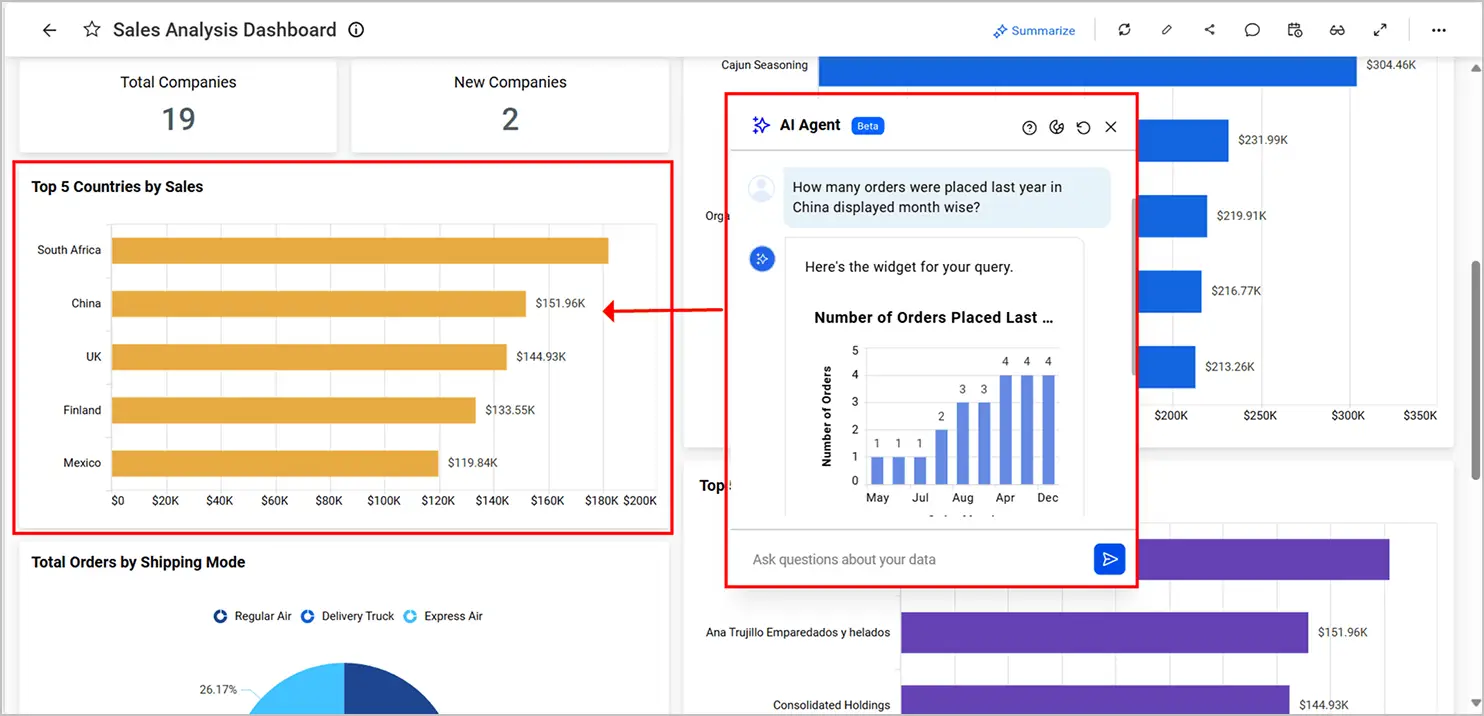
Sales Analysis Dashboard
Healthcare: Auditing dashboard access with the MCP Tool
Security, permissions, and governance
As AI adoption grows, governance becomes just as important as usability.
For AI Assistant, organizations can apply existing security models such as authentication controls and row-level security configurations within embedded analytics environments.
For MCP workflows, the tool runs with the permissions of the user the API key belongs to, so a least-privilege user limits what the AI app can see. Bold BI notes that audit activity is reviewable through Dashboard Usage Insights on premises, and that cloud coverage may differ.
Key governance benefits include:
- Easier access management
- Least-privilege implementation
- Controlled credential management
- Improved administrative oversight
Bold BI also supports bring-your-own-key for AI models. The AI Assistant page lists OpenAI and Azure OpenAI, and Anthropic Claude from version 16.1.90.
Limits to plan around
A few limits shape the choice:
- AI Assistant works with one data source or one dashboard at a time, and it can’t edit dashboards.
- The MCP Tool is read-only. It doesn’t replace AI Copilot for building dashboards.
- Audit coverage for MCP activity differs between on-premises and cloud, so check what you can review.
A simple evaluation plan
The most reliable way to choose an AI experience is through hands-on testing.
- Select a business use case and data source.
- Test common analytics questions using AI Assistant.
- Evaluate dashboard exploration workflows with AI Agent.
- Explore dashboard creation scenarios with AI Copilot.
- Connect a compatible AI platform through the MCP Tool.
- Compare user experience, governance controls, and operational capabilities.
- Validate outputs across different permission levels.
This process helps teams identify the approach that best supports their users and workflows.
Choose the AI experience that matches the workflow
The most successful AI analytics strategies start by matching the right technology to the right audience.
Teams building dashboards can accelerate development with AI Copilot. Dashboard viewers can explore insights more efficiently with AI Agent. Organizations embedding analytics into their products can provide conversational experiences through AI Assistant. Developers and data teams working within AI platforms can extend analytics workflows using the Bold BI® MCP Tool.
Rather than asking which AI capability is best, ask which one best supports the workflow you’re trying to improve.
Ready to explore AI-powered analytics with Bold BI? Start a free 30-day trial and see how the right AI experience can help your teams create, explore, and operationalize analytics more effectively.
Frequently asked questions
- 1.
What is the difference between AI Agent and AI Assistant?
AI Agent lives inside the Dashboard Viewer and answers questions about the open dashboard. AI Assistant is its own workspace with saved, resumable conversations and isn’t tied to one dashboard.
- 2.
Which AI models can I use with Bold BI?
Bold BI supports multiple AI models and providers. For bring-your-own-key, the AI Assistant page lists OpenAI and Azure OpenAI, and Anthropic Claude from version 16.1.90.
- 3.
Does the MCP Tool work with on-premises Bold BI?
Bold BI’s MCP Server page says it works with Cloud and on-premises deployments with a valid API key. Check the setup guide for network requirements.
- 4.
Do these features follow my permissions?
In embedded sessions, Bold BI states that SSO and row-level security carry into the AI Assistant. The MCP Tool runs with the permissions of the user the API key belongs to, so use a least-privilege user.
- 5.
When should I use the Bold BI MCP Tool instead of AI Assistant?
Use AI Assistant when users need conversational analytics inside an application. Use the Bold BI MCP Tool when AI platforms such as Claude, ChatGPT, GitHub Copilot, or VS Code need to read, query, and export dashboards, data sources, permissions, and other analytics resources.
- 6.
What is the difference between AI Copilot and the Bold BI MCP Tool?
AI Copilot helps dashboard authors create and edit analytics content inside Bold BI. The Bold BI MCP Tool allows external AI applications to work with analytics resources through MCP-enabled workflows.
- 7.
Can AI Assistant query multiple data sources at once?
No. AI Assistant works with one dashboard or one data source at a time. Organizations should plan data models accordingly when designing conversational analytics experiences.