


13.1.10
New Features
AI
- AI Agent support has been introduced across Bold BI in its beta version, enabling seamless integration of AI-powered analysis and dashboard summaries. Users can now interact with data and generate visualizations using natural language.
Designer
- Introduced support for 12 V2 chart types, enabling a more modern and flexible data visualization experience.
Data Sources
- Provided data relationship support.
Improvements
AI
- An AI usage analytics dashboard has been added for users who have configured a custom AI model with Oracle IMDB.
- Added resize support for the AI “Summarize” popup.
- Implemented creation of visuals using expressions
Embedding
- Introduced a new boolean member, hideChatHelp, to control the visibility of the help icon in the AI Assistant within SDK-based and iframe embedding.
- Provided expiration time support in iframe embed dialog UI for iframe token-based embedding.
- Enabled seamless transition between dashboard viewer to designer modes and vice versa in embedded application.
- Provided custom brand name in the AI Assistant for SDK-based embedding.
Server
- #699166 – A scheduled job was implemented to automatically delete records from the metrics table, helping to manage database size and prevent storage issues.
- #698129 – Introduced the ability to copy the embed URL independently, without including the “iframe” tag, for easier integration.
- #734212 – Developed a new REST API to create schedules, now supporting the updated customer email template.
- #683419 – Included a usage analytics dashboard to monitor embedded activity usage, providing better visibility into user engagement.
- #719933 – Enabled administrators to view all external sites in publish dialog when publishing dashboards and data sources between the sites, improving control and transparency.
- #695026 – Added functionality to allow users to download all dashboards from the offline page, regardless of the current grid page.
- #651105 – Removed the preview tag from the download/upload dashboard feature, indicating full production readiness.
- #743721 – Enhanced default group settings for the Cloud Analytics Server to assign to the default group when adding new user to the site.
- #742666 – Added support for group logos, allowing users to download logos via a URL in the “Get Dashboards by Group Permission” API.
- #743510 – Removed the Azure AD option from site default settings, as it is not supported for default login.
- #741970 – Implemented retry logic to handle the SMTP error “4.3.0 Temporary System Problem,” improving email delivery reliability.
- #724664 – Improved the display of data source and schedule disable statuses in the grid by providing more detailed and informative indicators.
- Automatically map users to groups during login with OAuth and OpenID providers using group claims from authentication tokens, with support for clearing old group assignments and customizing the claim name used for mapping.
- Added support for importing groups from the Fusion Auth provider for OAuth and OpenID.
Designer
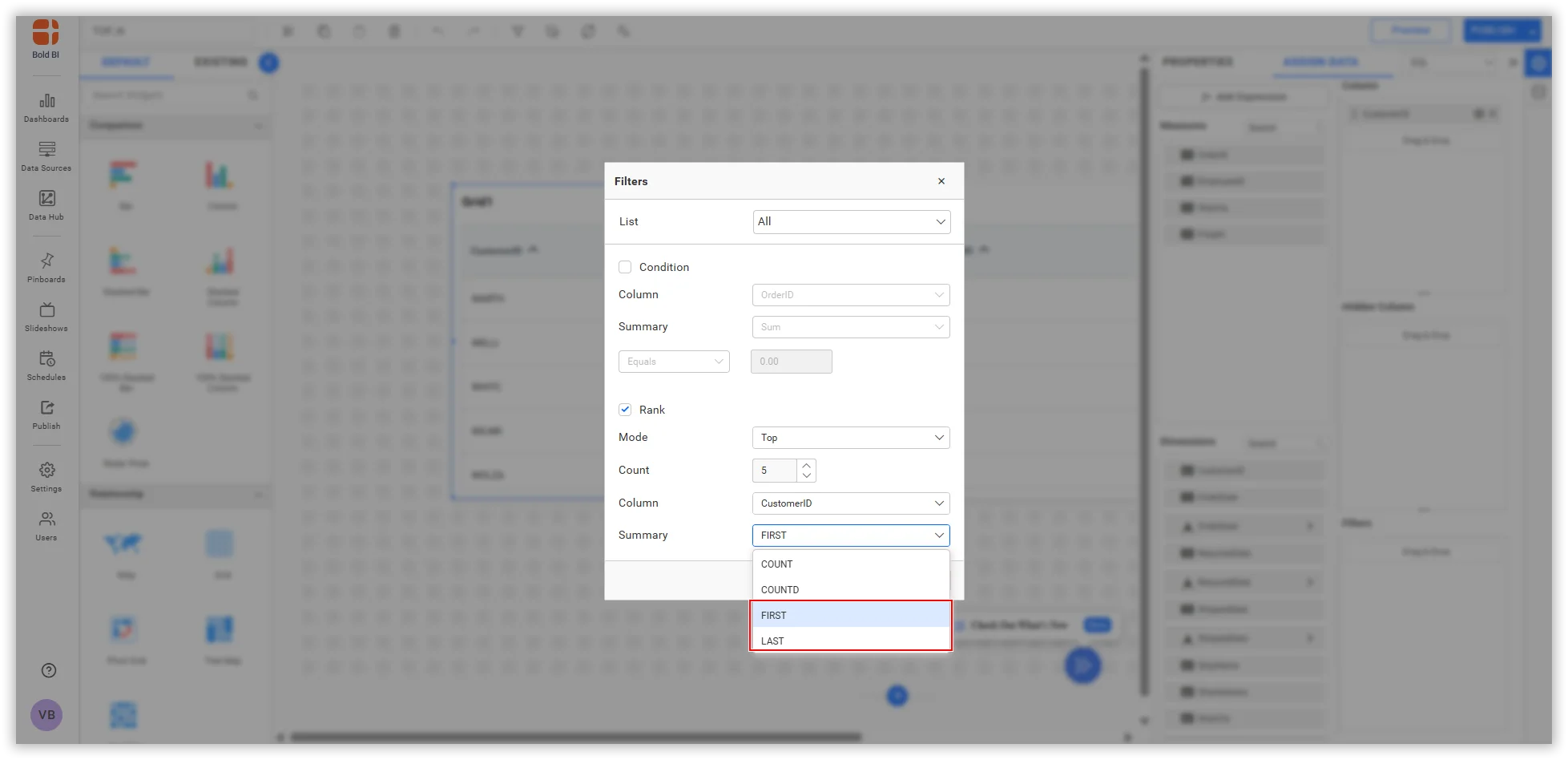
- #691621 – Added support for selecting First and Last options in the Top N Filter configuration.
- #700422 – Added support for rendering data labels within the column chart when the axis range exceeds the specified limits.
- #726432 – Increased the maximum value for the widget corner radius property to 100.
- #685259 – Added support for default column sorting based on the data source order by enabling the IgnoreSorting flag.
- #656403 – Added support for displaying tooltip text and value colors that correspond with the legend colors of the Cartesian chart.
- #664949 – Added support for displaying the Expression field in the View Underlying Data custom configuration.
- #665670 – Improved dashboard rendering performance for dashboards that use linked data sources.
- #637419 – Enhanced the Pivot Grid by adding support for all chart types in the pivot chart settings.
- #666976 – Introduced support for right-to-left (RTL) layout in the combo box widget.
- #716037 – Improved compatibility between Syncfusion components and Bold BI dashboards in embedded applications by resolving icon conflicts when both are used on the same page.
- #729280 – Added support to filter special characters (‘|’) in URL filtering.
- #683464 – Enhanced the data color palette to support improved theming capabilities in the dashboard.
- #727719 – Implemented functionality to save grid column reordering and chooser interactions in viewer mode, similar to views.
- #543802 – Enhanced the Excel export functionality by incorporating support for grid sorting operations.
- #704252 – Enhanced performance of PDF and image exports in offline environments by utilizing ‘AllowOfflineDashboardRendering’ flag.
- #733288 – Implemented support for ignoring the ‘Where’ filter query when the ‘All’ option is selected in the dashboard parameter field used within the data filter.
Data Sources
- Supported ignoring the WHERE clause in data filter queries when the IgnoreWhereClause flag is active in dynamic parameters.
- Maintained the customization of the data source option in config.json to prevent data loss during build upgrades.
- #702808 – Provided support for FIRST or LAST summary types in the RANK filter.
- #717404 – Provided support for customizable PreviousValue and NextValue expressions.
- #712468 – Provided support for a utility to change the connection credential for an SQL related data source in a Windows environment.
Data Hub
- Provided support for snowflake, OneDrive, Redshift connector in Bold Data Hub.
- Provided Extract Engine Support for Twilio, Shopify, MariaDB, Snowflake, SQLite, Google Analytics Connector.
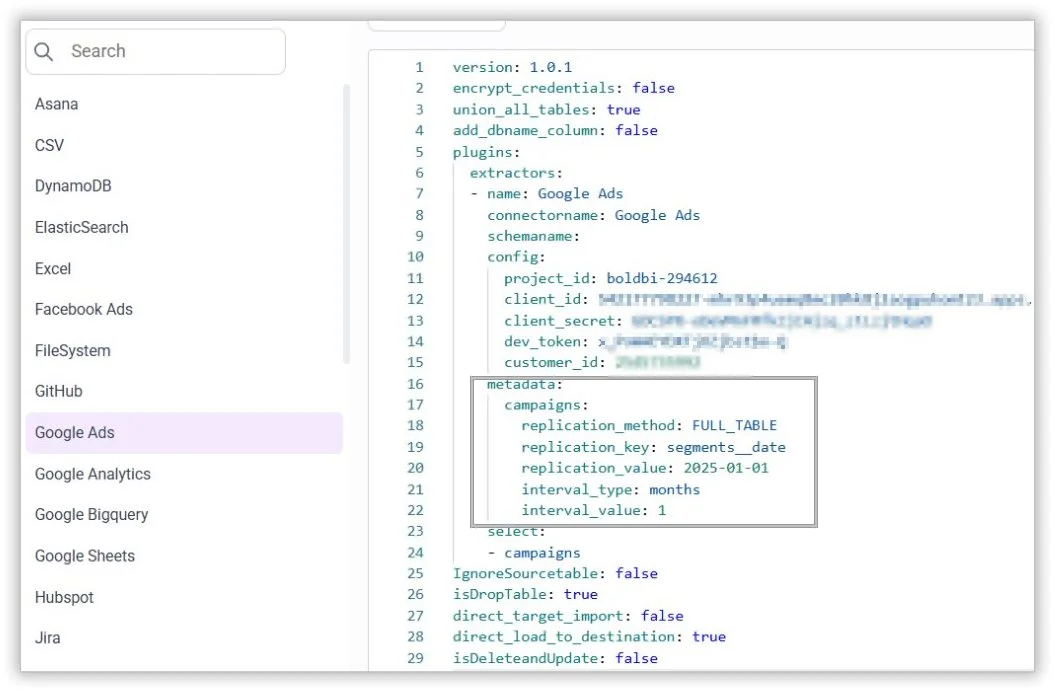
- Provided incremental refresh support for Google Ads.
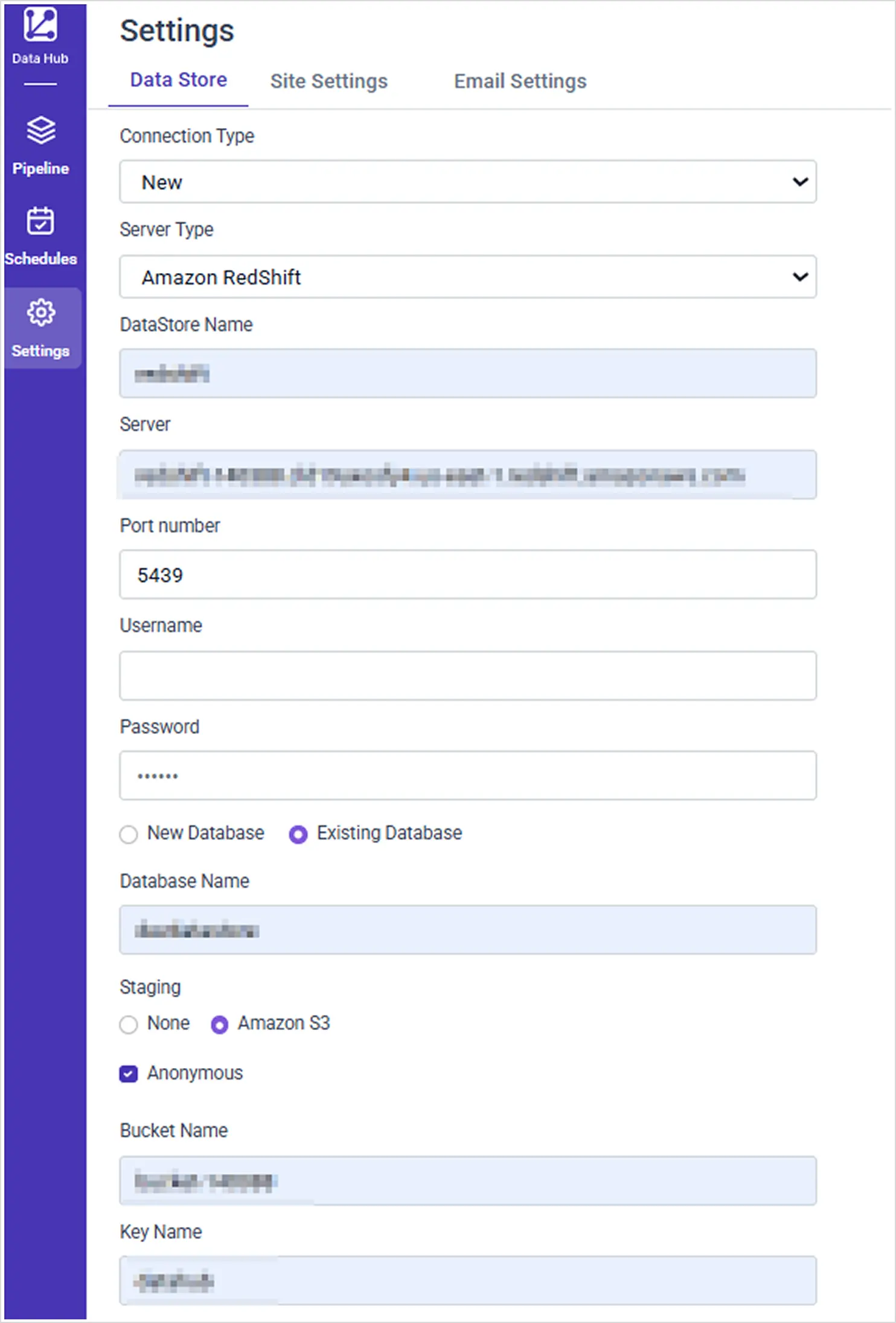
- Provided Support for Anonymous S3 Access in Bold Data Hub.
IDP
- #624641 – Added a configuration option in config.json to hide the release banner, allowing for a cleaner user interface.
- Added support for importing groups from the Fusion Auth provider for OAuth and OpenID.
Bug Fixes
AI
- Included the option to enable or disable the Help icon in the embedded JavaScript.
- Fixed console error when hovering over the tooltip of a widget generated inside the chat.
- #736489-Improved error messaging for cryptic AI errors on cloud.
- Fixed the positioning of the AI logo when using a custom icon.
- Resolved intermittent issue with Filter Overview Save and View options on Bold BI Dashboard.
- Fixed the usage token is properly updated across all processes.
- Fixed frequent AI service downtimes caused by underlying database issues.
- Resolved AI service downtime due to failure in fetching the AI license from the database.
- Fixed the UI enhancement to ensure the AI icon no longer overlaps with the widget properties panel.
- #742030-Fixed the issue where the AI Validation API configuration failed due to the use of a sub-application.
- #738140-Resolved AI Assistant icons appearing in each dashboard in multi-tab dashboards.
Embedding
- Resolved the issue of multiple error messages appearing in multi-tab dashboards during SDK-based embedding.
- Improved error handling by displaying a proper error message when an invalid widget ID format is passed in widget-based SDK embedding.
- Added appropriate error messages when either the dashboard ID or view ID is missing in SDK-based token embedding.
- Fixed the issue where the header of a multi-tab dashboard was not displaying correctly in SDK-based token embedding.
- Resolved the issue where long tab names in multi-tab dashboards were getting truncated in SDK-based embedding.
- Fixed the issue where data caching was not functioning correctly in draft mode for SDK-based embedding.
- Addressed UI spacing issues in Pinboard SDK-based embedding.
- Fixed the issue where dashboards rendered blank when a data source ID was provided in viewer SDK-based embedding.
- Fixed the issue where a dashboard was not correctly saved as public when saving a draft using the saveDashboard method by properly setting the isPublic parameter to true in SDK-based embedding.
- Fixed the issue when rendering the multi-tab dashboard using same dashboard IDs.
- Fixed the issue where the AI Assistant was not functioning unless summarization was initialized in SDK-based embedding.
- Fixed an issue where loading multiple widgets with the same widget name caused an infinite loading state.
Server
- #720620 – Resolved an issue where the dashboard context menu was not visible fully when opening the context menu of last dashboard from the dashboard listing page.
- #731898 – Fixed the schedule email template issue on the Cloud Analytics Server.
- #741687 – Resolved an issue with Office365 email provider where emails were not sent due to the auto-submitted header.
- #737789 – Fixed a schedule export failure when using isolation code with user attributes and added support for external users in schedules.
- #727312 – Resolved a problem with the user token API not working when using a GUID as the username in a PostgreSQL database.
- #738834 – Fixed an issue where adding or unselecting recipients in a schedule would remove previously added recipients.
- #735762 – Addressed a schedule export failure on the Cloud Analytics Server caused by missing null handling.
- #736286 – Fixed a case sensitivity issue in the “Get Dashboards by Group Permission” API when using group names.
- #721911 – Resolved a data filter issue in the mobile app caused by missing date format and data language parameters.
- #711483 – Fixed an issue where adding and publishing dashboard to external sites failed after upgrading to the latest version.
- #744459 – Fixed a rendering issue in the mobile app where dashboards failed to load due to the latest jQuery version not being referenced.
- #745135 – Resolved an issue where schedule-exported files were uploaded multiple times to the SFTP location.
- #750551 – Fixed the issue where the multi-tab dashboard tab switching was not functioning correctly in the mobile app.
Designer
- #718809 – Resolved an issue where the color of the line chart would change unexpectedly during horizontal scrolling.
- #726262 – Fixed an issue where the textbox displayed a scrollbar even when the ‘Show Scrollbar’ option was disabled.
- #734449 – Fixed the issue where the grid widget displayed ‘No Records to Display’ when the dynamic translator was enabled in view mode.
- #732158 – Fixed the issue where the query parameter was not passed in widget linking.
- #719912 – Resolved an issue where filtering in the combo box did not function correctly while configuring a data source with a dashboard parameter.
- #734450 – Fixed an issue where the text color in the RTE widget changed unexpectedly when switching themes.
- #738137 – Fixed an issue that caused the pivot chart to display a data retrieval error when adding columns.
- #707458 – Fixed a UI glitch issue in the dashboard parameter date picker when configuring relative dates.
- #727349 – Fixed a UI glitch and resolved the dashboard title override issue in the mobile view.
- #731799 – Fixed the vertical alignment issue in the Number Card Widget.
- #704722 – Fixed an issue where the sort order of the custom query was not functioning correctly in the dashboard parameter.
- #738139 – Resolved an issue where the widget was not visible in the PDF export when exporting the complete dashboard.
- #730398, #738876 – Resolved an issue where the background image and icon were missing in the number card widget after the dashboard was published.
- #736440 – Fixed an issue where the cylindrical bar formatting in the Grid Widget was not functioning correctly.
- #718546, #732436 – Resolved an issue where widgets displayed data retrieval problems when the dashboard parameter was configured with the “set as first value” option.
- #725980, #727970 – Fixed an issue where the configured expression fields were modified with other fields when conditional formatting was applied as a rule.
- #729280 – Fixed a URL filtering issue where special characters in dashboard parameters were not being filtered correctly.
- #735414 – Fixed an issue where the date type parameter was not passed in the pivot widget linking.
- #559894 – Fixed an issue where an unwanted border was appearing in RTE widgets.
- #735954, #735487 – Fixed an issue where the chart legend would reset to default settings after legend customization was applied.
- #721813 – Fixed an issue where the dropping widget was misaligned within the tab widget when a combined widget was placed in the tab.
- #729872 – Fixed an issue where filtering for null or blank values in the filter section was not functioning correctly.
- #722786 – Fixed an issue that disabled column-level linking in the grid during view mode when the dynamic translator was utilized.
- #735432 – Fixed an issue where CSV format dashboard export support through the REST API was not functioning correctly.
- #710372 – Resolved an issue where filtering zero displayed as infinity in the Pivot Grid.
- #739803 – Resolved an issue where enabling column linking caused inconsistent column widths when the “Fit to Content” option was enabled.
- #738916 – Fixed an issue where the widget title was not restored correctly when utilizing the undo functionality in the chart widget.
- #741103 – Resolved an issue where the greater than (>) and less than (<) symbols were incorrectly displayed in the chart axis format.
- #721077 – Fixed an issue where certain custom date format previews were not displaying the correct values.
- #722930 – Resolved an issue that caused unwanted console errors in the embedded application.
- #740269 – Fixed an issue where the ‘&’ character was displayed incorrectly in all widgets.
- #440154 – Fixed a console error that occurred when removing widgets.
- #738899 – Fixed an issue where category axis labels were not rendering correctly in the Line Chart widget.
- #695099, #732150 – Fixed the issue where the date picker selection was not maintained when URL filtering was applied.
- #726080 – Fixed an issue where the selected range in the date picker displayed a null value when a dashboard parameter was used in the expression.
- Fixed an issue that caused a 404 error when publishing the dashboard.
- #737420 – Resolved an issue where the filter icon remained visible in the combo box widget, even when the ‘Act as master widget’ property was disabled.
- #712674 – Fixed an issue where the scheduled export of all types of charts was inconsistent with the published dashboard.
- #739115 – Fixed an issue where dashboard parameter filtering was not functioning correctly when a special character comma was included.
- #738837 – Resolved an issue where selections were not maintained and filters were removed in the combo box when changing the filter in the dashboard parameter.
- Resolved a UI glitch in the Dynamic Translator window when using the dark theme.
- #724029 – Fixed an issue where the previous selection was retained in the view of underlying data customization.
- #738480 – Fixed the issue where the “Enable Multi Select” option was not displayed in the property panel when the dashboard parameter was configured.
- #743954 – Resolved an issue where draft changes were inadvertently removed when modifying the dashboard’s privacy settings on the server page.
Data Sources
- #731427 – Fixed the reported issue where the term ‘DECLARE’ could not be utilized as a column name in code view mode.
- #713297 – Fixed issue where the Datatype CLOB was not functioning properly after being converted to VARCHAR in the Oracle data source.
- #735863 – Fixed the label parameter issue in widget titles when using an Oracle data source.
- #735388 – Fixed the dashboard import issue for views in Oracle live data source.
- #685443 – Had hidden the “Append Successful” popup for 5 seconds.
- #720168 – Resolved the implementation of an alert message that notifies users when they attempt to modify the query without clicking the Run button.
- #738050 – Fixed the issue where users were unable to edit the data source in AppFolio.
- #738351 – Restricted the creation of the window function in Expression.
- #737871 – Fixed issues related to Extract Data Source auto-refresh and failure handling.
- #731400 – Resolved the issue preventing connection to the specific Appfolio data source.
- #739222 – Fixed an issue where the isolation filter was not working for external users and was displaying empty data for internal users without attributes.
- #677900 – Showed a confirmation popup when running a custom query to neglect expression validation.
- #742575 – Ignored the SSL validation while connecting the Web API data source when SSL ignore is enabled in Bold BI.
- #726862 – Fixed issue where the chart displayed ‘No Data to be displayed’ error even when data was present at the level.
- #746787 – Fixed issue where the column ‘unidade’ was read-only while creating the datasource.
- #727208 – Fixed the issue with average calculation not respecting the POP date filter.
- #743042 – Fixed issues encountered while creating a specific expression in the ClickHouse connector.
- #742667 – Fixed issue where the Data Source was not escaping single quotes in code view mode.
- #737972 – Displayed appropriate error logs when the “External API” dynamic connection string failed.
- #738664 – Displayed the confirmation popup when deleting an expression.
- #734013 – Displayed an alert message when the account was empty in Google Analytics 4.
- #729621 – Fixed an issue where the dashboard displays as ‘Untitled’ and shows empty cells in the designer when fetching data from the stored procedure cache.
- #724663 – Fixed the NetSuite icon-related issue after copying the datasource.
- #749595 – Fixed the issue where the data source fails to reconnect after a connection update in MySQL.
- Fixed the issue encountered when reconnecting the data source using shared tables.
- Disabled the ‘Query Joiner’ option for connecting to the Append Data Source.
- Fixed issue where “No data to display” appeared in dashboard parameter values when using a Web API live connector in a single database for multiple tenants.
- Fixed the issue where search is not working when a specific table contains the $ symbol.
- Restricted the table mode in the dashboard parameter for the Web API Live Connector.
- Fixed the issue where the number expression was appearing in the dimension column during data assignment when creating the expression using a dashboard parameter.
- Fixed the issue where the isolation filter was not functioning during schedule export.
- #742667 – Fixed the issue where the Data Source is not escaping single quotes in code view mode.
Data Hub
- #745257 – Fixed data hub column names changed issue.
- #739834 – Fixed data source not created when using oracle IMDB as datastore in Data Hub.
- Fixed refresh not updating properly when using refresh now for connectors using data hub engine.
- #728110 – Fixed validation not added for Postgres connector in Data Hub.
- #744891 – Fixed excel not connecting with multiple sheets issue in Bold Data Hub.
- #740208 – Fixed JSON Object is not extracted in Bold BI issue.
- #715585 – Fixed Blob datatype not supported in SQL Datastore issue.
IDP
- #707105 – Addressed a deployment failure in Oracle database server caused by recent table structure changes.
- #734790 – Fixed an issue where default login settings were not being saved in the site authentication settings.
- #732356 – Fixed an issue where the admin utility was not functioning correctly despite returning a proper response.
- #739751 – Resolved a deployment issue with MSSQL shared databases when using an existing database.
- #737480 – Fixed an issue where uploaded fonts were not reflected on the page after being updated in the Look and Feel settings.
- Fixed an issue where the “Reset Password” email was not being sent from the User Management System (UMS).
Important Notes
Designer
- Bing Maps deprecation and transition: Bing Map was deprecated on June 30, 2025. Free development keys are no longer available, and Bing Maps is fully unsupported. Enterprise license users have support until June 30, 2028, to transition. To ensure continued mapping, we are migrating to Azure Maps, with the transition scheduled for the October 2025 release.
Bold Data Hub
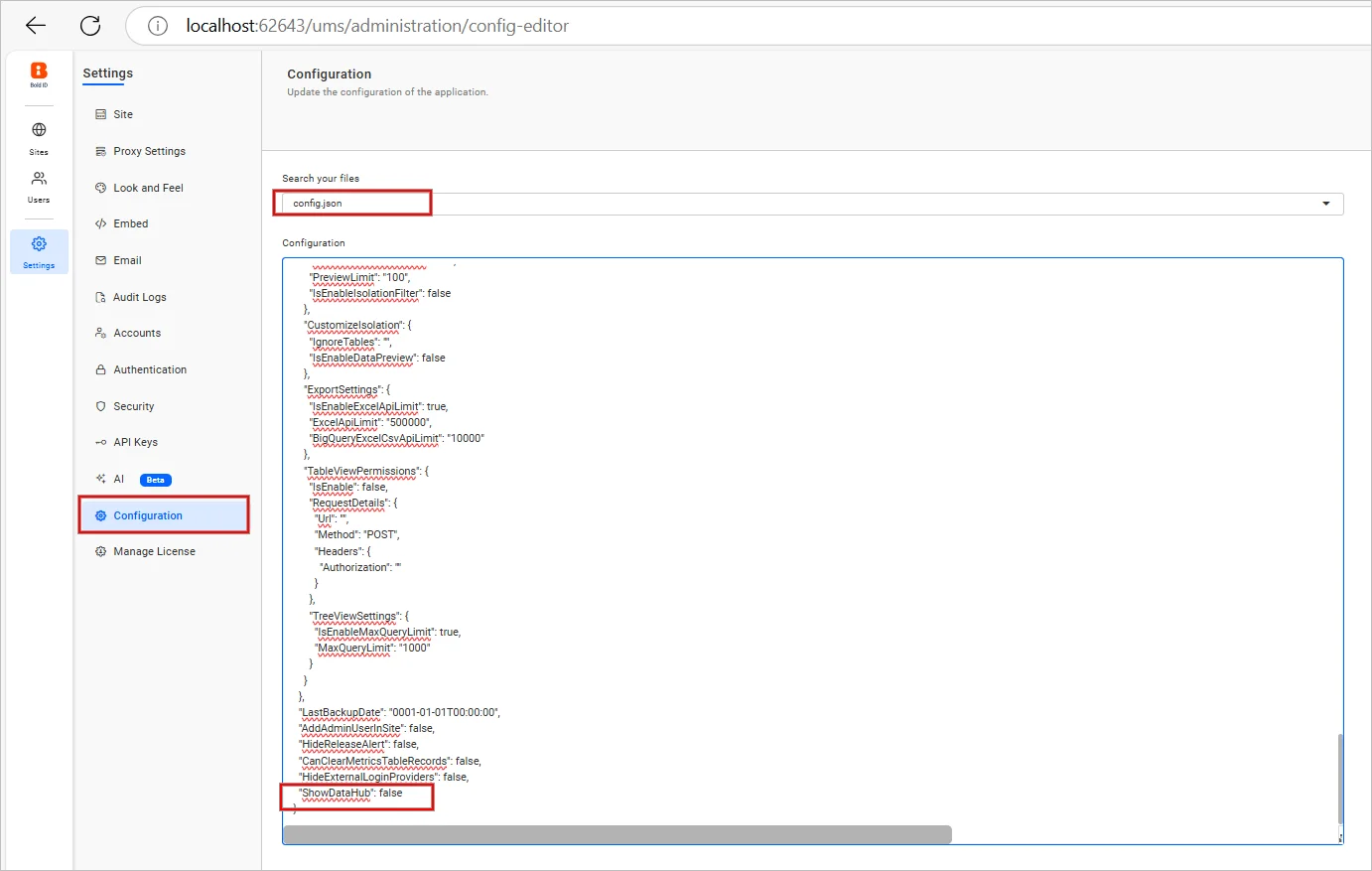
- We have removed the Bold Data Hub option from Bold BI menu bar for fresh installation; The Data Hub Engine can be used via extract engine option in supported data sources in Bold BI.
- Also, the Bold Data Hub option can be enabled by using the ShowDataHub property under config.json file in UMS administration page.
IDP
- Support for 32-bit Windows installers has been deprecated starting from the v13.1 release. Customers are advised to switch to a 64-bit machine to install the latest version of Bold BI. During installation, deployment files will be automatically placed in the x64 directory, and older deployment files from the x86 location will be removed.
Embedding
- You need to use the updated embed JS version, hosted in https://cdn.boldbi.com/embedded-sdk/v13.1.10/boldbi-embed.js.
- We have revamped the naming structure for all events, members, and methods in the Bold BI Embedding SDK. This update enhances consistency and improves readability across the SDK. The legacy API names (events, methods, and members) will be deprecated after one year from this v13.1 release. We strongly encourage to begin transitioning to the new naming structure to ensure future compatibility.
- New standardized names have been introduced for better clarity and alignment with modern development practices.
- Legacy names remain fully supported to ensure backward compatibility for existing implementations.
Breaking Changes
Server
JWT SSO callback method updated to POST- To enhance security, JWT Single Sign-On (SSO) callback requests have transitioned from GET to POST. This change ensures that sensitive authentication data is no longer exposed in URL parameters, reducing the risk of data leakage or interception.
- All existing integrations relying on GET-based JWT SSO callbacks must be updated to support POST requests. Failure to do so may result in authentication failures or disrupted login flows.
- In Code View mode, data relationships are not supported.
- Switching to existing joins based on data relationships is not possible.
- Additionally, expressions and data filters are limited and do not function as expected in this mode.