Department : Sales

Sales Analysis Dashboard for Sales Managers

See what’s driving your revenue — real-time global sales insights.

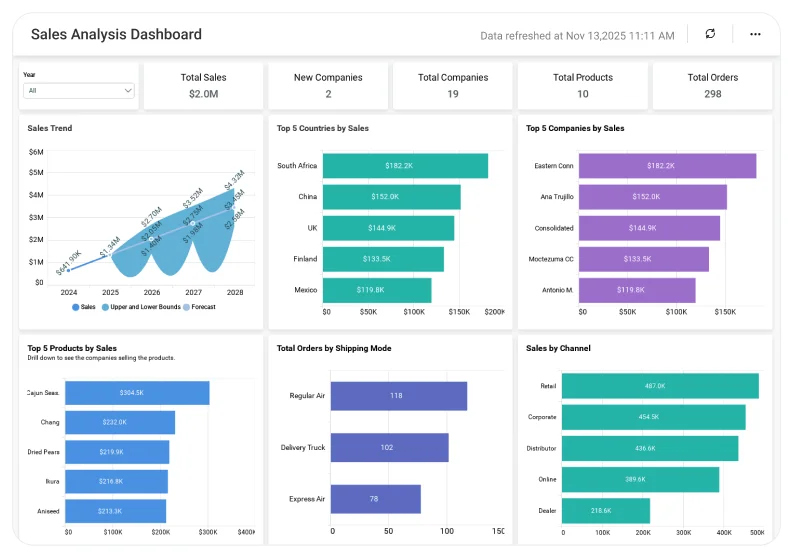
Get real-time visibility into revenue, units sold, product performance, and global sales trends—all in one embedded dashboard. The Sales Analysis Dashboard in Bold BI empowers sales managers, directors, and executives to monitor performance, identify top-selling products, and analyse regional strengths and gaps with dynamic, real-time visuals.

Connect CRM, ERP, ecommerce, or spreadsheet data to eliminate manual reporting and uncover insights that accelerate growth.


TL;DR: What You’ll See in Your First Week

  • Total sales by dollar amount with revenue trends.
  • Total sales by units sold.
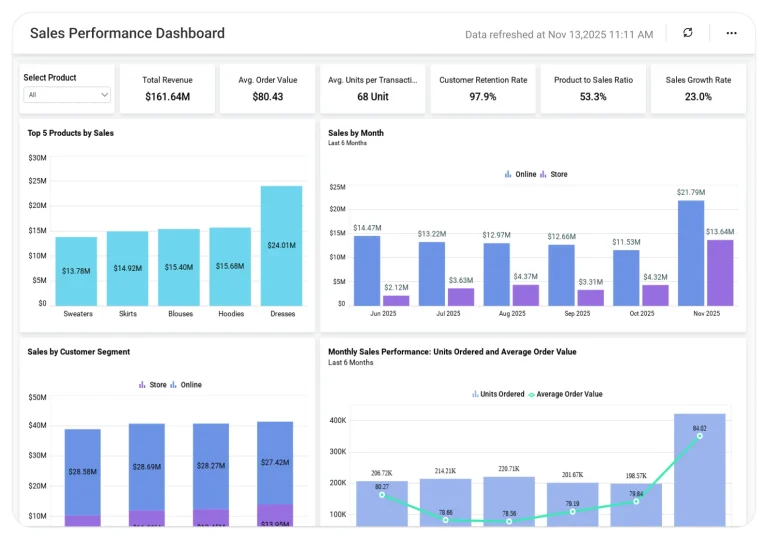
  • Top-selling products and categories.
  • Country-level and regional sales distribution.
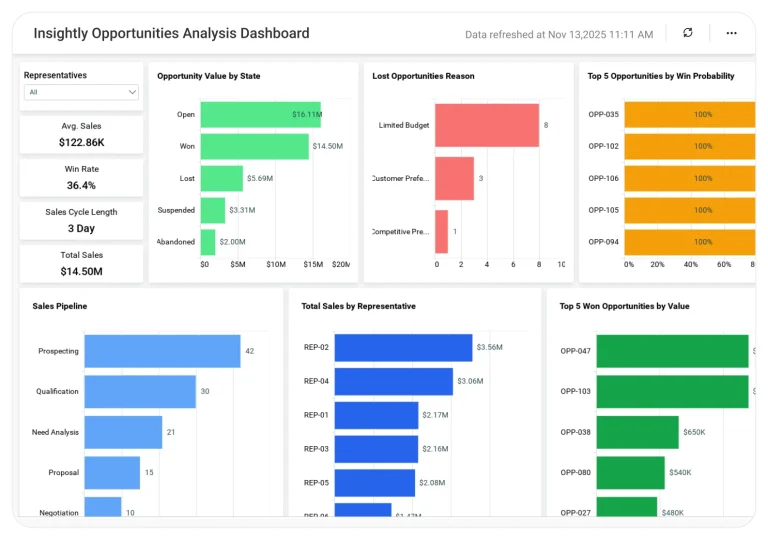
  • List ItemExecutive view: pipeline health, revenue patterns, and product contribution.

Why it matters to sales leaders

Stop guessing—manage your revenue with clarity and confidence.

When sales data is scattered across CRM, order management tools, and financial systems, your team is operatingoperates blindly. Bold BI gives you a single source of insights so you can answer core business-oriented questions instantly:

  • How much did we sell this month, quarter, or year?
  • How many total units were sold?
  • Which products are driving the most revenue?
  • Which regions are performing as compared to others?

This clarity enables you to monitor your teams more effectively, allowing leadership to make more informed strategic decisions. 

Why Bold BI is the Right Fit for Sales Analytics

  • Connects CRM + ERP + ecommerce + finance data into one governed dashboard.
  • Real-time updates improve accurate forecasts and territory health.
  • Drill from global insights to individual product, rep, or region details.
  • Cloud or self-hosted deployment for flexibility.
  • Embeddable into portals, CRM systems, or executive workspaces.

What is a Sales Analysis Dashboard? (30-second Answer)

 A Sales Analysis Dashboard is a real-time view of your key sales metrics—revenue, units sold, product performance, and regional trends—presented in one interactive, easy-to-understand dashboard. 

In Bold BI, this means automatically combining data from CRM, ERP, and ecommerce systems into dynamic visuals without manual Excel reporting.  

What You’ll Track

  • Total sales by revenue: See overall sales, monthly/quarterly performance, growth rate, and how you track goals.
  • Total sales by units sold: Understand product and category demand, volume trends, and high- vs. low-selling items.
  • Sales by country: Compare global performance with country-level revenue, units sold, heatmaps, and regional growth trends.

All dashboards are fully customizable—add KPIs, adjust targets, or combine data from products, regions, and sales teams.

How the Sales Analytics Dashboard Works (No-nonsense Setup)

  • Connect CRM, ecommerce platforms, Excel/SQL.
  • Apply the Sales Analysis template.
  • Blend sales, product, and regional data.
  • Share dashboards with reps, managers, and executives using secure access controls.
  • Set alerts for sales dips, goal variances, or product performance changes.

Why Sales Teams Choose Bold BI

  • Unifies product, revenue, and territory insights.
  • Drill from global view to individual transactions.
  • Governed analytics with RLS, SSO, and RBAC.
  • Embeddable dashboards inside CRM or portals.
  • Real-time performance insights for coaching and forecasting.

More Articles About Sales Analysis

  • Boost Your Sales with Embedded Analytics: This blog explains how embedded analytics can transform sales performance by integrating data visualization and analytical tools directly into sales applications. This empowers managers to make informed decisions, optimize pricing, and predict future sales, ultimately boosting productivity and profitability.
  • Unlocking Sales Success: Using Sales Funnel Analysis: This blog focuses on how analysing the sales funnel can enhance overall sales performance. Learn how sales funnel analysis reveals drop-offs and boosts conversions, complementing insights from the Sales Analysis Dashboard.
  • How to Create a Dashboard for Sales Analysis in Bold BI: This video will guide you through adding and configuring widgets on a sales analysis dashboard in Bold BI. It also includes setting up the combo box, bar chart, spline chart, doughnut chart, and grid widgets.

Compare Options (at a glance)

Feature Bold BI CRM Native Reports Spreadsheets
Primary Use Full BI Deal & rep activity reports Manual tracking
Cross-Data Insight Yes (product + region + revenue + units) Limited No
Deployment Cloud or self-hosted SaaS only Local
Standout Drilldowns, blending, governance Tool-specific Error-prone, static

Simple Pricing That Grows With You

Say goodbye to hidden costs, complex quotes, and pricing guesswork. 

Frequently Asked Questions

CRMs focus on rep activity. Bold BI blends data from CRM, ERP, ecommerce, and finance systems to show revenue, units sold, product performance, and global sales—all in one governed dashboard.
Yes—Bold BI supports full hierarchical filtering and drill-through, allowing you to move from a global view down to individual products, reps, or transactions with a single click.
Yes—secure, token-based embedding makes it easy to display dashboards inside CRMs, partner portals, or executive workspaces.
Absolutely. Bold BI uses encryption, RLS,SSO to protect sensitive revenue and customer information.
Yes—Bold BI lets you tailor dashboards for each role with unique KPIs, filters, layouts, and access levels. Reps can track daily tasks, managers can monitor pipeline health, and executives get high-level revenue visibility—all from the same trusted data source.
Yes—you can set alerts for revenue drops, low-performing regions, missed sales goals, or sudden product shifts. Bold BI delivers instant notifications via email or in-app alerts so teams can respond before issues impact performance.

Start your 30-day free trial instantly

Easy integration, AI-Powered Dashboards and 24x5 real-time support.