Podio Project Management
Understand project progress and collaboration to improve delivery and team productivity.
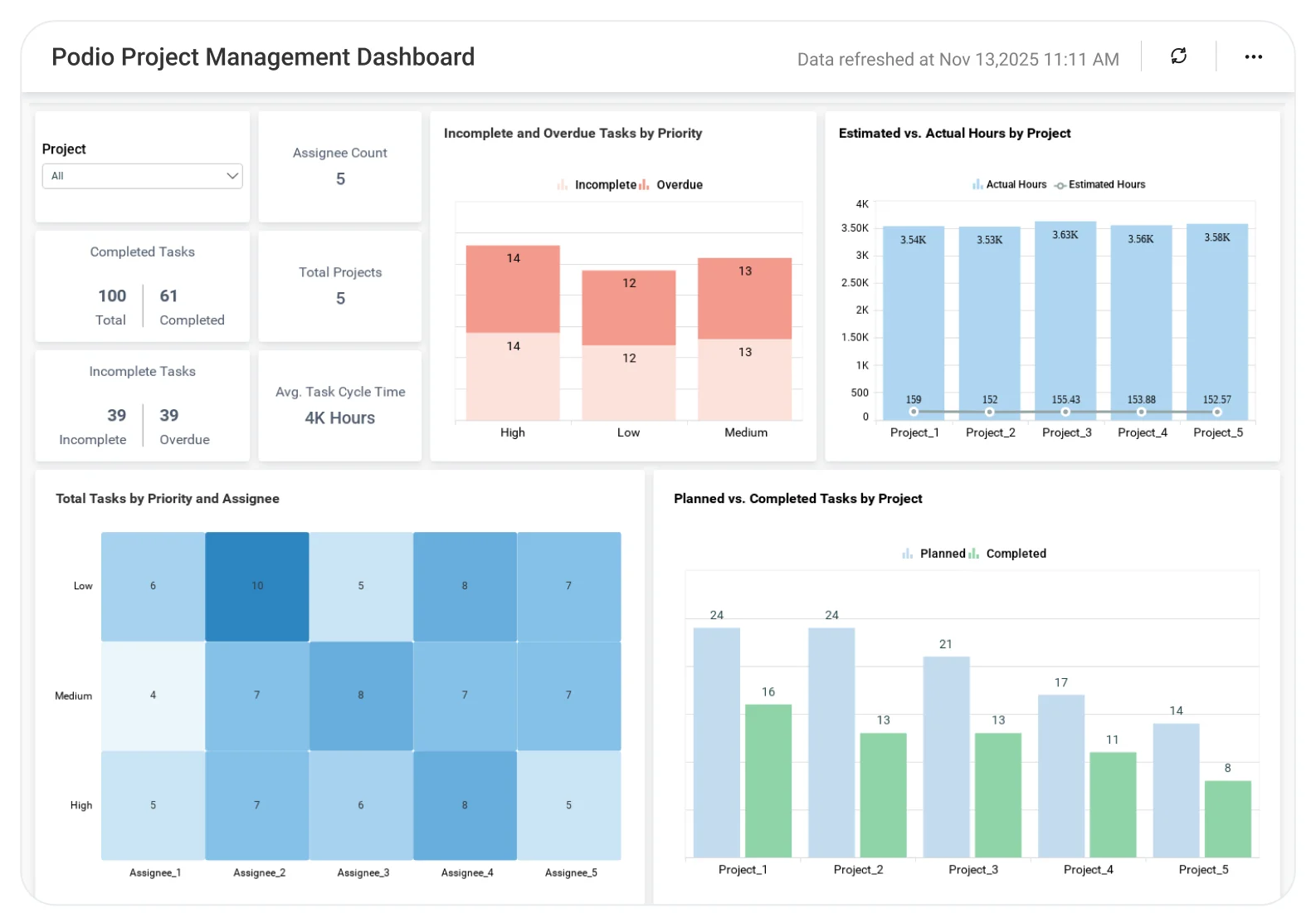
The Podio Project Management Dashboard helps teams analyze tasks, timelines, ownership, and project status, enabling better coordination, clear accountability, and more predictable project outcomes.
TL;DR
-
Real-time project health visibility: Track project progress, overdue tasks, and key milestones.
-
Resource insight: Monitor workload balance and team utilization.
-
Financial tracking: Compare estimated vs. actual costs for every project.
-
Performance visibility: View project completion rates and productivity trends
-
Executive summary: Cross-department overview of project portfolios and timelines.
What Is a Podio Project Management Dashboard?
The Podio Project Management Dashboard allows you to track the status of your projects, handle assignments, and make better use of resources all within Bold BI’s real-time, interactive analytics workspace.
It brings together project, team, and financial data to help you lead more efficiently and deliver on time.
Why Podio Project Management Dashboard Matters
When your project data is scattered across Podio apps and reports, it’s tough to make fast, data-driven decisions.
Bold BI unifies your Podio data to help you answer:
-
Which projects are falling behind schedule?
-
Are teams over- or under-utilized?
-
What is driving project cost variance?
-
How can we balance capacity across projects?
What You’ll Track
-
Project Status Overview: Monitor active, completed, and delayed projects to assess overall project health and prioritize workload effectively.
-
Task Progress Tracker: Track open, completed, and overdue tasks to identify bottlenecks and keep project execution on schedule.
-
Resource Utilization & Team Load: Understand workload distribution and utilization levels across teams to balance capacity and prevent burnout.
-
Timeline & Milestone View: Visualize project timelines, upcoming milestones, and delays to maintain alignment and ensure timely delivery.
All dashboards are fully customizable so you can add, remove, or adjust KPIs as your workflows evolve.
How It Works
-
Apply the Podio Project Management sample.
-
Combine Podio tasks, resources, and financial metrics.
-
Share your dashboard safely across all project owners and executives.
-
Set data alerts to receive notifications for missed deadlines or overspent budgets.
Why Bold BI Is the Right Fit for Podio Project Management Analytics
-
One platform for project, financial, and operational analytics.
-
Drill down from portfolio-level summaries to individual task insights.
-
Governed sharing with Single Sign On, Role Based Access Control, Row Level Security.
-
Embed dashboards directly inside your Podio workspace.
-
Deploy: cloud or self-hosted mode for maximum control.
Compare Options (at a glance)
| Feature | Bold BI | Podio Built-in Reporting | Spreadsheets / Manual Reporting |
|---|---|---|---|
| Cross-workspace project portfolio view | Yes | Limited | Manual |
| Task status & SLA tracking (due dates, overdue, aging) | Yes | Partial | Manual |
| Workload/capacity by assignee | Yes | Limited | Manual |
| Timeline & throughput trends | Yes | Limited | Manual |
| Custom KPIs & dashboards | Fully customizable | Fixed | Manual |
Frequently Asked Questions
More Articles About Podio Project Management
-
Podio Insights: Unveiling Project Efficiency through BI Dashboards
 This blog shows how BI dashboards in Podio track tasks and timelines, helping teams boost efficiency and meet goals.
-
Unlocking Data Insights Through Effective Data Storytelling
This blog discusses how data storytelling turns Podio metrics into actionable insights, leading to improved project outcomes.
-
Understanding Data Insights: Tips to Make Better Decisions:
This blog explains practical tips for interpreting Podio project data to make informed, strategic decisions.